Physical Address
304 North Cardinal St.
Dorchester Center, MA 02124
Physical Address
304 North Cardinal St.
Dorchester Center, MA 02124

Ten easy ChatGPT prompts for social media you can copy today: find post ideas in real customer questions, write captions in your own style, plan a week of posts and reply to comments. Each prompt shows an example reply.
You open Instagram to post something. You stare at the empty caption box for a while, then close the app. The next day, the same thing happens. So you search for ChatGPT prompts for social media, hoping for a shortcut.
Maybe you already tried one. You typed “write a post about my business” and got a cheerful caption full of exclamation marks and words like “transform” and “unlock”. It could have been about any business on earth. So you either rewrite the whole thing, or you post nothing.
The problem is what the prompt leaves out. ChatGPT doesn’t know your customers, your week or the way you talk, so it guesses. The prompts below give it those things first, and the posts start to sound like you.
You’ll get 10 easy prompts for 4 jobs: post ideas, captions in your own style, a one-week plan and replies to comments. Each prompt comes with an example reply for one made-up business, so you know what you should see. Start with Prompts 1 and 7. In about 30 minutes, you’ll have next week’s posts planned (my estimate, not a measured time).
In short
What you need
On this page
“I asked ChatGPT for a post, and it sounds like an ad.” That’s the most common complaint, and the cause is simple.
A one-line prompt like “Write an Instagram post about my fitness class” gives ChatGPT almost nothing to work with. With no real details, it falls back on safe, general words that could fit anyone. Your customers scroll past, because nothing in the post is about them.
So every prompt in this guide is built on the same four lines. I call it the 4-line frame:
| Line | What it tells ChatGPT |
|---|---|
| WHO IT’S FOR | The person you want to reach, in one line. |
| REAL DETAIL | One true thing from your work or your week. This is what makes the post yours. |
| GOAL | The one thing you want readers to do next. |
| MY STYLE | How you write: 2 or 3 of your own posts, or your “My style notes” from Prompt 4. |
Copy this frame (4-line frame):
WHO IT'S FOR: [ONE LINE ABOUT YOUR READER]
REAL DETAIL: [ONE TRUE THING FROM YOUR WORK OR YOUR WEEK]
GOAL: [THE ONE THING YOU WANT THEM TO DO]
MY STYLE: [PASTE 2 OR 3 OF YOUR POSTS, OR YOUR "MY STYLE NOTES"]
The image shows the difference. On the left, the one-line prompt. On the right, Prompt 5 from this guide, which uses the frame.
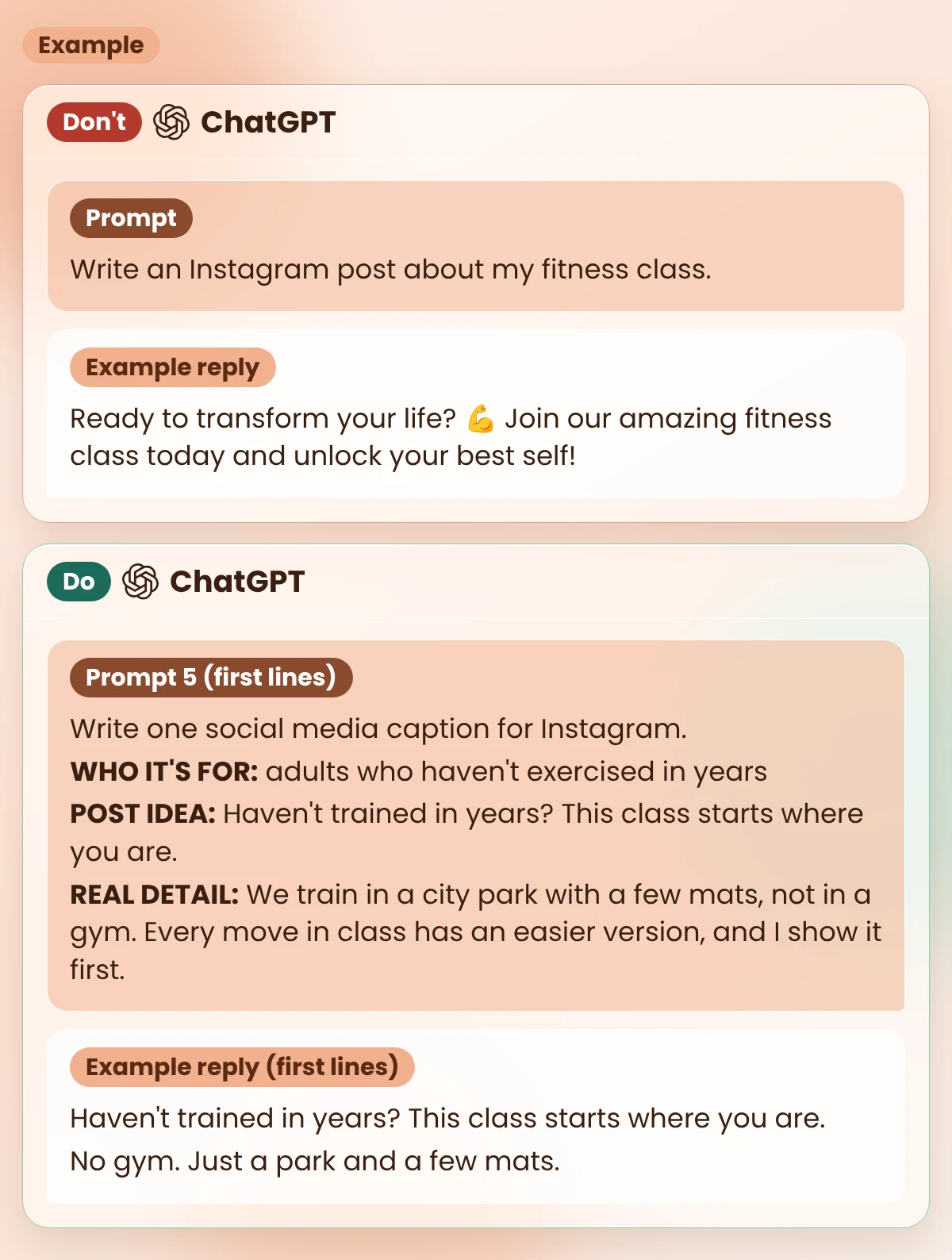
Our example: Jonas
Example: Jonas (a made-up personal trainer) runs small outdoor group classes for beginners in a city park. He posts on Instagram and Facebook. He wants to post three times a week, on Monday, Wednesday and Friday, without losing his evenings. All 10 prompts below use his details, so you can compare his replies with yours.
Already have a blog post you want to share? My guide on how to turn a blog post into social media posts covers that. This guide is for posts you make from scratch.
Running out of things to post is the usual reason people stop. The fix is closer than you think. Your customers tell you what they want to know every time they ask a question.
Each question one person asks, others are wondering too. A post that answers it is useful from the first line.
Copy this prompt (Post ideas):
I run [YOUR BUSINESS, IN ONE LINE].
My customers are [WHO THEY ARE].

Here are 5 real questions people asked me lately:
1. [QUESTION]
2. [QUESTION]
3. [QUESTION]
4. [QUESTION]
5. [QUESTION]

For each question, give me one social media post idea.
For each idea, write:
- A first line for the post (under 12 words)
- The format: photo, short video or carousel
- What I need to prepare (one line)

RULES
- Plain words. No hype.
- Use only what I tell you. Don't invent facts about my business.
- Don't give medical, legal or money advice. If a question needs it, add the note "Tell people to ask a professional."
Jonas’s input (Example):
| Prompt line | Jonas’s input (Example) |
|---|---|
| I run | small outdoor group fitness classes in a city park |
| My customers are | adults who want to get fit again, many of them beginners |
| Questions | 1. I haven’t exercised in years. Is the class too hard for me? 2. What happens if it rains? 3. Do I need to bring anything? 4. Can I come just once to try? 5. My knees hurt when I run. Can I still join? |
What you should see: 5 ideas, one per question, each with a first line, a format and one thing to prepare. Example reply for Jonas:
| Question | First line | Format | What to prepare |
|---|---|---|---|
| 1. Too hard for me? | Haven’t trained in years? This class starts where you are. | Short video | Film 20 seconds of the easy version of each move. |
| 2. If it rains? | Rain? We still train. Here’s where. | Photo | A photo of where the class goes when it rains. |
| 3. Bring anything? | What to bring to your first class (it’s a short list). | Carousel | A list of what you ask people to bring. |
| 4. Come once to try? | Not sure yet? Come once and see. | Photo | A photo of the group after class (ask them first). |
| 5. Knees hurt? | Sore knees? Talk to me before your first class. | Short video | Film yourself asking people to tell you about any pain before class. Note: Tell people to ask a professional. |
Look at idea 5. It doesn’t say what to do about sore knees. It only asks people to talk to Jonas first, and the rule in the prompt added a note: tell people to ask a professional. So the post sends them to a professional instead of giving advice.
One good question can fill more than one post. This prompt looks at the same topic from 5 sides.
Copy this prompt (5 angles):
Topic: [ONE POST IDEA OR QUESTION]
My business: [ONE LINE]

Give me 5 different ways to post about this topic:
1. A common mistake people make
2. A myth and the truth
3. A quick how-to in 3 steps
4. Behind the scenes of my work
5. A question to ask my followers

For each one, write a first line (under 12 words) and one line on what the post says.
If an angle needs a true story or fact from me, write [MY DETAIL] instead of making one up.
Jonas’s input (Example): Topic: “I haven’t exercised in years. Is the class too hard for me?” Business: small outdoor group fitness classes in a city park.
What you should see: 5 angles, each with a first line and one line on the post. Example reply for Jonas:
| Angle | First line | What the post says |
|---|---|---|
| 1. Mistake | The biggest mistake when you start again: doing too much. | Start with the easy version of each move, not the hardest one. |
| 2. Myth | Myth: you need to be fit before you join a class. | The truth: [MY DETAIL: how I make moves easier for beginners]. |
| 3. How-to | Your first class in 3 easy steps. | Send me a message, arrive a little early, tell me about any injuries. |
| 4. Behind the scenes | What I check before every beginner class. | [MY DETAIL: what I really check before class]. |
| 5. Question | When did you last exercise? Be honest. | Invites comments. No pressure to join. |
Angles 2 and 4 have gaps on purpose. Jonas fills them with what he really does. That’s the part no one else can write for him.
Small moments from your week make honest posts. They feel ordinary to you, but your followers never saw them.
Copy this prompt (Week notes):
Here are 3 rough notes from my week:
1. [NOTE]
2. [NOTE]
3. [NOTE]

Turn each note into one short social media post idea.
For each idea: a first line (under 12 words) and 2 lines on what the post says.

RULES
- Use only what is in my notes. Don't add details, numbers or results.
- If a note is about a customer, add: "Ask them before you post."| Note | Jonas’s notes (Example) |
|---|---|
| 1 | A new member said she was nervous before class. She finished it and stayed to chat. |
| 2 | Rain on Thursday. We moved the class under the roof of the old bandstand. |
| 3 | Bought new resistance bands for the group. |
What you should see: 3 ideas that use only your notes, plus a reminder on any note about a customer. Example reply for Jonas:
| Note | First line | What the post says |
|---|---|---|
| 1 | She was nervous. She stayed after class to chat. | A new member was nervous before her first class. She finished it and stayed to chat. Ask them before you post. |
| 2 | Rain didn’t stop Thursday’s class. | It rained on Thursday. We moved under the roof of the old bandstand and trained there. |
| 3 | Something new in this week’s class. | I bought new resistance bands for the group. Come and try them in class. |
Good to know
No customers yet? Use questions you see in online groups for your field, or the questions you had yourself when you started. Prompt 3 works for anyone: everyone has a week.
Writing the caption often takes longer than making the photo. And when ChatGPT writes it, you spend just as long making it sound like you again.
The answer is to show ChatGPT how you write, once. Prompt 4 turns your own posts into short style notes you paste into every caption prompt.
Copy this prompt (Style notes):
Here are 3 social media posts I wrote myself:

POST 1: [PASTE]
POST 2: [PASTE]
POST 3: [PASTE]

Study how I write. Then write my style notes.
Start with this exact first line: My style notes
Then give 6 short bullet points:
- How long my sentences are
- Words and phrases I use often
- How I start a post
- How I end a post
- How I use emojis
- Words I don't use

Describe only what you see in my posts. Don't guess.| Post | Jonas’s own posts (Example) |
|---|---|
| 1 | Monday crew, you showed up in the cold. Proud of you. Same time Wednesday 👊 |
| 2 | No gym. No mirrors. Just a park, a few mats and people who want to feel better. Beginners welcome. |
| 3 | Quick tip: if a move hurts, stop and tell me. There’s always an easier version. |
What you should see: the first line “My style notes” and 6 short bullets. Example reply for Jonas:
My style notes
- Short sentences, often 2 to 5 words.
- Words I use: “crew”, “showed up”, “beginners welcome”, “quick tip”.
- I start with who the post is for or a short statement (“Monday crew”, “No gym.”).
- I end with a plan or a next step (“Same time Wednesday”).
- One emoji at most, and only 👊.
- No hype words or fitness slang. I don’t promise results.
Want a fuller version for videos and newsletters too? My guide on ChatGPT for content creators builds a longer voice file the same way.
Copy this prompt (Caption):
Write one social media caption for [PLATFORM].

WHO IT'S FOR: [ONE LINE ABOUT YOUR READER]
POST IDEA: [ONE IDEA FROM YOUR "POST IDEAS" NOTE]
REAL DETAIL: [ONE TRUE THING FROM YOUR WORK OR YOUR WEEK]
GOAL: [THE ONE THING YOU WANT THEM TO DO]
MY STYLE: [PASTE YOUR "MY STYLE NOTES"]

RULES
- Under 80 words.
- Write it the way my style notes describe.
- Use only the facts I gave you. No results or promises.| Prompt line | Jonas’s input (Example) |
|---|---|
| Platform | |
| Who it’s for | adults who haven’t exercised in years |
| Post idea | Haven’t trained in years? This class starts where you are. (idea 1 from Prompt 1) |
| Real detail | We train in a city park with a few mats, not in a gym. Every move in class has an easier version, and I show it first. |
| Goal | Send me a message to book a first class. |
| My style | Jonas’s “My style notes” from Prompt 4 |
What you should see: one caption under 80 words, in short lines like your own posts, with one clear next step. Example reply for Jonas:
Haven’t trained in years? This class starts where you are.
No gym. Just a park and a few mats.
Every move has an easier version. I show it first, so you never have to guess.
Beginners welcome.
Want to try? Send me a message and book your first class. 👊
Every fact in it came from Jonas. No “transform”, no promise of results, and one 👊, just like his style notes say.
On a busy feed, the first line has to make people stop. The last line tells them what to do. This prompt gives you options for both, so you pick instead of staring.
Copy this prompt (First lines and endings):
Here is my caption:
[PASTE YOUR CAPTION]

My style notes:
[PASTE YOUR "MY STYLE NOTES"]

1. Write 5 different first lines for this caption. Under 12 words each. Mix questions, short statements and one myth.
2. Write 3 different endings that each ask for one clear action.

RULES
- No fake urgency ("last chance", "only today").
- No promises of results.
- Use only facts that are in my caption.
What you should see: 5 first lines and 3 endings, all built from your caption. Example reply for Jonas’s caption from Prompt 5:
| Part | Example reply for Jonas |
|---|---|
| 5 first lines | 1. Haven’t trained in years? Good. Start here. 2. No gym. No guessing. Just a park. 3. Myth: you need to be fit before you join a class. 4. You don’t need to be ready. You just need to show up. 5. Every move has an easier version. Here’s how it works. |
| 3 endings | 1. Send me a message and book your first class. 2. Comment “FIRST” and I’ll send you the class times. 3. Tag a friend who’d come with you. |
Jonas keeps his ending and tries first line 2 for his next post. Writing ads or a landing page too? My guide on ChatGPT for marketing copy has prompts for those.
Monday morning comes, and you still don’t know what to post. Deciding every day is tiring, so on a busy day nothing goes out.
A content calendar is just a list: what you post, where and on which day. Plan the week in one sitting, and each day you only make one small post.
Copy this prompt (Week plan):
Plan my social media posts for next week.

Where I post: [PLATFORMS]
Days I can post: [DAYS]
Time I have per post: [MINUTES]
My post ideas:
[PASTE YOUR "POST IDEAS" NOTE]

Make a table with these columns: Day, Platform, Post idea, Format, What to prepare.

RULES
- One post per day I listed. Nothing on other days.
- Use only my ideas. Don't add new ones.
- Mix formats across the week.
- Keep each post small enough to make in the time I have.
Jonas’s input (Example): Where I post: Instagram and Facebook (the same post on both). Days: Monday, Wednesday, Friday. Time per post: 30 minutes. Post ideas: his “Post ideas” note from Prompt 1.
What you should see: a table with one row per posting day, built only from your ideas. The image shows Jonas’s example reply.
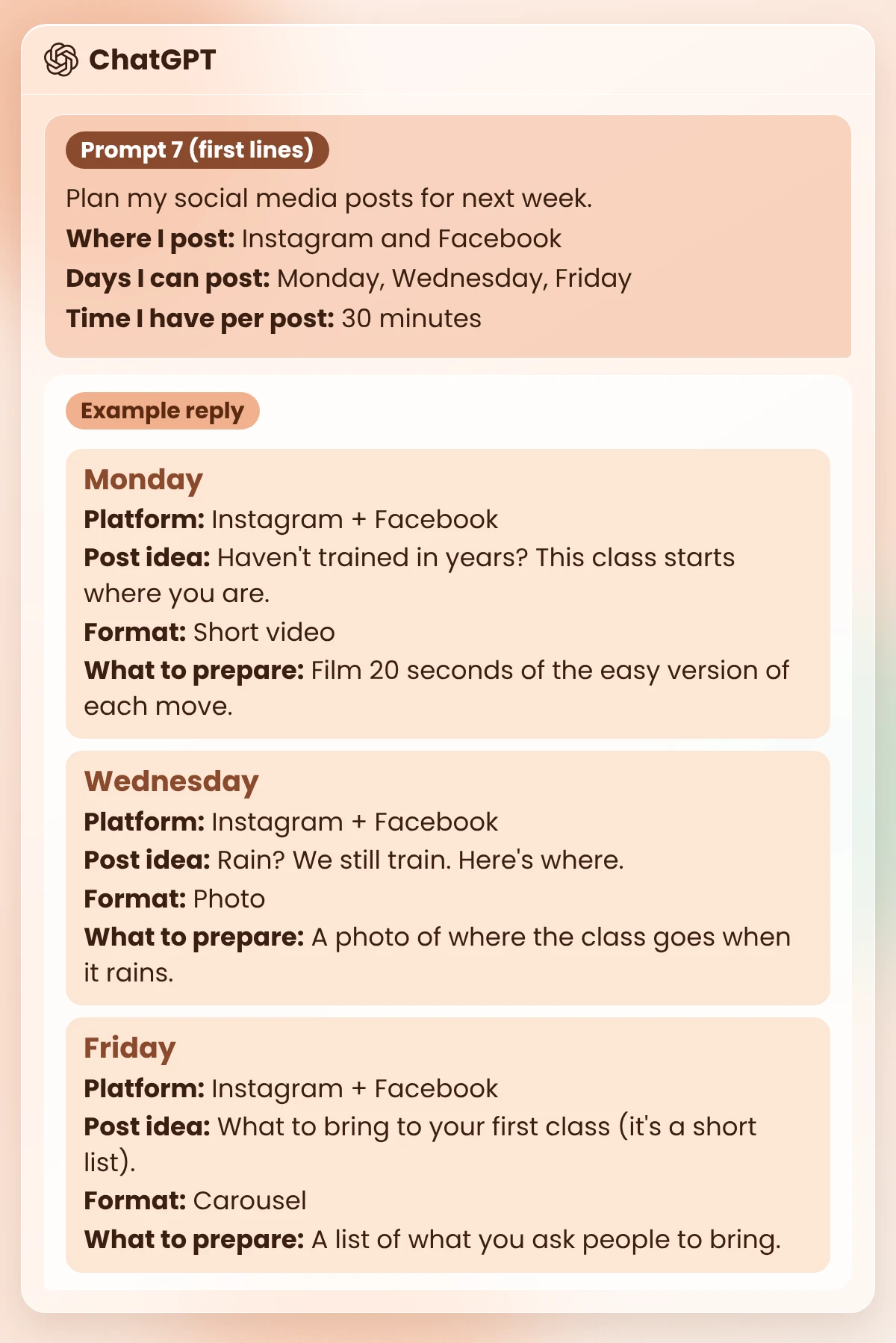
Notice what’s missing: no Tuesday post, and no idea Jonas didn’t give. The rules in the prompt keep the plan to his real week.
Many people know they should post short videos, then freeze when they press record. A simple script with what to film, what to show on screen and what to say fixes that.
Copy this prompt (Video script):
Turn this post into a short vertical video script, under 30 seconds.

Post idea: [ONE "SHORT VIDEO" ROW FROM YOUR WEEK PLAN]
My caption: [PASTE THE CAPTION]
What I can film: [WHAT YOU CAN SHOW]

Make a table with 4 rows and these columns: Seconds, What to film, Text on screen, What I say.
Use my style notes for the spoken words:
[PASTE YOUR "MY STYLE NOTES"]

RULES
- Short spoken lines I can say in one breath.
- Use only facts from my caption.
The 30 seconds is my suggestion for a first video, not a platform rule. Change it if you like.
Jonas’s input (Example): the Monday row of his week plan, his caption from Prompt 5, and “What I can film: me in the park, showing the hard and the easy version of a squat.”
What you should see: 4 rows that fit in 30 seconds, with spoken lines short enough to say in one breath. Example reply for Jonas:
| Seconds | What to film | Text on screen | What I say |
|---|---|---|---|
| 0 to 3 | Jonas facing the camera in the park | Haven’t trained in years? | “Haven’t trained in years? Start here.” |
| 3 to 12 | The hard version of a squat, then the easy version | Every move has an easier version | “Every move has an easier version. I show it first.” |
| 12 to 22 | Wide shot of the park and the mats | No gym. Just a park. | “No gym. Just a park and a few mats.” |
| 22 to 28 | Jonas waves at the camera | Beginners welcome | “Want to try? Send me a message and book your first class.” |
“I don’t have time to answer everyone.” But comments left without a reply feel like nobody is home, and a rude one can ruin your evening.
ChatGPT can draft calm replies in your style in seconds. You still read each one, fill in any gaps and post it yourself.
Copy this prompt (Comment replies):
Draft replies to these comments on my social media post.

My post was about: [ONE LINE]
My style notes:
[PASTE YOUR "MY STYLE NOTES"]

Comments:
1. [COMMENT]
2. [COMMENT]
3. [COMMENT]

RULES
- Under 30 words each. Friendly and calm.
- If someone is rude or critical, stay polite. Don't argue.
- Never invent facts like times, prices or places. If you need one, write [ASK ME: what you need].
- No links unless I give you one.| Prompt line | Jonas’s input (Example) |
|---|---|
| My post was about | Beginners are welcome; every move has an easier version (his Prompt 5 caption). |
| Comments | 1. Looks fun but I’m really unfit 😅 2. What time is the Saturday class? 3. Why pay? You can work out at home for free. |
What you should see: one short, calm reply per comment, with [ASK ME: …] wherever a fact is missing. The image shows Jonas’s example replies under each comment.
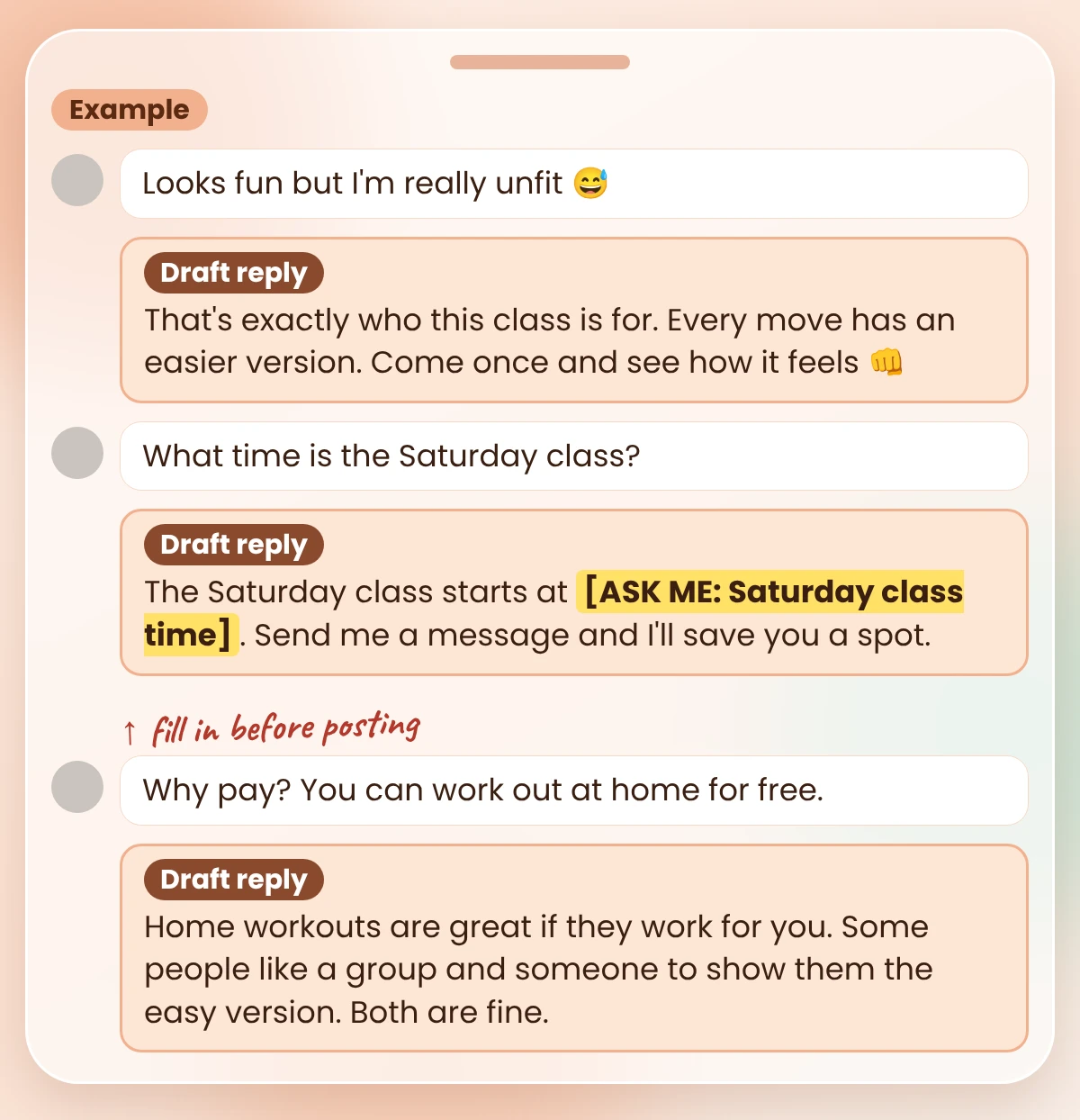
Look at reply 2. Jonas never gave a Saturday time, so ChatGPT wrote [ASK ME: Saturday class time] instead of guessing. He types in the real time before he posts it. And reply 3 stays polite to someone who disagrees.
Watch out
Don’t let any tool post replies for you without reading them. One wrong time or price in a public reply can cost a customer. When a comment turns into a real talk about working together, my guide on how to use AI for lead generation shows how to follow up honestly.
AI drafts can slip in things you’d never say: a big promise, a hype word, a fact you can’t back up. Once it’s posted, your name is on it.
This last prompt doesn’t rewrite your post. It points at the risky lines and asks you a question about each one. You decide the fix, so the post stays yours.
Copy this prompt (Before-you-post check):
Check this social media post before I publish it. Don't rewrite it.

My style notes:
[PASTE YOUR "MY STYLE NOTES"]

Post:
[PASTE YOUR POST]

Mark any line that has:
- HYPE: words like "transform", "amazing", "unlock"
- PROMISE: a result I can't be sure of
- FACT: a fact, time or price I should check
- NOT ME: a line that doesn't match my style notes

For each mark, quote the line and ask me one question about it.
If nothing needs a mark, say "Nothing to fix."
Jonas’s input (Example): a draft he once made without his style notes. It includes this line: “This class will transform your body in just 2 weeks! 🚀🔥”
What you should see: each risky line quoted, its marks, and one question. Example reply for that line, and Jonas’s fix:
| Part | Example |
|---|---|
| Line | “This class will transform your body in just 2 weeks! 🚀🔥” |
| Marks | HYPE (“transform”), PROMISE (“in just 2 weeks”), NOT ME (2 emojis; your notes say one at most, and only 👊) |
| Question | Can you be sure anyone gets this result in 2 weeks? If not, what can you honestly promise? |
| Jonas’s fix | Come once. See if the pace suits you. |
Jonas can’t promise a body change in 2 weeks, so he promises what he can: a first class at a pace he can see. On the second run, the check says “Nothing to fix”.
Watch out
The check can miss things, and it can’t know if a fact about your business is true. You can. If your work touches health or money, be extra careful with any promise of results, and read the post once more before you publish.
Ten prompts is a lot for one day. You only need two to plan next week.
That’s about 30 minutes, by my estimate (not a measured time). Tomorrow, run Prompt 4 once, then write your first caption with Prompt 5.
Good caption prompts tell ChatGPT who the post is for, one real detail from your work, the one thing you want readers to do, and how you write. Prompt 5 in this guide does all four. Paste your style notes every time, so the caption sounds like you.
Yes. Give it your posting days, your platforms, the time you have and your own ideas, as in Prompt 7, and it drafts a weekly plan as a table. Tell it to use only your ideas, then check the plan against your real week before you follow it.
The same 10 prompts work for each client. Keep a separate “My style notes” note for every client, so their posts don’t start to sound alike. And remove private client details before you paste anything into a chat.
Yes, the prompts are free to copy and change. ChatGPT itself has different plans, so check OpenAI’s ChatGPT pricing page for what each plan includes today.
In a normal chat, ChatGPT writes the text, and you post it. To post at set times, you need a scheduling tool, and you should still read every post before it goes out. My AI workflow automation examples show where a tool can take over and where you should stay in charge.
Show it your own writing. Run Prompt 4 on 2 or 3 posts you wrote yourself, save the reply as “My style notes”, and paste it into every caption and reply prompt. Then read each draft out loud and change what you wouldn’t say.
They’re plain text, so you can paste them into other chat assistants, such as Claude, in the same way. The replies will be worded differently, so check them against “What you should see” in each prompt.
None of these prompts will make your posts good on their own. What they do is take away the blank caption box. Your real questions, your real week and your own words do the rest.
Start with five questions and Prompt 1. Next week’s posts can be planned before tonight is over.
My free AI Workflow Starter Kit has more copy-ready workflows like these.

12+ years in digital marketing. I test every workflow on real work before I share it, free tools first.
More about me →Steps, a copy-paste prompt and the limits I found. Free, nothing to buy.
Get the Free Starter Kit →