Physical Address
304 North Cardinal St.
Dorchester Center, MA 02124
Physical Address
304 North Cardinal St.
Dorchester Center, MA 02124
ChatGPT writes fast, but it doesn't sound like you. Here are 8 simple ways to use ChatGPT for content creators: ideas, hooks, scripts and repurposing, with free prompts.
You need a caption today, a short video script tomorrow and a newsletter by Friday. So you open ChatGPT, type “write a post about my morning routine”, and get back something you would never say out loud. That’s how most first tries with ChatGPT for content creators go, and it’s why so many people close the tab.
You’re not bad at prompts. ChatGPT has simply never heard you talk. It doesn’t know your jokes, your opinions or the words your audience uses. So it fills the gap with safe, average words, and you end up rewriting almost every line.
The way out is to stop asking it to be you. Show it a sample of your voice once. Keep your ideas and your stories. Then let ChatGPT help with the slow jobs around them: ideas, hooks, outlines, scripts, repurposing and editing.
In this post, you’ll get 8 simple ways to do that, each with a prompt you can copy. Give it about 30 minutes (my rough estimate for a first run). You’ll finish with a reusable voice file, a list of ideas from your own audience and one short video script that still sounds like you.
In short
What you need
On this page
To keep things concrete, every way below uses the same worked example: Maya, a made-up home-cooking creator who posts short recipe videos and a weekly newsletter. Her lines are labelled “Example”. Your own results will look different, because they’ll be built from your words.
Every other way in this post works better after this one, so do it first. You’ll give ChatGPT three things you wrote and ask it to describe how you sound. That description is your voice file. You make it once and reuse it every time.
Log in at chatgpt.com or open the ChatGPT app on your phone, then start a new chat. Paste the prompt below, add your 3 samples at the bottom and send it.
I'm a content creator. I want you to learn how I write and talk.
Below are 3 samples of my own content. Study them, then write a short "voice file" about me.
Start it with this exact first line: My voice file (use it whenever I say "my voice file")
Then list:
1. My tone in 3 to 5 plain words
2. How long my sentences usually are
3. Words and phrases I use often (quote them)
4. Words I never use
5. How I usually open and end a post
6. Any jokes, habits or quirks you notice
Only describe what you can see in my samples. Don't guess or add anything.
Keep it under 200 words.

My samples:
[paste sample 1]
[paste sample 2]
[paste sample 3]
What you should see: a short list with six parts, and quotes taken from your own samples. If it lists words you never use, delete them. If it misses a phrase you say all the time, add it.
Example (Maya’s voice file): Tone: warm, a bit cheeky, practical. Sentences: short, often under 10 words. Phrases: “okay, real talk”, “pantry hero”, “no fancy gear”. Never uses: “elevate”, “delicious journey”. Opens with: a kitchen mistake. Ends with: “Tell me what you’d swap.”
Short version (the one in the image below): Study my 3 samples below. Write a voice file: my tone, sentence length, phrases I use, words I never use, how I open and end. Only describe what you see. Under 200 words.
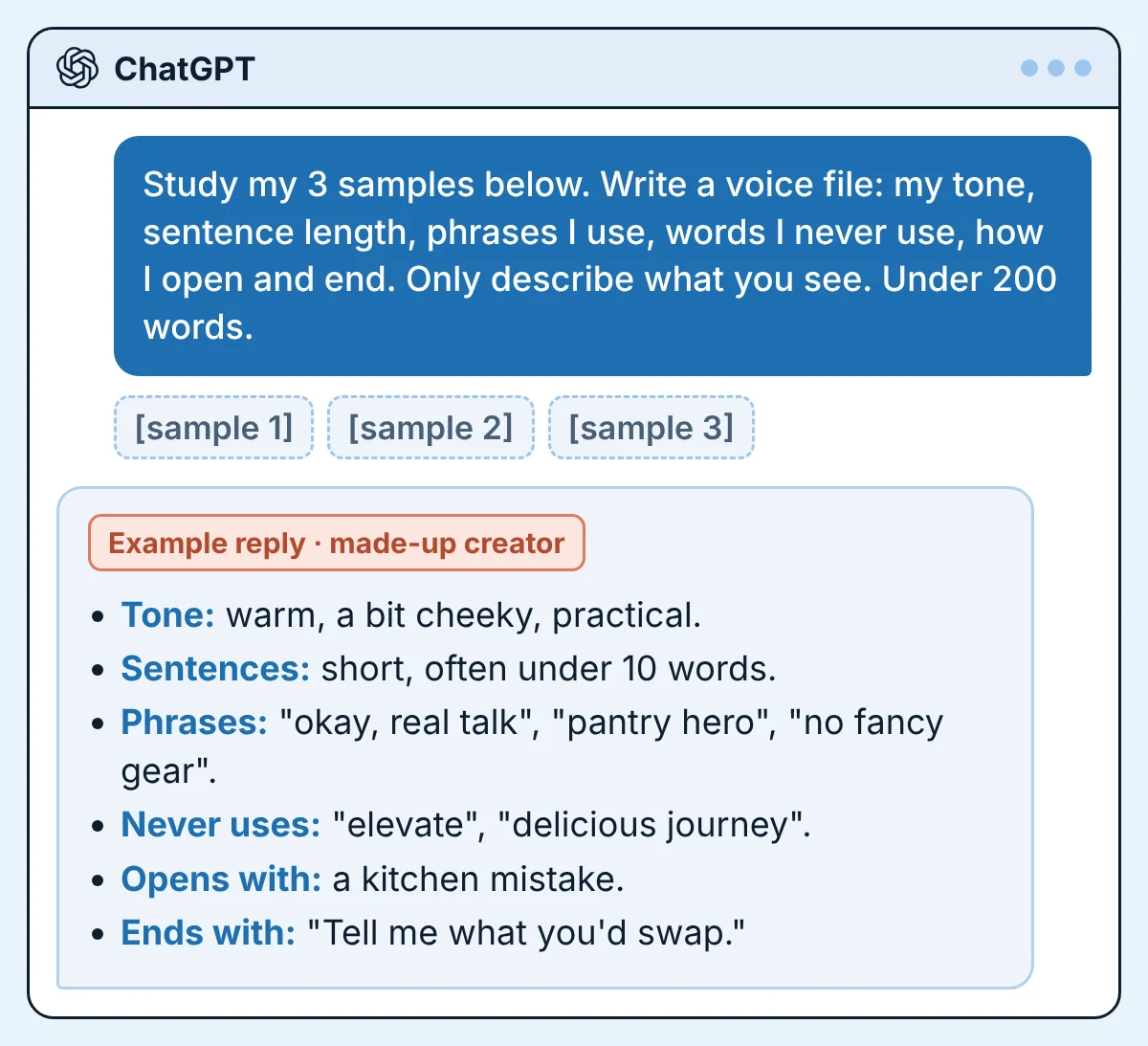
First, check the top line of your voice file. It must read: My voice file (use it whenever I say “my voice file”). If it’s missing (for example, if you used the short version), type it in by hand. Every later prompt in this post says “my voice file”, and this line is how ChatGPT knows what that means.
Then save it. You have two options. Pick one.
Check it worked: start a new chat and type Use my voice file. Describe my writing voice in one line. The answer should match your voice file. If ChatGPT says it can’t find a voice file, or the answer doesn’t match, use Option B: paste the voice file at the start of the chat.
Watch out
Blank-page days rarely mean you have no ideas. Your audience keeps handing them to you in comments, DMs and replies. They’re just scattered across apps. ChatGPT is good at sorting a messy pile like that into themes.
If you ask it for ideas out of thin air, you get the same list everyone else gets. If you give it your audience’s own words, you get ideas only your channel could make.
Copy 10 to 20 comments or questions into a note and delete any names. Open a new chat (if you used Option B, paste your voice file first). Then paste this prompt with your comments at the bottom:
Below are real comments and questions from my audience. Names are removed.
Group them into 5 themes. For each theme give me:
- The exact question or complaint, quoted
- 2 content ideas that answer it (one short video, one post)
Don't invent questions that are not in the list.
Write the idea titles in my voice (use my voice file).

Comments:
[paste 10 to 20 comments or questions]
What you should see: up to 5 themes, each with a real quote from your list. If a quote isn’t in your comments, ChatGPT made it up. Delete that theme.
Example (one theme from Maya’s list): Theme: cooking on a tight budget. Quote: “what can I make when I only have rice and eggs?” Short video: “3 dinners from rice and eggs”. Post: “My pantry list for broke weeks”.
Your first line decides whether anyone reads the second one. Writing ten versions of a first line is slow for a person and quick for ChatGPT. Choosing the right one is still your job.
Stay in the same chat, or open a new one. Fill in the two brackets and send:
Write 10 opening lines (hooks) for this idea: [your idea]
Audience: [who it's for]
Mix these styles: a question, a strong opinion, a mistake, a surprising fact.
Rules:
- Under 12 words each
- Sound like my voice file
- No clickbait I can't deliver, no hype words (ultimate, game-changer, insane)
- If a hook needs a story or a number, write [MY STORY] or [MY FACT] instead of making one up
What you should see: 10 short lines, some with [MY STORY] or [MY FACT] in them. Pick one. Then change at least one word so it’s the way you’d say it.
Example (3 of Maya’s 10, for “3 dinners from rice and eggs”):
That last one only works if Maya fills in a true story. If she has none, she skips it.
Writing from an outline is much easier than writing from a blank page. And an outline is where ChatGPT helps without taking over, because the points still come from you. You bring messy notes. It brings order and a few questions.
Type your notes as bullet points, even half-sentences. Open a chat, paste this prompt and your notes, and send:
Here are my rough notes for a [blog post / newsletter / YouTube video] about [topic].
Turn them into a simple outline:
- A working title
- 4 to 6 sections, each with one line on what it says
- Where I should add a personal story: write [MY STORY]
Keep my points and my order unless something is clearly missing.
Then ask me 3 questions about the parts that are thin.
Don't write the full text.

My notes:
[paste your bullet points, even messy ones]
What you should see: a title, 4 to 6 short sections and 3 questions at the end. Answer the questions in your own words. Your answers are the parts that make the piece yours.
For a full blog post, I wrote a separate guide on how to write a blog post with AI that still sounds like you. There, ChatGPT interviews you first and you write from your own answers.
Short videos look easy until you press record and start rambling. A script fixes that. The trick is to start from your own words, so the script sounds like you talking and not like an advert.
First, get your idea out of your head. Type a few lines, or tap the microphone on your phone keyboard and just talk for a minute. Then paste this prompt with your notes and send:
Turn my notes into a short video script I can say out loud.
Length: about [30 / 45 / 60] seconds when I read it at my normal speed.
Structure:
1. Hook (one line)
2. 3 quick points, one sentence each
3. One line that tells viewers what to do next
Write it the way I talk (see my voice file): short sentences, my phrases, no words I'd never say.
Add [SHOW: ...] notes for what should be on screen.
Don't add facts, numbers or stories that are not in my notes.

My notes:
[paste your notes or voice-typed ramble]
What you should see: a hook, three short points, one closing line and a few [SHOW: …] notes. Read it out loud with your phone’s timer running. If it runs long, cut words until it fits. If a line feels strange in your mouth, rewrite it.
Example (Maya’s notes): rice + eggs = dinner. fried rice with old rice. egg soup over rice. rice omelet. no gear needed.
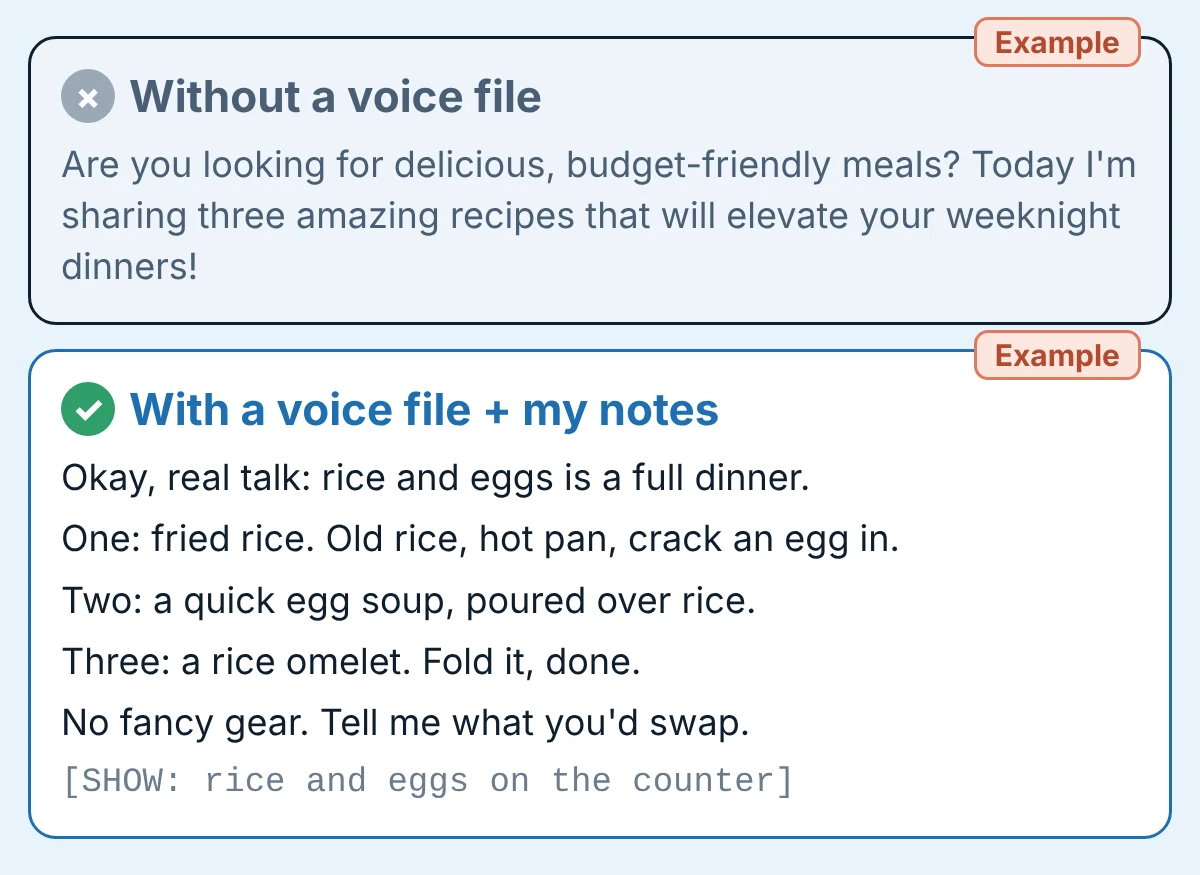
Example: without the voice file, a plain “write a recipe video script” ask gives lines like: “Are you looking for delicious, budget-friendly meals? Today I’m sharing three amazing recipes that will elevate your weeknight dinners!”
Example: with the voice file and her notes:
You did the hard part when you made one good video or post. Posting it once and moving on wastes most of that work. ChatGPT can cut one piece into smaller ones in a minute. Because it only uses your content, your ideas and phrases stay in.
Copy the text of one piece: a video transcript, a blog post or a newsletter. Paste it below this prompt in a new chat and send:
Below is one piece of my content: .
Turn it into:
1. 3 short social posts (under 60 words each), each built on a different point
2. 1 carousel outline: 6 slides, one idea per slide
3. 1 newsletter intro (under 100 words)
4. 1 short video script outline (hook + 3 points)
Use only ideas that are in my content. Keep my phrases and follow my voice file.
Mark anything you're unsure about with [CHECK].

My content:
[paste it]
What you should see: six pieces, all built on points from your original. If one brings in an idea you never said, delete it or check it. Then post them over the next days instead of all at once.
Want a full week planned from one blog post? Follow my step-by-step guide on how to turn a blog post into social media posts with AI.
This is the way that protects your voice the most. You write the draft. ChatGPT only points at problems. An editor suggests; a ghostwriter replaces. Tell it which job it has.
Open a new chat, paste this prompt with your draft at the bottom and send:
You are my editor, not my ghostwriter. Below is a draft I wrote.
Don't rewrite it. Do this:
1. Point out sentences that are unclear or too long, and suggest a shorter version
2. Find spelling and grammar mistakes
3. Flag any claim that needs a source: [CHECK]
4. Tell me which line is the weakest and why
Keep my words, my jokes and my slang. Don't add new ideas or facts.

My draft:
[paste it]
What you should see: a list of small fixes, not a new draft. Accept or reject each one yourself.
Example (Maya’s caption): “Honestly this fried rice thing changed my whole week, its so easy and you dont need nothing fancy.” The edit keeps “Honestly” and her tone, and only fixes “its” to “it’s” and “dont need nothing” to “don’t need anything”.
For a longer editing routine, see how to edit AI content so it sounds human.
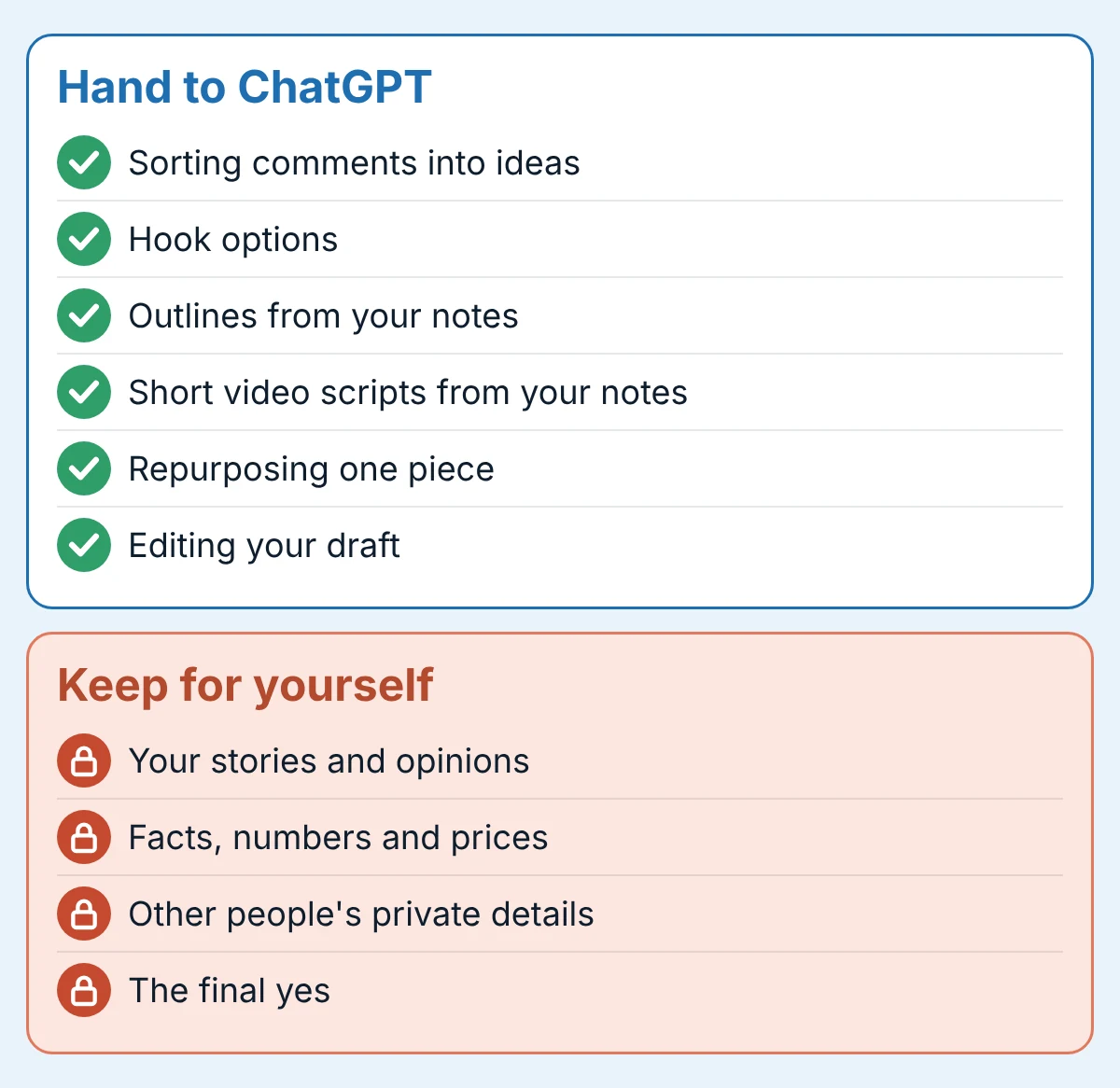
Deciding what stays yours is a way of using ChatGPT too. It’s the part that keeps your audience trusting you. ChatGPT for content creators works best as a helper, never as the person behind the account.
Good to know
If you blog, Google says using AI is not against its rules by itself, but using automation mainly to manipulate search rankings is spam. Read Google’s guidance about AI-generated content. Write for people first. For picking tools for each step of a post, see my free AI tool stack for bloggers.
You don’t need all 8 ways this week. Here’s a short first run. The times are my rough estimates, not tested averages.
Done when: you have a voice file saved, a list of ideas with real quotes, and one script you’d be happy to record.
Yes, with the slow jobs around your ideas: sorting audience questions into ideas, writing hook options, turning notes into outlines and scripts, repurposing and editing. It can’t supply your stories, opinions or experience. Those still come from you.
Give it a voice file made from your own writing, start every prompt from your own notes, and ban words you’d never say. Then edit by hand and read the result out loud before you post.
It’s good at structure, variations and first drafts of short pieces. It’s weak at anything that needs your experience or exact facts. Use it as a helper and keep the final say.
You can sign up for ChatGPT without paying and paste these prompts into a chat. What the free plan includes, and its usage limits, change over time, so check OpenAI’s own pricing page for today’s details before you decide to upgrade.
Start with the voice-file prompt in Way 1 and the outline prompt in Way 4. For a full post, use the interview method in my guide on how to write a blog post with AI.
Raw, unedited output often uses the same safe phrases, so it can feel generic. When the ideas, stories and final edit are yours, the content sounds like you, because most of it is you.
ChatGPT doesn’t steal your voice. It just doesn’t have it until you show it. So make the voice file first. It’s one prompt, and every other way in this post gets better after it.
Then keep the deal simple: you bring the ideas, the stories and the final yes. ChatGPT brings speed. That’s how ChatGPT for content creators saves time without making you sound like everyone else.
Want more simple, copy-paste AI workflows like these? Grab my free AI Workflow Starter Kit, or browse more guides on the blog.

12+ years in digital marketing. I test every workflow on real work before I share it, free tools first.
More about me →Steps, a copy-paste prompt and the limits I found. Free, nothing to buy.
Get the Free Starter Kit →