Physical Address
304 North Cardinal St.
Dorchester Center, MA 02124
Physical Address
304 North Cardinal St.
Dorchester Center, MA 02124
Four free ways to see if AI search cites your blog, three paid trackers with their listed prices worked out, and a simple rule for when paying makes sense.
Semrush lists its AI Visibility Toolkit at $99 a month. That’s $1,188 a year to answer one simple question: does ChatGPT, Perplexity or Google’s AI ever name your blog as a source?
Google’s guide says its AI features use the same ranking systems as normal Search. So normal SEO still works, and most GEO tools only report how that work is going. This post covers 7 generative engine optimization tools: 4 free checks first, then 3 paid trackers and when one is worth the money.
In short
What you need
On this page
Generative engine optimization, or GEO, means making your pages easy for AI answer tools to find, understand and cite. “Cite” here means the AI names your page as a source, usually with a link next to its answer.
The tools sold under that name come in two kinds. The card below sorts all seven from this post.
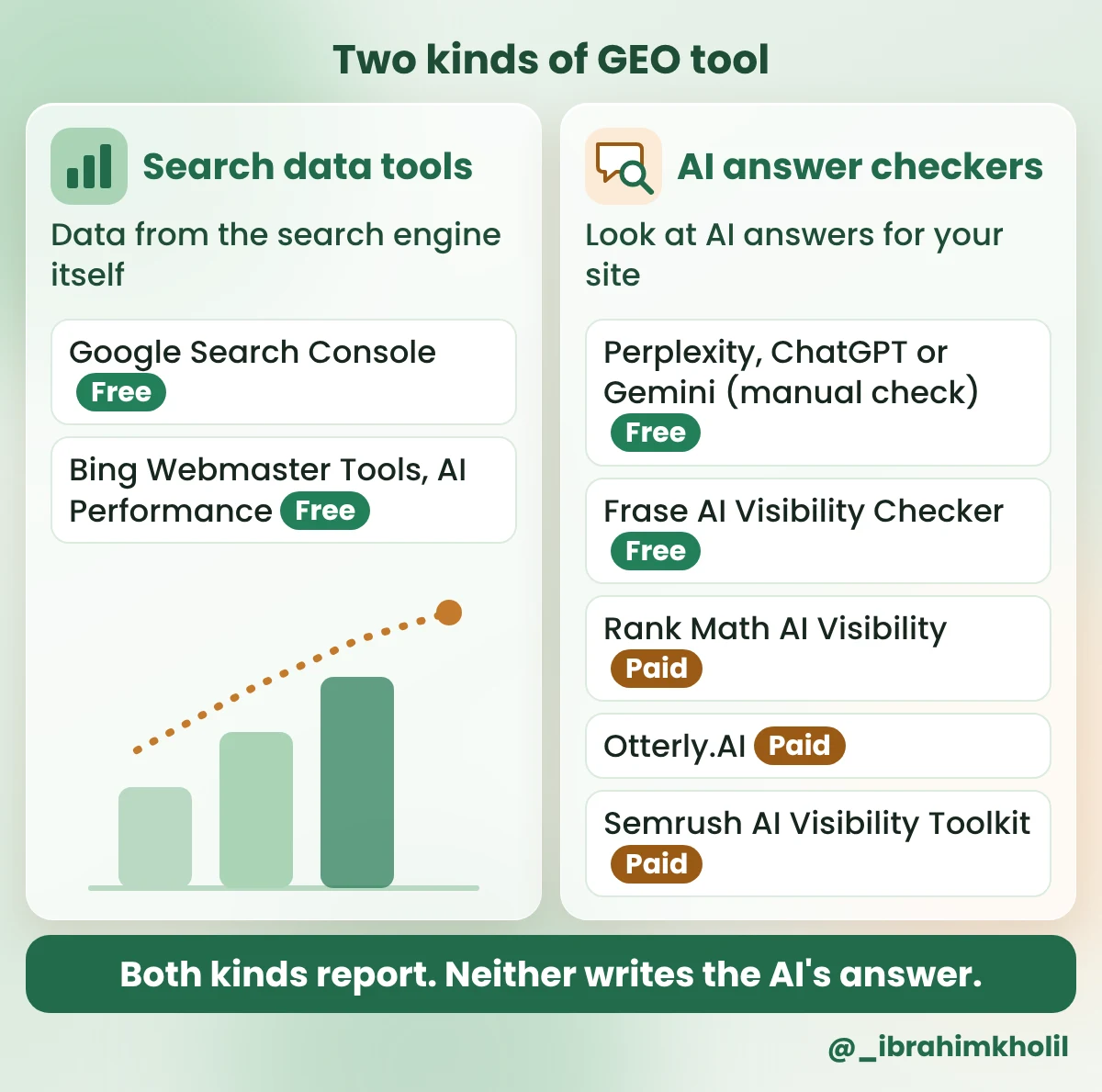
A GEO tool can show you whether AI cites you. It can’t make AI cite you.
What changes the answer is the page itself. Google’s guide to its generative AI features (May 2026) puts helpful, original content first. It also says pages must be public and crawlable. My post on how to optimize content for AI search walks through what Google asks for, and the basics are in how to use AI for SEO.
So think of the tools below as a bathroom scale. They tell you where you stand. The work on the page is still yours.
Here’s the whole list in one table.
| Tool | Cost | What it shows you |
|---|---|---|
| 1. Google Search Console | Free | How your pages do in Google Search, including AI feature traffic |
| 2. Bing Webmaster Tools, AI Performance | Free (public preview) | How often Microsoft Copilot and Bing’s AI summaries cite your pages |
| 3. Perplexity, ChatGPT or Gemini (manual check) | Free accounts exist | Whether your site is a source for the questions you ask |
| 4. Frase AI Visibility Checker | Free check | A quick one-off check, run for you |
| 5. Rank Math AI Visibility | Paid (Rank Math AI subscription) | Mentions and citations in ChatGPT and Gemini, inside WordPress |
| 6. Otterly.AI | From $29 a month | Your chosen questions, tracked on a schedule |
| 7. Semrush AI Visibility Toolkit | $99 a month | Your chosen questions, tracked on a schedule, plus wider analysis |
Prices were checked in November 2026 and change often. Confirm them on each maker’s page before you pay.
How to pick today: start with tools 1, 2 and 3. Together they cover Google, Bing and the chat tools, and they cost nothing. Add tool 4 if you want a quick second opinion. Look at tools 5 to 7 only when you have more questions to check than time. If your blog runs on WordPress with Rank Math, tool 5 lives right in your dashboard.
The free tools do two jobs: they show what the search engines report, and what the chat tools say. The search engines come first.
Both tools are free and read data straight from the search engine. Neither one shows clicks from AI answers, so don’t expect a neat “AI traffic” number.
Search Console is Google’s free report on how your site does in Google Search. It counts traffic from AI features in the Performance report under the “Web” search type. That traffic is mixed in with normal results, and you can’t filter it out.
In June 2026, Google announced a separate generative AI report for AI Overviews and AI Mode. It’s still rolling out, so it may not be in your account yet.
What you should see: a chart of clicks and impressions, with a table under it. Impressions are how many times your pages appeared in Google results. The table opens on Queries, the words people searched. The Pages tab next to it lists your own pages. A brand-new site may show little or no data at first.
To check one post, open the Pages tab and use Find in page (Ctrl+F, or Cmd+F on a Mac) with a word from the post’s web address. If the post isn’t in the list, it had no impressions in that date range, or Google hasn’t indexed it yet. Fix a post like that first, before you spend money on any GEO tool.
This is the only free tool here that counts citations straight from the search engine. Microsoft launched it as a public preview in February 2026. It shows how often Microsoft Copilot, Bing’s AI summaries and some partner tools cited your pages over about the last three months.
What you should see: your total citations, page-level citations over time and “grounding queries”. Grounding queries are, roughly, the searches the AI ran when it picked up your pages. A June 2026 update added topics, intents, citation share and a compare view. The report has no clicks or visits.
Keep a few grounding queries handy. They make good test questions for the next section.
Google and Bing report on their own AI. For ChatGPT, Perplexity and Gemini, the free way to find out is to ask them yourself. It’s the same job most paid trackers do, only by hand.
The trick is the questions. If you type your blog’s name, of course the AI finds it. What counts is whether you show up when someone asks the question your post answers.
Example blogger: Carmen
Carmen writes a blog about baking sourdough bread at home, for beginners. She’s invented for this post, and so is every result in her examples. Her blog has one post nobody else has: she baked the same loaf with 4 store-bought flours.
Part 1: write 5 test questions.
Copy this prompt (Question maker):
I want to check if AI search tools mention my blog.
Write 5 questions a reader might type into ChatGPT or Perplexity before they find a blog like mine.

MY BLOG IS ABOUT: [TOPIC]
MY READERS ARE: [WHO THEY ARE]
SOMETHING ONLY MY BLOG HAS: [ONE POST, TEST OR DETAIL, OR NONE]

Rules:
- Write each question the way a real person types it, in plain words.
- Don't use my blog's name or my name.
- Make question 5 about the thing only my blog has. If that line says NONE, make question 5 another general question.
- Give only the 5 questions, no answers.
How to fill the lines: for the topic, name what most of your posts are about. For readers, say who you write for in a few words. For the last line, pick a post with your own test, numbers, photos or method. Original details like these are more likely to be cited than general answers. If you have nothing like that yet, write NONE.
Carmen’s three lines: MY BLOG IS ABOUT: baking sourdough bread at home. MY READERS ARE: beginners baking their first loaves in a normal home oven. SOMETHING ONLY MY BLOG HAS: a post where I baked the same loaf with 4 store-bought flours.
What you should see: 5 short questions with no answers. Here’s Carmen’s reply:
1. How do I bake my first sourdough loaf at home?
2. Why is my homemade sourdough bread so flat?
3. Can I bake sourdough in a normal home oven?
4. What’s the easiest sourdough recipe for beginners?
5. Which store-bought flour works best for a beginner sourdough loaf?
Questions 1 to 4 come from her topic and readers. Question 5 is about her flour test, as the prompt asked. If Bing already gave you grounding queries, you can swap one or two of them in.
Part 2: ask the questions and note the sources.
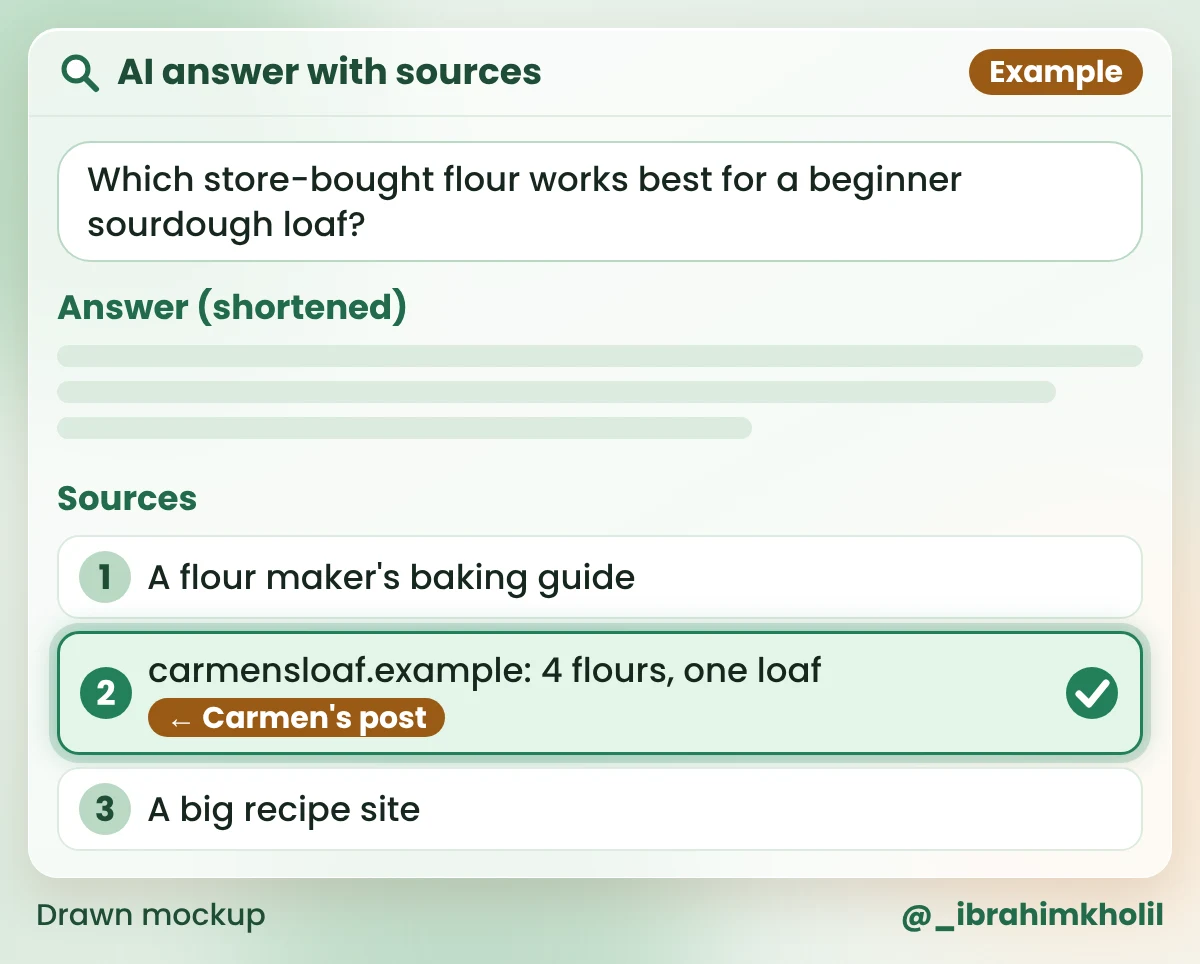
Here’s what Carmen’s question 5 could look like. The answer text is shortened; the sources are the part to read.
Your log, ready to copy:
AI CHECK LOG
Date:
Tool:
Question | My site cited? (Yes/No) | Which page
1.
2.
3.
4.
5.
What you should have now: one filled log for one tool. Here’s Carmen’s:
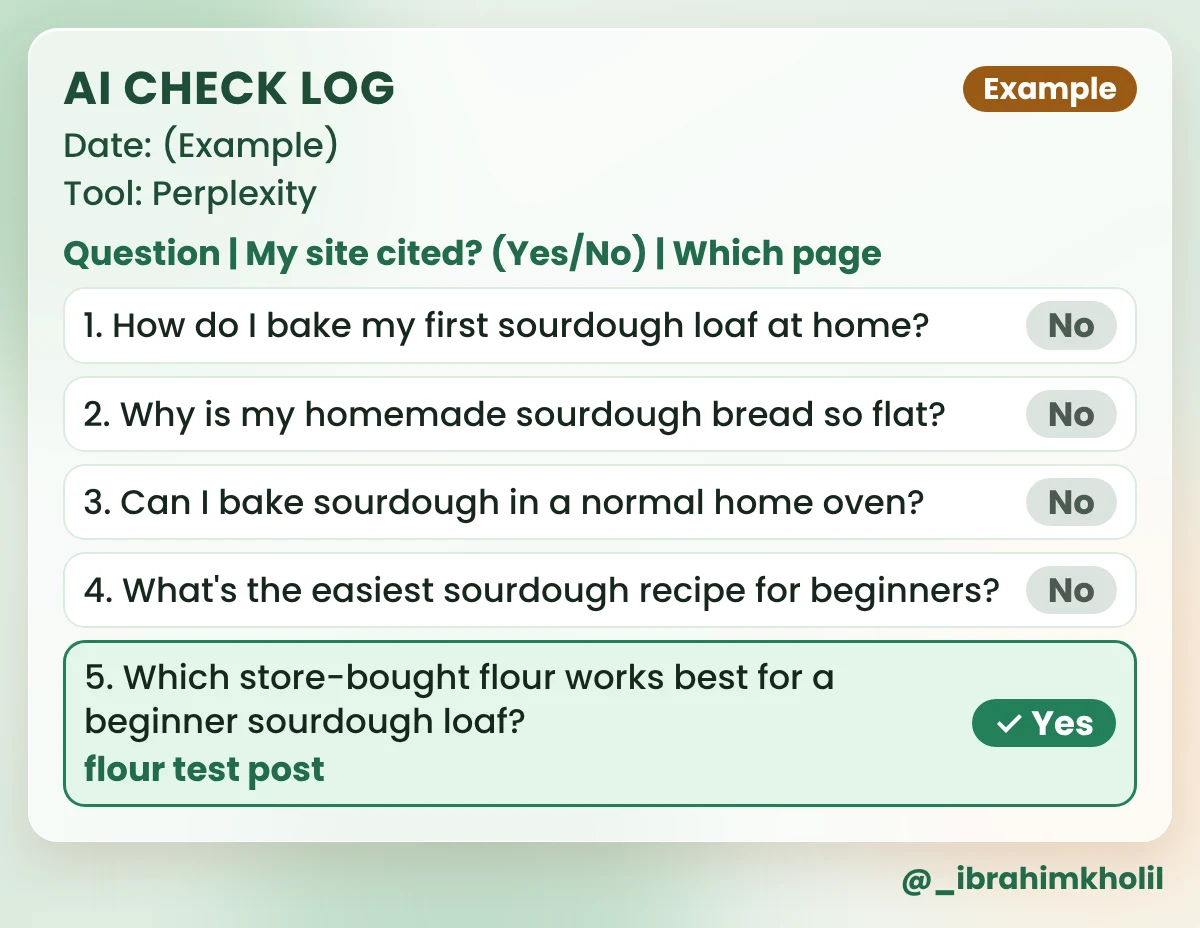
Only the post with her own flour test showed up. Your results may look different. The monthly check below shows what to do next.
Frase, a company that sells SEO software, offers a free AI Visibility Checker. The ChatGPT check needs no sign-up, and the Perplexity and Gemini report asks for your email. RightBlogger has a similar free AI visibility checker.
Both checkers come from companies that sell paid tools, so expect an offer after the result. Use them as a second opinion, not as your record.
Now you know what the free tools can tell you. Paid tools run the same checks for you automatically.
Paid trackers are your manual check on autopilot. You give them a list of questions, which they call “prompts”. They ask AI tools those questions on a schedule and report when your site is mentioned or cited.
That saves time, but a tracker only checks the questions you give it. It doesn’t know what your readers really ask. Your free log is still where good questions come from.
Rank Math makes a popular SEO plugin for WordPress. Its AI Visibility feature tracks brand mentions, citations, sentiment and your position in ChatGPT and Gemini answers. Sentiment means whether a mention sounds positive or negative. It’s part of a paid Rank Math AI subscription with a free trial. I couldn’t find a public price, so check Rank Math’s AI Visibility page before you sign up.
Otterly.AI is the cheapest paid tracker here. Its Lite plan is listed at $29 a month for 15 prompts.
Semrush is a large SEO platform. Its AI Visibility Toolkit costs $99 a month for 1 domain and 25 tracked prompts, with no free trial. More prompts and extra domains cost more.
What the prices mean per question: divide the monthly price by the number of prompts.
| Tracker (listed price) | Per prompt, per month | Per year |
|---|---|---|
| Otterly.AI Lite: $29 for 15 prompts | $29 ÷ 15 = about $1.93 | $29 × 12 = $348 |
| Semrush: $99 for 25 prompts | $99 ÷ 25 = about $3.96 | $99 × 12 = $1,188 |
| Rank Math AI Visibility | Price not found | Check its page |
Compare that with Carmen’s free log: her 5 questions cost nothing. A tracker is worth it only when 5 questions by hand stop being enough.
Also on the market, but a weaker fit for a one-person blog:
Before you pay for any tracker
One check tells you little. The same check every month shows you a trend. Pick a date you’ll remember, like the first Monday. After the first round, it takes about 20 minutes.
What to do with each question:
Carmen’s next move: questions 1 and 3 both point to her beginner loaf post, and Google already shows it. So that’s her ONE post this month. She checks whether its first paragraph answers both questions directly. Question 2 has no post yet, and her easy recipe post isn’t in Search Console, so both wait for next month. She doesn’t buy a tracker, because 5 questions by hand are still quick.
For better questions next month, the tools in my post on AI keyword research tools help you find what people really search for.
Not in Google’s view. Its guide says its AI features are built on its core ranking and quality systems, so SEO best practices still apply. GEO is a new name for making pages easy to find, understand and cite. It’s not a separate secret skill.
No, neither is required for Google’s AI features. An llms.txt file is a text file some sites add for AI bots. Your pages do need to be public and crawlable. Other AI companies may have their own advice, so check their pages too.
Ask them the questions your posts answer, without your blog’s name, and read the sources. Perplexity lists sources with each answer, Gemini shows source links, and ChatGPT shows them when it searches the web. The Question maker prompt and the log above make it a short monthly job.
Partly. It includes AI feature traffic under the “Web” search type, mixed with normal results. A separate generative AI report is still rolling out, so it may not be in your account yet.
Yes. Bing Webmaster Tools’ AI Performance report is free and counts citations by page. Google Search Console is free too. Frase and RightBlogger offer free checkers, though both companies sell paid tools.
Usually not at the start. Run the free checks first. Pay only when AI already cites you and checking by hand takes more time than you have.
Most generative engine optimization tools measure. They don’t change what AI writes. Search Console, Bing’s AI Performance report and a hand check in Perplexity already show a small blog where it stands, for free. A paid tracker just saves you time.
Open Claude today and run the Question maker on your own blog. Five questions and one log are enough to know where you stand.
My free AI Workflow Starter Kit has more copy-ready workflows like the ones in this post.

12+ years in digital marketing. I test every workflow on real work before I share it, free tools first.
More about me →Steps, a copy-paste prompt and the limits I found. Free, nothing to buy.
Get the Free Starter Kit →