Physical Address
304 North Cardinal St.
Dorchester Center, MA 02124
Physical Address
304 North Cardinal St.
Dorchester Center, MA 02124

SEO is mostly small, boring writing jobs. Here's how to use AI for SEO the safe way: 8 simple tasks to hand off today, with a copy-paste prompt for each and the jobs you should keep for yourself.
SEO feels like a job for technical people. Keywords, meta descriptions, internal links, Search Console reports. So when people tell you to use AI for SEO, it sounds like one more technical thing to learn.
But there’s a problem.
Most of SEO isn’t technical at all. It’s small, repetitive writing jobs. A title here, a meta description there, ten internal links to add, an FAQ to tidy up. They’re boring, so they get skipped. And skipped SEO tasks quietly cost you clicks.
If this sounds like you, you’re not alone. Almost every blogger and small business owner has a folder of posts that “needs SEO later”.
But there’s a fix. Those small, repetitive jobs are exactly what AI is good at drafting.
In this post, I’ll show you 8 simple SEO tasks you can hand off to a free AI chatbot today, with a copy-paste prompt for each. You’ll also see what Google says about AI content, and the few jobs you should never hand off.
In short
On this page
“I’m scared Google will punish my site if I use AI.”
That’s the first worry for most people. So let’s go straight to the source.
In February 2023, Google published its guidance about AI-generated content. It says appropriate use of AI or automation is not against its guidelines. What it does count as spam is using automation to generate content mainly to manipulate search rankings.
Google’s spam policies make the line clearer. “Scaled content abuse” means making many pages mainly to manipulate rankings and not to help people, and the policy names generative AI as one way that can happen.
Basically, it’s like using a calculator in a maths exam. Nobody cares that you used it. They care whether the answer is right.
So the question isn’t “Did AI help?” It’s “Is this page useful and true?” Every task below keeps you in charge of that.
Every task follows the same simple loop. I call it Feed, Draft, Check.
| Task | What AI drafts | What you check |
|---|---|---|
| 1. Keyword ideas | Lists of phrases, grouped by intent | Real search volume in a keyword tool |
| 2. Briefs and outlines | Headings and questions | What page 1 really shows |
| 3. SEO titles | 5 title options | It’s true and matches the post |
| 4. Meta descriptions | 3 options with a length | The real character count |
| 5. Internal links | Link spots and anchor text | Every page really exists |
| 6. FAQs | Short answers | Questions are real, answers are right |
| 7. Alt text | Image descriptions | It describes what’s really in the image |
| 8. Old post audit | Patterns in your exported data | The numbers match your report |
Open a free AI chatbot like ChatGPT, Gemini or Claude. Then pick one task. You don’t need all 8 today.
“I don’t know what people actually search for.”
AI is great at brainstorming the words real people might type, and at sorting them by what the searcher wants: to learn, to compare or to buy.
My site helps [who] with [topic]. List 30 search phrases my readers might type into Google, written the way real people search (questions and long phrases, not just single words).
Group them by intent: learn, compare, buy, do.
Don't give me search volumes or difficulty numbers. I'll check those in a keyword tool.
The ideas come from AI. The numbers never do. Check volume and difficulty in a keyword tool. If you already have a blog, the Performance report in Google Search Console shows the real searches people use to find your pages.
“My posts don’t match what ranks.”
That usually means the post answered a different question from the one the searcher had. A short brief fixes this before you write.
Make a one-page content brief for a blog post.
Focus keyword: [keyword]
Reader and their problem: [who + problem]
What I saw on page 1 of Google: [your short notes]
Questions people ask: [paste the list]
Give me: search intent, 5-7 H2 headings in plain English, and the questions each section must answer.
Use ONLY my notes. If something is missing, write NEEDS MY INPUT.
Look at page 1 yourself first. AI can’t see today’s results unless you show it. I explain the full method, with a free template, in how to make an AI content brief.
“My titles are either boring or way too long.”
Google’s guide to title links asks for titles that are descriptive and concise, and warns against stuffing them with keywords. That’s a perfect brief for AI.
Here is my blog post: [paste the post or its outline]
Focus keyword: [keyword]
Write 5 title options. Rules:
- Put the focus keyword near the start, once.
- Keep each one short and clear.
- Only promise what the post really delivers.
- No clickbait words the post can't back up.
Pick one, then read it next to your first paragraph. If the post doesn’t deliver the promise, change the title, not the truth.
“Writing a 150-character summary for every post is so boring.”
It is. And it’s one of the easiest jobs to hand off. Google’s page on search snippets says it sometimes uses your meta description in the results, when it describes the page better than text taken from the page itself. So a clear one is worth having.
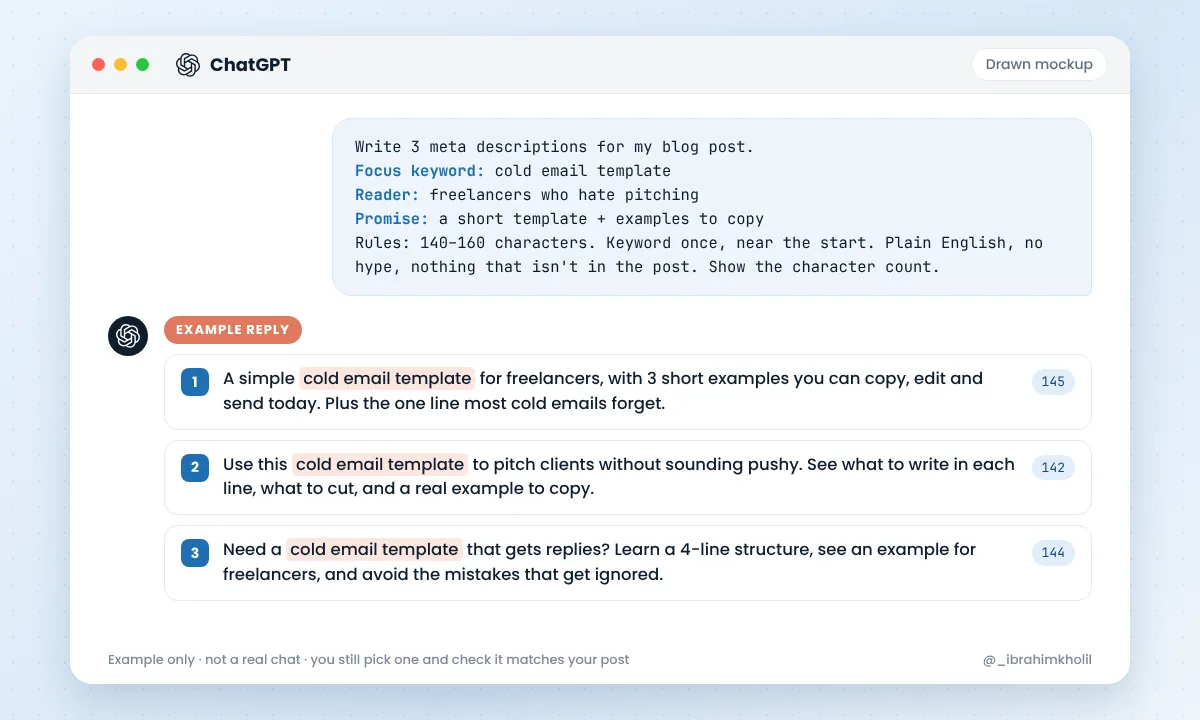
Write 3 meta descriptions for my blog post.
Focus keyword: [keyword]
Reader: [who it's for]
Promise: [what the post gives them]
Rules: 140-160 characters. Keyword once, near the start. Plain English, no hype, nothing that isn't in the post. Show the character count after each one.
Don’t trust the character count AI gives you. Chatbots often count wrong. Paste your pick into your SEO plugin (Rank Math or Yoast both show a length bar) and trim it there.
“I always forget to link to my own posts.”
Internal links help readers find your other posts, and they help Google find them too. Google’s link best practices say good anchor text is descriptive, reasonably short and relevant to the page it points to. So “click here” is out.
Here is a list of my published posts (title + URL):
[paste your list]
Here is my new draft:
[paste the draft]
Suggest 3 to 6 places in the draft to link to posts from my list.
For each one, give: the sentence, the anchor text (3-6 descriptive words) and the URL.
Use ONLY URLs from my list. Never make up a URL.
Click every link before you publish. AI sometimes “remembers” pages that don’t exist.
“I don’t know which questions to answer.”
Collect the questions first: “People also ask” boxes, Google autocomplete, and the questions your readers send you. Then let AI help with the wording.
Here are real questions people ask about [topic]:
[paste your list]
Remove duplicates and group similar ones. Then write a short answer (2-4 sentences) to each, using ONLY the facts in my post below. If my post doesn't answer a question, write NOT IN MY POST.
[paste your post]
The “NOT IN MY POST” line shows you gaps worth filling. The full method is in how to build an FAQ with an AI FAQ generator.
“I upload images and leave the alt text empty.”
Alt text describes an image for people who can’t see it, and it helps Google understand the image. Google’s image SEO guide asks for useful, descriptive alt text and warns against stuffing it with keywords.
Write alt text for this image in one plain sentence (under 125 characters).
Describe what is really in the image. Don't guess names, brands or numbers you can't see.
The post is about: [topic]. Mention it only if it fits naturally.
[upload the image, or describe it]
Read each one while looking at the image. If AI describes something that isn’t there, fix it.
“My old posts get fewer clicks, and I don’t know why.”
Google Search Console’s Performance report shows clicks, impressions, click-through rate (CTR) and average position for your pages and searches. You can export it. Then AI can help you spot patterns in a few minutes.
Here is my Google Search Console export (pages with clicks, impressions, CTR and position for the last 3 months):
[paste the table]
1. List the 5 pages with the most impressions but a low CTR. These may need a better title or meta description.
2. List pages where position is between 8 and 20. These may need a content update.
3. Don't invent any numbers. Only use the data I pasted. Show the numbers next to each page.
Compare AI’s list with your report before you act. Then use tasks 3 and 4 to fix the titles and descriptions it found.
Good to know
Before you paste data into any AI tool, check its privacy settings. Only share what you’re happy to share. Your Search Console export is your site’s data, so treat it with care.
“Okay, so where’s the line?”
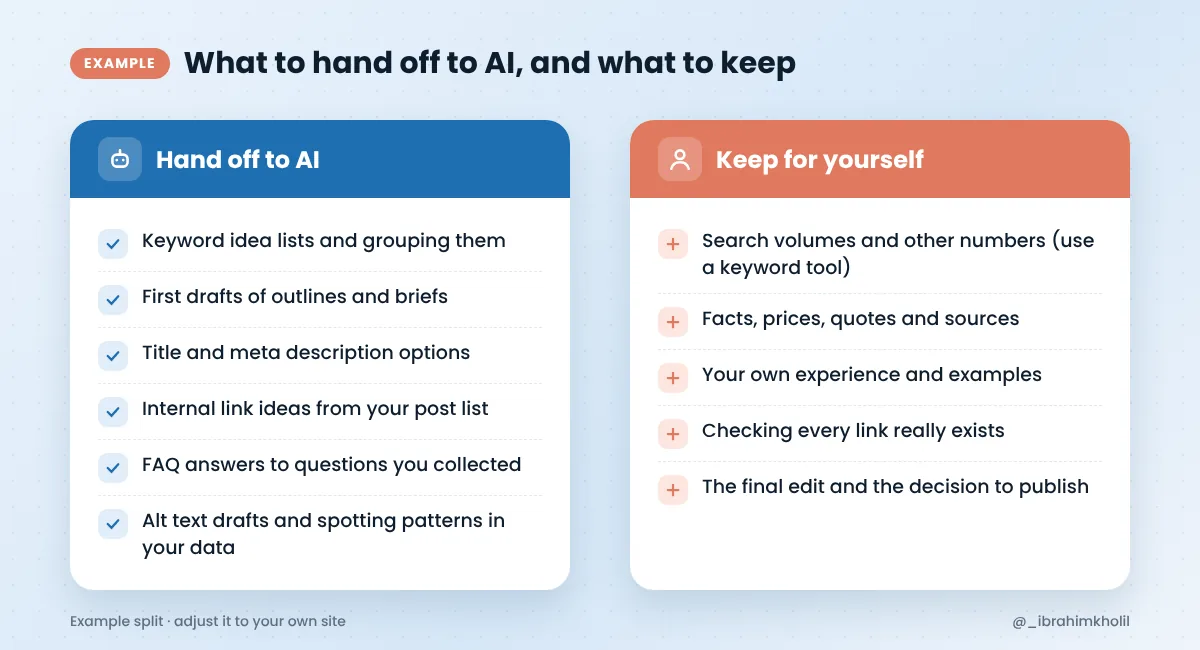
Using AI isn’t bad for SEO by itself. Publishing pages that are wrong, thin or made only for rankings is. Google’s guide to helpful, people-first content asks whether your content gives original information, research or analysis. That part has to come from you.
Watch out
“Do I need to pay for a special AI SEO tool?”
Not to start. For the 8 tasks above, a free general chatbot like ChatGPT, Gemini or Claude does the drafting. You can use Claude AI for SEO drafts the same way you use ChatGPT. The prompts work in all of them.
The real data comes from SEO tools, not from the chatbot. Search Console is free for your own site, and a keyword tool gives you volumes. Paid AI SEO tools can pull some of that data in for you, which saves copy-and-paste time. Check each tool’s own pricing page before you decide.
Want a list of free tools for each step of a post? Here are my picks of AI tools for bloggers. And if you write the post itself with AI, read how to write a blog post with AI that still sounds like you.
Reading prompts is easy. Using one is where it clicks.
Your 20-minute test
That’s it. One post, better than it was this morning. Do one more tomorrow.
Once your post is in shape, you can reuse it too. Here’s how to turn a blog post into social media posts.
Yes. Google’s guidance says appropriate use of AI or automation is not against its guidelines. Use AI for drafts and repetitive tasks, then check the facts, numbers and quality yourself before you publish.
Not by itself. The problem is low-quality or unhelpful content, and content made mainly to manipulate rankings. If the page is useful, accurate and checked by you, using AI to help write it isn’t the issue.
It can, if it’s helpful and accurate. Google says it focuses on the quality of content, not on how it was made. But making many pages mainly to rank is scaled content abuse under Google’s spam policies, whether a person or AI writes them.
Nobody can promise what will happen. What’s clear today is that many SEO tasks are changing, while the basics still matter: answer real questions, be accurate, and make pages easy to understand and find.
For drafting titles, meta descriptions, briefs and FAQs, a free general chatbot like ChatGPT, Gemini or Claude works well. Real data, like search volumes and clicks, should come from SEO tools and Google Search Console.
Yes. The free versions of the main chatbots can handle all 8 tasks in this post, and Google Search Console is free for your own site. Paid tools can save time later, but you don’t need them to start.
SEO isn’t one big scary job. It’s a pile of small ones.
Let AI draft the boring parts: keyword ideas, briefs, titles, meta descriptions, links, FAQs, alt text and a first look at your data. Then you check the facts, add what only you know, and press Update. That’s how to use AI for SEO without losing trust, with Google or with your readers.
You can do this. It’s easier than it looks.
Want more simple, ready-to-use AI workflows? Get my free AI Workflow Starter Kit. And for more simple AI workflows, browse the blog.

12+ years in digital marketing. I test every workflow on real work before I share it, free tools first.
More about me →Steps, a copy-paste prompt and the limits I found. Free, nothing to buy.
Get the Free Starter Kit →