Physical Address
304 North Cardinal St.
Dorchester Center, MA 02124
Physical Address
304 North Cardinal St.
Dorchester Center, MA 02124
Asking AI to 'make it better' gives you someone else's post. These 5 steps use AI to check one old post, fix its opening and one section with your own facts, and catch anything it adds.
Open a blog post you wrote last year and read the first paragraph out loud. If you’d skip it as a reader, the post needs work. AI content optimization can do a lot of that work for you, as long as you give the AI the right job.
Most people give it the wrong one. They paste the post into a chat, type “make this better”, and get back a smooth post that isn’t theirs anymore. The sentences are longer. The words aren’t ones they’d use. Sometimes there’s a new “fact” in it they never wrote. After a try or two like that, it’s tempting to leave the old post alone.
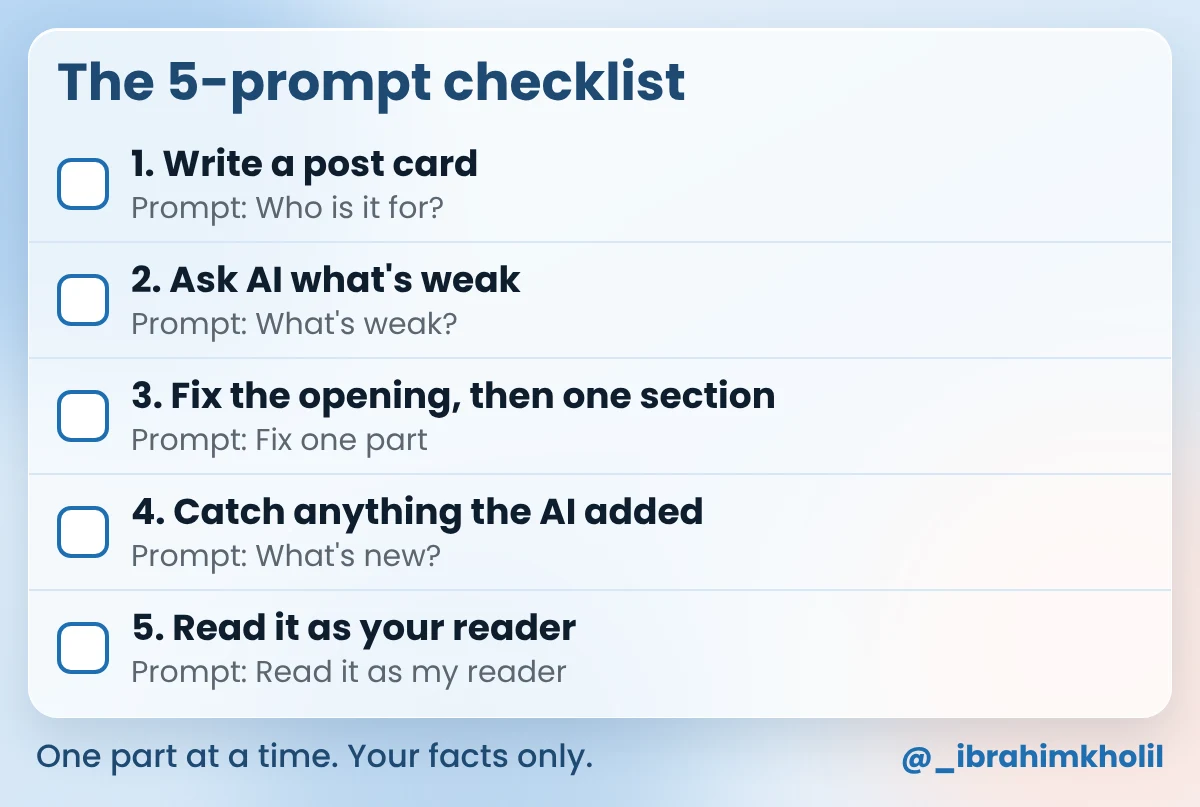
“Better” is too vague for a chat assistant. Give it five small jobs instead: say who the post is for, list what’s weak, rewrite the opening and one section from your own facts, point out anything it added, and read the result as your reader would. The AI does the checking and the drafting. Every fact still comes from you.
Tonight’s job is small on purpose: the opening and one section of one old post. The opening will answer your reader’s question, and the section will be rebuilt from facts only you know. Every prompt comes with an example reply, so you know what yours should look like. The rest of the post can wait for another evening.
In short
What you need
On this page
Search for the phrase and you’ll find it used for two different jobs. One is getting your content shown in AI search answers. The other is using AI to make the content itself clearer and more useful for the person reading it. This post is about the second job: one existing post, made better, with your facts kept intact.
Is that allowed? Google’s guidance about AI-generated content says appropriate use of AI or automation is not against its guidelines. What it counts as spam is using automation mainly to manipulate search rankings. Making one post easier for your reader to use is the opposite of that.
Google’s guide to helpful, people-first content also asks whether your content provides original information, reporting, research or analysis, and whether it has easily-verified factual errors. AI can’t give you the first, and it can add the second. That’s why every step below keeps your facts in charge.
The search side of an update (title, meta description, internal links, Search Console numbers) is covered in my guide on how to update old blog posts. This post stays inside the text.
“Make this better” asks the AI to guess what better means. It guesses polished, long and general, because that’s the safest guess for any post. Your post then sounds like everyone else’s, and it can pick up claims you’d never make.
Small jobs take the guessing away. Each prompt below asks for one thing, and the job before it gives it what it needs:
The post we’ll fix
The table holds a short post for new students at a small pottery studio, written two years ago. Its writer, Greta, is invented, and so is every line (Example). Each step below works on this exact text.
| Part | Greta’s old post (Example) |
|---|---|
| Title | What to Bring to Your First Pottery Class |
| Intro | Pottery is one of the oldest crafts in the world, and more people are trying it every year. In this post, we will talk about some things you might want to think about before your first class. There are many things to consider, so let’s get started. |
| What to wear | Clothes are important. You should wear something comfortable. Some people like aprons. Also think about your hands and your hair. |
| What to bring | Bring yourself and a good attitude! Everything else will be explained in class. |
| When to arrive | Try to come a little early so you have time to settle in. |
An AI can’t judge a post if it doesn’t know who it’s for. Neither can you, two years later. Greta’s post shows the problem: the title is about a first class, and the intro is about the history of pottery.
A post card fixes that. It’s a short note with four parts: the reader, their question, what they can do after reading, and your facts. You write it yourself. The prompt below only helps you see what the post says now.
Copy this prompt (Who is it for?):
Read my blog post below. Don't rewrite it.
Answer in 3 short lines:
1. Who does this post seem written for?
2. What one question does it seem to answer?
3. What can a reader do after reading it?
If you can't tell, say "Not clear" and why.

MY POST:
[PASTE YOUR POST]
What you should see: three short lines. If any line says “Not clear”, your post card matters even more. Example reply for Greta’s post:
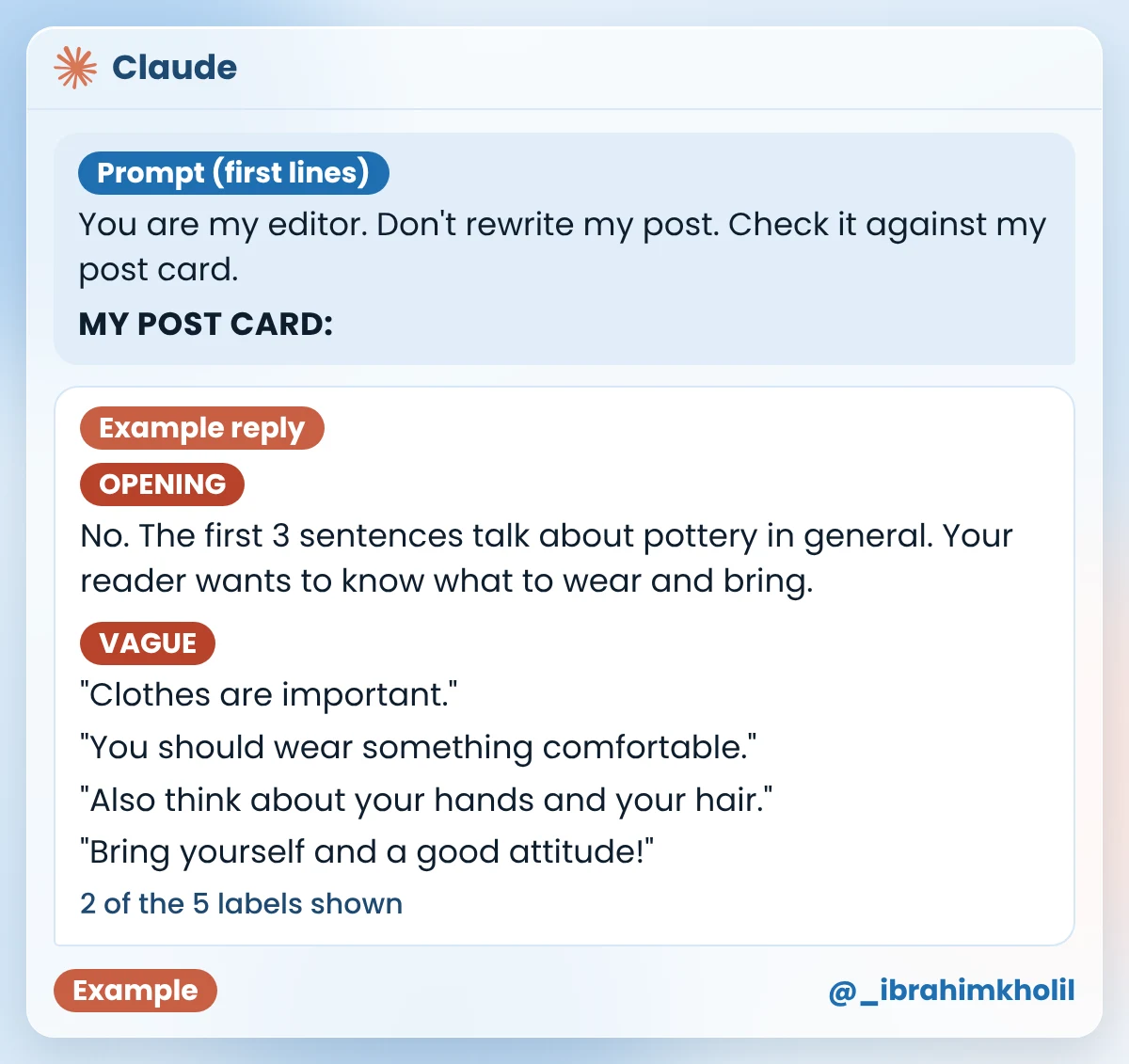
1. Not clear. The intro talks about pottery in general. The headings are for someone getting ready for a class.
2. Not clear. The headings point to “What should I wear and bring to my first class?”, but the intro never says it.
3. Not clear. The post doesn’t say exactly what to wear or bring.
Greta’s post card (Example), written by her and saved as “Post card”:
| Part | Greta’s answer (Example) |
|---|---|
| Reader | Someone who just booked their first beginner class at my studio. |
| Question | What should I wear and bring to my first pottery class? |
| After reading, they can | Arrive dressed right, on time, with nothing extra to buy. |
| My facts | Wear clothes you don’t mind getting dirty. Clay can stain light clothes. We give you an apron. Tie back long hair. Take off rings and bracelets. Short nails make shaping the clay easier. You don’t need to buy anything. Clay and tools are part of the class. Come 10 minutes before class to put on your apron. |
How to fill yours (my suggestion, not a rule): for “Reader”, pick the person who needs this post most, in one line. If you’re unsure, think of the customer who asks you this question. For “My facts”, write what you tell customers, what you do and what you’ve seen. If you’re not sure a fact is true, leave it out.
A list of problems is easy to check. A full rewrite isn’t: you’d have to compare every line with the old one to see what changed. So this prompt asks for labels and quotes only, measured against your post card.
Copy this prompt (What’s weak?):
You are my editor. Don't rewrite my post. Check it against my post card.

MY POST CARD:
[PASTE YOUR "Post card" NOTE]

MY POST:
[PASTE YOUR POST]

Give me a short list with these labels:
OPENING: Do the first 3 sentences answer the question on my post card? If not, say why.
VAGUE: Lines that don't tell the reader what to do. Quote each one.
CHECK: Facts or numbers in my post that need a source. Quote each one.
MISSING: What my reader needs that the post doesn't say. Use only my post card.
KEEP: Parts that already work. I'll leave them alone.
Keep it short. Don't invent facts.
What you should see: five labels, each with quotes from your post. The image shows the first part of the reply for Greta’s post. The table under it shows the rest.
| Label | Rest of the example reply |
|---|---|
| CHECK | “more people are trying it every year”: what is the source? “Pottery is one of the oldest crafts in the world”: does your reader need this here? |
| MISSING | Your post card says readers need nothing extra to buy. The post never says that. Your post card says to come 10 minutes before class. The post only says “a little early”. |
| KEEP | The three headings: “What to wear”, “What to bring”, “When to arrive”. They’re clear, and they’re in the order a reader needs them. |
Greta deleted both CHECK lines. She had no source for the first one, and neither line helps someone get ready for a class. She kept the three headings, as the reply suggested. You decide on every line. The list only tells you where to look.
Now the AI writes, but only one part at a time and only from your post card. A whole post in one go is too much to check. An opening or one section is a few lines you can read in a minute. You run this prompt twice tonight: first on your opening, then on one section.
Copy this prompt (Fix one part):
Rewrite one part of my blog post: my opening or one section.
Use only the facts in my post card and in the old text. Don't add new facts.

MY POST CARD:
[PASTE YOUR "Post card" NOTE]

OLD TEXT:
[PASTE YOUR OPENING OR ONE SECTION]

RULES
- If this is my opening, the first 2 sentences must answer the question on my post card.
- Put the most useful line first.
- Short sentences and plain words. Write the way I'd talk to a customer.
- Turn vague lines into clear actions.
- Use a short list if there are 3 or more actions.
- If you need a fact I didn't give, write [ASK ME: ...].
What you should see: a shorter text that starts with the most useful line. Example reply for Greta’s opening:
Booked your first pottery class? Here’s what to wear, what to bring and when to arrive. You don’t need to buy anything. Clay and tools are part of the class.
The first two sentences now answer the question on her post card. The pottery history and “let’s get started” are gone. The class facts come from her post card, and the three topics come from her old headings.
Example reply for her second run, on the “What to wear” section:
Wear comfortable clothes you don’t mind getting dirty. Clay can stain light clothes. We give you an apron.
– Tie back long hair.
– Take off rings and bracelets.
– Keep your nails short if you can. It makes shaping the clay easier.
– Wear closed-toe shoes.
It used the five clothing facts from her post card and kept “comfortable” from the old section. It left out the facts about buying and arriving, because those belong to other sections. It reads well. But one line in it came from nowhere: Greta’s post card never mentions shoes. You could miss that on a quick read, and that’s what Step 4 is for.
Good to know
Want the new lines to sound even more like you? My guide on how to edit AI content has an editing prompt for exactly that. For typos and grammar after the rewrite, see these AI proofreading tools.
“I told it to use only my facts. Isn’t that enough?” Not always. A chat assistant can add a line that sounds right even when your prompt says not to. Greta’s shoe line is a good example. Reading for it with tired eyes is hard. A side-by-side check is easy.
Copy this prompt (What’s new?):
Compare my new text with my old text and my post card. Don't rewrite anything.

MY POST CARD:
[PASTE YOUR "Post card" NOTE]

OLD TEXT:
[PASTE THE OLD TEXT]

NEW TEXT:
[PASTE THE NEW TEXT]

List every sentence and list item in the new text. After each one, write:
FROM CARD, FROM OLD (or both), or NEW if it says something neither one says.
Under each NEW line, ask me one short question.
What you should see: every line of the new text with a label, and a question under each NEW line. Example reply for Greta’s “What to wear” section, and her fix:
| Line in the new section | Example reply |
|---|---|
| Wear comfortable clothes you don’t mind getting dirty. | FROM CARD and FROM OLD |
| Clay can stain light clothes. | FROM CARD |
| We give you an apron. | FROM CARD |
| Tie back long hair. | FROM CARD |
| Take off rings and bracelets. | FROM CARD |
| Keep your nails short if you can. It makes shaping the clay easier. | FROM CARD |
| Wear closed-toe shoes. | NEW. Is this a rule at your studio? If not, delete it. |
Greta’s fix (Example): it isn’t a rule at her studio, so she deleted the line. Closed-toe shoes might be fine advice somewhere else. But this post speaks for her studio, and she never said it.
Her opening went through the same check. The reply marked “Booked your first pottery class?” and both class sentences FROM CARD, and “Here’s what to wear, what to bring and when to arrive.” FROM OLD (her headings). No NEW lines, so she kept it as it was.
Watch out
After four steps, you know the post too well to read it fresh. You fill gaps in your head that a new reader can’t. So the last prompt asks the AI to read it as the person on your post card and say what they’d still wonder about.
Copy this prompt (Read it as my reader):
Read this blog post as the reader on my post card. Don't rewrite it.

MY POST CARD:
[PASTE YOUR "Post card" NOTE]

MY POST:
[PASTE THE NEW POST]

Answer as that reader:
1. Can you do what my post card promises? Say yes or no, and why.
2. Which line would you skip?
3. What question do you still have?
Greta pasted her new opening (Step 3), her “What to wear” section after the Step 4 fix, and her old “What to bring” and “When to arrive” sections, still as they were in the table at the top (Example).
What you should see: three short answers, written as your reader. Example reply:
1. Mostly. I know what to wear and that I don’t need to buy anything. But “a little early” doesn’t tell me when to come.
2. I’d skip “Bring yourself and a good attitude!” It doesn’t tell me anything to do.
3. Will clay get on my sleeves? The post doesn’t say what kind of top to wear.
Greta’s fixes (Example): for the sleeves question, she added a fact she knows from her own classes to “What to wear”: “Short sleeves, or sleeves you can push up, are easiest.” That line came from her, not from the AI, so it’s safe to add. Then she updated the post. Answers 1 and 2 point at the two sections she hasn’t fixed yet, so they go on her list for another evening, with Steps 3 and 4.
Here’s her “What to wear” section before Step 1 and after Step 5:
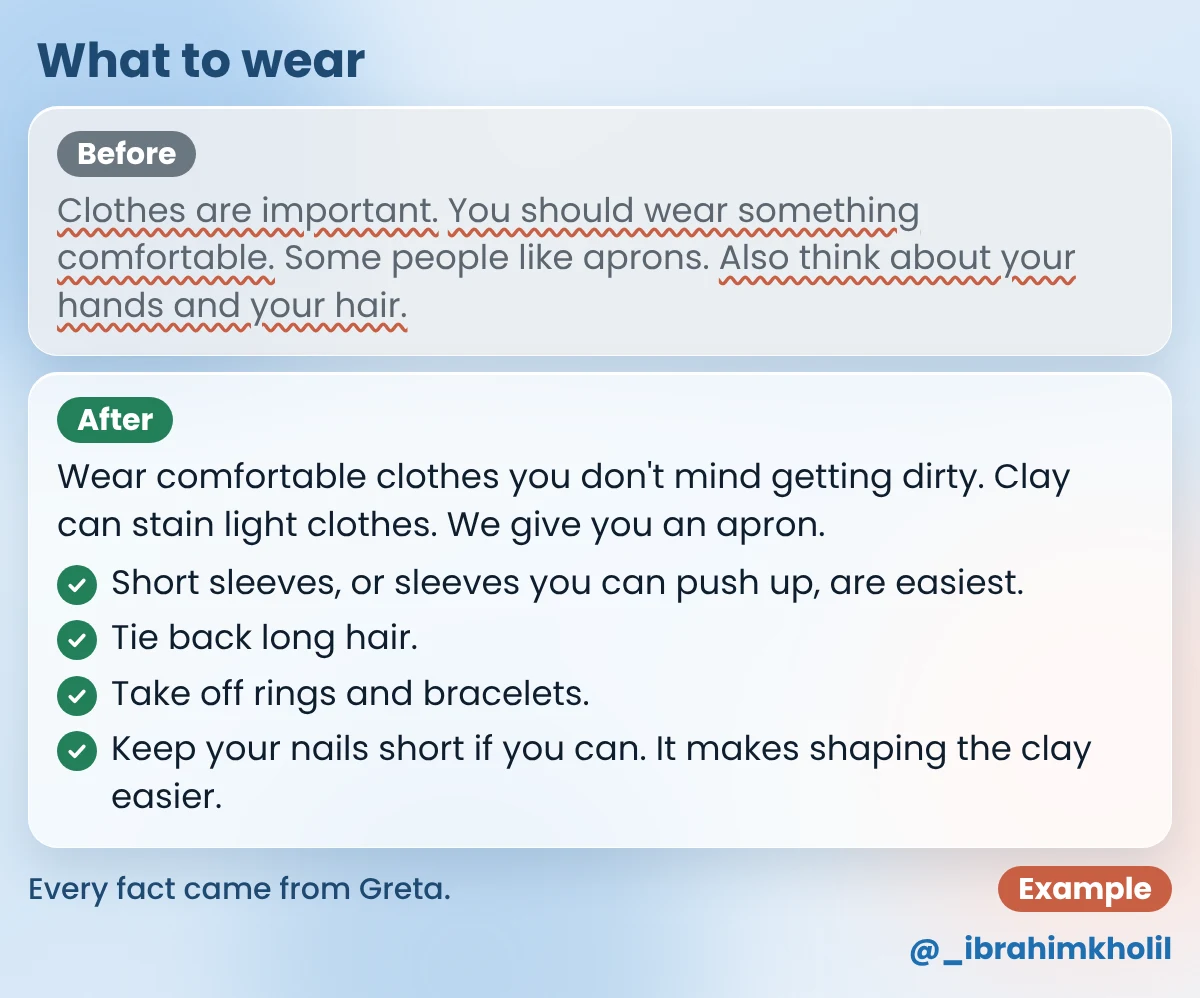
Notice what changed and what didn’t. The headings and the URL stayed. The vague lines became actions. Every fact in the new version is one Greta gave, and the one line the AI made up never reached her readers.
Search for AI content optimization tools and most of the results come from SEO software companies. SEO software companies sell paid content optimization tools. This post doesn’t review them.
For the job in this post, you don’t need one. The five steps only need a chat assistant that can read your text and follow a prompt. The hard parts, your facts and your decisions, no software can do for you.
A simple rule (my suggestion): start with the five prompts on three posts. If you then want more than a chat assistant gives you, look at paid software. Each tool’s own page shows what it does and its current plans; check there before you pay. For more search jobs you can do with a chat assistant, see how to use AI for SEO.
Don’t start with your most important post. Pick one that’s useful but a bit tired, like Greta’s. Tonight: write the post card, run Step 2, fix and check the opening and one section (Steps 3 and 4), test the post with Step 5, and update it. The other sections can wait for another evening, one at a time.
Keep your “Post card” note. The next time you update this post, half the work is already done.
The phrase is used for two jobs: getting content shown in AI search answers, and using AI to make content clearer and more useful for readers. This post covers the second. You use a chat assistant to check one post against its reader, rewrite weak sections from your own facts, and catch anything the AI added.
For improving one post’s text, a chat assistant like Claude or ChatGPT and the five prompts above are enough. SEO software companies also sell paid content optimization tools. This post doesn’t rank them; check each tool’s own page for what it does and costs.
Not to start. The steps in this post need only a chat assistant. Try them on a few posts first. If you then want more than a chat assistant gives you, paid software may be worth a look.
Google’s guidance says appropriate use of AI is not against its guidelines. Using automation mainly to manipulate rankings is. Nobody can promise a ranking either way, but a post that’s clearer, correct and full of your own facts is what Google’s helpful-content guide asks for.
It’s safer to go one part at a time: the opening, then one section. A full rewrite is hard to check line by line, and an added claim can slip through. One part at a time keeps every change small enough to read.
If the reply skips parts or stops early, paste the post in parts. For Steps 1 and 2, paste the intro and the headings first. For Steps 3 and 4, you only ever paste one part anyway: your opening or one section.
Your old posts don’t need a new writer. They need a clear reader, your own facts, and someone to point at the weak lines. The five prompts give you all three.
The opening is the first thing every reader sees. Fix that part first, then one section, and let the rest of the post wait its turn.
My free AI Workflow Starter Kit has more copy-ready workflows like this one. And when the text is done, my guide on how to update old blog posts covers the title, the links and the numbers.

12+ years in digital marketing. I test every workflow on real work before I share it, free tools first.
More about me →Steps, a copy-paste prompt and the limits I found. Free, nothing to buy.
Get the Free Starter Kit →