Physical Address
304 North Cardinal St.
Dorchester Center, MA 02124
Physical Address
304 North Cardinal St.
Dorchester Center, MA 02124
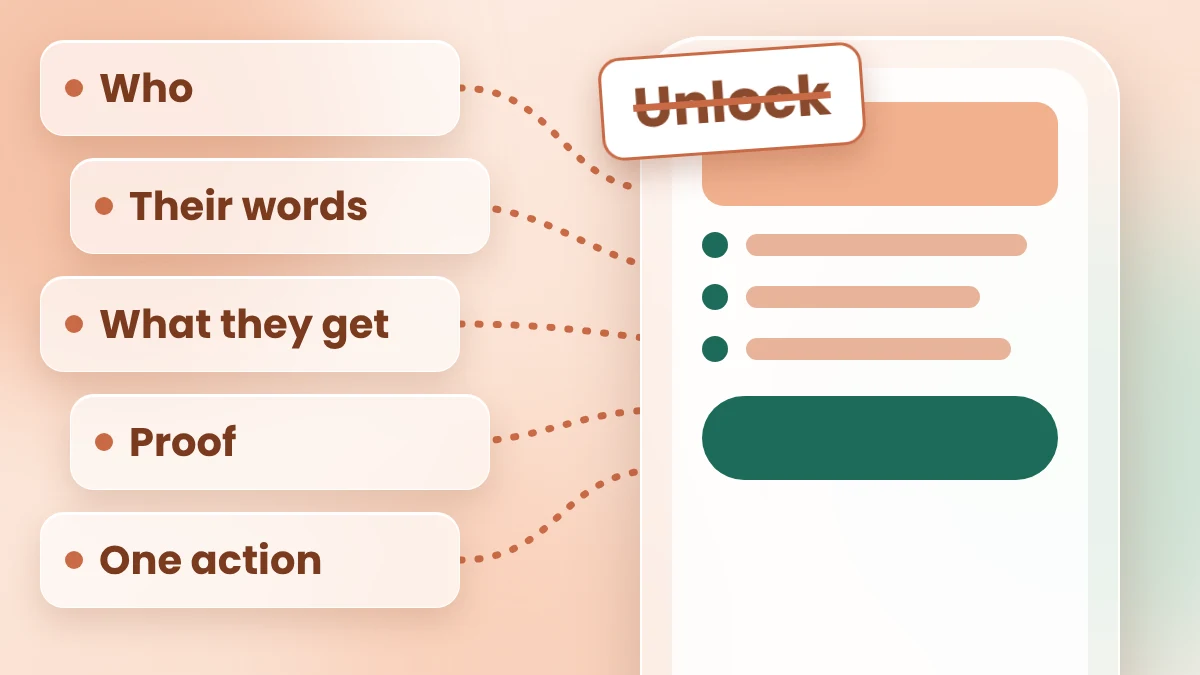
AI landing page copy sounds generic when the AI knows nothing about you. Give it 5 real inputs, run one prompt, then edit with the swap test.
Your free checklist is finished. Your email tool is set up. Now you need the page that gets people to sign up, and the box at the top that says “Headline” has been empty for an hour. So you paste your offer into an AI landing page copy generator, and it hands you something like “Unlock your potential today.”
That line isn’t wrong. It’s empty. It could sit on any page on the internet, because the AI knew nothing about your reader, your offer or your proof. So it filled the gaps with big, safe words. And when you try to fix it yourself, you’re back at the empty box.
A different tool won’t solve that. Better inputs will, plus a quick check at the end. Give the AI five real facts before it writes, ban the hype words, and then test every line with one question: could another business put this line on its page unchanged? I call that the swap test.
This guide takes you through 6 simple steps, from a blank page to page text you can test. Every AI step has a prompt to copy. The prompts are written for Claude, and they also work in ChatGPT. One made-up example runs through all six steps, so you can see what you should get. Plan on about an hour for your first page (my estimate, not a measured result).
In short
What you need
On this page
“I stare at the page and don’t know what goes where.” A blank page is hard because it has no shape. So before any AI, give it a shape.
A landing page is one page with one job: get the visitor to take one action, such as signing up for your free checklist. Every visitor arrives with a few quiet questions. Each of the 6 parts answers one of them.
| Part | The visitor’s question it answers |
|---|---|
| 1. Headline | Is this for me, and what do I get? |
| 2. Subhead | How does it help me? |
| 3. Who it’s for | Do they understand my situation? |
| 4. Benefits (3) | What changes for me? |
| 5. Proof | Why should I believe this? |
| 6. One button | What do I do now? |
Keep it to one button with one action. Two different buttons make the visitor choose, and that’s one more reason to leave (my view, not a measured rule).
Meet the example
Example: Priya (a made-up freelance bookkeeper) wants to collect emails. Her free offer is a 1-page checklist of the receipts freelancers should save each month. We’ll build her page through all six steps.
Generic copy starts with a generic ask. “Write a landing page for my checklist” gives the AI nothing, so it guesses. Five short inputs stop the guessing. Write them in a note first. It takes a few minutes, and it’s the part no AI can do for you.
No customer line yet? Ask one person who fits your offer: “What’s the most annoying part of [the problem]?” Write down their answer word for word. For a full method, my post on ChatGPT for marketing copy shows how to turn raw feedback into a customer-words file.
Example inputs for Priya:
| Input | Priya’s answer (Example) |
|---|---|
| 1. Who it’s for | Freelancers who do their own bookkeeping |
| 2. Their problem, in their words | “Every April I’m digging through my email for receipts.” (a made-up line; use a real one from your customers) |
| 3. What they get | A free 1-page checklist of the receipts to save each month (PDF) |
| 4. Proof I really have | NONE YET (the checklist is new) |
| 5. The one action | Enter your email to get the checklist |
Search for an AI landing page copy generator, and you’ll find a long list of tools. You don’t need to compare them all. The draft depends far more on your five inputs than on the tool.
This guide uses a normal chat assistant, because you can see and change every word of the prompt. A chat assistant (Claude or ChatGPT) is an AI you type to in plain words, like a message.
How to pick one today:
Plans and limits change, so check each tool’s own pricing page before you sign up for anything.
Ask AI for “landing page copy” with no rules, and you get hype words and promises you never made. This prompt closes those gaps. It hands over your five inputs, asks for the 6 parts in order, bans the usual hype words and tells the AI not to invent proof.
Copy this prompt (Landing page):
Write the text for a landing page. Use only the facts I give you below.

ABOUT MY OFFER
1. Who it is for: [WHO, e.g. freelancers who do their own bookkeeping]
2. Their problem, in their own words: [PASTE A REAL LINE FROM A CUSTOMER]
3. What they get: [WHAT IS INSIDE, THE FORMAT, THE PRICE OR "FREE"]
4. Proof I really have: [REAL REVIEWS, NUMBERS OR RESULTS, OR "NONE YET"]
5. The one action: [e.g. enter your email to get the checklist]

WRITE THESE 6 PARTS
1. Headline: 3 options, each under 12 words. Say who it is for and what they get.
2. Subhead: one sentence that says how it helps.
3. Who it is for: 3 short lines that start with "You".
4. Benefits: 3 bullet points. One benefit per bullet, tied to their problem.
5. Proof: use only the proof I gave. If I wrote "NONE YET", write [ADD PROOF] and suggest what real proof I could collect.
6. Button: 2 options, 2 to 5 words each, that say what happens on click.

RULES
- Plain words a 12-year-old understands. Short sentences.
- Don't use these words: unlock, unleash, transform, revolutionary, game-changer, seamless, supercharge, elevate, ultimate.
- Don't invent numbers, reviews, results or promises.
- If a fact you need is missing, ask me instead of guessing.
Short version (for a quick test): Write landing page copy for [OFFER] for [WHO]. Use only these facts: [FACTS]. Give 3 headlines, a subhead, 3 benefits and one button. No hype words. Don’t invent proof.
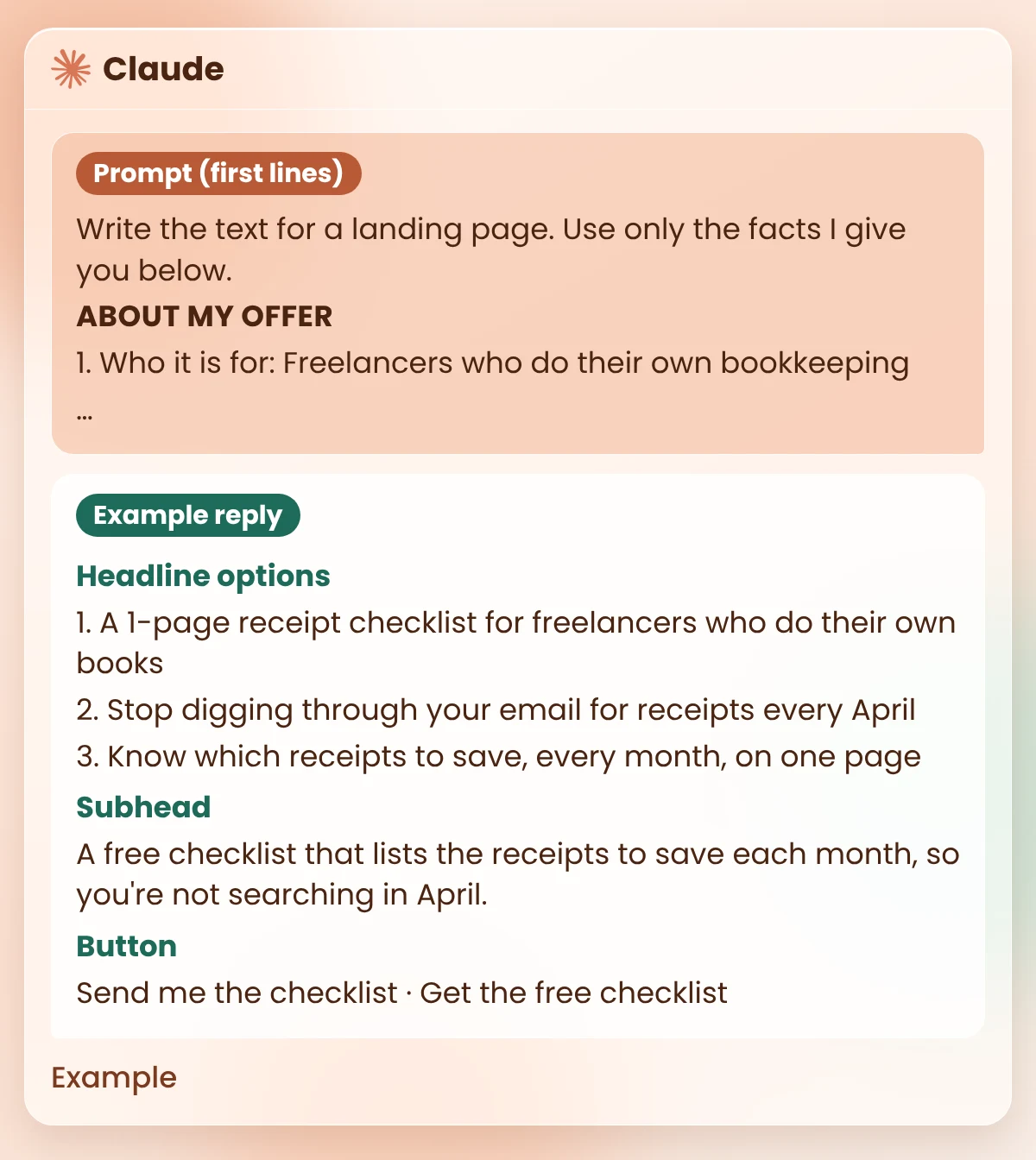
What you should see: the 6 parts in order, with 3 headline options and 2 button options. The image above shows the headline options, the subhead and the buttons from Priya’s example reply. Here are the other parts of that reply:
| Part | Example reply for Priya |
|---|---|
| Who it is for | You work for yourself. You do your own books. You dread finding receipts in April. |
| Benefits | Know which receipts to save, every month. Spend April filing, not searching your inbox. It fits on one page, so it’s easy to keep using. |
| Proof | [ADD PROOF] Suggestion: once a few people have used the checklist, ask one of them for a short quote you may share. |
Notice the Proof row. Priya wrote NONE YET, so the AI left a gap instead of making up a review. That gap is the prompt doing its job. Copy the whole reply into a note; you’ll edit it in Step 5.
Watch out
AI can still slip in a promise you never made, like “in minutes” or “guaranteed”. Read every line against your five inputs. If a line says something your inputs don’t, cut it or change it. A made-up claim on your page is a broken promise to your reader.
Even with good inputs, a few lines will come back flat. They’re not wrong. They just don’t sound like anyone in particular.
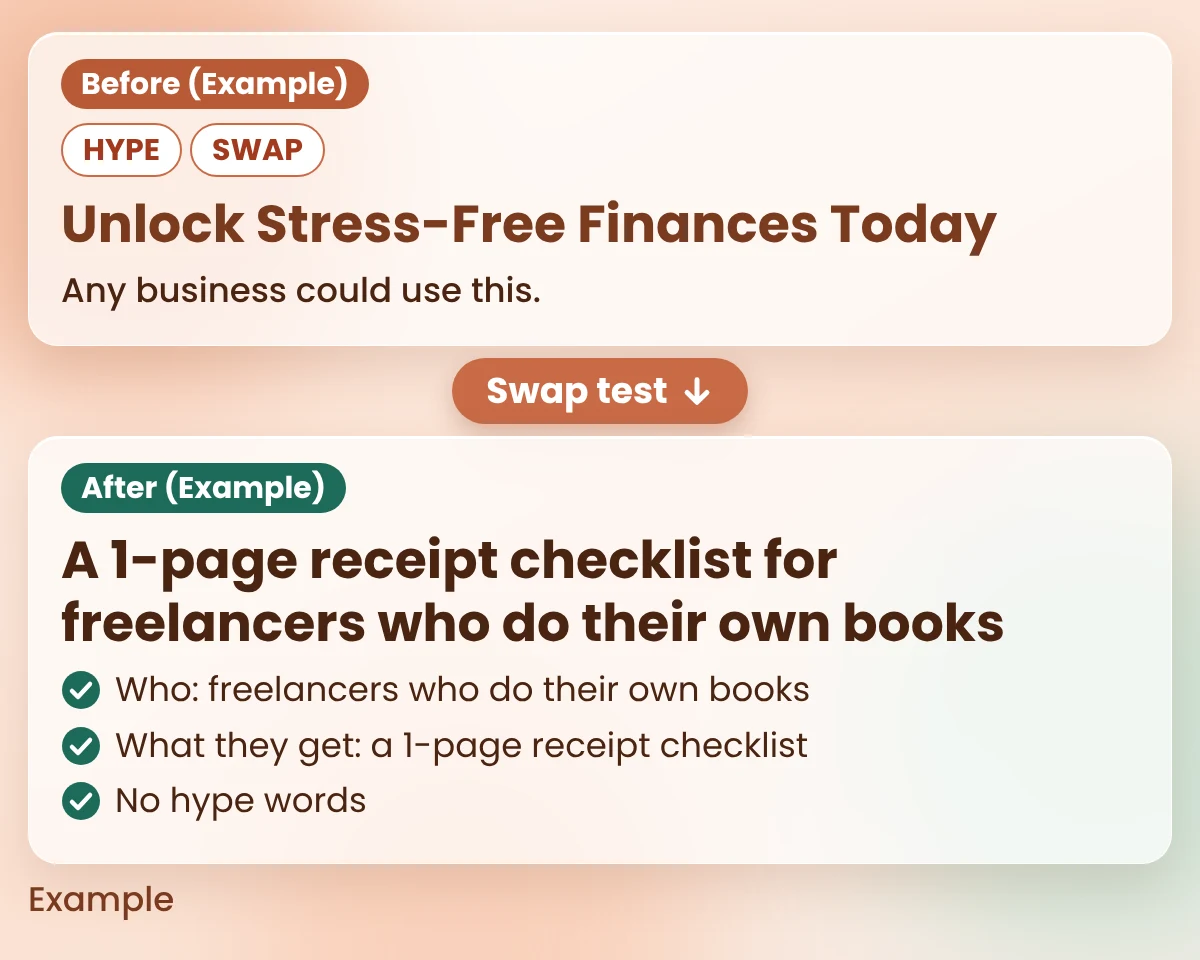
The swap test finds them fast. For each line, ask: could another business use this line unchanged? If yes, it needs a detail only you have: who it’s for, what’s inside, or the reader’s own words. Here is an example. Say Priya had written the headline “Unlock Stress-Free Finances Today” on a first try. The swap test marks it SWAP and HYPE, and asks: “Who exactly do you help, and what is the one thing they get?” She answers in her own words, and the line becomes the specific headline from her reply. The image below shows the before and after.
Copy this prompt (Swap test):
Read my landing page text below. Don't rewrite it.
Go through it line by line and mark:
- SWAP if any other business could use the line unchanged.
- PROVE if it makes a claim I haven't shown proof for.
- HYPE if it uses big, empty words.
For each marked line, ask me one question that would help me make it specific.

MY PAGE TEXT:
[PASTE YOUR PAGE TEXT]
What you should see: a short list of your lines, each marked SWAP, PROVE or HYPE, with one question under each. Lines with no mark passed. Example: for Priya’s first headline you would see “SWAP, HYPE: Unlock Stress-Free Finances Today. Question: who exactly do you help, and what is the one thing they get?” The questions pull out details only you know, and those details are what make the page sound like you.
Good to know
After the fixes, read the page out loud once. Any line you wouldn’t say to a customer face to face, rewrite in the words you would use. For more ways to make AI text sound like a person, see how to edit AI content so it sounds human. Then run a final proofread with one of these AI proofreading tools.
“How do I know which headline is better?” You don’t, until real visitors choose. So don’t guess. Test.
A variant is just a second version of the same page with one thing changed. Change only the headline, so you know what caused any difference. The AI already gave you three headline options, so your second version is ready.
Example: Priya tests headline option 1 against option 2, two weeks each, and writes down visitors and sign-ups for both. We don’t show her results, because she’s made up.
The honest limit
Running A and B one after the other isn’t a perfect test. Other things change between the two weeks: a holiday, a new post, a busy news day. If the difference is small, treat it as a tie and keep the headline you like more. If your page builder can show both versions at the same time (often called a split test or A/B test), use that instead.
You don’t need the whole page today. Start with the part that makes everything else work.
Then compare that headline with the one on your page now. If the new one says more clearly who it’s for and what they get, you’ve already made your page better.
I haven’t seen a fair test that proves one tool is best, so I won’t name a winner. In my view, the inputs matter more than the tool. Paste the same five inputs into two tools, such as Claude and ChatGPT, and keep the draft that needs fewer fixes.
Yes, it can write a first draft. The prompt in Step 4 is plain text, so it works in ChatGPT as well as Claude. Check every claim against your own facts, and edit with the swap test before you publish.
Who it’s for, the problem it solves, what the visitor gets, proof you really have and one clear action. In practice, that’s six parts: headline, subhead, who it’s for, benefits, proof and one button. The table in Step 1 shows the question each part answers.
You can use the free plan of a chat assistant with the prompt in this post. Claude has a free plan, and claude.com/pricing shows what it includes today. For any other tool, check its own pricing page for current limits before you sign up.
Long enough to answer the visitor’s questions about your offer, and no longer. For a free sign-up, the six parts are often enough (my view). A paid offer usually raises more questions, so it may need more proof and more detail.
Write NONE YET in your inputs, and the prompt will leave a gap instead of inventing a review. Launch without proof, then ask your first few users for a short quote you may share. Never make one up.
A good landing page doesn’t need clever words. It needs to say who it’s for, what they get and what to do next, in words your reader would use.
An AI landing page copy generator can write that draft for you, but only if you hand it real facts. So start with your five inputs. The rest of the page gets much easier once those are written.
Want more copy-ready AI workflows like this one? Grab my free AI Workflow Starter Kit. For more guides on AI for marketing and sales, browse the blog.

12+ years in digital marketing. I test every workflow on real work before I share it, free tools first.
More about me →Steps, a copy-paste prompt and the limits I found. Free, nothing to buy.
Get the Free Starter Kit →