Physical Address
304 North Cardinal St.
Dorchester Center, MA 02124
Physical Address
304 North Cardinal St.
Dorchester Center, MA 02124
AI drafts save time but sound like everyone else. Here's how to edit AI content in 7 easy fixes, with a copy-paste editor prompt and a before/after example.
AI can hand you a full first draft in moments. That part is easy. The hard part is knowing how to edit AI content so it sounds like a real person wrote it.
But there’s a problem.
The draft looks fine. The grammar is clean. And yet it reads like a hotel welcome card: polite, smooth and empty. Readers feel it in the first two lines, and they leave.
If this sounds like your drafts, you’re not alone. Most AI text sounds the same for one simple reason: nobody gave the AI anything real to say.
But there’s a fix. You don’t need a fancy tool for it. You need a short edit pass that you do every single time.
In this post, I’ll share the 7-Fix Edit Pass: seven easy fixes that make AI writing sound human. You’ll also get a copy-paste editor prompt and a before/after example you can use on your next draft.
In short
On this page
“My readers can tell it’s AI. Honestly, so can I.”
That feeling is useful. It means your ear already works. You just need names for what you’re hearing, so you can fix it on purpose.
Think of an AI draft like a stock photo. Nothing is wrong with it. It’s sharp and well lit. But it could sit on any website, so nobody remembers it. Robotic writing basically means text that could belong to anyone.
Here are the five signs to look for:
| Sign | What it looks like (example) | Quick fix |
|---|---|---|
| 1. Generic opener | “In today’s fast-paced digital world…” | Start with the reader’s problem. |
| 2. Filler phrases | “It’s important to note that…” | Delete them. The sentence still works. |
| 3. Same sentence length | Every sentence is long and smooth, so nothing stands out. | Mix short and long sentences. |
| 4. No specifics | “Many businesses see great results.” | Add a real name, number, place or example, or cut the line. |
| 5. No opinion | “There are pros and cons to both.” | Say what you would do, and why. |
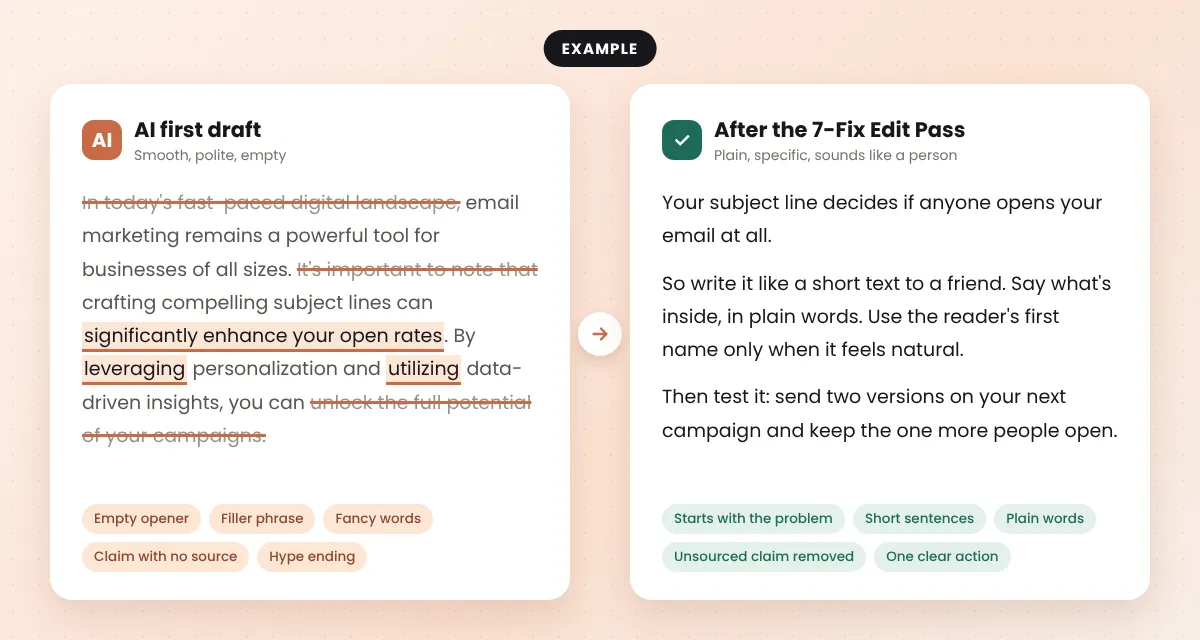
Look at the left side of that example. Every sentence is “correct”. But you can delete half of it and lose nothing. That’s the clearest sign of all.
“I can see it’s bad. I just don’t know where to start editing.”
Start at the top and go in order. Each fix is small. Together, they change how the whole post sounds.
AI loves to clear its throat. The first one or two sentences often say nothing, like “In today’s digital world, content matters more than ever.”
Delete them. Then start with the reader’s problem, in their words. While you’re there, cut filler phrases like “It’s important to note that”, “In conclusion” and “When it comes to”.
The test: if you delete a sentence and nothing is lost, leave it deleted.
This is the fix that matters most. AI can’t know what happened in your business last week. You can.
Add one real detail per section: a customer question you got, a mistake you made, a tool you actually use, a number from your own dashboard. Small is fine. True is the rule.
Google’s guide to helpful, people-first content asks whether your content provides original information, reporting, research or analysis. Your own details are exactly that.
AI sentences tend to be long, smooth and all the same size. That rhythm is what makes text feel like a machine read it out.
Find any sentence with “and”, “which” or “by” in the middle. Split it in two. Then let one very short sentence sit on its own now and then.
Like this.
Nobody says “leverage” to a friend. Use the word you’d say out loud:
Also delete hype words like “game-changer”, “seamless” and “revolutionary”. They promise a lot and prove nothing.
AI tries hard to be balanced. “Both options have their benefits” is safe, but it doesn’t help anyone decide.
So add one line per section that starts with “I’d…” or “My advice…”. For example: “If you only have one hour a week, I’d skip the paid tool and use a free chatbot.” Readers trust a clear, honest opinion more than a list of maybes.
AI can sound sure about things that aren’t true. A made-up statistic or a wrong product feature will hurt your trust faster than any robotic sentence.
Highlight every number, quote, study, price and product name. For each one, find the official source and link it. If you can’t find a source, delete the claim.
Google’s helpful content self-assessment asks whether your content has easily-verified factual errors. Don’t give readers that reason to leave.
Your ears catch what your eyes skip. Read the post out loud, slowly. Anywhere you run out of breath, the sentence is too long. Anywhere you feel silly saying a word, change it.
If you’d never say a line to a friend over coffee, rewrite it until you would. This also catches typos. Google’s same self-assessment asks about spelling and stylistic issues, so it’s worth the five minutes.
Good to know
Editing starts before the draft. The better your input, the less you have to fix. In how to write a blog post with AI that still sounds like you, I show how to let AI interview you first. And an AI content brief keeps the draft on track from the start.
“I did all the edits, and it still doesn’t sound like me.”
That happens when AI has never heard how you talk. So give it a sample. Not a polished one. A real one.
I call this the Voice Note Trick. It works because most people talk more naturally than they write.
Below is a transcript of me talking about my topic. Study how I speak: my sentence length, the words I repeat, how I explain things.
Then edit my draft so it sounds like the transcript.
Rules:
- Keep my meaning and my facts. Don't add new facts, numbers or stories.
- Use my own phrases from the transcript where they fit.
- Keep sentences short and plain.
- Show me the edited version, then list the 5 biggest changes you made.

My transcript:
[paste your voice note text]

My draft:
[paste your draft]
The list of changes matters. It lets you say yes or no to each one, so the final voice stays yours.
“Can’t AI just do the first edit pass for me?”
It can. But there’s a catch. If you ask AI to “make this sound more human”, it rewrites everything, and you get a new robotic draft in a different costume.
So flip it. Ask AI to point at the problems instead of fixing them. Then you fix them yourself, in your own words. Paste this into ChatGPT, Gemini or Claude:
You are my editor, not my ghostwriter. Don't rewrite my draft.
List the problems instead, each with the exact sentence and a short fix:
1. Empty openers and filler phrases
2. Sentences longer than 25 words
3. Fancy words, with a plain swap
4. Claims, numbers or names that need a source: mark CHECK
5. Spots that need my own example or opinion: mark ADD YOURS
Keep my meaning. Don't add new facts.

My draft:
[paste your draft]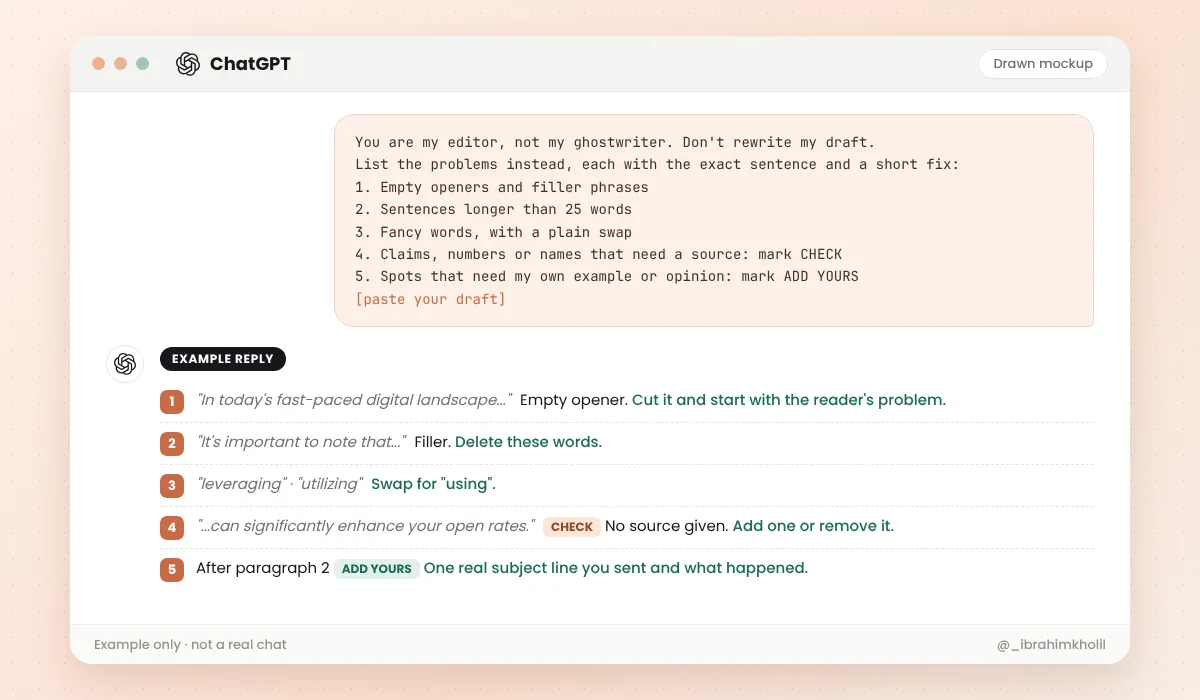
Now you might be thinking, “Isn’t that slower?” A little. But the “ADD YOURS” marks show you exactly where the post needs you, and the “CHECK” marks stop a wrong fact from going live.
“Every time I ask AI to improve my writing, it turns it into something bland.”
Yes, you can use AI to edit. The trick is to give it checks, not rewrites. A good editor asks questions and points at weak spots. A ghostwriter replaces your words. You want the editor.
| Let AI do this | Keep this for yourself |
|---|---|
| Spot grammar and spelling mistakes | Your stories and examples |
| Flag long or unclear sentences | Your opinion and advice |
| Find missing steps (“what would a beginner ask here?”) | The final wording |
| Mark claims that need a source | Finding and checking the source |
And is it OK to use AI this way at all? Google’s guidance about AI-generated content says appropriate use of AI or automation is not against its guidelines. What breaks the rules is using automation mainly to manipulate search rankings. Editing a post so it helps readers more is the opposite of that.
“Should I just paste my draft into a humanizer tool and be done?”
I get the appeal. One click, done. But think about what a humanizer does: it takes AI text and rewrites it again with more AI. It swaps words and shuffles sentences. It can’t add the one thing that makes writing human, which is something true that only you know.
Many of these tools are sold as a way to get past AI detectors. I can’t verify those claims, so I won’t repeat them. And chasing a “human score” is the wrong goal anyway. Your reader is the test, not a detector.
Watch out
My advice: skip the humanizer and spend those ten minutes on Fix 2 and Fix 6. A true detail and a checked fact do more for your post than any rewrite tool. If you want to know which AI tools are worth your time, see my list of AI tools for bloggers.
Reading about editing is easy. Doing it once is where it clicks.
Your 15-minute test
Keep the before and after side by side. Next time you edit, you’ll spot the same problems in seconds.
Once your post sounds like you, you can reuse it. Here’s how to turn a blog post into social media posts without starting over.
Cut the empty intro and filler, swap fancy words for plain ones and mix short and long sentences. Then add what AI can’t: a true detail from your own work and your honest opinion. Read it aloud before you publish.
Use the 7-Fix Edit Pass: cut the intro, add a true detail, break long sentences, swap fancy words, add your opinion, check every fact and read it aloud. Go in that order, top to bottom.
Yes, as a checker. Ask it to list problems such as filler, long sentences and claims that need a source, instead of rewriting the whole text. You make the final changes, so the voice stays yours.
Edit it by hand with the 7 fixes in this post. The two that matter most are adding one true detail per section and reading the text aloud. No humanizer tool can add your own experience.
Google says appropriate use of AI is not against its guidelines. Its focus is whether content is helpful and made for people. Using automation mainly to manipulate rankings is against its spam policies. Nobody can promise any page will rank.
An AI content editor, human or tool, checks an AI draft before it goes live. It looks at clarity, facts, voice and missing steps, then fixes or flags them. The goal is a post that helps the reader, not just a post that reads smoothly.
AI gives you a draft. Editing turns it into your post.
Cut what says nothing. Add what only you know. Check every fact. Then read it aloud and listen for your own voice. That’s how to edit AI content so a real person enjoys reading it.
You can do this. It’s easier than it looks.
Want simple, copy-paste AI workflows like this one? Grab my free AI Workflow Starter Kit. And for more guides, browse the blog.

12+ years in digital marketing. I test every workflow on real work before I share it, free tools first.
More about me →Steps, a copy-paste prompt and the limits I found. Free, nothing to buy.
Get the Free Starter Kit →