Physical Address
304 North Cardinal St.
Dorchester Center, MA 02124
Physical Address
304 North Cardinal St.
Dorchester Center, MA 02124
Old posts quietly go stale. Here's how to update old blog posts with AI in 7 simple steps, with a copy-paste gap-finder prompt and a safe way to refresh without losing rankings.
Most of us believe the same thing: to grow a blog, you have to publish new posts. So you keep writing, and the old posts sit there. But if you want steady traffic, learning how to update old blog posts can be a faster win than writing something new.
But there’s a problem.
Old posts go stale without any warning. A tool changes its name. A step stops working. A newer post on page one answers a question yours never did. Nothing breaks. Your post just slowly gets less useful, and fewer people find it.
If you have 30 or 50 old posts and no idea where to start, you’re not alone. Updating feels as slow as writing from scratch, and it’s scary to touch a post that already brings a few visitors.
But there’s a fix. AI is good at the boring comparison work, and you stay in charge of the facts and the final words.
In this post, I’ll share 7 simple steps to update old blog posts with AI without hurting your rankings. You’ll get a copy-paste gap-finder prompt, a simple way to choose between a refresh and a rewrite, and a safe checklist to follow.
In short
On this page
“I have 50 posts. Where do I even start?”
Don’t start with the oldest post. Start with the posts that already have a chance. A post that still gets some visits is much easier to lift than one nobody sees.
Open the Performance report in Google Search Console. It shows clicks and impressions for your pages in Google Search. Compare the last 3 months with the 3 months before. Google suggests the weekly or monthly view when you compare two date ranges.
Then look for these three kinds of posts:
Pick 3 posts. That’s your whole list for this month. Don’t try to fix everything at once.
“Should I fix this post, or burn it down and start over?”
Ask one question: does the post still answer what people are searching for? Type your main keyword into Google and look at the top results. If they answer the same question as your post, a refresh is enough. If they now answer a different question, you need a rewrite.
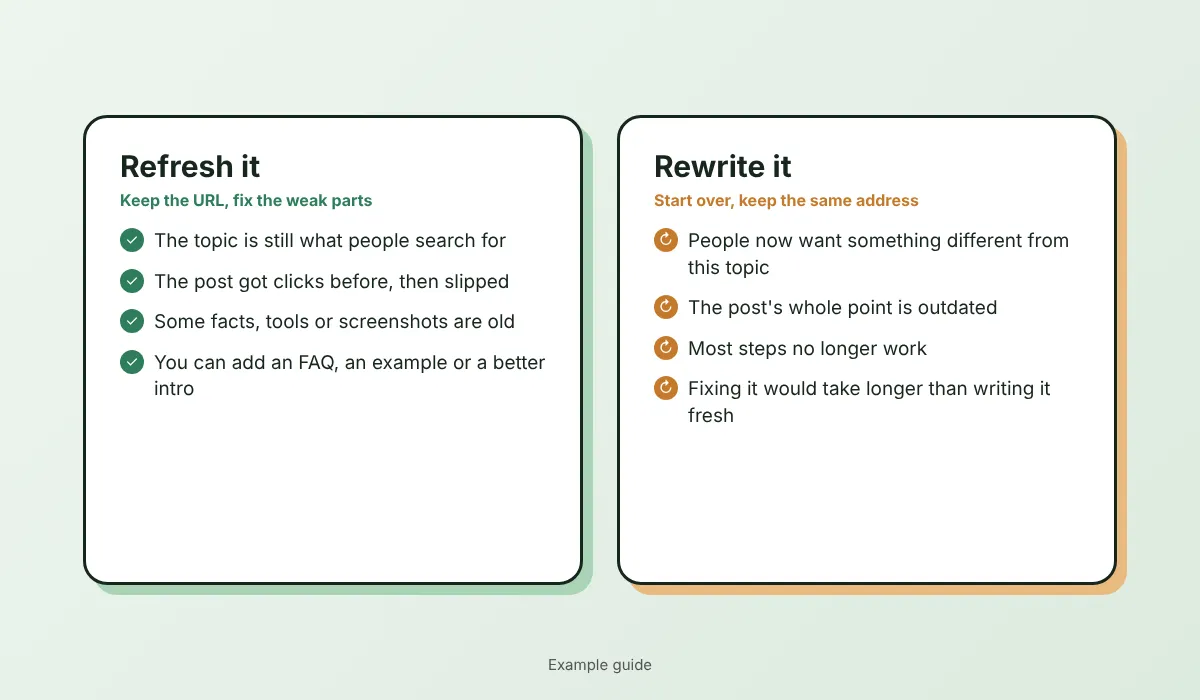
Either way, keep the same URL. A rewrite can be new inside, but the address stays. That way you keep the links and history the page already has.
“Updating takes me as long as writing a new post.”
It does when you do everything by hand. So split the work. AI compares and lists. You decide and add the true parts. I call this the 7-Step Refresh.
Copy the full text into a document and write down today’s clicks and impressions from Search Console. This is your “before”. If an update goes wrong, you can go back. WordPress also keeps revisions, but your own copy is the safest.
Search your main keyword in Google. Open the top 3 to 5 results and copy only their headings (the H2s) and the questions in “People also ask”. Don’t copy their text. You only want to know what readers expect to find.
Paste your post and the headings into ChatGPT, Gemini or Claude. Ask for a list, not a rewrite:
You are my content editor. Don't rewrite my post.
Below are (A) my old blog post and (B) the headings and questions from posts that now rank on page 1 for the same keyword.
Give me:
1. Topics or questions in B that my post doesn't answer
2. Sections in my post that may be out of date (tools, steps, prices, screenshots): mark CHECK
3. Places that need my own example or experience: mark ADD YOURS
4. Sections I should NOT touch because they are clear and useful
Keep it short. Don't invent facts, numbers or sources.

(A) My post:
[paste your post]

(B) Page-1 headings and questions:
[paste the headings]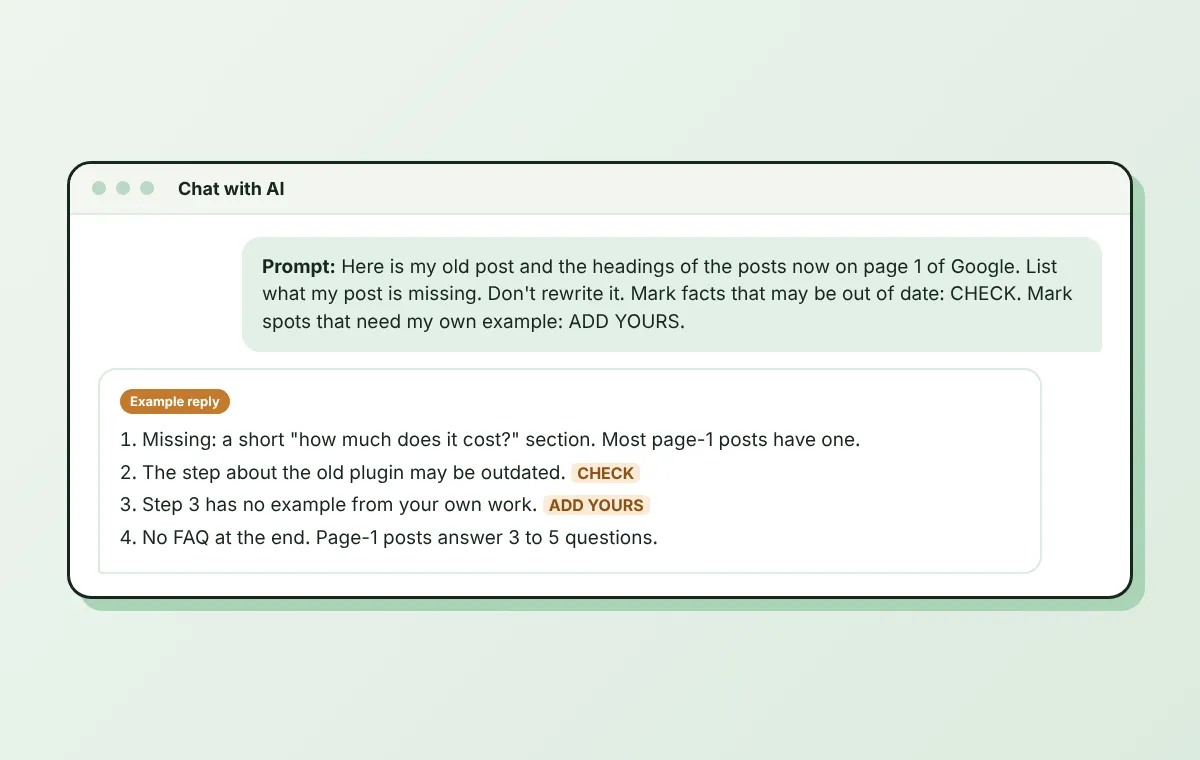
The fourth item is the safety net. It tells you what to leave alone, which is exactly what protects your rankings.
Work through the list. For each CHECK, open the official page of the tool or source and fix the fact. If you can’t confirm it, delete it. For each ADD YOURS, write one real detail from your own work: a question a customer asked, a mistake you made, a result you saw.
Need help with the wording? Use the editor prompt in how to edit AI content so it sounds human.
Old intros are often slow. Ask AI to give you 3 shorter versions that start with the reader’s problem and promise the answer. Pick one and edit it so it sounds like you. Make sure your main keyword is still in the first paragraph.
If the post has many impressions but few clicks, the title may be the problem. Ask AI for 5 title options that are true to the post, then choose one. Keep your main keyword in it. Do the same for the meta description: about 150 characters that promise what the reader gets. For more small SEO jobs like this, see how to use AI for SEO.
Link to the newer posts you’ve published since this one. Then add a short FAQ with the questions from Step 2 that your post didn’t answer. Write real answers in 2 to 4 sentences. My guide on the AI FAQ generator shows how to do this without made-up questions.
Good to know
A good content brief makes the next update easier. With an AI content brief, you already have the questions and sources saved for each post.
“What if I update it and my traffic drops?”
That fear is fair. Nobody can promise an update will raise your rankings. But you can lower the risk with a few simple habits:
Watch out
“Do I have to update everything every year?”
No. There is no magic number. Update a post when its facts change or its results drop. A simple way to plan it is by how fast the topic moves:
| Type of post | Check it |
|---|---|
| Tools, prices, AI features (change fast) | Every 3 months |
| Step-by-step guides | Every 6 months, or when a step stops working |
| Evergreen advice (ideas that rarely change) | Once a year, or when results drop |
This is my suggested schedule, not a rule from Google. The easiest habit is one old post per week. Put it in your calendar, like a small appointment.
“I updated it. Did it work?”
Remember the “before” numbers from Step 1. Write down the date of the update. Then wait. Search results don’t change overnight, so check again after a few weeks and compare the same date ranges in Search Console.
Look at clicks and impressions first. If they went up, note what you changed and do the same on your next post. If not, don’t panic. Check the post again for missing answers, and try a better title next.
Your 30-minute test
One small update done is better than a perfect plan for 50 posts.
Want to start your next post faster too? See how to write a blog post with AI that still sounds like you.
Pick posts that lost clicks, compare them with today’s page-one results, fix old facts, improve the title and meta description, add internal links and an FAQ, and keep the same URL. Check the results after a few weeks.
When facts change or results drop. Posts about tools and AI features may need a check every few months. Evergreen posts can wait a year. One old post per week is an easy habit.
Refresh if the post still answers what people search for. Rewrite if the top results now answer a different question. In both cases, keep the same URL.
A content refresh means improving an existing post: fixing old facts, filling gaps, updating the title and adding links, without starting from zero.
Usually no. The page may already have links and history. If you ever must change a URL, set up a redirect from the old one to the new one.
AI can find gaps and suggest improvements, but it can’t check facts or add your experience. Use it as an assistant, and review every change yourself.
You don’t need a bigger blog. You may just need better old posts.
Pick three posts that lost clicks. Let AI list the gaps. Add what’s true and what only you know. Keep the URL and check the numbers later. That’s how to update old blog posts without breaking what already works.
You can do this. It’s easier than it looks.
Want simple, copy-paste AI workflows like this one? Grab my free AI Workflow Starter Kit. And for more guides, browse the blog.

12+ years in digital marketing. I test every workflow on real work before I share it, free tools first.
More about me →Steps, a copy-paste prompt and the limits I found. Free, nothing to buy.
Get the Free Starter Kit →