Physical Address
304 North Cardinal St.
Dorchester Center, MA 02124
Physical Address
304 North Cardinal St.
Dorchester Center, MA 02124
Not sure what to use ChatGPT for in your business? Here are 10 everyday uses with copy-paste prompts for replies, posts, invoices and checklists, plus a simple privacy habit.
A lot of people think AI is for big companies with tech teams. But ChatGPT for small business owners can be surprisingly useful, because small teams feel every lost hour the most.
But there’s a problem.
You open ChatGPT, look at the empty box and think, “Okay… now what?” You ask it something vague, get a vague answer, and close the tab. Then you go back to answering the same customer message for the fifth time today.
If this sounds like you, you’re not alone. Most owners don’t need “AI strategy”. They need help with the small, boring jobs that eat the day.
So that’s what this post is about. I’ve worked in digital marketing and online business for more than 12 years. In this post, I’ll share 10 practical, everyday uses of ChatGPT, each with a copy-paste prompt. You’ll also get a simple privacy checklist, so you know what never to paste in.
In short
On this page
“I keep hearing about it. I just don’t know what to actually use it for.”
Think of ChatGPT like a fast new assistant on their first day. They write quickly and never get tired. But they don’t know your prices, your customers or your rules unless you tell them. And sometimes they sound very sure about things that are wrong.
So the trick basically means this: give it the facts, let it do the writing, and you do the checking.
| Good at | Not good at |
|---|---|
| First drafts of emails, posts and descriptions | Facts, prices or laws without a source you checked |
| Summaries of long text you paste in | Legal, tax or medical advice for your case |
| Templates, checklists and step lists | Knowing your business details you didn’t give it |
| Ideas when you’re stuck | Keeping private data private if you paste it in |
Every use below follows the same simple loop. I call it the Brief, Draft, Check loop:
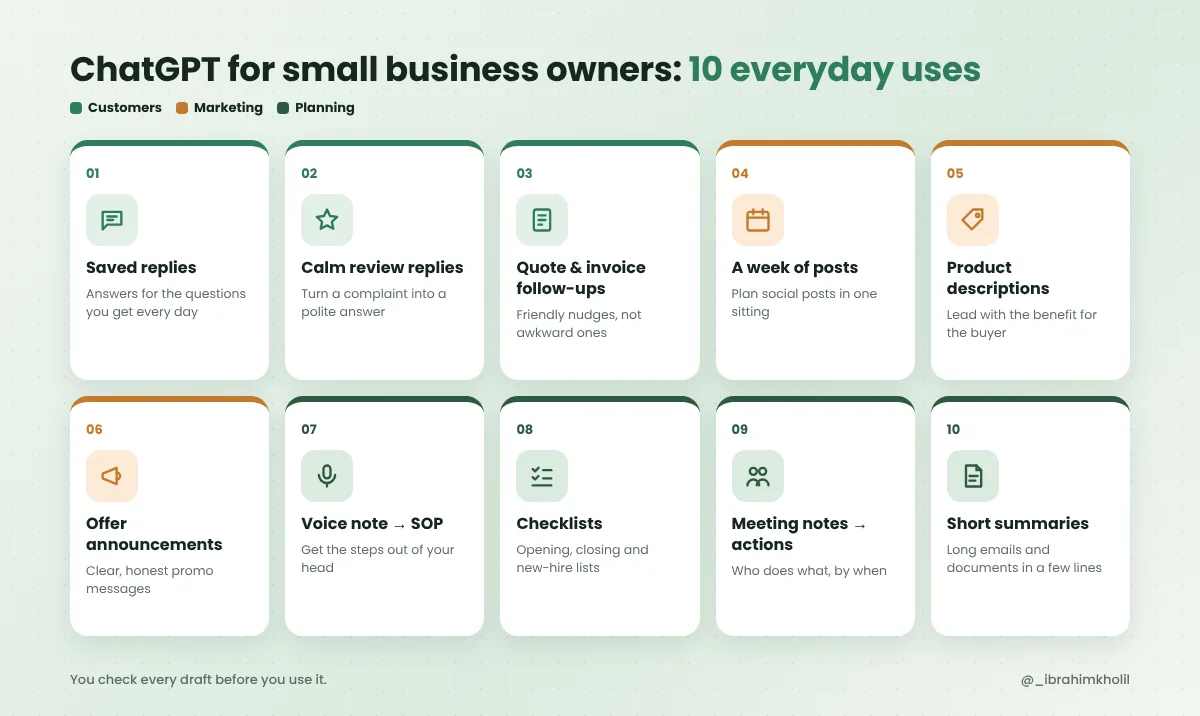
“I spend hours answering the same messages.”
This is where most owners feel the quickest relief. The questions repeat, so the answers can be written once and reused.
Open your inbox or DMs and copy the five questions you answer most. Delivery, opening hours, custom orders, refunds, “is this in stock?”. Then let ChatGPT write a short reply for each one.
You help me reply to customers for my small business.
My business: [what you sell, and where]
My tone: [for example: friendly, short, no emojis]
Here are the questions customers ask me most:
[paste 5 real questions]
For each question, write a saved reply under 60 words.
Use only the facts I give you. If a reply needs a detail I didn't give (price, time, policy), write [ADD DETAIL] instead of guessing.
The [ADD DETAIL] rule is the important part. It stops ChatGPT from making up a delivery fee or a refund policy you never had.
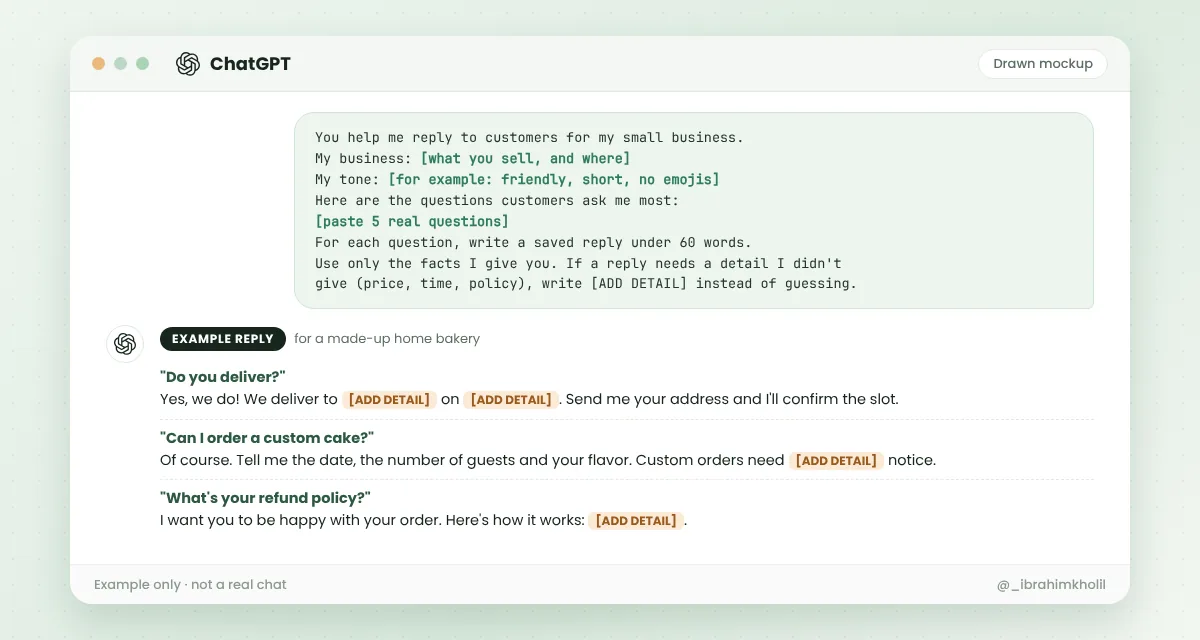
Fill in the gaps, then save the replies where you’ll actually use them: your email templates, your phone’s text shortcuts or the quick replies in your business messaging app. If the same questions keep coming from your website, you can also turn them into a page with an AI FAQ generator.
A bad review stings. And the first reply you want to write is usually not the one you should post. ChatGPT is useful here because it isn’t upset.
A customer left this complaint. I've replaced personal details with [CUSTOMER] and [ORDER].
[paste the complaint]
What really happened, from my side: [2-3 honest lines]
Write a calm, public reply under 80 words that:
- thanks them and says sorry for their experience, without blaming them
- explains briefly what happened, using only my facts
- offers one clear next step: [refund / replacement / call me at the shop]
Don't promise anything I didn't mention.
Read it once out loud before you post. If it sounds like a robot, change two or three words so it sounds like you. My guide on how to edit AI content so it sounds human shows how.
You sent a quote and heard nothing. Or an invoice is late, and you hate chasing it. Asking for money feels awkward, so the email gets pushed to “tomorrow”.
Write 3 short follow-up emails for a [quote / unpaid invoice].
Situation: [what it was for, when you sent it, the due date]
Email 1: a friendly check-in (send after a few days).
Email 2: a clear reminder with the amount and how to pay: [ADD DETAIL].
Email 3: firm but polite, with a final date.
Keep each under 90 words. Sound like a real person, not a debt collector.
Save all three as templates. Next time, you just change the name and the dates.
“Marketing always gets pushed to the end of the week.”
Then Friday comes, and nothing gets posted. The fix isn’t more motivation. It’s making the first draft so quick that you actually do it.
Give ChatGPT what’s really going on in your business this week. New stock, a busy day, a customer question, a behind-the-scenes moment. Real input gives you posts that don’t sound generic.
Plan 5 social media posts for my business for this week.
My business and customers: [1-2 lines]
What's happening this week: [new product, event, common question, a small win]
For each post give: the idea in one line, a short caption (under 60 words), and a simple photo idea I can take on my phone.
Mix it up: 1 helpful tip, 1 behind the scenes, 1 product, 1 customer question, 1 soft offer.
Don't invent reviews, numbers or awards.
Batch it on Monday, post through the week. If you also write blog posts, this guide shows how to turn one blog post into social media posts.
Most product pages list features: size, material, hours. Buyers want to know what it does for them. ChatGPT is good at flipping that around, as long as you give it the real details.
Write a product description for: [product or service name]
Real facts: [size, materials, what's included, price if you want it shown]
Who buys it and why: [the problem it solves for them]
Structure:
- 1 opening line about the buyer's problem or wish
- 3 short bullet points: benefit first, then the fact that proves it
- 1 closing line with a clear next step
Under 120 words. Use only the facts above.
Check every fact against the real product before you publish.
You have a small offer, but the message comes out either too pushy or too vague. ChatGPT can write a few versions, so you pick the one that feels right.
Write 3 versions of a short announcement for this offer:
Offer: [what it is, the exact discount or bonus]
Who it's for: [your customers]
Dates: [start and end]
Rules: [any limits]
Version A: friendly, for regular customers (email).
Version B: short, for a social post (under 50 words).
Version C: one line for a sign or text message.
Keep every detail exactly as I gave it. No fake urgency.
Honest offers build trust. If there’s no real deadline, don’t let the AI invent one.
“Everything lives in my head.”
That works until you’re sick, on holiday or trying to hire help. Writing a process down feels like a big job. With ChatGPT, it can start with you just talking.
An SOP (standard operating procedure) is just “how we do this task, step by step”. Record yourself explaining a task while you do it. Use your phone’s voice typing or any transcription app to get the text, then paste it in.
Below is a messy transcript of me explaining how I do a task in my business.
Turn it into a simple SOP:
- Title and a one-line goal
- What you need before you start
- Numbered steps, one action per step, in plain words
- Common mistakes to avoid
Use only what I said. If a step seems missing or unclear, add a line "QUESTION FOR OWNER:" instead of guessing.
Transcript:
[paste it]
Answer the “QUESTION FOR OWNER” lines, and the SOP is done.
Small things get missed when the day is busy: the back door, the card machine charger, the weekly backup. A checklist fixes that, and ChatGPT can draft one in a minute.
Make a [opening / closing / first-week new hire] checklist for my business.
My business: [type, size, what a normal day looks like]
Things I already know must be on it: [list a few]
Group the items by time or area. Keep each item short enough to tick off.
At the end, list 5 items businesses like mine often forget, marked "SUGGESTION" so I can decide.
Print it or pin it where the task happens. A checklist in a forgotten folder doesn’t help anyone.
You had a good call with a supplier or your team. A week later, nobody remembers who agreed to do what.
Here are my rough notes from a meeting:
[paste notes; use first names or roles only]
Give me:
1. A 3-line summary
2. Decisions we made
3. Action items as a table: task | who | by when
4. Open questions nobody answered
If a task has no owner or date in my notes, write "NOT SET" instead of guessing.
Send the action table to everyone the same day. That one message prevents most “I thought you were doing it” moments.
A supplier sends a long email about new terms. A software tool updates its policy. You know you should read it, but you don’t have 20 minutes.
Summarize this for a busy small business owner:
[paste the text, with private details removed]
Give me:
- What it says, in 3 bullet points
- What changes for me, if anything
- Any dates, deadlines or costs mentioned (quote the exact line)
- What I might need to do next
Don't add anything that isn't in the text.
For anything legal or financial, use the summary to understand it, then read the key parts yourself or ask a professional.
Good to know
Notice the pattern in every prompt: your real facts go in, and a rule like [ADD DETAIL], NOT SET or QUESTION FOR OWNER tells ChatGPT to leave a gap instead of guessing. Use that rule in your own prompts too. If you write blog posts for your business, the same idea works for writing a blog post with AI that still sounds like you.
“Do I need to pay for this?”
Not to start. OpenAI offers a free ChatGPT plan, and it’s enough to try every prompt in this post. OpenAI also sells paid personal plans and separate plans for teams and companies, with more usage and extra features.
Plans and prices change often, so I won’t list numbers here that could be out of date next month. Check OpenAI’s ChatGPT pricing page before you decide.
So, here’s what to do: use the free plan for two weeks with the prompts above. If you hit the limits often, or you need a shared team workspace, then compare the paid plans. Pay for a clear time saving, not for a feeling.
“Everyone says a different tool is the best. Which one should I pick?”
For the everyday jobs in this post (replies, posts, checklists, summaries), the popular assistants like ChatGPT, Claude and Gemini can all do the work. The prompts above work in any of them.
Picking one and building the habit matters more than picking the “perfect” tool. Switching every week means you never build your saved prompts. If you’re curious about other options, I compared a few in AI tools for bloggers.
“Can I just paste the customer’s email in?”
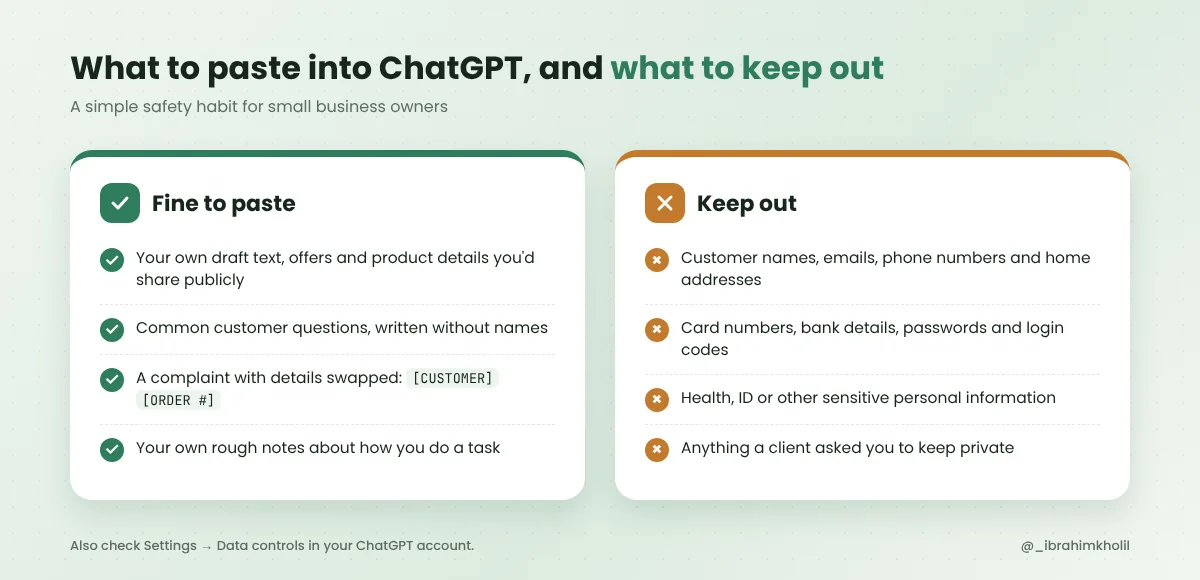
Please don’t. Your customers trusted you with their details, not an AI tool. Swap real details for placeholders before you paste: [CUSTOMER], [ORDER], [ADDRESS]. ChatGPT writes just as well without them.
Watch out
Your 15-minute test
It drafts customer replies, follow-up emails, social posts, product descriptions, SOPs, checklists and summaries. You give it your real facts and check what it writes. It saves the most time on tasks you repeat every week.
There is a free ChatGPT plan, and you can use it for business tasks like the ones in this post. OpenAI also sells paid plans with more usage and features, including plans for teams. Check OpenAI’s current pricing page for details, because plans change.
Only once the free plan shows a clear time saving. Use it for a couple of weeks first. If you keep hitting limits or need a shared workspace for your team, then compare the paid plans.
Either works for everyday tasks like emails, posts and checklists. The prompts in this post work in both. Using one tool every day and saving your best prompts matters more than the brand.
Yes. It works well for everyday writing and planning tasks in a business. Follow OpenAI’s terms, keep customer personal data out of your chats and check every fact before it reaches a customer.
Start with one task, like saved replies. Copy a prompt from this post, fill in the brackets and press enter. If you can write an email, you can use ChatGPT.
You don’t need to use all 10 ideas this week. Pick the one that annoys you most, whether that’s repeat questions, late invoices or empty social feeds, and fix that first.
Give it your facts. Let it draft. You check. That’s how ChatGPT for small business owners turns from “interesting” into hours you get back.
You can do this. It’s easier than it looks.
Want more simple, copy-paste AI workflows like these? Grab my free AI Workflow Starter Kit. And for more guides, browse the blog.

12+ years in digital marketing. I test every workflow on real work before I share it, free tools first.
More about me →Steps, a copy-paste prompt and the limits I found. Free, nothing to buy.
Get the Free Starter Kit →