Physical Address
304 North Cardinal St.
Dorchester Center, MA 02124
Physical Address
304 North Cardinal St.
Dorchester Center, MA 02124
Write a product description with AI that only uses your facts: a fact sheet, one free prompt, a claim check that flags invented materials or health claims, and where to paste it in Shopify, Etsy or WooCommerce.
Buyers can’t pick up your product. They can’t smell the candle, feel the fabric or hold the mug, so your listing has to answer for it: what it’s made of, how big it is, when it ships. If one of those answers is wrong, the buyer finds out the day the parcel opens. That’s just as true when an AI product description generator wrote the words.
This post takes one listing from a blank note to a pasted description, with AI doing the writing and you holding the facts. Your first product should take around 20 minutes, by my estimate. At the end, one description is live in your shop, and every size, material and claim in it matches a note you wrote yourself.
The steps work the same on Shopify, Etsy and WooCommerce. Only the box you paste into changes, and Step 6 shows each one.
In short
What you need
On this page
You’ll meet the term in three forms: separate websites with a “generate” button, a button inside your shop software, and a normal AI chat with a good prompt. They all produce smooth sentences. None of them has seen your product.
Ask for a description with little to go on, and the gaps get filled with what similar products often have: a typical size, a common material, a word like “non-toxic” or “eco-friendly”. A wrong size means a return. A health or quality claim you can’t prove can mean much bigger trouble.
Copying the supplier’s text isn’t a safe way around it either. Other shops selling the same item may use the same words, and the supplier’s sheet may not match the exact version you stock. Use the supplier’s sheet for facts, never for wording.
The order of the six steps below matters more than the tool you pick: facts first, writing second, checking third, and your own eyes last.
The shop in every step
Mira runs a small candle shop on Etsy and is writing the listing for her Fig & Cedar candle. She, her shop and her candle are made up for this post, and so is every fact about them (Example). Hold your own product next to hers as you go.
A fact sheet is a short note with everything a buyer might ask about one product, one line each. It’s the only thing the AI is allowed to use, so it decides how true your description is.
Two lines on it do most of the protecting. “What it is NOT” stops the AI from adding the claims it likes to add. “In my words” gives it one sentence that sounds like you, so the description doesn’t sound like every other shop.
Do this
FACT SHEET
Product:
What it is:
Who it's for:
Size:
Materials:
Color, scent or flavor:
Care:
Shipping:
What it is NOT:
In my words:
The card below shows where to look for each line. These are my suggestions, not platform rules.
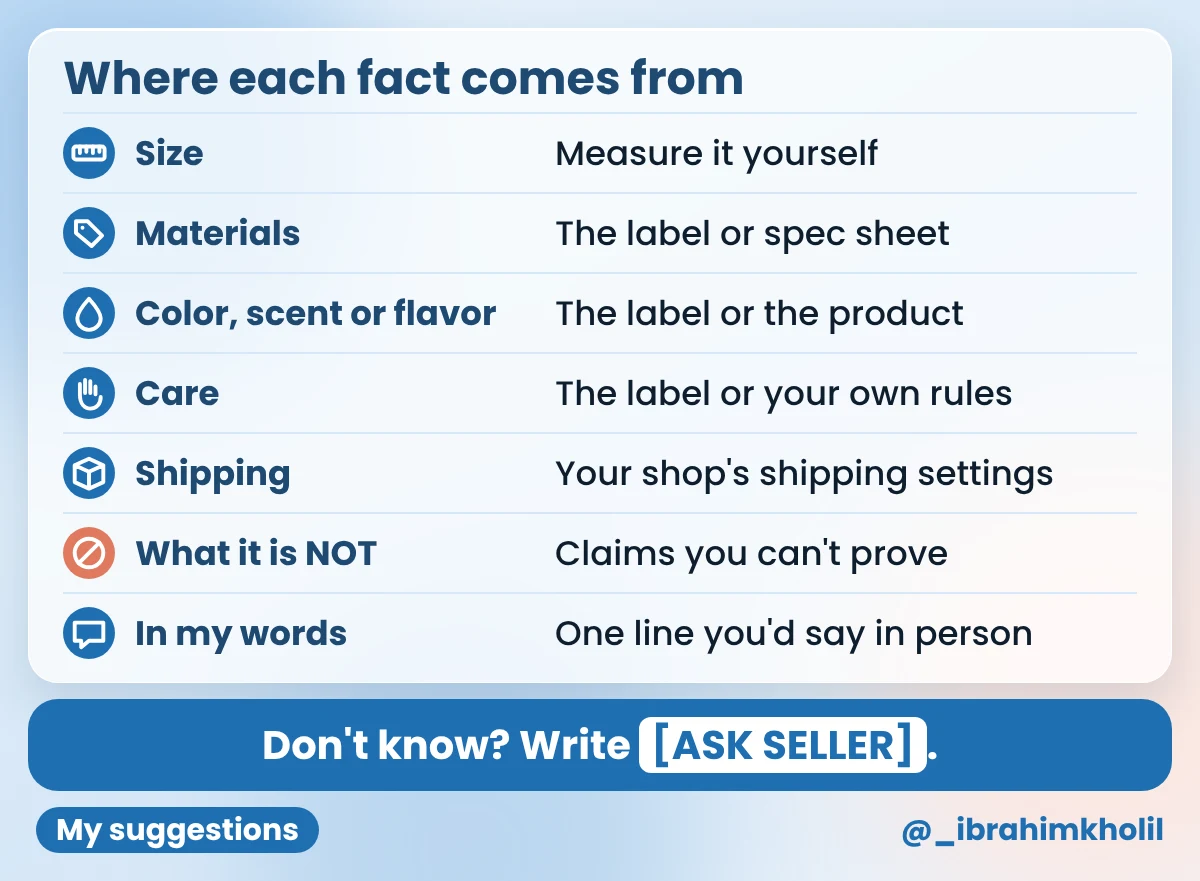
Mira’s fact sheet (Example):
| Line | Mira’s fact (Example) |
|---|---|
| Product | Fig & Cedar candle |
| What it is | A scented candle, hand-poured in a glass jar |
| Who it’s for | Anyone who wants a cozy candle at home, or a small gift |
| Size | 3 inches wide, 3.5 inches tall (without the lid) |
| Materials | Soy wax blend, cotton wick, clear glass jar, wooden lid |
| Color, scent or flavor | Fig and cedar (fragrance oil, not essential oils) |
| Burn time | [ASK SELLER] |
| Care | Trim the wick to 1/4 inch before each burn. Never leave it burning alone. |
| Shipping | Ships in 3 working days, wrapped in recycled paper |
| What it is NOT | Not 100% soy. Not unscented. |
| In my words | I make every candle in my kitchen studio, a few at a time. |
Mira added a “Burn time” line, because she expects buyers to ask. She has never timed a full candle, so she wrote [ASK SELLER] instead of a number she’d have to guess.
Done when: every line of your fact sheet holds a fact or [ASK SELLER].
Search for an AI product description generator and you’ll find a long list of separate websites. Their free limits change often, so if you try one, check its own pricing page first. For one product from your own fact sheet, you probably don’t need any of them.
Pick by where you sell:
| Where you sell | First draft from | Then |
|---|---|---|
| Shopify | The generator built into the product description box, or Step 3 in any AI chat | Steps 4, 5 and 6 |
| Etsy | Step 3 in any AI chat | Steps 4, 5 and 6 |
| WooCommerce | Step 3 in any AI chat | Steps 4, 5 and 6 |
| More than one shop | Step 3 in any AI chat: one fact sheet and one prompt work everywhere | Steps 4, 5 and 6 |
The pick rule: on Shopify, try the built-in generator first because it’s already on the page. Everywhere else, use the AI chat you already have. I didn’t find an AI writer built into WooCommerce itself; plugins exist, so check each one’s own page if you want one.
On Shopify: draft with the built-in generator
Shopify’s page for its AI product descriptions says they’re included in paid Shopify plans at no extra cost, in its main supported languages. I couldn’t open Shopify’s help pages while writing this, so the button names below come from how those pages read in search results. If your screen differs, search Shopify’s help for “generate product descriptions”.
Done when: the “Description draft” note holds the generated text, and the Shopify product is saved without it. Skip Step 3 and go to Step 4. If you’d rather have the [ASK SELLER] rule, use Step 3 in any AI chat instead; it works for Shopify too.
Type “write a description for my candle” and every gap is open for guessing. The Draft prompt below closes those gaps with a ban list for the words AI likes to add, and a marker it has to use instead of inventing. It also asks for a short line, which WooCommerce shops can use as a short description.
If you’ve read my steps for an AI proposal generator, you’ll know the idea: the facts come from you, and the AI only arranges them.
Do this
The Draft prompt, ready to copy:
You're writing a product description for my online shop, using my fact sheet below and nothing else.
Banned: any material, size, number, review or award my sheet doesn't list, and any health, safety, eco or quality word (like "non-toxic", "eco-friendly" or "premium") my sheet doesn't use.
Gaps: where a buyer would need a detail my sheet doesn't give, put [ASK SELLER: what's missing]. Where my sheet already says [ASK SELLER], leave it in the same spot.

MY FACT SHEET:
[PASTE YOUR FACT SHEET]

Write 3 parts:
1. Opening: 2 or 3 sentences. Say what it is and who it's for. Use my "In my words" line without changing its meaning.
2. Details: a short list of every other fact a buyer needs (size, materials, care, shipping and so on), worded as on my sheet. Use my "What it is NOT" line only to avoid wrong claims; don't list it.
3. Short line: one sentence under 25 words, for a short description box.

Plain, friendly English. Short sentences. No hype words.
The 25-word limit for the short line is my suggestion, so it fits a small box. Change it if your shop shows more.
What comes back: three labelled parts built from your sheet, with [ASK SELLER] wherever your sheet had it. The image shows the opening and the short line of the example reply for Mira. Her details list is below it.
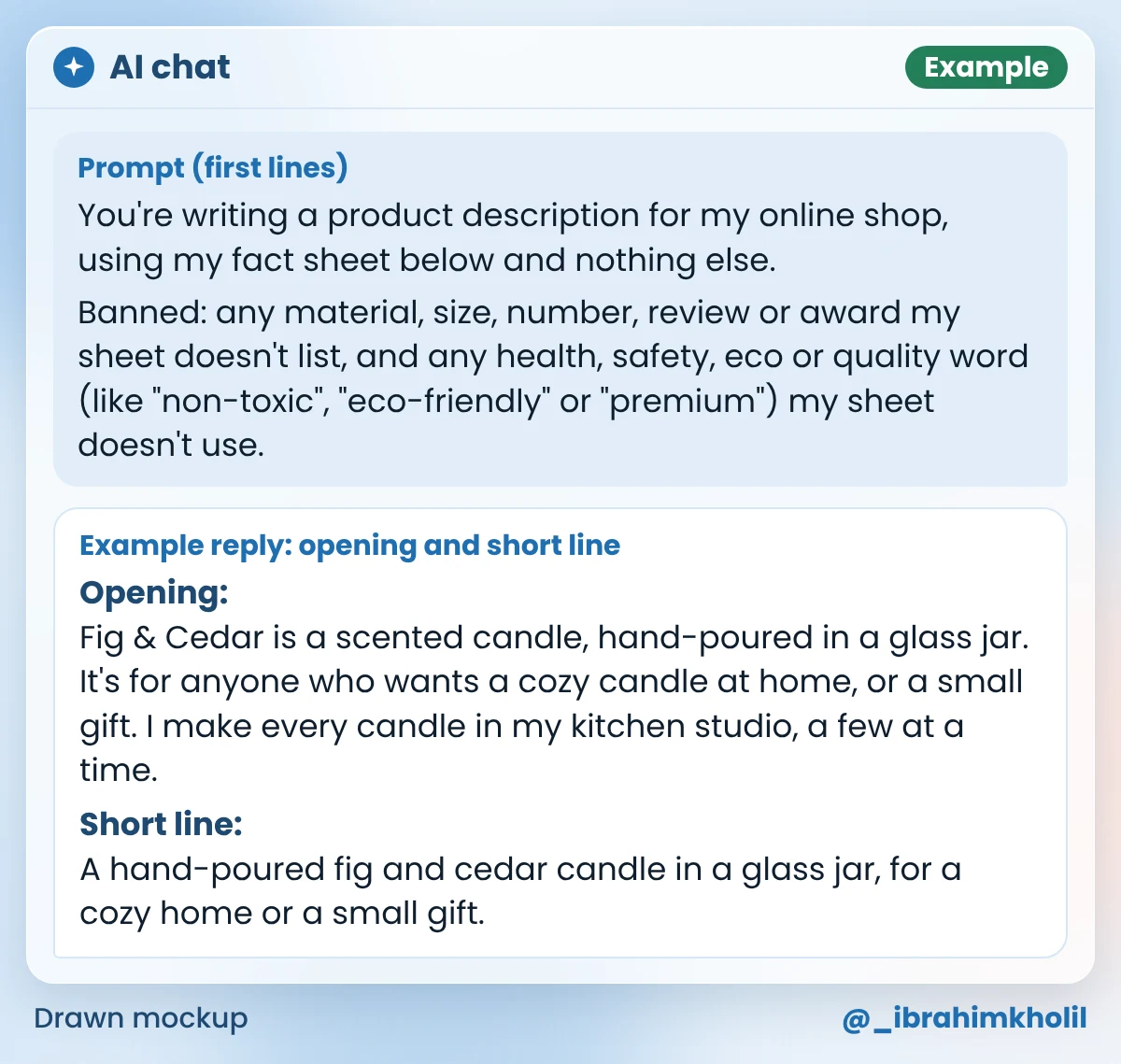
Details:
– Size: 3 inches wide, 3.5 inches tall (without the lid)
– Materials: clean-burning soy wax, cotton wick, clear glass jar, wooden lid
– Scent: fig and cedar (fragrance oil, not essential oils)
– Burn time: [ASK SELLER]
– Care: trim the wick to 1/4 inch before each burn. Never leave it burning alone.
– Shipping: ships in 3 working days, wrapped in recycled paper
The burn time stayed as [ASK SELLER], just as Mira left it. Now look at Materials: “clean-burning soy wax”. Her sheet says soy wax blend, and “Not 100% soy”, and nothing about how the candle burns. The ban list covered words like this, and the AI used one anyway. That happens with these tools, and it’s the line Step 4 is built to catch.
A claim is any line a buyer could hold you to: a material, a size, a number, or a word about quality, health, safety or the planet. You’ll read the whole draft in Step 5 anyway. The Claim check comes first because one word like “clean-burning” is easy to read straight past when the sentence around it sounds right.
This matters beyond returns. For example, the US Federal Trade Commission’s advertising guide for small businesses, as summarized in search results, says you need proof for objective claims before you publish them, and that health and safety claims need scientific evidence. A money-back guarantee doesn’t replace that proof. Other countries have their own rules, so check yours. This isn’t legal advice.
Do this
The Claim check, ready to copy:
Compare this product description with my fact sheet. Don't rewrite anything.

MY FACT SHEET:
[PASTE YOUR FACT SHEET]

MY DESCRIPTION DRAFT:
[PASTE YOUR DESCRIPTION DRAFT]

Answer with a table of 3 columns:
Line: each line that names a material, a size, a number or a promise, or says something about quality, health, safety or the planet.
Verdict: OK if my fact sheet says it, PROVE IT if it doesn't.
Question: only for PROVE IT lines. Name the words my sheet doesn't back up and ask me one question.
Under the table, list every [ASK SELLER] that is still open.
What comes back: a table with one verdict per line, a question beside each PROVE IT, and a list of open gaps underneath. Mira’s example reply:
| Line | Verdict | Question |
|---|---|---|
| Fig & Cedar is a scented candle, hand-poured in a glass jar. | OK | |
| Size: 3 inches wide, 3.5 inches tall (without the lid) | OK | |
| Materials: clean-burning soy wax, cotton wick, clear glass jar, wooden lid | PROVE IT | “Clean-burning” isn’t on your sheet, and your sheet says “soy wax blend”, not soy wax. What proof do you have that it burns clean? |
| Scent: fig and cedar (fragrance oil, not essential oils) | OK | |
| Care: trim the wick to 1/4 inch before each burn. Never leave it burning alone. | OK | |
| Shipping: ships in 3 working days, wrapped in recycled paper | OK | |
| A hand-poured fig and cedar candle in a glass jar, for a cozy home or a small gift. | OK |
How Mira handled it (Example): she has no proof that the candle burns clean, so the Materials line now reads “soy wax blend, cotton wick, clear glass jar, wooden lid”, copied from her sheet. She still hasn’t timed a full burn, so the Burn time line came out for now, and “time one candle” went on her to-do list. Two small changes, so one check was enough.
After Step 4 the description is true. It may still read like a catalog. This last pass is yours alone, with no prompt, because only you know how you talk to buyers.
Do this
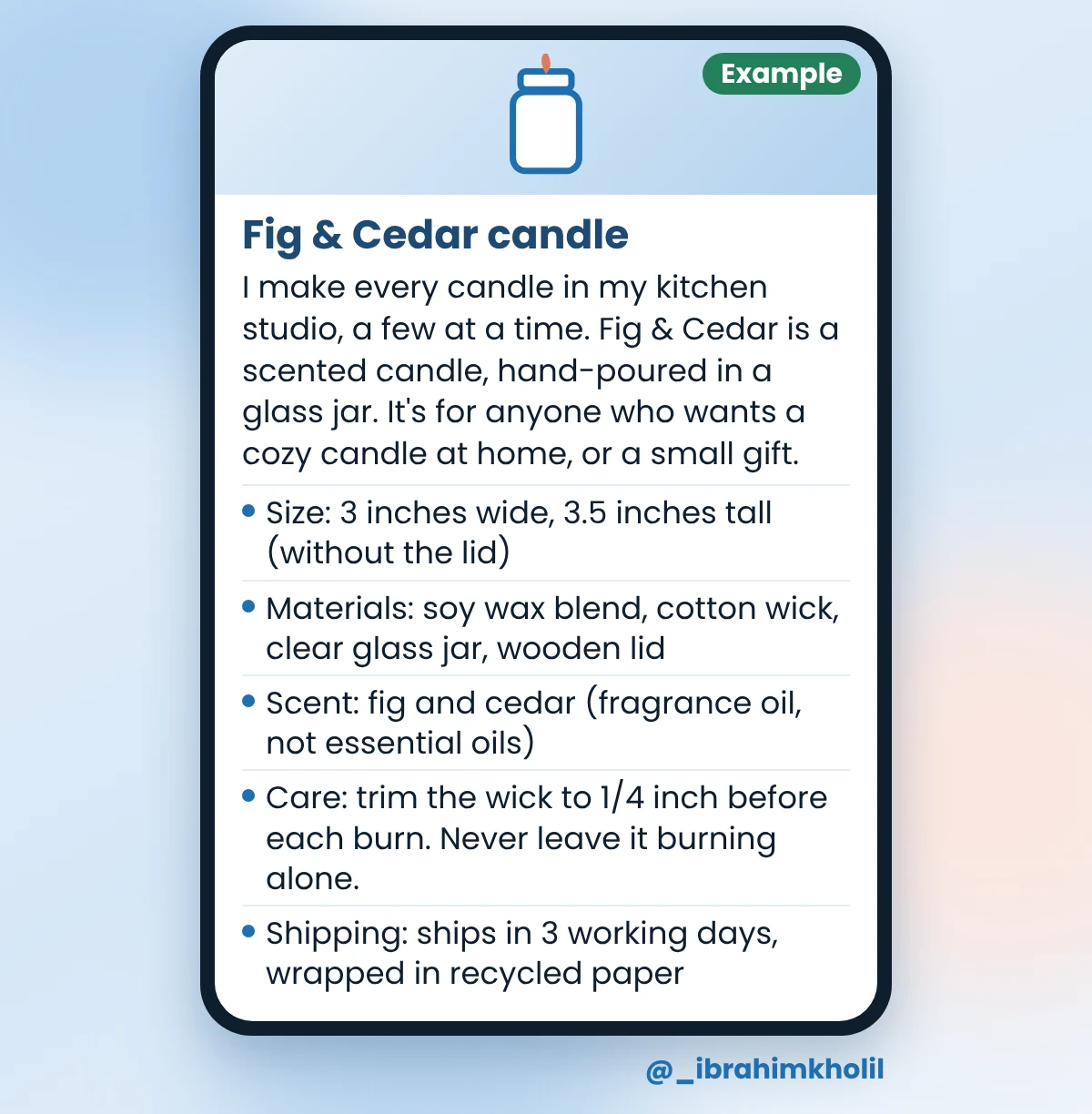
Mira’s edit (Example): every line was true, but her opening started like any big shop’s. She moved her own line (“I make every candle in my kitchen studio, a few at a time”) from the end of the opening to the very start, because a big shop can’t say it. Her first two sentences still say what the product is: a candle, and a scented one, hand-poured in a glass jar. Nothing else changed. You’ll see the finished description in Step 6.
Done when: the draft has no PROVE IT lines and no [ASK SELLER] left, and you’d say the opening out loud.
The AI’s labels (“Opening:”, “Details:”, “Short line:”) are for you, not for buyers. Delete them before you paste. What goes where depends on your shop:
| Shop | Main description box | Short line |
|---|---|---|
| Shopify | Opening, then the details list | Not needed |
| Etsy | Opening, then the details list | Not needed |
| WooCommerce | Opening, then the details list | Goes in the “Product short description” box |
I couldn’t open the platforms’ help pages while writing this. The paths below follow how those pages and a few guides read in search results, so treat the names as a guide. Menus change; if one looks different, search the platform’s help for “add a product” or “edit a listing”.
Guides found in search say the short description usually shows near the top of the product page and the main description further down. Your theme decides the exact spot, so open the live page once to check.
Check the live page: it should show the checked text, no AI labels and no [ASK SELLER]. Here’s Mira’s description, exactly as she pasted it into Etsy after her Step 4 fix and Step 5 edit:
Two easy traps
Etsy sellers worry about this one most, and the rules have been moving. I couldn’t open Etsy’s pages while writing, so this is what they and recent news coverage say as they appear in search results, in plain words.
The six steps keep you involved at every point: your facts, your check, your edit, your click on Publish. Never let a tool create and publish listings in bulk without you reading each one. Rules change, so read Etsy’s current Creativity Standards before you list. This isn’t legal advice.
After you paste
Hold on to each fact sheet. A buyer’s question is often already answered on it. Once reviews come in, my steps for an AI review response generator help you reply from your own facts too. And if you also sell a service, here’s how to use AI for lead generation without spam.
The two prompts here cost nothing, and they run in any AI chat; check each chat’s own site for its current plans. On Shopify, its own page says the built-in generator comes with paid plans at no extra cost. Separate generator websites change their free limits often, so look at their pricing pages.
Yes, as a writing helper. Give it your own facts, check every claim, and edit and publish each listing yourself. Etsy’s rules are strictest about items made with AI and listings made by bots with no human involvement, so read its current Creativity Standards.
Yes. Shopify’s own page describes AI product descriptions included in paid plans. Its help pages, as they read in search results, describe a “Generate text” icon in the description toolbar where you give a title and some features and choose a tone. Run the Claim check on what it writes before the text goes live.
Hand it a fact sheet, ban everything that isn’t on it, and give it [ASK SELLER] to use when a fact is missing. Then check the result, because even a strict prompt can let one invented word through, like “clean-burning” in Mira’s draft.
I didn’t find one built into WooCommerce itself. Plugins exist, so check each one’s own page for what it does and costs. An AI chat with the prompt above works fine: paste the result into the main description and the short line into the short description box.
This post doesn’t cover photo-based tools. Keep in mind that a photo shows shape and color, but not the materials, the size or the burn time. Those still have to come from your fact sheet.
A good product description answers what a buyer would ask if they could hold the item. An AI product description generator writes those answers fast, but it can’t know them. Your fact sheet is where they come from, and the Claim check is how you prove the AI kept to it.
Choose one product you want to sell more of and measure it tonight. Once its fact sheet is filled in, the description is about two prompts and one read away.
More prompts like these are in my free AI Workflow Starter Kit.

12+ years in digital marketing. I test every workflow on real work before I share it, free tools first.
More about me →Steps, a copy-paste prompt and the limits I found. Free, nothing to buy.
Get the Free Starter Kit →