Physical Address
304 North Cardinal St.
Dorchester Center, MA 02124
Physical Address
304 North Cardinal St.
Dorchester Center, MA 02124
One free prompt that replies to good, bad and unfair reviews in your own voice, plus a do-not-say list and a check step, shown on a made-up dog-grooming salon.
Good reviews are easy to leave unanswered. Bad ones are hard to stop thinking about. Either way, the reply box under each review stays empty, and an AI review response generator starts to look like the quick fix.
Search for one and most of page one is free tool pages. You paste a review in and get a polite reply back. The trouble is that the tool doesn’t know what really happened. So a bad review gets a vague “sorry for any inconvenience”, and an unfair one gets an apology for something you never did.
A better tool won’t fix that. What fixes it is giving the AI the two things it can’t guess: what kind of review this is, and your side of the story. One prompt in a free chat assistant like Claude can take both, along with a short list of words a reply should never contain.
The seven ways below start with setting up that prompt once. Then you use it on a good, a bad and an unfair review, check each reply before anyone sees it, and clear the old reviews you never answered. Plan on one coffee break for the set-up. After that, a reply is mostly pasting and reading.
In short
What you need
On this page
The salon in every example
Every review below is invented for this post, and so is the business. Theo runs a small dog-grooming salon called Theo’s Dog Grooming. It grooms dogs only. These are the three reviews he hasn’t answered yet:
| Reviewer | Review (Example) |
|---|---|
| Anna K., 5 stars | Bella came home calm and fluffy. Theo sent me a photo halfway through so I wouldn’t worry. We’ll be back! |
| Mike D., 2 stars | Booked for 10:00, wasn’t seen until 10:40. Nobody told me why. The cut was fine but I won’t wait like that again. |
| Jordan P., 1 star | Rude and overpriced. They refused to groom my cat and wouldn’t even explain. |
A review reply needs two kinds of information. Some of it never changes: your business, how you sound, how you sign off. The rest changes with every review: the review itself and what really happened.
So the prompt has a top part you fill in once and a bottom part you fill in each time. Fill in the top part tonight, save it, and every later reply starts from that note.
Copy this prompt (Review reply prompt):
Write a reply to a customer review for my business. I will post it in public.

MY BUSINESS: [NAME, WHAT YOU DO, WHERE]
HOW I SOUND: [3 WORDS, FOR EXAMPLE: WARM, PLAIN, SHORT]
SIGN-OFF: [YOUR FIRST NAME, ROLE, BUSINESS NAME]
PUBLIC CONTACT: [THE BUSINESS EMAIL OR PHONE YOU ALREADY SHARE IN PUBLIC]
NEVER SAY: [WORDS AND PHRASES YOU NEVER WANT IN A REPLY]

REVIEWER: [FIRST NAME AS SHOWN ON THE REVIEW, OR "NO NAME"]
REVIEW TYPE: [GOOD, BAD OR UNFAIR]
THE REVIEW: [STAR RATING AND THE FULL TEXT]
MY NOTES: [WHAT REALLY HAPPENED, IN 1 TO 3 LINES, OR "NOTHING TO ADD"]

Rules:
1. Use only facts from the review and my notes. If you need a fact you don't have, write [ASK ME: your question].
2. Respond to each point the reviewer raises. If my notes say nothing about a point, don't invent an answer: thank them for it or leave it out.
3. GOOD: thank them, mention what they liked in their own words, and invite them back. No sales pitch.
4. BAD: thank them, say sorry for what went wrong, give the reason from my notes in one short line, say what I'm changing (only if my notes say so), and invite them to contact me.
5. UNFAIR: stay calm and kind. Never say they are lying. State the facts from my notes once and invite them to contact me.
6. Never share private details the reviewer didn't write, such as what they paid, health details or anything personal.
7. Never offer money, discounts or gifts.
8. Don't promise anything my notes don't promise.
9. Never use anything from NEVER SAY.
10. Keep it under 80 words. End with my sign-off.
11. If REVIEWER has a name, greet them by it once.
The 80-word limit is my suggestion, not a platform rule. People often read reviews on a phone, and a short reply gets read to the end.
What you should see: a saved note where only the four review lines still have brackets. Here is Theo’s top part (Example):
| Line | Theo’s answer (Example) |
|---|---|
| MY BUSINESS | Theo’s Dog Grooming, a small dog-grooming salon. Dogs only. |
| HOW I SOUND | Warm, plain, short |
| SIGN-OFF | Theo, owner, Theo’s Dog Grooming |
| PUBLIC CONTACT | theo@example.com |
| NEVER SAY | “We apologize for any inconvenience”, “valued customer”, “per our policy” |
Five-star reviews are the ones people skip, because “Thanks so much!” feels like enough. But when every reply says the same line, readers can tell it was pasted.
Rule 3 fixes that. The reply has to name what this customer liked, in their own words. That one detail is what makes a reply sound written for them.
What you should see: a short reply that repeats what the customer liked and ends with your sign-off. The image shows Theo’s filled prompt and the Example reply to Anna’s review.
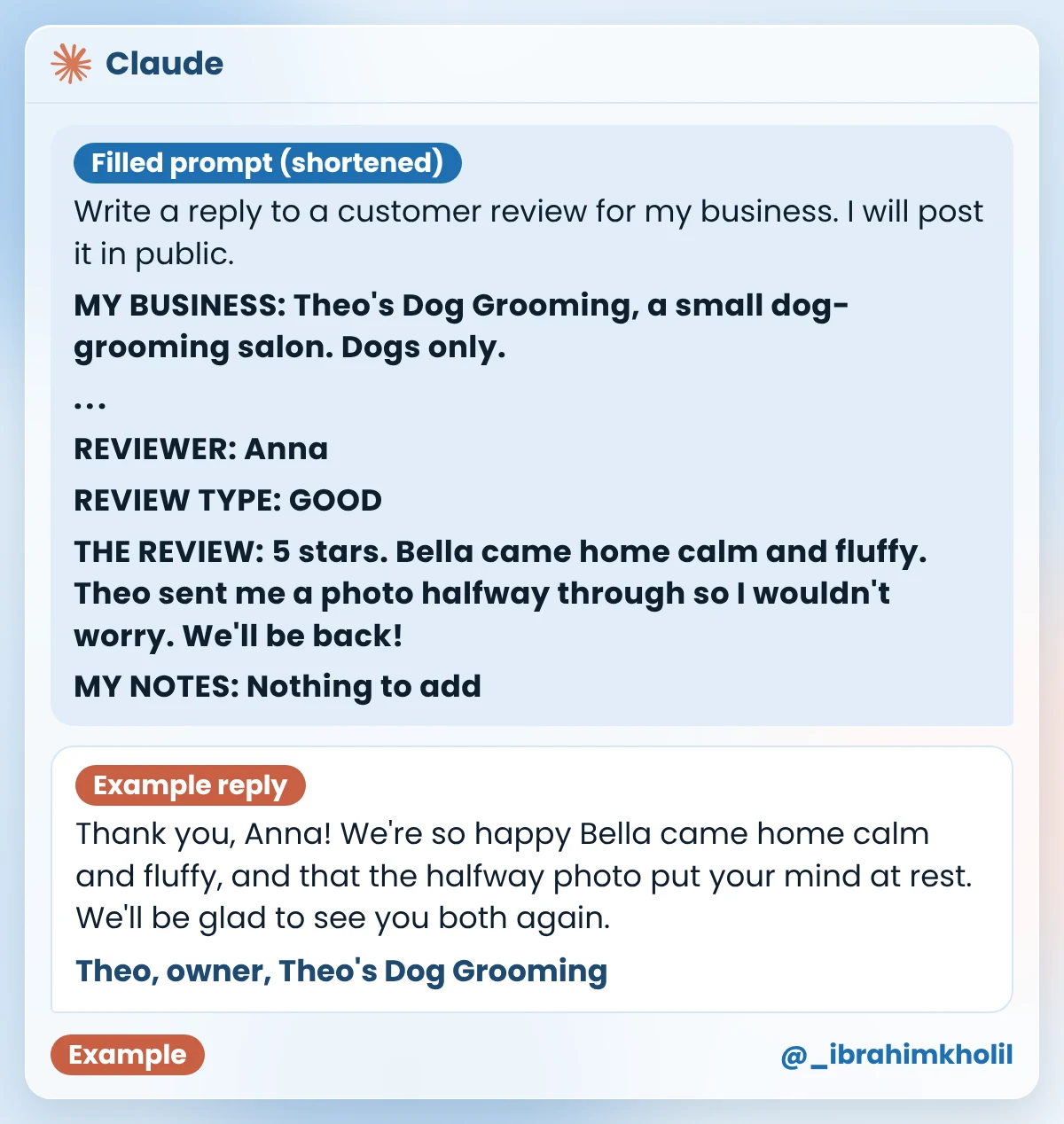
Look at the reply next to Anna’s review in the box above. Anna’s name comes from the REVIEWER line. Bella coming home calm and fluffy, the halfway photo and Anna’s plan to come back come from her review. Nothing in the reply came from anywhere else.
A bad review stings, and the first reply you want to write is usually a defense. AI goes the other way: left alone, it writes a soft apology that says nothing.
Neither one helps the person who reads the review next. What helps is a reply that owns the problem, gives the real reason in one line and says what changes. Your notes are what make that possible, because only you know the reason.
Theo’s notes on Mike’s review (Example):
Our 9:00 dog took much longer than planned. We didn’t call the customers after it. From now on, we text customers if we’re running more than 15 minutes late.
What you should see: thanks, a sorry, the reason, the change and your contact. Example reply to Mike:
Hi Mike, thank you for telling us, and I’m sorry you waited 40 minutes without a word from us. The dog before you took much longer than planned, and we should have called you. I’m glad the cut turned out fine. From now on, we’ll text customers if we’re running more than 15 minutes late. This won’t happen again. If you’d like to talk, email me at theo@example.com.
Theo, owner, Theo’s Dog Grooming
Most of it follows the notes: the wait, the reason, the cut and the new text message rule. One line doesn’t. “This won’t happen again” is a promise Theo’s notes never make, so it breaks rule 8. Chat assistants slip like this now and then, which is why every reply gets the Reply check before it goes up.
Also notice what the reply leaves out: the other customer’s dog is never named, and nobody is blamed.
Some reviews get the facts wrong. They complain about a service you don’t offer, mix you up with another business, or come from someone who was never a customer. These are the reviews where an angry reply feels fair and looks worst.
Rule 5 keeps the reply calm. The AI states your facts once, never calls the reviewer a liar, and offers a way to talk. Anyone reading then sees both sides and a business that stayed polite.
How to choose the REVIEW TYPE (my suggestion): GOOD if the customer is happy overall. BAD if something really went wrong on your side. UNFAIR if the facts are wrong. If you’re torn between BAD and UNFAIR, pick BAD. Owning a small part of the problem is safer than arguing about it in public.
Theo’s notes on Jordan’s review (Example):
We only groom dogs. I remember a phone call last week asking to book a cat. I said we only groom dogs. No record of a visit.
What you should see: your facts said once, kindly, with a way to get in touch. Example reply to Jordan:
Hi Jordan, I believe we spoke on the phone last week. We only groom dogs, so I couldn’t book your cat, and I’m sorry if I didn’t explain that clearly. If you’d like to talk it through, email me at theo@example.com.
Theo, owner, Theo’s Dog Grooming
The sorry for not explaining clearly answers “rude” and “wouldn’t even explain” without arguing. “Overpriced” is left out, because Theo’s notes say nothing about price, and rule 2 says not to invent an answer. If you have a true line about your prices, add it to your notes.
Watch out
Rules in a prompt tell the AI what to do. A do-not-say list tells it the exact words to avoid, and it grows every time you spot a line you don’t like. Because it lives in your saved note, every future reply gets it for free.
Here is what I’d keep out of every reply. These are my suggestions, not platform rules:
What you should see: a NEVER SAY line that is longer than before. Theo’s line now reads (Example):
NEVER SAY: "We apologize for any inconvenience", "valued customer", "per our policy", "discount", "free next visit"A reply under a review is public, and it stays there. One made-up fact or one promise you can’t keep is seen by everyone who reads that review.
Reading your own draft is hard, because you know what you meant. A second prompt in a new chat reads it with fresh eyes and marks only the lines that need you. It doesn’t rewrite anything, so the words stay yours to choose.
Copy this prompt (Reply check):
Check my reply to a customer review before I post it. Don't rewrite it.

THE REVIEW: [REVIEWER'S FIRST NAME AND THE REVIEW]
MY NOTES: [PASTE YOUR NOTES]
MY REPLY: [PASTE THE REPLY]

Mark each problem line with one label:
NEW FACT if it says something the review and my notes don't,
PRIVATE if it shares a detail the reviewer didn't write,
PROMISE if it promises something my notes don't,
ARGUE if it blames or argues with the reviewer.
Quote the line, add the label and ask me one question about it.
If nothing is wrong, write: Nothing to fix.What you should see: either “Nothing to fix” or a short list of quoted lines, each with a label and a question. The image shows the Example reply for Theo’s draft to Mike and the line after his fix.
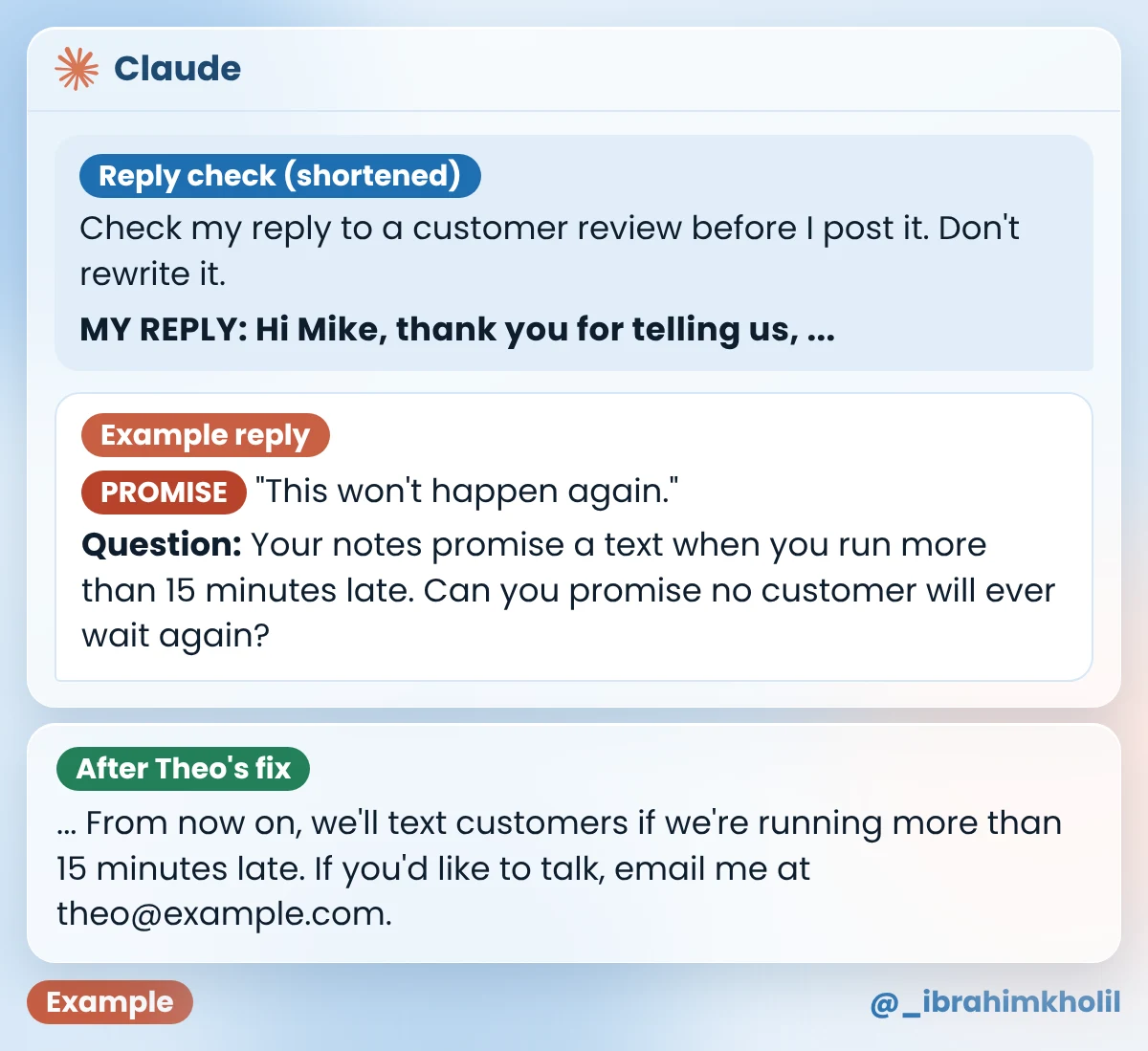
Theo’s fix (Example): his notes only promise a text when the salon runs late, so he deleted “This won’t happen again.” He also added “won’t happen again” to his NEVER SAY line, so the next reply doesn’t bring it back.
Maybe you have a list of old reviews that never got a reply. Doing them one chat at a time feels like a whole afternoon, so the list keeps growing.
You can send several in one message instead. The add-on below replaces the four review lines in your saved prompt, so the business details, rules and NEVER SAY list still apply to every reply.
Copy this add-on (Backlog add-on):
Instead of one review, here are [NUMBER] reviews I haven't answered yet. Write one reply for each, under the same rules. Start each reply in a different way, and number the replies to match.

1. REVIEWER: [FIRST NAME OR "NO NAME"] / REVIEW TYPE: [GOOD, BAD OR UNFAIR] / THE REVIEW: [STAR RATING AND TEXT] / MY NOTES: [NOTES OR "NOTHING TO ADD"]
2. REVIEWER: [...] / REVIEW TYPE: [...] / THE REVIEW: [...] / MY NOTES: [...]
3. REVIEWER: [...] / REVIEW TYPE: [...] / THE REVIEW: [...] / MY NOTES: [...]Theo’s three old reviews (Example), all GOOD with “Nothing to add” as notes:
| Review (Example) | Example reply |
|---|---|
| 1. Chris L., 5 stars, no text | Thank you for the five stars, Chris! It means a lot to a small salon like ours. Come back any time. Theo, owner, Theo’s Dog Grooming |
| 2. Dana W., 4 stars: “Good job, a bit pricey.” | Thanks, Dana, for the four stars and the honest note on price. We’re glad you liked the job we did, and we’d be happy to see you again. Theo, owner, Theo’s Dog Grooming |
| 3. Eli M., 5 stars: “Max loved it.” | We’re so happy Max loved it, Eli! Thank you for taking the time to tell us. We hope to see Max again soon. Theo, owner, Theo’s Dog Grooming |
Each reply starts differently, greets the reviewer by name, invites them back and uses only what that reviewer wrote. Reply 2 thanks them for the price note but doesn’t defend or change prices, because Theo’s notes say nothing about price.
Good to know
The same draft-then-check idea works for customer emails. My AI workflow automation examples show it for the questions you answer most. For more everyday jobs, see these uses of ChatGPT for small business owners.
You don’t need to set up all seven ways before your first reply. Fill in the top part of the prompt, then pick the newest review you haven’t answered and run it through the type that fits.
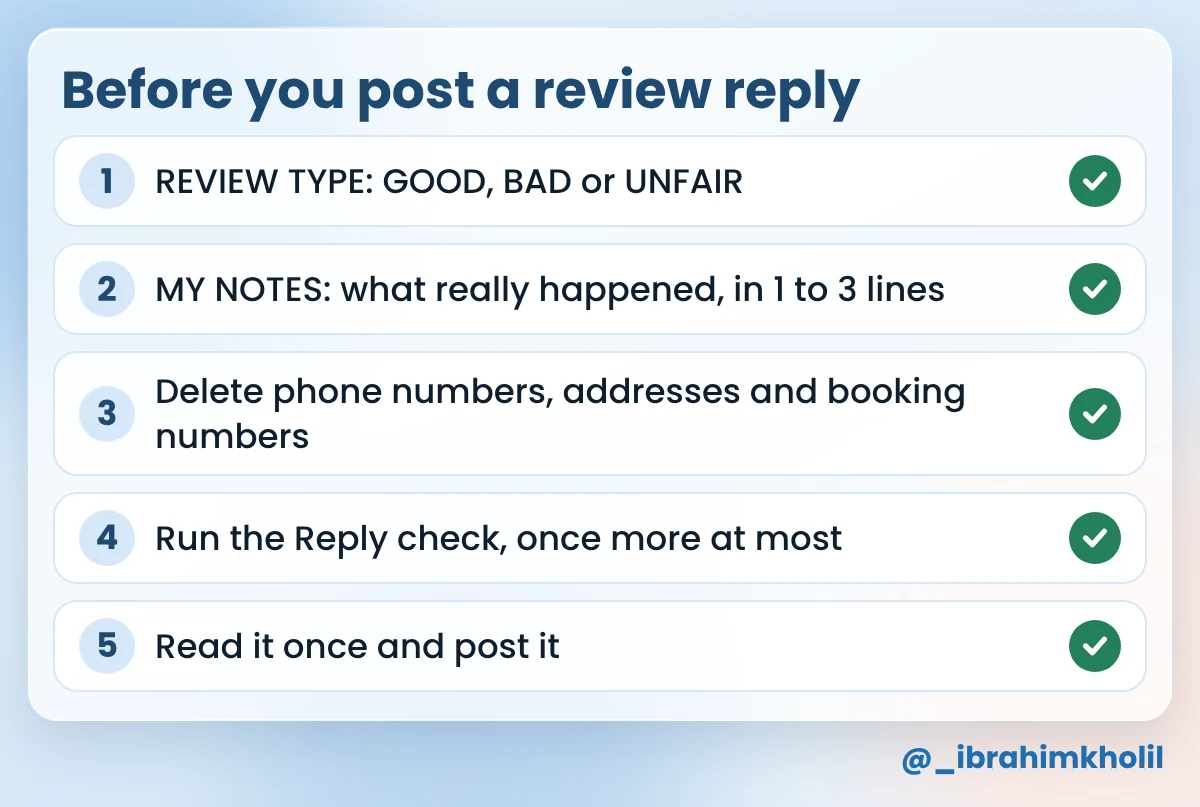
Once the note is saved, the next review starts from there. Your NEVER SAY line gets a little better with every reply you check.
The prompt in this post works as one inside a free chat assistant. Claude has a Free plan, and claude.com/pricing shows what it includes today. Dedicated review tools exist too; each tool’s own page shows its current plans, so check there before you sign up.
My suggestion: answer bad and unfair reviews first, because those are the ones a new customer reads most carefully. Answer good ones when you can, and use the Backlog add-on to catch up on old ones.
This post keeps a person between the draft and the Post button, because a wrong reply is public. If a tool offers to post replies for you, read its settings and its own help page before you switch that on.
Keep out private details the reviewer didn’t share, offers of money or gifts, blame, canned phrases and promises you can’t keep. Put the exact words in the NEVER SAY line of your prompt, and run the Reply check before you post.
The review is already public, but your notes may not be. Before you paste, delete phone numbers, addresses, booking or order numbers and anything the reply doesn’t need. Check your assistant’s privacy settings too.
Reply short and calm, say what your records show, and offer a way to get in touch. Don’t accuse the reviewer. If you think the review breaks the site’s rules, look in the site’s help pages for how to report it.
Yes, the prompt works for any review text you can copy. Check the marketplace’s own rules on replies first. For tools that help with the rest of a freelance week, see my list of AI tools for freelancers.
A reply is written to one reviewer, but anyone who opens the review can read it. That’s why the facts come from your notes and every reply gets checked before it goes up.
The AI saves you the blank page. You bring what really happened and press Post. Start with the review that’s been bothering you most.
My free AI Workflow Starter Kit has more copy-ready workflows like the prompts in this post.

12+ years in digital marketing. I test every workflow on real work before I share it, free tools first.
More about me →Steps, a copy-paste prompt and the limits I found. Free, nothing to buy.
Get the Free Starter Kit →