Physical Address
304 North Cardinal St.
Dorchester Center, MA 02124
Physical Address
304 North Cardinal St.
Dorchester Center, MA 02124

Google says its AI features need no special tricks. These 5 checks make sure one post you already have can be indexed, reached by AI search bots, and trusted.
Google now shows an AI summary above the results on some searches, and ChatGPT answers with a few links under the reply. For a blogger, the worry is simple. These tools answer questions your posts already cover, and the links point to other people’s sites. That’s usually when people start looking up how to optimize content for AI search.
The search results for that phrase don’t make it easier. Many of them are long agency checklists with a new name on every line: GEO, AEO, llms.txt, special schema, content “chunked” for AI. Each item sounds urgent, and none of them tells a solo blogger where to start.
Google’s own documentation is much calmer. It says its AI features have no extra requirements. The page has to be in Google’s index and allowed to show a snippet (the short text under a search result). Past that, it’s the work you already know, with extra weight on information only you can give.
This post turns that into five checks for one post you already have. Give the first one an afternoon; that’s my rough guess, since every site is set up a little differently. Afterwards, you’ll know whether Google can index the post, whether your robots.txt lets AI search bots in, and whether the post says something a chatbot couldn’t write without you.
Nobody can promise that AI tools will cite you, and this post won’t either. What the checks do is make sure nothing on your side is in the way.
In short
What you need
On this page
Google’s page on AI features and your website says there are no additional requirements to appear in AI Overviews or AI Mode, and no special optimization to do. The page needs to be indexed and eligible to show in Google Search with a snippet. Google updates these pages, so check it for the current wording.
A newer Google guide, on optimizing for its generative AI features, points the same way. It says normal SEO best practices still apply, because these features are built on Google’s core ranking and quality systems. It also calls unique, useful content likely the most important long-term factor.
One more thing to know before you start: AI Overviews don’t show up for every search. Google shows one only when its systems decide it adds something to the normal results. So even a great post won’t appear in one every time.
Trade coverage of that guide, for example Search Engine Journal’s summary, reports that Google says these aren’t needed for its AI features:
That same summary puts it plainly: in Google’s view, AEO and GEO (generative engine optimization) are still SEO. Check Google’s guide itself before you remove anything you already use.
So the work comes down to five ways, done on a post you already have:
Ines’s post (Example)
Ines isn’t a real person. She’s a guitar teacher I made up for this post, and every line of her post is made up too. She has a small WordPress blog for her students. Each way below checks this two-year-old post.
| Part | Ines’s old post (Example) |
|---|---|
| Title | How Often Should You Change Guitar Strings? |
| Intro | Guitar strings are an important part of your guitar. Old strings can make your guitar sound bad. In this post, we will look at how often you should change them. |
| How often? | Many players change their strings every few months. Old strings can also be harder to tune. |
| Signs your strings are worn | Your strings may need changing if they sound dull or look dirty. Coated strings last much longer than plain ones. |
| Final thoughts | Strings are important, so take care of them! |
Good to know
The phrase “AI content optimization” is also used for a different job: using AI to make a post’s text clearer. That side is in my guide to AI content optimization. For other search jobs you can hand to a chat assistant, see how to use AI for SEO.
Google’s index is the list of pages Google can show. If your post isn’t in it, Google can’t use it in an AI answer either. Two small settings can quietly cause that: a “noindex” tag, which asks search engines to leave the page out, and a “nosnippet” tag, which stops Google from showing text from it.
According to coverage of Google’s robots meta tag page, nosnippet also keeps a page’s text out of AI Overviews and AI Mode, and “max-snippet” limits how much text can be used. Both limit your normal search results too. If you find one you didn’t set, find out why it’s there before you keep it.
noindex, then for nosnippet. What you should see: no match for either word.| Check | Ines’s result (Example) |
|---|---|
| SEO plugin’s page setting | Set to index. No “No Index” or “No Snippet” option ticked. |
| Page source | No match for noindex or nosnippet. |
| Search Console | URL is on Google. |
Ines’s post passed Way 1. Her problem was in a file she’d forgotten about.
robots.txt is a small public text file. It tells bots (programs that read websites) which parts of your site they may visit. Each AI company runs more than one bot, and each bot has its own name in that file.
That’s where a mix-up happens. You block a name you think is about AI training, and it turns out to be the bot that shows your site in AI search answers. Search bots fetch pages so a tool can show and link them. Training bots collect text to train AI models. Blocking one doesn’t block the other.
The table lists the main names from each company’s own documentation. The last column is my suggestion if you want to appear in AI search, not a rule from these companies.
| Bot name | Company | What it does | My suggestion |
|---|---|---|---|
| Googlebot | Google Search, including AI Overviews and AI Mode | Allow | |
| bingbot | Microsoft | Bing search | Allow |
| OAI-SearchBot | OpenAI | Shows sites in ChatGPT search results | Allow |
| Claude-SearchBot | Anthropic | Indexes pages for Claude’s search answers | Allow |
| PerplexityBot | Perplexity | Indexes sites for Perplexity search | Allow |
| GPTBot | OpenAI | Collects text to train AI models | Your choice |
| ClaudeBot | Anthropic | Collects text to train AI models | Your choice |
| Google-Extended | AI training and grounding in some other Google products; Google says it doesn’t affect Search | Your choice |
There’s a third kind: bots that open a page only when someone asks a chatbot to read it (ChatGPT-User, Claude-User, Perplexity-User). The companies treat robots.txt differently for these, so check each company’s page if they matter to you.
Copy this prompt (Read my robots.txt):
Explain my robots.txt file in plain words. Don't change it.

MY ROBOTS.TXT:
[PASTE YOUR ROBOTS.TXT]

1. For each rule, say which bot it is for and what it blocks.
2. Check these search bots: Googlebot, bingbot, OAI-SearchBot, Claude-SearchBot, PerplexityBot.
For each one, write ALLOWED or BLOCKED and quote the lines that decide it.
3. Check these training bots: GPTBot, ClaudeBot, Google-Extended.
Say if each one is blocked, and add "Training bot, your choice."
If you're not sure how a rule works, write NOT SURE instead of guessing.
Here’s Ines’s robots.txt (Example). The domain is a placeholder:
User-agent: *
Disallow: /wp-admin/
Allow: /wp-admin/admin-ajax.php

User-agent: GPTBot
Disallow: /

User-agent: OAI-SearchBot
Disallow: /

Sitemap: https://example.com/wp-sitemap.xml
What you should see: three parts, with a quoted line behind every verdict. The table shows part 1 of the example reply for Ines’s file. The image under it shows parts 2 and 3.
| Rule in Ines’s file | Example reply, part 1 |
|---|---|
| User-agent: * / Disallow: /wp-admin/ | For every bot without its own rules. Keeps them out of your admin area. |
| Allow: /wp-admin/admin-ajax.php | Lets those bots reach one admin file. |
| User-agent: GPTBot / Disallow: / | Blocks GPTBot from your whole site. |
| User-agent: OAI-SearchBot / Disallow: / | Blocks OAI-SearchBot from your whole site. |
| Sitemap: https://example.com/wp-sitemap.xml | Tells bots where your sitemap is. It blocks nothing. |
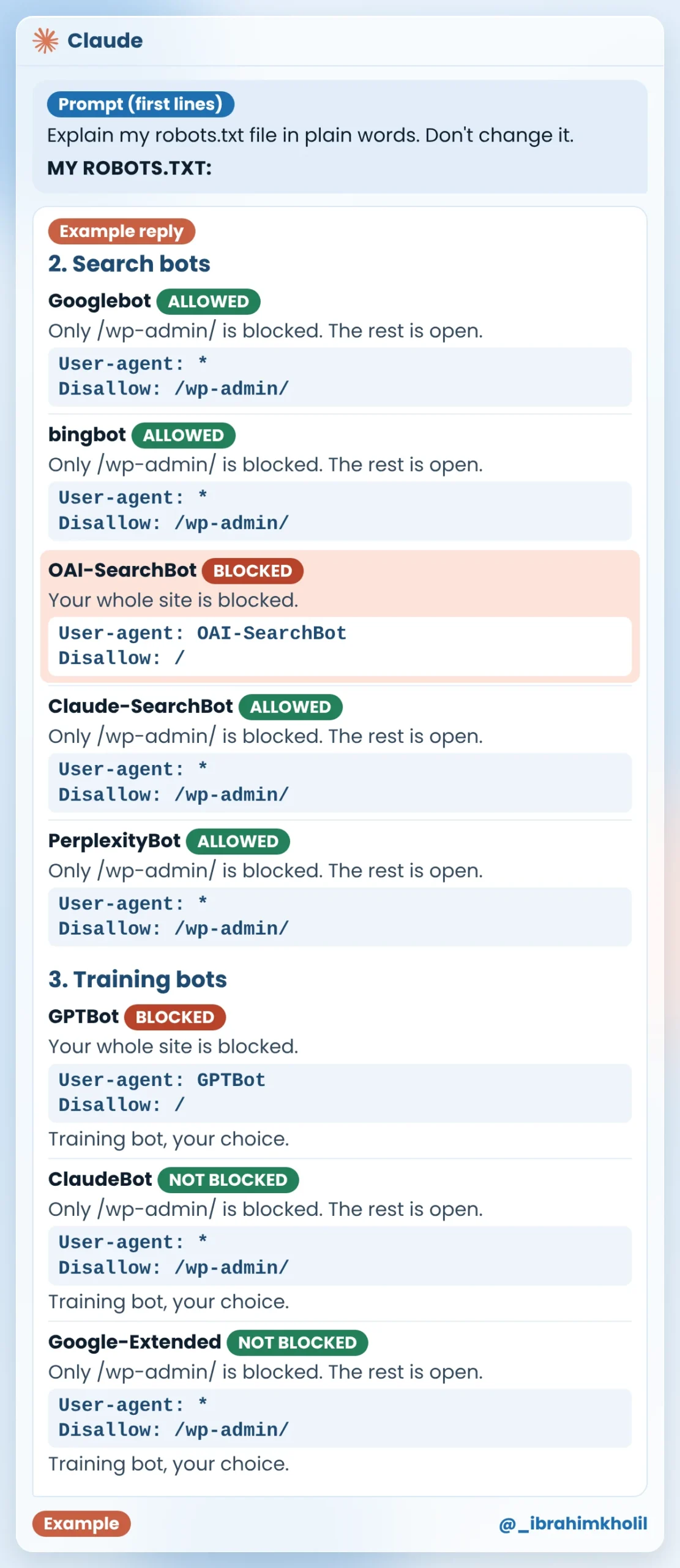
Ines’s fix (Example): she had copied the OAI-SearchBot rule from a forum, thinking it was about training. She wants her post to show up in ChatGPT search. Ines uses Rank Math, so she opened Rank Math SEO, then General Settings, then Edit robots.txt, and deleted those two lines. She doesn’t want her lessons used to train AI models, so she kept the GPTBot rule.
Message for your host (step 4 fallback): copy it, fill in your domain and the lines, and send it to your host’s support.
Hi, please remove these lines from the robots.txt on my site [YOUR DOMAIN]: [PASTE THE LINES TO REMOVE]
Please keep every other line as it is, and tell me when it's done.
Watch out
Once bots can reach the post, the content is what counts. Google’s newer guide has a section on “non-commodity” content: information that isn’t the same as on every other page about the topic.
Think about what a chatbot can already write. It can write the general version of most how-to posts in seconds. What it can’t write is what you do, what you’ve seen and what you’ve tested. That’s also the part your reader can’t get anywhere else.
Copy this prompt (Only I know this):
Read my blog post below. Don't rewrite it.

MY POST:
[PASTE YOUR POST]

1. Quote up to 3 lines that any blog on this topic could have written.
2. Under each line, ask me one question that only I can answer from my own work: something I do, have seen or have tested.
3. Don't suggest answers. Don't add facts.
What you should see: up to three quoted lines, each with one question about your own work. Example reply for Ines’s post:
1. “Many players change their strings every few months.”
How do you decide when your students’ strings need changing?
2. “Your strings may need changing if they sound dull or look dirty.”
What do you check on a student’s guitar to tell that the strings are worn?
3. “Old strings can also be harder to tune.”
Have you seen this in your lessons? What happened?
Ines answered the first two questions from her own lessons. She’d never paid attention to tuning problems, so she had no real answer to the third, and she deleted that line. The image shows the lines before and after her answers went in.
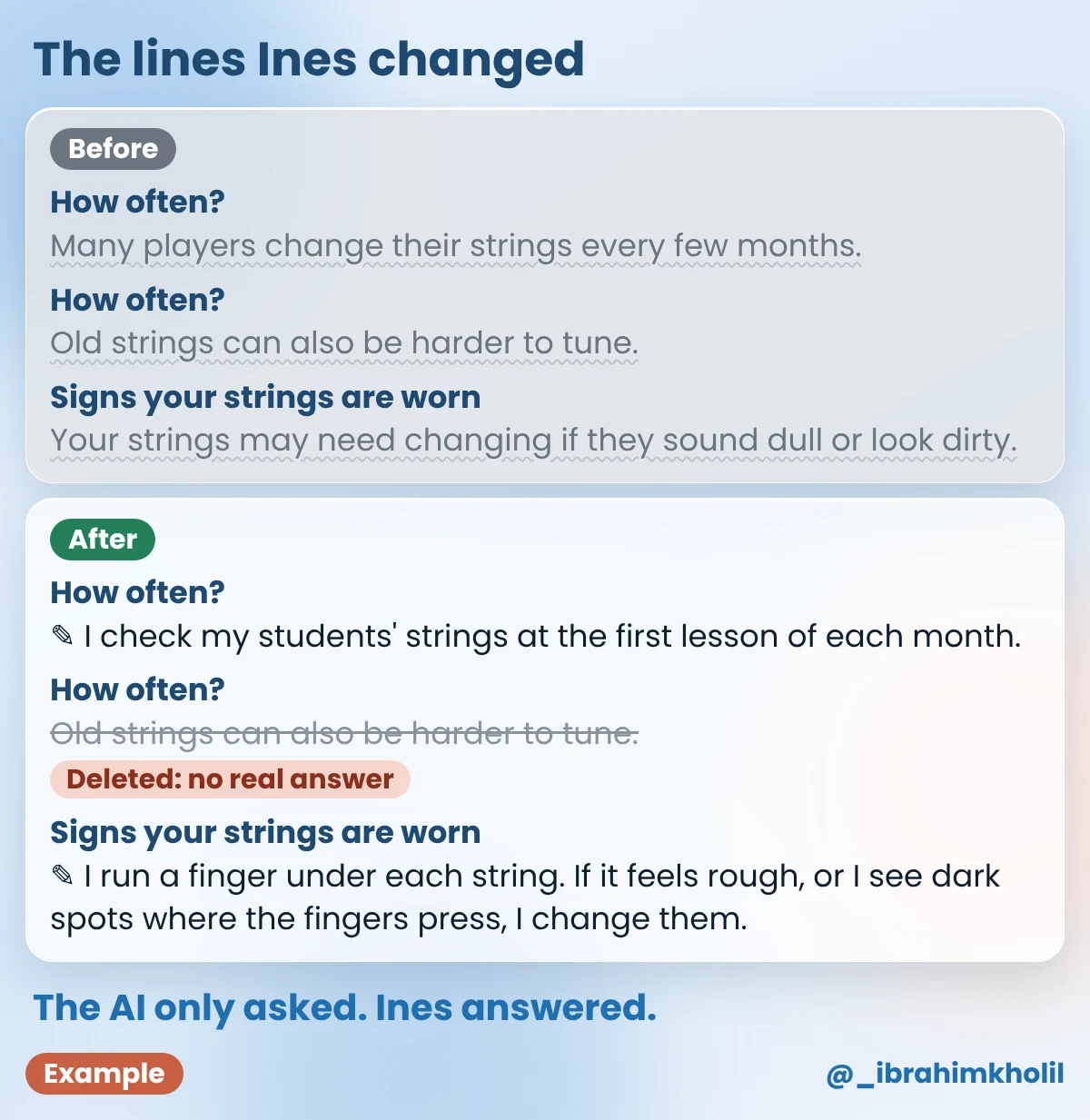
Notice who wrote the new lines: Ines, not the chat assistant. The AI only pointed at the generic lines and asked questions. The facts that make the post worth citing still have to come from you.
This way is for your reader, not a trick for AI. Google’s guide doesn’t ask you to chop posts up for AI, and I found no official source saying that an FAQ or an answer-first opening makes AI tools cite you more.
It’s here because of what happens after the click. A reader can arrive from Google, from a link in an AI answer or from your newsletter. Wherever they come from, they came with one question. If the first lines don’t answer it, they leave.
Copy this prompt (Read it as a beginner):
Read my blog post as a beginner who searched for this question:
[THE QUESTION MY POST ANSWERS]
Don't rewrite anything.

MY POST:
[PASTE YOUR POST]

Answer as that beginner:
1. Do the first 3 sentences answer my question? Say yes or no, and why.
2. Which heading doesn't tell me what's under it? Quote it.
3. What 3 questions would I still have after reading?
Ines used her title as the question: “How often should you change guitar strings?”
What you should see: three short answers, written as your reader. Example reply for Ines’s post:
1. No. The first 3 sentences say strings matter, but they never say how often to change them.
2. “Final thoughts”. It doesn’t tell me what’s in that part.
3. Can I change the strings myself? Which strings should I buy? Do I need to change all six at once?
Ines’s fixes (Example): she rewrote the intro from her own Way 3 answers. Now it starts with the answer:
I check my students’ strings at the first lesson of each month. I change them when they feel rough or show dark spots where the fingers press.
She replaced “Final thoughts” with a heading that says what’s under it, “Quick answers”, and turned that part into a short FAQ:
| Question | Ines’s answer (Example) |
|---|---|
| Can I change the strings myself? | Yes. I show every new student how at their second lesson. |
| Do I need to change all six at once? | In my lessons, I change all six at once. |
She left out “Which strings should I buy?” The answer depends on the guitar, and she’d rather not guess in a post for every student.
Google’s guidance on using generative AI content allows AI help, as long as the content meets its spam policies. Mass-producing pages that add nothing for readers can count as “scaled content abuse”. Coverage of a later update says Google also advises checking AI output by hand before you publish, titles and alt text included.
That’s a good habit for any post, AI-assisted or not. One wrong number is enough to make a reader doubt the rest.
Copy this prompt (Check my claims):
List every factual claim in my blog post: numbers, names, dates and "this works" statements.
Don't rewrite anything.

MY POST:
[PASTE YOUR POST]

After each claim, write one label:
MINE if it reads like the writer's own experience,
SOURCE? if it needs a source,
CHECK if it might be wrong or out of date.
What you should see: a list of claims, each with one label. Example reply for Ines’s updated post:
| Claim in Ines’s post | Example reply |
|---|---|
| I check my students’ strings at the first lesson of each month. (intro and How often?) | MINE |
| I change them when they feel rough or show dark spots where the fingers press. (intro) | MINE |
| I run a finger under each string. If it feels rough, or I see dark spots where the fingers press, I change them. (Signs) | MINE |
| Coated strings last much longer than plain ones. | SOURCE? |
| I show every new student how at their second lesson. | MINE |
| In my lessons, I change all six at once. | MINE |
Ines’s fix (Example): she’d read the coated strings line somewhere years ago and couldn’t find a source, so she deleted it. Her title and alt text already matched the post.
A sitemap is a file that lists the pages on your site, so search engines can find them. Bing wrote about sitemaps in AI-powered search and recommends listing yours in robots.txt.
Menu names in these tools may look a little different on your screen.
If your theme shows an “updated” date, change it only when the content really changed, like Ines’s post today. I found no official source saying a fresh date gets a post cited in AI answers, so don’t change dates for that reason. My guide on how to update old blog posts covers dates, titles and links in more detail.
The honest part
What you do control is everything on your side: the settings, the file and the words. That’s the part these checks cover.
You don’t need to optimize content for AI search across your whole blog at once. Pick one post that answers a clear question and still matters to your readers. Then work through the five ways in order, because each one builds on the last: Way 4 uses your Way 3 answers, and Way 5 checks them all.
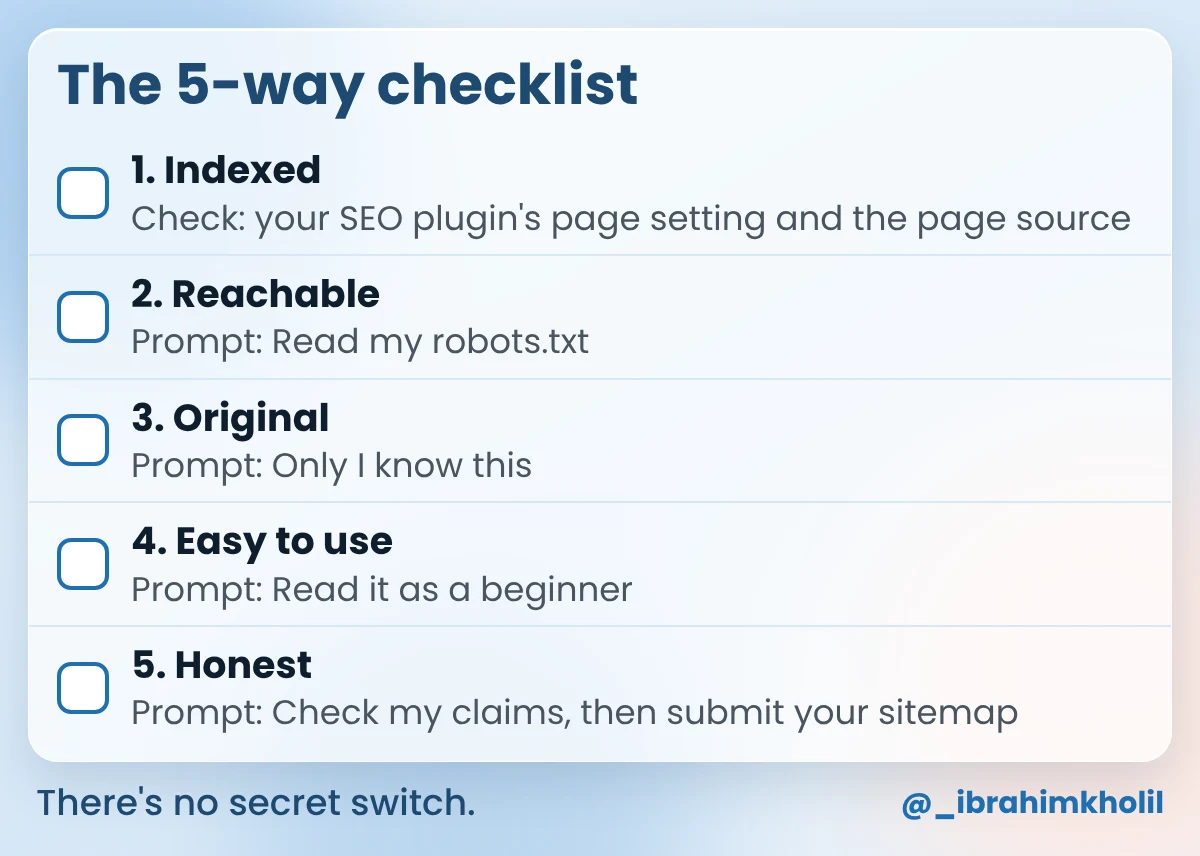
The second post goes faster. The WordPress Reading setting, robots.txt and your sitemap cover the whole site, so on the next post you only need Way 1’s page checks and Ways 3 to 5.
It means making sure AI search tools, like Google’s AI Overviews and ChatGPT search, can reach your page and find something worth showing. Google says its AI features need no special optimization: the page must be indexed and allowed a snippet. The rest is useful, original, honest content.
Trade coverage of Google’s newer guide reports that Google says no: llms.txt, special schema, Markdown copies and chunking aren’t needed for its AI features. Check Google’s guide for the current wording. Other AI companies may say other things, so check their pages too.
That’s your choice. GPTBot collects text for training OpenAI’s models. OAI-SearchBot is the bot that shows sites in ChatGPT search, and OpenAI says you can block GPTBot while allowing OAI-SearchBot.
Generative engine optimization (GEO) is a newer name for getting content into AI answers. Coverage of Google’s guide sums up Google’s view as: GEO is still SEO. The same basics apply: indexable pages, original content and honest facts.
No. Google’s AI features page asks for an indexed page that can show a snippet, not a Search Console account. Search Console is still useful, because its inspect tool tells you if Google has your page.
Nobody can promise that. Google shows AI Overviews only when it decides they help, and each AI tool picks its own sources. The five checks make sure nothing on your side blocks you and that your post holds something worth citing.
I found no official source that says so. Change the “updated” date only when the content really changed. A new date on an unchanged post tells readers something that isn’t true.
AI search didn’t bring a new set of secret rules. Google’s own pages describe a post that bots can reach, that holds what only you know, and that tells the truth.
If you only have a few minutes today, open yourdomain.com/robots.txt and run the Read my robots.txt prompt. One wrong line there affects every post on your site.
My free AI Workflow Starter Kit has more copy-ready workflows like the prompts in this post.

12+ years in digital marketing. I test every workflow on real work before I share it, free tools first.
More about me →Steps, a copy-paste prompt and the limits I found. Free, nothing to buy.
Get the Free Starter Kit →