Physical Address
304 North Cardinal St.
Dorchester Center, MA 02124
Physical Address
304 North Cardinal St.
Dorchester Center, MA 02124

Of these 7 AI keyword research tools, 2 are AI chats that suggest keyword ideas and 5 hold real search data, 3 of them free from Google. Keyword research with AI in the loop: two copy-ready prompts, a free route that works with Keyword Planner's ranges, and a worked example with real Ubersuggest numbers.
You ask an AI chat for blog keywords, and it gives you twenty in a few seconds. They all sound good. You pick one, spend two evenings on the post, and then nothing happens, because almost nobody types that phrase into Google. That’s the catch with AI keyword research tools: some of them guess, and some of them count.
The guessing kind is easy to reach. It’s the chat you already use. The counting kind shows real search numbers, but its screens are full of short labels like SD, KD and CPC, so many small bloggers close the tab and go with the guess.
The fix is to stop asking one tool to do both jobs. A chat assistant is good at ideas. A tool with real search data is good at numbers. Ideas from AI, numbers from data.
That’s why only 2 of the 7 tools here are AI chats: Claude suggests the ideas and ChatGPT helps you choose. The other 5 hold real search data, and 3 of those are free Google tools. So it’s keyword research with AI in the loop, not AI alone. The free route uses three of the seven, from first idea to one checked keyword for your next post.
In short
What you need
On this page
“ChatGPT told me this keyword gets 2,000 searches a month.” Maybe it does. But a normal chat doesn’t see Google’s search counts. It writes what sounds likely, and a number that sounds likely is still a guess.
So split the work in two. A chat assistant is good at thinking like your reader: it turns their questions into phrases they might type. A keyword tool is good at the numbers: how often people search a phrase each month (that’s search volume) and how hard it is to reach page 1 for it (that’s difficulty; lower is easier).
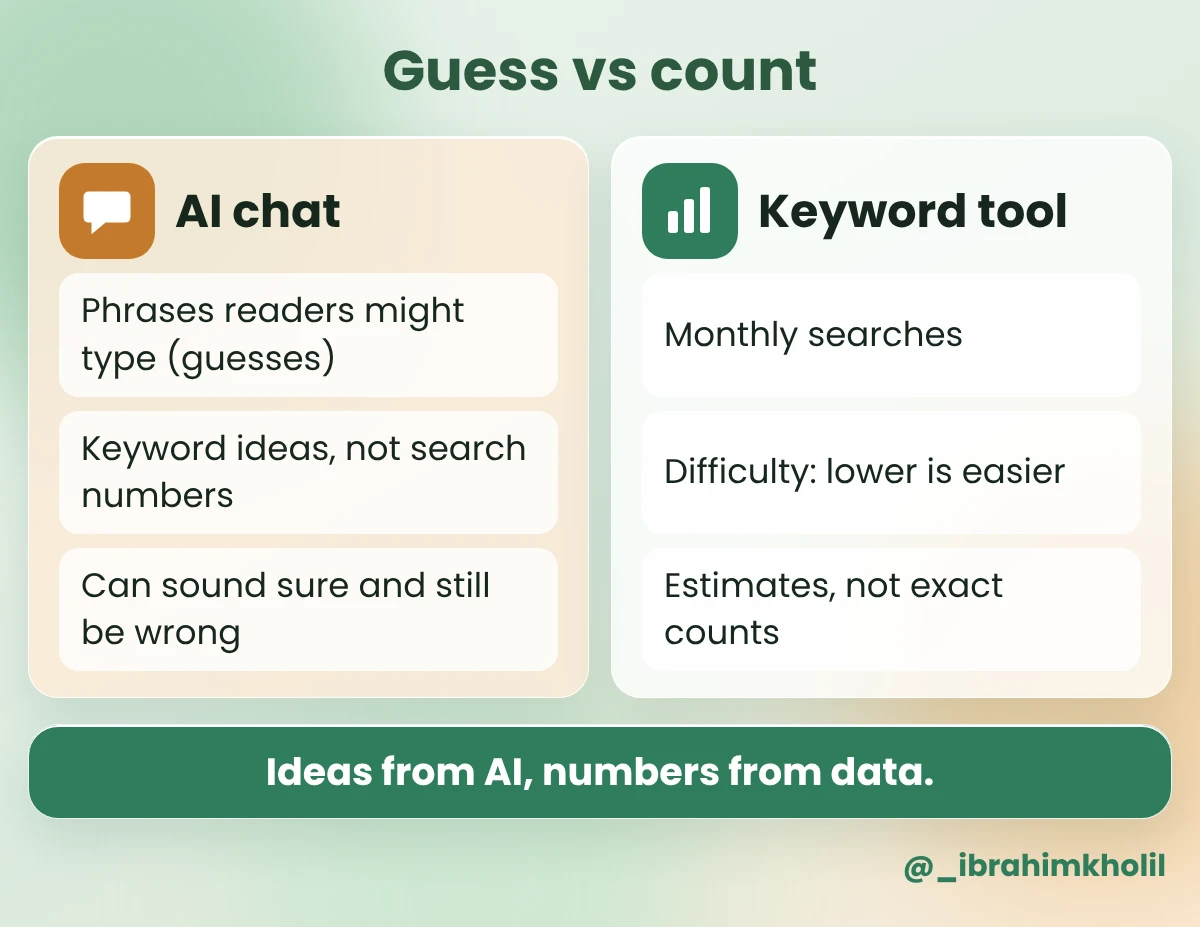
Even the numbers from a keyword tool are estimates, not exact counts, and two tools often show different numbers for the same phrase. Use one tool’s numbers for your whole list, so you compare like with like (my suggestion, not a rule).
This is the same rule I use for every SEO task in my guide on how to use AI for SEO: the ideas can come from AI, the numbers never do.
Most “best tools” lists rank tools by how many features they have. A small blogger needs three answers instead: Does it give real numbers or guesses? Can I start for free? And what job does it do for me today? Here are the seven, in the order you’d use them. Two are AI chats (rows 1 and 7). The other five hold search data.
| # | Tool | Kind | What it tells you | Free to start? |
|---|---|---|---|---|
| 1 | Claude | AI chat | Phrases readers might type (guesses) | Free plan; see its pricing page |
| 2 | Google Keyword Planner | Search data | Monthly searches (may be a range) | Free; runs inside Google Ads |
| 3 | Google Search Console | Your site’s data | Searches your pages already show up for | Free for your own site |
| 4 | Google Trends | Search data | Whether interest is rising or falling | Free |
| 5 | Ubersuggest | Search data | Search volume and SEO difficulty | Check its pricing page |
| 6 | Semrush | Search data | Volume, difficulty and much more | Check its pricing page |
| 7 | ChatGPT | AI chat | Sorts your checked list and picks one | Free plan; check its site |
How to pick today (my suggestion):
Where the examples come from
The examples below use a blog that teaches small bloggers to use AI. The keyword ideas in Claude’s reply are an Example of what you might get. The search numbers are real: Ubersuggest estimates for the US, checked on 13 November 2026.
A blank keyword tool asks you to type a phrase, and you don’t know which phrase to try. That’s where a chat assistant helps most. Give it the questions your readers really ask, and it turns them into phrases they might type into Google.
The prompt below tells it not to invent numbers. Every phrase it gives you is a guess until a data tool checks it.
Copy this prompt (Keyword ideas):
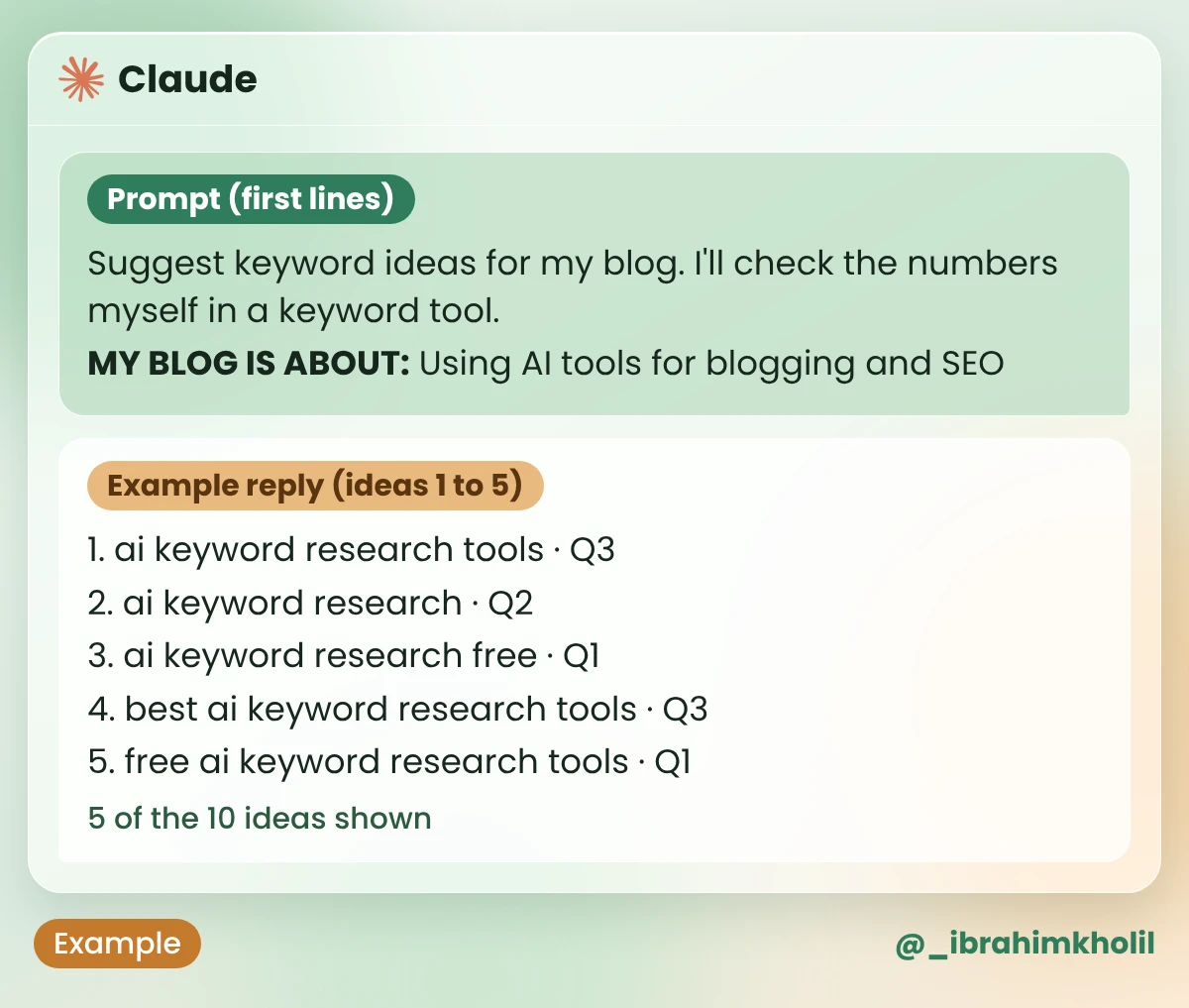
Suggest keyword ideas for my blog. I'll check the numbers myself in a keyword tool.

MY BLOG IS ABOUT: [YOUR TOPIC, IN ONE LINE]
MY READERS: [WHO THEY ARE]
QUESTIONS THEY ASK ME: [PASTE 3 TO 5 REAL QUESTIONS, NUMBERED Q1, Q2, Q3...]

DO THIS
1. List 10 search phrases my readers might type into Google. Use their everyday words.
2. Make most of them 3 words or longer.
3. After each phrase, write which of my questions it comes from (Q1, Q2...).
4. Use every question at least once.

RULES
- Don't give search volumes, difficulty scores or rankings. You can't see them, so don't guess.
- End with: "All 10 are guesses. Check each one in a keyword tool."| Prompt line | Input (Example) |
|---|---|
| My blog is about | Using AI tools for blogging and SEO |
| My readers | Small bloggers who do their own SEO |
| Questions they ask me | Q1. Is there a free AI tool for keywords? Q2. Can ChatGPT find keywords for me? Q3. Which keyword tool should I start with? |
What you should see: 10 phrases, each tagged with one of your questions, no numbers, and the “All 10 are guesses” line at the end. The image shows ideas 1 to 5. The table under it shows ideas 6 to 10.
| # | Example reply (ideas 6 to 10) | From |
|---|---|---|
| 6 | can chatgpt do keyword research | Q2 |
| 7 | chatgpt prompt for keyword research | Q2 |
| 8 | keyword research with ai for beginners | Q3 |
| 9 | free keyword tool for bloggers | Q1 |
| 10 | how to use ai to find keywords | Q2 |
| All 10 are guesses. Check each one in a keyword tool. | ||
Every question was used: Q1 led to ideas 3, 5 and 9, Q2 to ideas 2, 6, 7 and 10, and Q3 to ideas 1, 4 and 8. There isn’t a single number in the reply, because the prompt said not to guess. Now the list goes to the tools that count.
You have 10 phrases and no idea which ones people actually search. Paying for a big SEO tool just to find out feels like too much for a small blog.
Google has three free tools that answer different parts of that question. Start with the one that fits your blog today, not all three.
Keyword Planner is Google’s own keyword tool. It lives inside Google Ads, the place where people buy ads, but you can use it to look up searches without running an ad.
What you should see: a row for each phrase with its monthly searches. If you don’t run ads, you may see a range, such as “100 to 1K”, instead of one number. A range is still enough to sort the strong ideas from the empty ones.
If your blog has been live for a while, people already find it through searches you never planned. Search Console shows you those searches. Its Performance report lists clicks, impressions (how often your page appeared in results), click-through rate and average position for your pages and searches.
What you should see: a table of the searches people typed before they saw your pages, with clicks and impressions next to each one. A brand-new site may show little or nothing yet. That’s normal; use Keyword Planner until it fills up.
Good to know
A search that already shows one of your posts often doesn’t need a new post. It may need a better version of the old one. My guide on how to update old blog posts uses the same Performance report to find them.
A phrase can have decent searches today and be fading fast. Google Trends shows the direction. It shows interest compared with the phrase’s own busiest time, not a number of searches.
What you should see: a line chart over time. Small phrases may show “not enough data”. That only means the phrase is too small for Trends, so check it in Keyword Planner instead.
Keyword Planner tells you how often people search. It doesn’t tell you how hard it is for a small blog to show up. For that, you need a difficulty score, and that’s what these two tools add.
Both sell paid plans. What you can do for free changes, so read each tool’s pricing page before you sign up.
What you should see (real numbers): here are Ubersuggest’s estimates for ideas 1 to 5 from Claude’s example reply, US, checked on 13 November 2026.
| Phrase | Monthly searches (US) | SEO difficulty |
|---|---|---|
| ai keyword research tools | 170 | 6 |
| ai keyword research | 140 | 27 |
| ai keyword research free | 10 | 27 |
| best ai keyword research tools | 0 | 4 |
| free ai keyword research tools | 0 | 4 |
Look at the last two rows. Both sound like strong keywords, and an AI chat would happily suggest them. The data shows almost nobody types them. That’s the whole reason to count before you write.
Semrush is a large SEO suite. Keyword volume and difficulty are one part of it, next to many other tools. If you blog for clients or SEO is most of your job, it may be worth a look. For one small blog, start with the free tools above, and come back when you need more.
What to check before you sign up: what its free account includes today, and whether the plan you’d need fits your budget. Both are on its own pricing page.
Now you have a list with numbers, and you freeze. One phrase has more searches, another is easier, a third sounds better. This is a good job for an AI chat, because this time it works with real numbers instead of guessing them.
I use ChatGPT here so you see both assistants, but Claude does this job just as well. Use the one you already have.
Copy this prompt (Pick one):
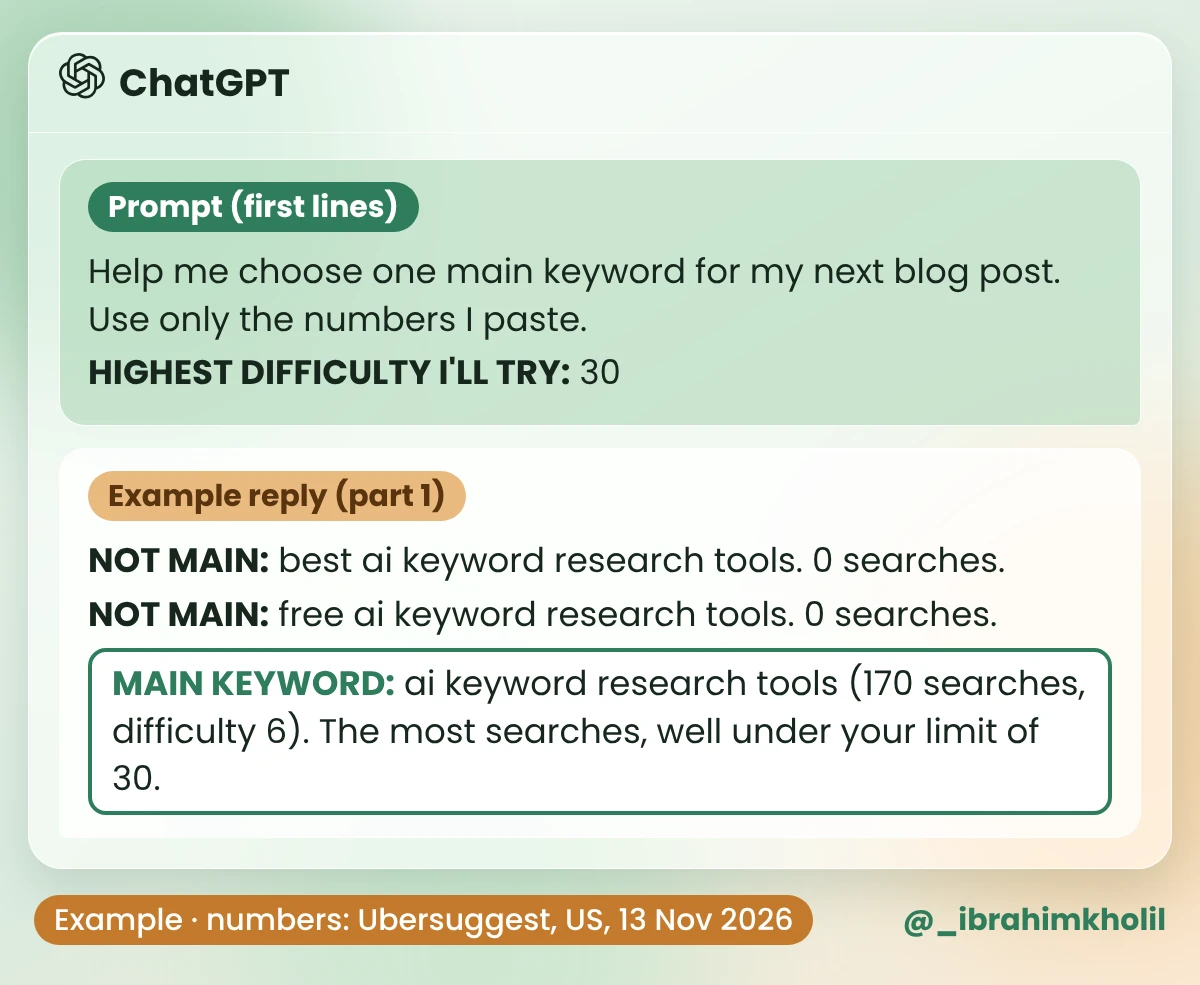
Help me choose one main keyword for my next blog post. Use only the numbers I paste.

MY BLOG IS ABOUT: [YOUR TOPIC, IN ONE LINE]
MY KEYWORD LIST (phrase, monthly searches, difficulty if my tool shows it):
[PASTE YOUR ROWS. A RANGE LIKE "100 TO 1K" IS FINE.]
HIGHEST DIFFICULTY I'LL TRY: [A NUMBER, OR NONE IF MY TOOL SHOWS NO DIFFICULTY]

DO THIS
1. Mark NOT MAIN every phrase with 0 searches (or a range that starts at 0), or a difficulty above my limit. Say why in a few words.
2. From the rest, pick ONE main keyword: the most searches with a difficulty under my limit. If I gave ranges, compare the ranges. If I wrote NONE, pick from the highest search range and prefer the longer, more specific phrase.
3. Say how the other phrases, NOT MAIN ones too, could be used as a heading or an FAQ question in the same post.
4. If I wrote NONE, end with: "No difficulty score. Look at page 1 on Google before you write."

RULES
- Don't change or add numbers. Don't guess a difficulty I didn't give.
- If two phrases mean nearly the same thing, say so.
Input (Example): the blog line from Tool 1, the 5 real rows from the Ubersuggest table above, and a limit of 30.
What you should see: the NOT MAIN phrases with a reason, one main keyword, and a use for every other phrase. The image shows the first part of the reply. The table under it shows the rest.
| Phrase | Example reply (the rest) |
|---|---|
| ai keyword research (140, difficulty 27) | Under your limit. Use it in a heading. |
| ai keyword research free (10, difficulty 27) | Few searches. Use it as an FAQ question. |
| best ai keyword research tools (NOT MAIN) | Zero searches, but readers may still ask it. Use it as an FAQ question. |
| free ai keyword research tools (NOT MAIN) | Means nearly the same as “ai keyword research free”. Answer both in one FAQ question. |
All five rows got a job, and no number changed. The main keyword is “ai keyword research tools”: the most searches of the five (170) and a difficulty of 6, well under the limit of 30. The two rows with a lower difficulty (4) have 0 searches, so they can’t be the main keyword. On the free route with NONE, you’d get the same kind of reply without difficulty numbers, plus the page-1 line at the end. “ai keyword research tools” is also the main keyword of the post you’re reading, and the other phrases became its headings and FAQ.
Watch out
An AI chat can sound sure and still be wrong, and that includes numbers. If a chat gives you a search volume, ask which tool it came from. If it can’t name one, treat it as a guess. And remember that keyword tools give estimates, not exact counts. A low number doesn’t make a phrase useless. It may still be a good heading or FAQ question, as the example shows.
You don’t need all seven tools tonight. You need one idea tool, one data tool and one decision. Here’s the short route:
How you know it worked: your note has one main keyword with a real number next to it, from a tool you can name, plus two or three phrases for headings. Then turn it into a plan with my guide to the AI content brief, and into headings with the AI blog outline generator steps.
Yes, if you mix two kinds. Claude and ChatGPT have free plans for keyword ideas; check their sites for what’s included today. Google Keyword Planner, Google Search Console and Google Trends are free for checking real search data. Together they cover ideas and numbers without a paid tool.
It can do half of it. ChatGPT is good at suggesting phrases your readers might type and at sorting a list you’ve already checked. A normal chat doesn’t see Google’s search counts, so any volume it gives you is a guess unless it names the tool the number came from.
Of the 7 in this post, 2 are AI chats for ideas (Claude and ChatGPT) and 5 hold real search data. The best set is one of each kind. For a new blog with no budget, my suggestion is Claude plus Google Keyword Planner. If your blog already has posts, add Google Search Console. Move to Ubersuggest or Semrush when you want difficulty scores on the same screen, after you’ve read their pricing pages.
Not always. If you don’t run ads, it may show a range, such as “100 to 1K”, instead of one number. A range is still enough to tell a phrase people search from one they don’t. For a closer number and a difficulty score, check the same phrase in Ubersuggest or Semrush.
Look at the difficulty score in a keyword tool; lower is easier. My suggestion is 30 or lower; that’s the limit I set for my own posts, not a rule from Google. Each tool uses its own scale, so compare phrases using one tool.
Don’t make it the main keyword of a post. But don’t throw it away either: readers may still ask it in those words, so use it as a heading or an FAQ question inside a post about a bigger phrase. Tool numbers are estimates, so a zero can also mean the number is too small to show.
The two evenings spent on a post nobody searches for are the real cost of skipping the check. Counting takes a few minutes. Guessing can take a whole post.
Start with step one tonight: write down 3 questions your readers asked you this month. That’s all the Keyword ideas prompt needs.
My free AI Workflow Starter Kit has more copy-ready workflows like this one.

12+ years in digital marketing. I test every workflow on real work before I share it, free tools first.
More about me →Steps, a copy-paste prompt and the limits I found. Free, nothing to buy.
Get the Free Starter Kit →