Physical Address
304 North Cardinal St.
Dorchester Center, MA 02124
Physical Address
304 North Cardinal St.
Dorchester Center, MA 02124
An AI blog outline generator gives you generic headings when all it gets is a keyword. Give it your readers' real questions instead. Here are 5 steps with copy-paste prompts, worked examples with the math shown, and the common mistakes to avoid.
You sit down to write a post about starting a blog. An hour later you have 900 words, and the question your readers actually asked, “how much will this cost me?”, is buried in paragraph eleven.
That usually isn’t a writing problem. It’s a planning problem. The post started without a clear order of questions to answer, so it wandered.
An AI blog outline generator can fix this, but only if you give it the right material. Type in a keyword and you’ll get the same generic headings everyone else gets. Give it the questions your readers have asked, and you get a plan you can actually write from.
By the end of this article you’ll know what a useful outline contains, why keyword-only prompts fall flat, and how to build a better outline in five steps using ChatGPT or Claude. Every step has a prompt you can copy and a worked example, so you can see exactly what to expect.
The short version
What you need
On this page
A blog outline is the plan for your post: the headings, the order they appear in, and a note on what each section should cover. It’s short on purpose. The detail belongs in the draft.
Most useful outlines have the same six parts, and each one has a single job:
| Part | Its job |
|---|---|
| Headline | Tells the reader what they’ll get |
| Promise | Two lines up top: their problem, then what the post gives them |
| H2 headings | One per reader question, in the order they need the answers |
| Experience slots | A marked spot in each section for something only you know |
| FAQ | Short questions the H2s don’t cover |
| Next step | One line telling the reader what to do when they finish |
Most people don’t read a web page from top to bottom. Nielsen Norman Group’s eye-tracking research describes a “layer-cake” pattern, where readers jump from heading to heading and only stop on sections that look relevant to them (NN/g, F-shaped reading pattern).
So your H2s are doing two jobs at once. They organize your writing, and they’re the signposts a skimming reader uses to decide whether to stay. A heading like “Benefits of Blogging” gives them nothing to grab onto. “How much does a blog cost per year?” tells them exactly where their answer is.
Plenty of websites market themselves as an AI blog outline generator, but you don’t need a special tool. ChatGPT and Claude can both build a solid outline in a normal chat. Google’s own guidance on generative AI notes it can be useful for adding structure to original content (Google Search Central), and an outline is exactly that.
The catch is what you feed it.
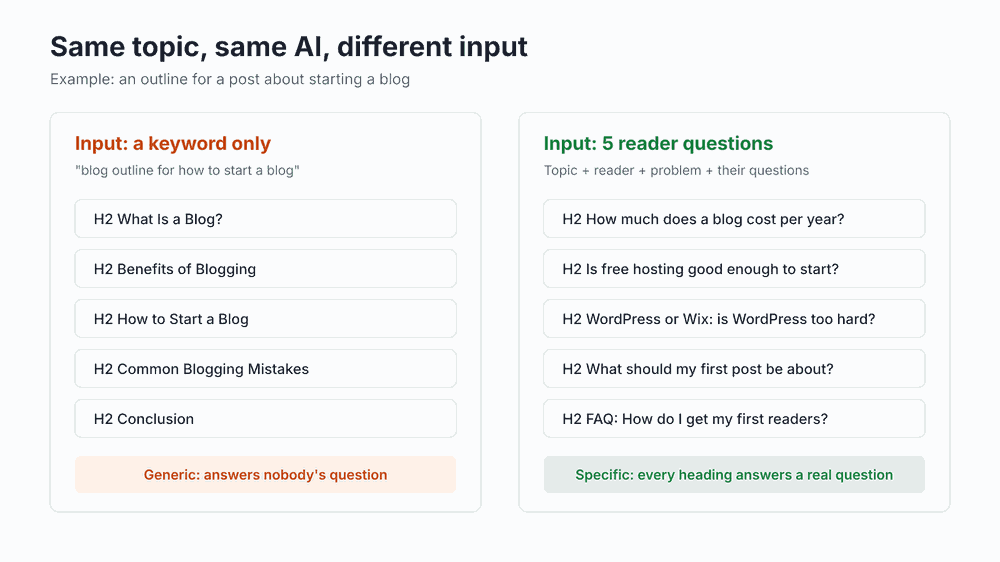
When you type “blog outline for how to start a blog,” the AI has to guess who’s reading and what they’re worried about. With nothing to go on, it falls back on the most common headings for that topic: What Is a Blog, Benefits, Mistakes, Conclusion.
Those headings aren’t wrong. They’re just not written for anyone in particular, which is why thousands of posts already use them.
The fourth input does most of the work. Real questions turn directly into headings people want answered, so the AI no longer has to guess.
It’s easy to skip outlining because it feels like extra work. Here’s a quick way to check whether it pays off for you. The numbers below are a hypothetical example; plug in your own.
| Hypothetical blogger | Calculation | Result |
|---|---|---|
| Restructuring drafts that wandered | 4 posts a month × 45 minutes | 180 minutes (3 hours) a month |
| Outlining first instead | 4 posts a month × 20 minutes | 80 minutes a month |
| Difference | 180 − 80 | 100 minutes a month, or 20 hours a year |
The math only works if outlining actually removes most of the restructuring. If your drafts rarely wander, you’ll save less. If you regularly rewrite whole posts, you’ll save more.
Outline or content brief?
An outline is your headings and their order. A content brief adds the target keyword, search intent and sources. If you want the full plan, my guide to the AI content brief shows how to build one around the outline you’ll make here.
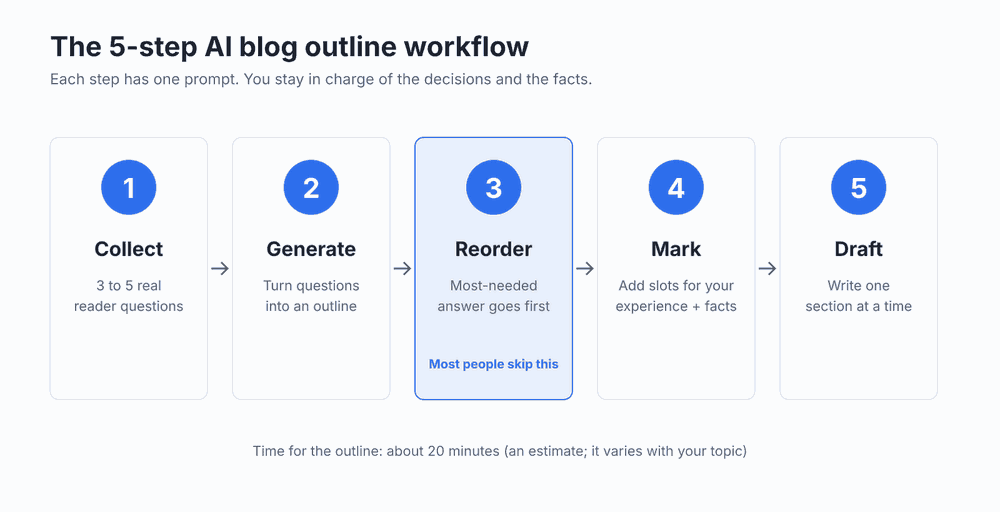
Here’s how the five steps fit together. We’ll use one example the whole way through: a post for beginners about starting a blog without wasting money.
Your readers have already told you most of what your post needs to cover. The problem is that their questions are scattered across comments, inboxes and DMs, mixed in with “thanks!” and “love this.”
This step pulls them into one clean list. The AI only sorts what you give it; it doesn’t add questions of its own.
Questions from search and communities are fine to use. Just don’t present them as messages from your own readers if they aren’t.
Keep the original wording too. “Is WordPress too complicated?” tells you far more about the reader’s worry than “WordPress vs Wix” does.
Pull the questions out of these messages from my readers. Private details are removed.

MESSAGES:
[PASTE 3 TO 5 MESSAGES OR SEARCH PHRASES]

DO THIS
1. List every question, in the readers' own words.
2. If one message holds two questions, split them.
3. If a line is a search phrase, rewrite it as the question a reader would ask.
4. If two lines ask the same thing, list it once and note how many times it was asked.
5. Put the most-asked questions first.

RULES
- Don't add questions that aren't in the messages.
- Skip small talk and thanks.These are sample messages written for this article, the kind a beginner blogger might receive:
| # | Message (example) |
|---|---|
| 1 | “Thinking of starting a blog but I don’t want to spend money yet. Is free hosting OK to start?” |
| 2 | “How much does a blog actually cost per year? Every site says something different.” |
| 3 | “WordPress or Wix? WordPress looks so complicated.” |
| 4 | “I’ve got a blog name but no idea what to write first lol” |
| 5 | “Is it even worth paying for hosting if nobody reads it? How do people get readers?” |
The reply should look something like this:
| # | Example reply |
|---|---|
| 1 | Is free hosting good enough to start? (asked 2 times) |
| 2 | How much does a blog cost per year? |
| 3 | WordPress or Wix? Is WordPress too complicated? |
| 4 | What should my first post be about? |
| 5 | How do I get readers for a new blog? |
Message 5 contained two questions. The prompt split them: the hosting worry joined question 1, and “how do people get readers” became its own line. Five messages in, five clean questions out, and nothing invented.
A list of questions still isn’t an outline. It has no headline, no promise to hook the reader, and no ending that tells them what to do next.
The prompt below adds those parts and keeps your readers’ questions as the H2s. It also tells the AI to leave a visible gap wherever it would otherwise have to guess a fact.
Turn my notes into a blog outline. Use only what I give you.

TOPIC: [WHAT THE POST IS ABOUT, IN ONE LINE]
READER: [WHO IT'S FOR]
THEIR PROBLEM: [WHAT WORRIES THEM, IN ONE LINE]
REAL QUESTIONS: [PASTE YOUR LIST FROM STEP 1]
NEXT STEP FOR READERS: [WHAT YOU WANT THEM TO DO AFTER READING]

WRITE
1. 3 headline ideas, each under 60 characters.
2. A 2-line promise: their problem, then what they get.
3. One H2 per real question, in my order and in the readers' words. Under each H2, 2 short bullets on what the section should cover.
4. 3 FAQ questions a reader might also ask. Mark each one CHECK, because you're guessing.
5. One closing line that leads to my next step.

RULES
- Write only the outline, not the post.
- No "Introduction" or "Conclusion" headings.
- If a section needs a fact, price or number from me, write [YOUR ...] instead of guessing.| Prompt line | Example input |
|---|---|
| Topic | How to start a blog without wasting money |
| Reader | Beginners who want a first blog and haven’t paid for anything yet |
| Problem | They’re afraid of spending money and months on a blog nobody reads |
| Questions | The 5 questions from Step 1 |
| Next step | Get the free AI Workflow Starter Kit |
| Part | Example reply |
|---|---|
| Headlines | How to Start a Blog Without Wasting Money Starting a Blog? Answer These 5 Questions First Your First Blog: What It Costs and Where to Begin |
| Promise | You want to start a blog without paying for something nobody reads. Here’s what it costs, which platform to pick, and what to write first. |
| H2 1 | Is free hosting good enough to start? What free plans let you do When paying is worth it: [YOUR VIEW] |
| H2 2 | How much does a blog cost per year? The two costs you can’t skip Typical yearly total: [YOUR NUMBER] |
| H2 3 | WordPress or Wix? Is WordPress too complicated? Who each one suits What you’d pick: [YOUR PICK] |
| H2 4 | What should my first post be about? Answer a question you already get Example first post: [YOUR EXAMPLE] |
| H2 5 | How do I get readers for a new blog? Where first readers come from What worked for you: [YOUR EXPERIENCE] |
| FAQ | Do I need my own domain name? (CHECK) Can a new blog make money? (CHECK) How often should I post? (CHECK) |
| Closing | Want prompts that speed up the next steps? Grab the free starter kit. |
If the AI filled in a price or wrote “WordPress is the best choice,” ask it to replace those with gaps. That one rule saves you from most made-up facts later.
This is the step most people skip, and it’s the one that prevents the “900 words in and still no answer” problem from the start of this article.
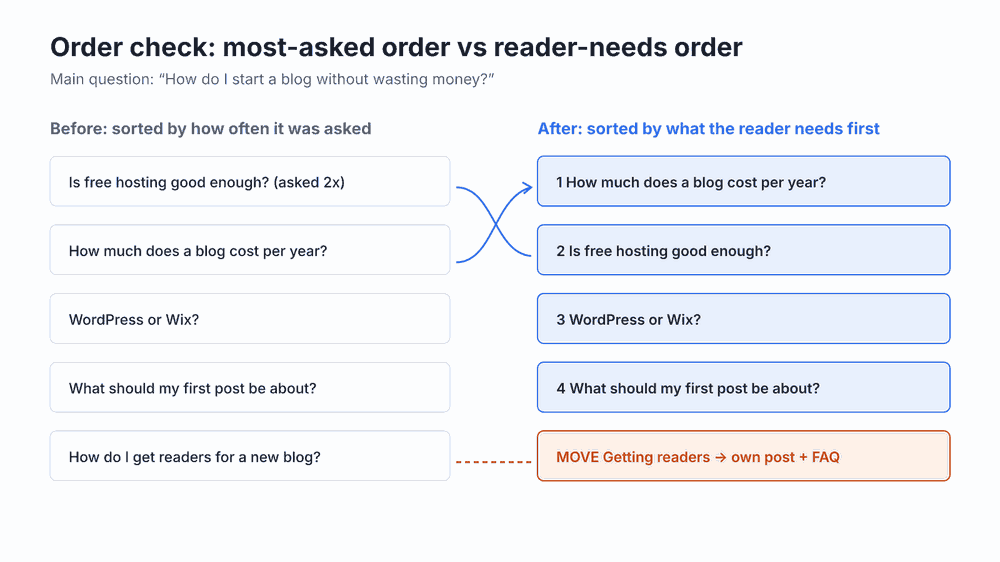
Right now your H2s are sorted by how often each question came up. That’s rarely the order a reader needs. Someone deciding whether to start a blog can’t judge free hosting until they know what paid hosting costs.
Put the answers in the wrong order and readers have to scroll past things they can’t evaluate yet. Some of them won’t bother.
Check the order of this blog outline. Don't rewrite it.

MY OUTLINE: [PASTE YOUR OUTLINE]
THE MAIN QUESTION OF THE POST: [ONE LINE]

DO THIS
1. Put the H2s in the order a reader needs them to answer the main question. Give a one-line reason for each.
2. If two H2s answer the same question, mark them MERGE.
3. If an H2 is big enough to be its own post, mark it MOVE and say why.
4. If an H2 doesn't help answer the main question, mark it CUT.

RULES
- Plain words.
- Don't add new H2s.For our example, the main question is “How do I start a blog without wasting money?” Here’s what a typical reply looks like:
| New order | Reason (example reply) |
|---|---|
| 1. How much does a blog cost per year? | Cost shapes every other decision. |
| 2. Is free hosting good enough to start? | The natural follow-up once they’ve seen the price. |
| 3. WordPress or Wix? | With a budget in mind, they can pick a platform. |
| 4. What should my first post be about? | The last decision before launch. |
| MOVE: How do I get readers? | A real question, but a whole post on its own. Answer briefly in the FAQ and link to a full guide. |
The MOVE is the most useful line here. A full section on getting traffic could easily double the post’s length and push the cost answer, the thing readers came for, further down. As a short FAQ answer with a link, it stays helpful without taking over.
You won’t agree with every suggestion, and you don’t have to. The check only sees your outline. You know your readers.
At this point, anyone could publish your outline. What makes the finished post yours is the part AI can’t know: what you’ve seen, tried, paid for or would do differently.
AI tools can state wrong facts confidently. Google’s guidance for sites using generative AI recommends reviewing and fact-checking AI-generated content before you publish it (Google Search Central). Marking every fact as “to check” during the outline stage makes that review hard to skip.
The same goes for experience. If you ask AI to suggest a story, it will happily invent one that sounds plausible. If you ask it to question you instead, the story comes from your memory, and that’s the only kind worth publishing.
Here is my blog outline:
[PASTE YOUR OUTLINE]

Under each H2, add:
- [MY EXPERIENCE: ...] One question that helps me remember a real moment from my own work that fits this section. Ask the question only. Don't suggest an answer.
- [FACT TO CHECK: ...] For every [YOUR ...] gap, every price and every claim that needs a source.

RULES
- Don't write stories or examples for me.
- Don't fill in any facts.
- Don't change my headings.| H2 | Added (example reply) |
|---|---|
| How much does a blog cost per year? | [MY EXPERIENCE: What did you spend in your first year, and what turned out to be a waste?] [FACT TO CHECK: current domain and hosting prices] |
| Is free hosting good enough to start? | [MY EXPERIENCE: Have you used a free platform? What made you stay or leave?] [FACT TO CHECK: what today’s free plans limit] |
| WordPress or Wix? | [MY EXPERIENCE: Which did you pick first, and would you pick it again?] [FACT TO CHECK: current plan features] |
| What should my first post be about? | [MY EXPERIENCE: What was your first post, and how did it do?] |
Answer the memory questions you can, in a few words. Skip any you can’t answer from something that really happened; a section with a clear answer and no story still works. Then delete any FAQ idea marked CHECK that no reader has actually asked, and pick your headline.
Even with a finished outline, four empty sections can feel like a lot. So don’t write the post. Write one section.
The prompt below makes the AI interview you about a single H2, then arrange your answers into a paragraph. You supply the substance; it handles order and grammar.
Help me write one section of my blog post in my own words.

MY OUTLINE: [PASTE YOUR OUTLINE]
THE SECTION: [THE H2 YOU WANT TO WRITE]

DO THIS
1. Ask me 3 short questions about this section. Then wait for my answers.
2. Turn my answers into the section. Keep my words. Fix only grammar and order.
3. If I didn't give a number or fact, write [FACT TO CHECK] instead of guessing.
Answer the questions the way you’d explain it to a friend. Typing works, but your phone’s voice input is often faster.
| Turn | Example |
|---|---|
| AI asks | 1. What does a beginner have to pay for? 2. What can they skip at first? 3. Is there a cost that catches people out? |
| Example answers | 1. “A domain and hosting. That’s it.” 2. “Premium themes, plugins, email tools. All of that can wait until you have readers.” 3. “Renewal prices. The first year is cheap; the second often isn’t.” |
| Section it returns | To start a blog, you need to pay for two things: a domain name and hosting. Premium themes, plugins and email tools can wait until you have readers. Before you pay, check the renewal price, because the first year is often much cheaper than the second. [FACT TO CHECK: current domain and hosting prices] |
Every sentence came from the answers. The AI added nothing and flagged the one number it didn’t have. Now that section needs a real price, and this is where showing the math makes it far more useful to the reader.
Say a host advertises $3 a month for the first year and $10 a month on renewal, and a domain costs $15 a year. These are hypothetical prices for illustration; always check your host’s current pricing page.
| Year | Hosting | Domain | Total |
|---|---|---|---|
| Year 1 | $3 × 12 = $36 | $15 | $51 |
| Year 2 | $10 × 12 = $120 | $15 | $135 |
| Two years | $156 | $30 | $186, about $7.75 a month |
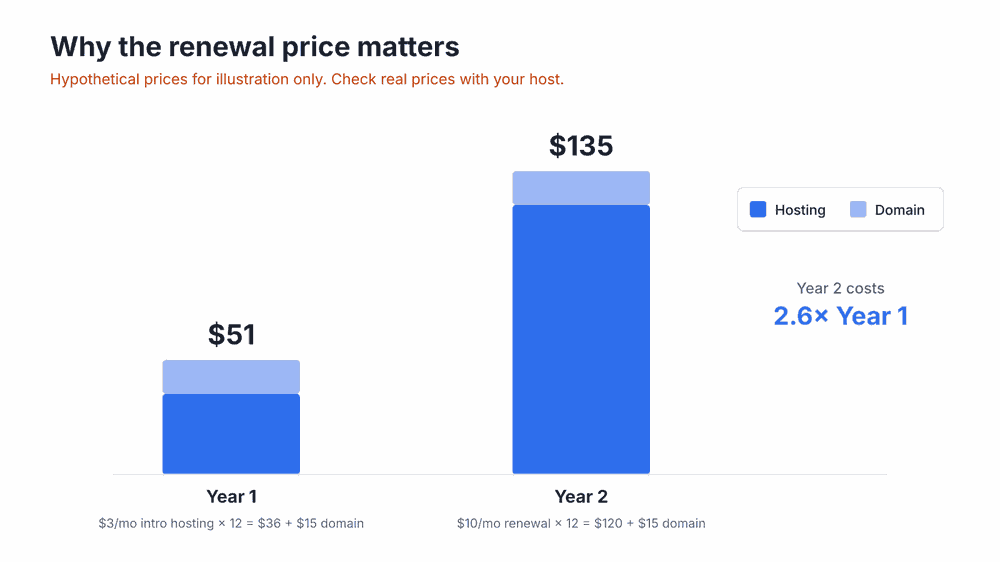
The advertised “$3 a month” works out to about $7.75 a month over two years once renewal kicks in. That single calculation answers the reader’s real question (“what will this actually cost me?”) far better than a list of plan names would.
Most outline problems trace back to a handful of habits. Here’s what each one leads to, and the quick fix.
| Mistake | What happens | Fix |
|---|---|---|
| Prompting with a keyword only | Generic headings that match thousands of other posts | Add your reader, their problem and real questions |
| Keeping the AI’s guessed facts | Wrong prices or claims end up published under your name | Require [YOUR …] gaps and check each one |
| Skipping the order check | The main answer sits halfway down, and skimmers leave first | Sort H2s by what the reader needs first |
| Letting one H2 swallow the post | A side topic doubles the length and buries the point | Mark it MOVE, answer briefly, link out |
| Asking AI for “a story” | An invented anecdote that readers may see through | Ask for memory-jogging questions instead |
| Generating the whole post at once | Long, flat text with none of your voice in it | Draft one section at a time from your answers |
If you only fix one of these, make it the second. A generic heading costs you some readers. A wrong fact costs you their trust.
Before you start drafting, tick each line:
Good to know
For the full process from outline to published post, see my guide on how to write blog posts faster. To draft a complete post with AI while keeping your own voice, read how to write a blog post with AI.
Start with 3 to 5 questions your readers have asked. Turn each into an H2, put them in the order the reader needs, and mark where your own experience and facts go. Add a headline, a two-line promise, a short FAQ and one next step.
Yes, and so can Claude. With only a keyword, you’ll get generic headings. Give it your topic, your reader, their problem and their real questions, and the outline becomes specific enough to write from.
A headline, a two-line promise, H2s that each answer one reader question, a spot in each section for your own experience, a short FAQ and one next step.
The prompts in this article are free and work in a normal chat on ChatGPT or Claude. Free plan limits change, so check each site for current details. Dedicated outline tools exist as well; compare their pricing pages before signing up.
Short enough to see on one screen: one line per part and two bullets under each H2. If it’s longer than that, you’re probably drafting inside the outline.
Google says it focuses on the quality of content rather than how it was produced, and that using AI mainly to manipulate rankings breaks its spam policies (Google Search Central blog). An AI-assisted outline that you fill with checked facts and your own experience fits the helpful, people-first content Google describes.
No. An outline is your headings and their order. A brief adds the keyword, search intent and sources. My guide to the AI content brief shows how to build one around the outline from this article.
The big idea is simple: an AI outline is only as good as what you give it. Readers’ real questions produce specific headings. Checking the order puts the main answer up front. Marking facts and experience keeps the finished post accurate and genuinely yours.
Your next step takes a few minutes. Open your comments or inbox, copy three questions readers have asked, and run them through the Question finder prompt in Step 1.
For more ready-to-use workflows like this one, get my free AI Workflow Starter Kit. And if you’re choosing tools for the rest of your blogging, my list of AI tools for bloggers covers each job.

12+ years in digital marketing. I test every workflow on real work before I share it, free tools first.
More about me →Steps, a copy-paste prompt and the limits I found. Free, nothing to buy.
Get the Free Starter Kit →