Physical Address
304 North Cardinal St.
Dorchester Center, MA 02124
Physical Address
304 North Cardinal St.
Dorchester Center, MA 02124
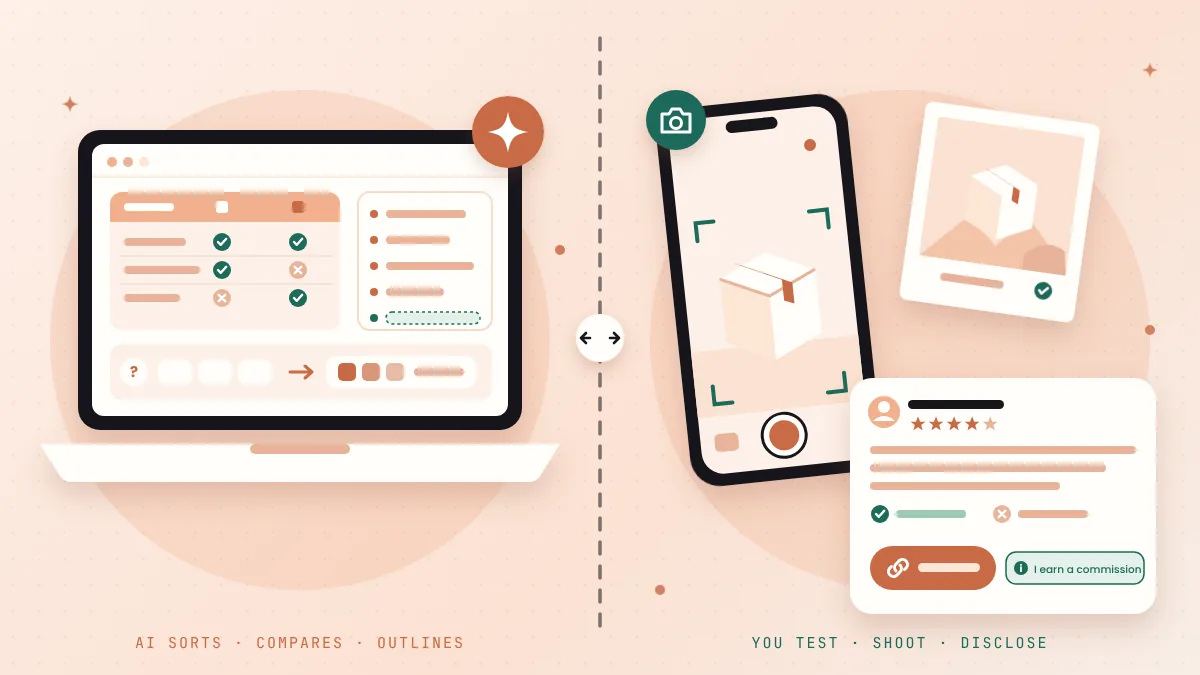
AI can't test a product for you, but it can do the slow parts. Here's how to use AI for affiliate marketing in 7 easy ways, with free prompts and the rules to check first.
Many people believe AI can now run an affiliate site for them. Type a product name, get a “review” in seconds, add your links, and wait for sales. If you’ve ever wondered how to use AI for affiliate marketing, that’s probably the promise you’ve seen.
But there’s a problem.
Readers can tell when nobody touched the product. The review sounds like every other review. It has no photos, no real opinion and no “here’s what annoyed me.” And Google’s own review guidance asks for exactly the thing AI can’t fake: evidence that you actually used what you’re recommending.
AI can write about a product. It can’t use it for you.
If you feel stuck between “AI is cheating” and “I don’t have time to do it all by hand,” you’re not alone. Most bloggers and small online businesses who earn from affiliate links feel the same pull.
But there’s a fix. Let AI do the slow, boring parts, and keep the parts that build trust for yourself.
In this post, I’ll share 7 easy ways to use AI for affiliate marketing without losing your readers’ trust. Each one comes with a copy-paste prompt you can use in a free AI chatbot today.
In short
On this page
“I’m scared AI content will look fake to my readers and to Google.”
That’s a fair worry. So let’s look at what Google actually says, not what people guess.
Basically, Google doesn’t care much who typed the words. It cares whether the page helps the reader. That’s good news, because it gives you a clear line.
I call it the Hands-On Line. Everything that needs your hands on the product (testing, photos, opinions, the final “should you buy it?”) stays with you. Everything else can get help from AI.
| AI is good at | Only you can do |
|---|---|
| Summing up reviews and questions you paste in | Actually using the product |
| Turning official specs into a clean table | Taking your own photos or screen recordings |
| Outlining a review so nothing is missed | Giving an honest opinion and naming the downsides |
| Drafting emails, social posts and FAQs | Deciding who should not buy it |
| Spotting claims you can’t back up | Writing and placing a clear disclosure |
“Do I need one of those paid AI affiliate tools?”
No. Everything in this post works with free tools:
Here’s the full workflow at a glance. You can use one way on its own, or all seven for one product.
“I don’t know which products or angles to write about.”
The best angles come from real buyers. Collect what people say about a product in public reviews, forum threads, comments and your own inbox. Then let AI sort the mess:
Below are comments and reviews people wrote about [product]. Group them into:
1) the main reasons people buy it,
2) the main complaints,
3) the questions people ask before buying.
Use only what is in the text. Don't add your own opinions or facts.
Then suggest 5 blog post angles that answer a real buyer question.
[paste the comments and reviews]
Use the summary to plan, not to publish. Don’t copy other people’s review text into your post. Use it to learn what buyers care about, then answer it with your own experience.
“Comparison posts take me days.”
Most of that time goes into copying specs into a table. AI is fast at this, as long as you give it the facts. Copy the spec or feature text from each product’s official page, then paste this:
Make a comparison table of these products using ONLY the official text I paste below.
Columns: feature, [product A], [product B], [product C].
If a feature is not in the text for a product, write "not listed". Don't guess.
Don't include prices.
After the table, list any feature where the official pages use different words for what might be the same thing.
[paste official spec text for each product]
Why no prices? Because they change, and some programs have strict rules about how you show them. More on that in the Amazon section below.
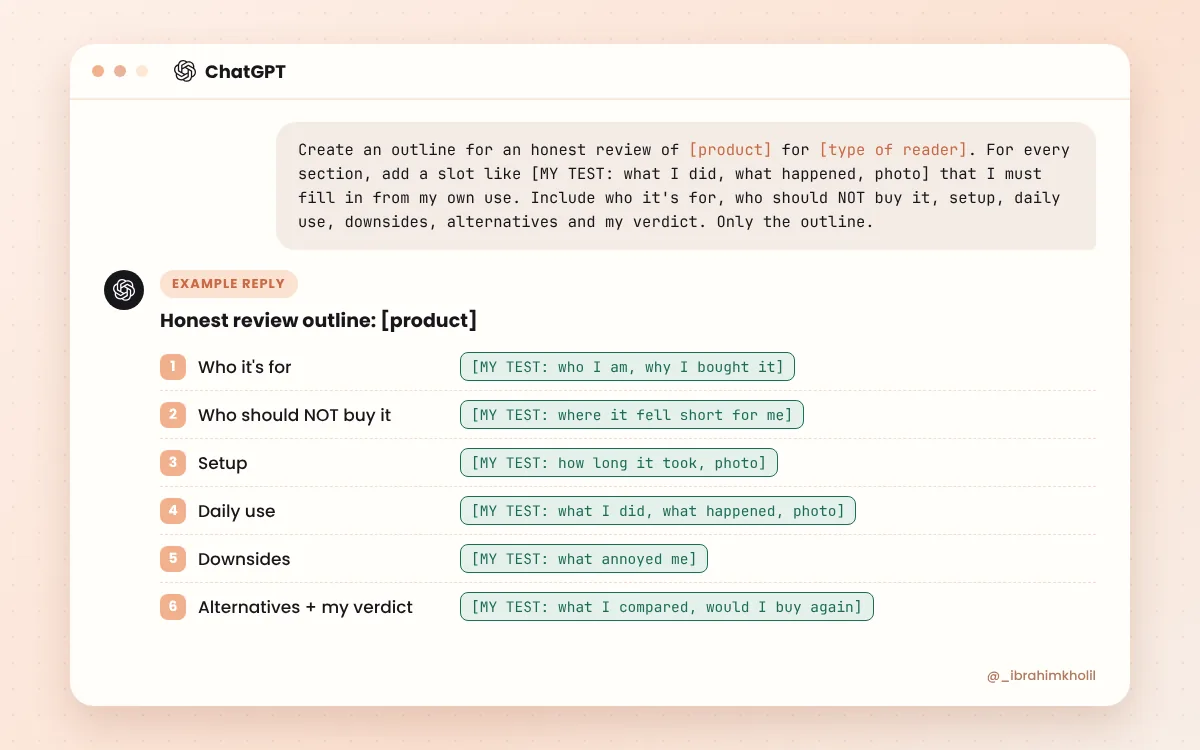
This is the heart of the Hands-On Line. AI builds the skeleton. You add the parts that prove you used the product.
Create an outline for an honest review of [product] for [type of reader].
Use the buyer questions and complaints below.
For every section, add a slot in brackets like [MY TEST: what I did, what happened, photo] that I must fill in from my own use.
Include sections for: who it's for, who should NOT buy it, setup, daily use, downsides, alternatives, and my final verdict.
Don't write the review itself. Only the outline.
[paste your buyer questions and complaints from the research step]
Then use the product and fill every slot in your own words. Want help turning your notes into a post that still sounds like you? Read how to write a blog post with AI that still sounds like you.
Buyers often have one last doubt before they click your link. “Does it work on a Mac?” “Can I cancel?” A short FAQ at the end of your review answers those doubts on the spot.
Use the questions from the research step, and answer them only from the official page and your own test notes. I explain the full method, with prompts, in how to build a helpful FAQ with an AI FAQ generator.
AI can sound very sure of itself and still be wrong. On an affiliate page, one wrong spec can cost you a reader’s trust, or worse, a refund request they blame on you.
Before you publish, run this check in a new chat:
Compare my draft review with the official product text and my test notes below.
List every claim, number, price, feature or promise in my draft that is NOT supported by the official text or my notes.
Also list any sentence that sounds like I used the product when my notes don't say so.
Don't rewrite anything. Just give me the list.
Draft: [paste]
Official text: [paste]
My test notes: [paste]
Fix or delete everything on that list. If you can’t back a claim up, leave it out.
“I never know what to write for the disclosure.”
AI can help you write it in plain words. Then you put it where readers will see it, close to your links (see the disclosure section below).
Write 3 short, plain-English affiliate disclosures for a blog post.
Each one must say clearly that I earn a commission if readers buy through my links.
No legal jargon, no hiding it, under 25 words each.
Also write one very short version I can put right next to a link or button.
If you’re in a program with its own required wording, like Amazon Associates, add that exact sentence too.
“I have no time to promote my reviews.”
Once your honest review is live, AI can turn it into emails and posts in minutes:
Turn my review below into:
- 3 short emails for my list (one story, one "who it's for", one "the downsides"),
- 5 social media posts.
Use only facts and opinions from my review. Keep my wording where you can.
Each email and post must include a short affiliate disclosure near the link placeholder [link].
[paste your published review]
For a full week of posts from one article, follow my guide to turn a blog post into social media posts.
“Can I use AI on my Amazon affiliate pages?”
The workflow above works the same. But Amazon Associates has its own rules, and some of them matter a lot when AI writes parts of your page. Here are the ones to check first, from Amazon’s Operating Agreement and Program Policies:
Watch out
Program rules change. Amazon says its agreement and policies can be updated, so read the current versions in your Associates Central account before you publish. Other affiliate programs have their own rules, too. This post is a practical guide, not legal advice.
“Do I really need to say I use affiliate links?”
Yes. In the US, the FTC’s Endorsement Guides FAQ says that if you earn a commission through links, you should disclose that relationship clearly and conspicuously, so readers can decide how much weight to give your recommendation.
Here’s what that means in practice, based on the FTC’s answers:
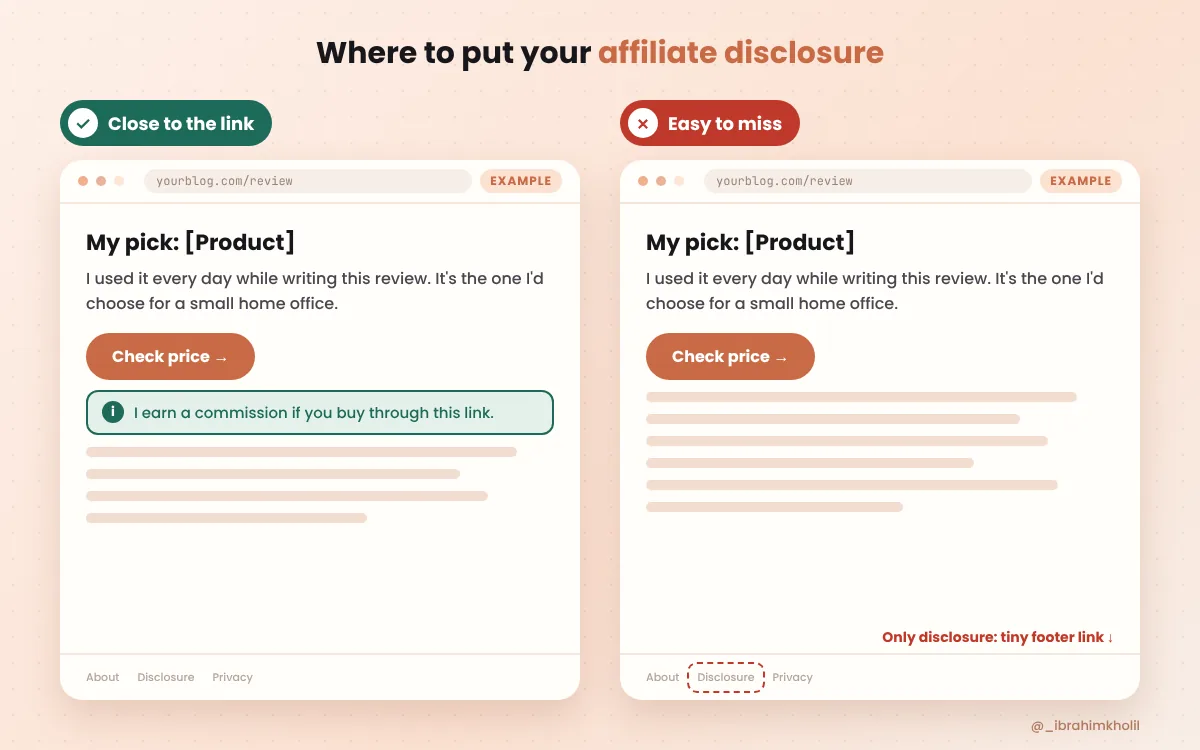
Now you might be thinking, “Should I also say I used AI?” No rule in these sources says you must. But Google’s helpful content guidance notes that being open about how content was made, including any role of AI, can help readers trust it. A short line like “I used AI to organize my notes; the testing and opinions are mine” is honest and easy.
Good to know
Platform tools (like a “paid partnership” label) don’t remove your responsibility. The FTC says the disclosure is on you, so add your own clear line anyway.
“There are a hundred ‘AI affiliate tools.’ Which one do I need?”
Honestly, most beginners don’t need a special tool. Every prompt in this post works in a free, general AI chatbot. What matters more is what you give it: real buyer questions, official facts and your own test notes.
| Job | Free tool |
|---|---|
| Research, tables, outlines, emails | ChatGPT, Gemini or Claude (free plans) |
| Test notes and product tracking | Google Sheets or any notes app |
| Photos and screen recordings of your test | Your phone or your computer’s built-in screen recorder |
| Social images for promotion | A free design tool such as Canva |
Want a bigger list? See my guide to AI tools for bloggers, with a simple tool for each step of a post.
Reading is one thing. Doing it once is where it clicks. Here’s how to use AI for affiliate marketing on one real product, start to finish.
Your quick test
You’ll end up with a review that is faster to write and still clearly yours.
Watch out for these
Yes. Google says appropriate use of AI is not against its guidelines. Use AI for research, tables, outlines and promotion, and keep the testing, photos and opinions your own.
For most beginners, a free general chatbot like ChatGPT, Gemini or Claude is enough. The quality of what you paste in (real buyer questions, official facts, your test notes) matters more than the tool.
Nobody can say for sure, and I won’t guess. What we do know is that Google’s review guidance rewards first-hand experience, which AI can’t provide. So real testing is a good place to put your effort.
Using AI as a helper for honest affiliate content is legit. Be careful with courses or tools that promise “push-button” income from AI-written sites. Low-value pages made at scale go against Google’s spam policies.
Use the same workflow, then check Amazon’s rules: show the required “As an Amazon Associate I earn from qualifying purchases” statement, don’t show prices unless Amazon serves them or you use its API, and add your own commentary and analysis.
Yes, the same as in any post. The FTC says to disclose clearly and close to your links, in plain words like “I get commissions for purchases made through links in this post.”
You don’t need an expensive AI tool, and you don’t need to fake anything.
Let AI find the questions, build the tables, outline the review and write the emails. Keep the testing, the photos, the opinions and the disclosure for yourself. That’s the Hands-On Line, and it’s my honest answer to how to use AI for affiliate marketing.
So this week, pick one product you really use and run the five-step test above.
You can do this. It’s easier than it looks.
Want more copy-paste workflows like this? Get my free AI Workflow Starter Kit, and browse the blog for more simple AI workflows.

12+ years in digital marketing. I test every workflow on real work before I share it, free tools first.
More about me →Steps, a copy-paste prompt and the limits I found. Free, nothing to buy.
Get the Free Starter Kit →