Physical Address
304 North Cardinal St.
Dorchester Center, MA 02124
Physical Address
304 North Cardinal St.
Dorchester Center, MA 02124

Write a sales email to past clients and leads with a free AI chat: an offer card, five copy-ready prompts, a check for pushy lines and unbacked claims, and a way to send it that isn't spam.
If you’ve searched for an AI sales email generator, you probably already have people to write to. Past clients. Leads who asked for your price and then went quiet. A few subscribers who open every email you send.
Writing to them feels harder than writing to strangers. They know you, so a pushy line costs you more, and a vague one wastes a real chance. Meanwhile, the people most likely to say yes still don’t know you have something to offer.
The answer starts before any AI: a short card with the facts a buyer needs. Their problem in their own words, your offer, the price, one true piece of proof and one small next step. Five prompts then work from that card. One finds your clients’ words, one writes the email, one checks it for pushy lines and claims you can’t back, one adds a personal first line for each person, and one drafts your answers when they reply.
“No spam” here means three things you control: you write only to people who know you, every claim is one you can back, and every email gives an easy way to say “no more”. The first round, card and five sent emails included, adds up to about an hour in my estimate. The box below shows the parts.
Five prompts, five jobs
| Prompt | What it gives you |
|---|---|
| 1. Customer words | The problem in your clients’ own words, quoted from their messages |
| 2. Sales email | A short email and subject line, built only from your Offer card |
| 3. Spam check | Every claim matched to a card line, plus any pushy line or gap |
| 4. Personal line | One true opening sentence for each person you write to |
| 5. Reply | A draft answer to each reply, from the same card |
Before you open the chat
| Part of the first round | Minutes (my estimate) |
|---|---|
| Fill in the Offer card | 10 |
| Prompt 1: find 3 messages, run it, pick quotes | 10 |
| Prompt 2: the email | 5 |
| Prompt 3: the check, plus fixes | 10 |
| Prompt 4: notes and lines for 5 people | 10 |
| Add your address once, then send 5 emails one at a time | 15 |
| Total | About 60 |
On this page
A sales email asks someone to spend money. Before they reply, they need to see three things fast: that it’s about their problem, what exactly you offer, and what saying yes costs them. Miss one, and the easy move is to do nothing.
These are the gaps I’d look for first. None of them comes from a study; they’re my own checklist.
An AI chat can write a smooth email in seconds, but it can’t fix these gaps alone. It doesn’t know your clients, your price or your proof. Given nothing, it fills the space with general lines that fit any business, and those are the lines that make an email feel like an ad nobody asked for.
So the facts come from you, and the AI only arranges them. That’s what the Offer card is for.
Each line of the card answers one thing a buyer wants to know: their problem in words they’d use, what you do about it, what it costs, how long it takes, why they should believe you, why they’re hearing about it now, and what to do next.
You fill it in by hand, once per offer. Every prompt in this post reads from it, so anything not on the card can’t end up in your email as a fact.
Copy this template (Offer card):
Offer card
PROBLEM (their words): [FROM PROMPT 1]
RESULT (their words): [FROM PROMPT 1]
OFFER: [WHAT YOU DO, IN ONE SENTENCE]
PRICE: [YOUR PRICE, EXACTLY AS YOU'D QUOTE IT]
TAKES: [HOW LONG UNTIL THEY HAVE THE RESULT]
PROOF: [ONE TRUE THING YOU CAN BACK UP, OR LEAVE EMPTY]
NEXT STEP: [ONE SMALL THING TO DO, LIKE REPLYING]
WHY NOW: [A TRUE REASON, OR "none"]
SIGN-OFF: [YOUR FIRST NAME]
LAST LINE: If you'd rather not get offers from me, reply "no thanks" and I won't send more.On your screen: a note whose first line reads Offer card, with every line from OFFER to LAST LINE filled in, or empty on purpose (TAKES, PROOF).
Marta, our example bookkeeper
Marta is invented for this post. She’s a freelance bookkeeper for small shop owners, and every detail, price and reply that follows is made up (Example). Her new offer is a Year-end catch-up: she sorts a client’s 2026 receipts and bank records into tidy books for $450, fixed. She plans to send her emails in December 2026.
Her WHY NOW, worked out (Example): she expects each catch-up to take about 9 hours, and she has about 36 free hours in January 2027. 36 ÷ 9 = 4, so her card says she has room for 4 catch-up jobs in January 2027. If all four say yes, that’s 4 × $450 = $1,800 of January work, with no promise she can’t keep.
You describe your work in your words. Clients describe their problem in theirs, and theirs are the ones that make a reader think “that’s me”. The good news: those words are probably sitting in your inbox already, in the first messages people sent you.
This prompt doesn’t write anything. It only quotes, and it says which message each quote came from, so you can check every word.
Copy this prompt (Prompt 1, customer words):
Below are messages from my past clients and from people who asked about my work. Names and private details are removed.

MESSAGES:
1. [PASTE A MESSAGE]
2. [PASTE A MESSAGE]
3. [PASTE A MESSAGE]

Pull out their exact words. Don't add, explain or rewrite anything.
PROBLEM WORDS: quote the words they use for the problem they had. After each quote, write the message number in brackets.
RESULT WORDS: quote the words they use for what they wanted instead. After each quote, write the message number in brackets.
If a message has neither, write "Message N: nothing to quote".
On your screen: two short lists of quotes, each with a message number. Every quote should match a message word for word. If one doesn’t, leave it off your card.
Marta’s three messages (Example):
As step 2 says, she kept the problem sentences and, from message 3, the sentence about what the client wanted instead. Claude’s reply is in the image below.
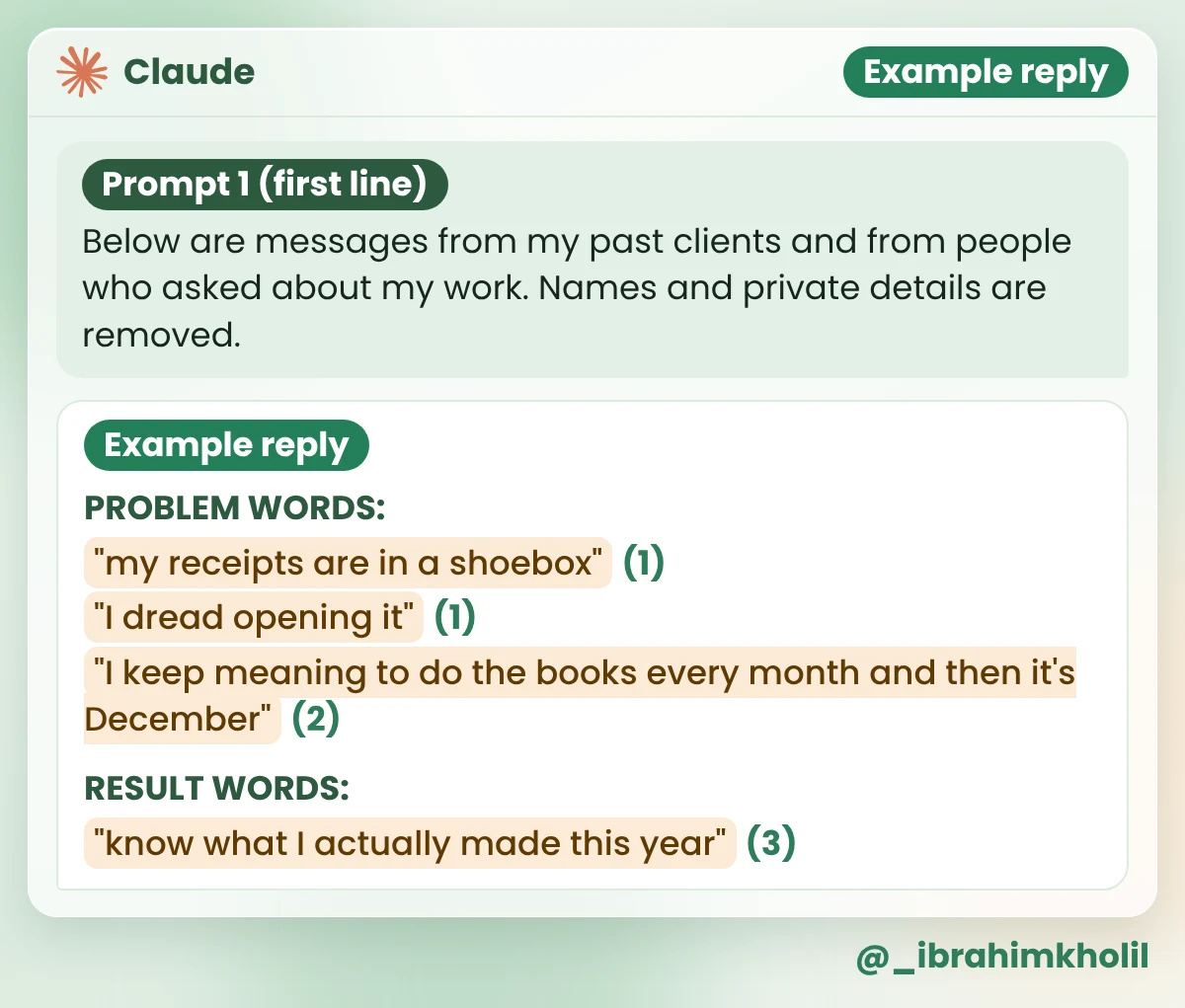
Marta’s pick (Example): she takes the shoebox and the December quotes for PROBLEM, and the “what I actually made” quote for RESULT. She leaves out “I dread opening it”, because she doesn’t want her email to lead with dread. Message 3 was written in 2026, so on her card “this year” becomes “in 2026”: she sends in December, and “this year” would point to the wrong year once January comes.
Marta’s finished Offer card (Example)
| Line | What she wrote (Example) |
|---|---|
| PROBLEM (their words) | my receipts are in a shoebox; I keep meaning to do the books every month and then it’s December |
| RESULT (their words, year added) | know what I actually made in 2026 |
| OFFER | Year-end catch-up: I sort your 2026 receipts and bank records into tidy books. |
| PRICE | $450, fixed |
| TAKES | (empty: she isn’t sure yet) |
| PROOF | In early 2026, I did this catch-up for 5 shop owners. |
| NEXT STEP | Reply “yes” and I’ll send two times for a 15-minute call. |
| WHY NOW | I have room for 4 catch-up jobs in January 2027. |
| SIGN-OFF | Marta |
| LAST LINE | If you’d rather not get offers from me, reply “no thanks” and I won’t send more. |
With the card filled in, the writing part is quick. The prompt below turns a free AI chat into an AI sales email generator that can only use what’s on your card.
Its rules close the gaps from the first section. The email opens with the client’s problem, names one offer with its price, asks for one thing, and leaves a spot at the top for a line written for each person. Where the card has nothing, the email shows [NOT GIVEN] instead of a guess.
Copy this prompt (Prompt 2, sales email):
Write one short sales email from my Offer card. It goes to people who already know me.

MY OFFER CARD:
[PASTE YOUR "OFFER CARD" NOTE]

Rules:
1. Start with the line [PERSONAL LINE] on its own. I fill it in later.
2. Next, name the PROBLEM in my clients' own words. Then say what I offer in one sentence, and the RESULT.
3. Give the PRICE exactly as my card says, and how long it TAKES.
4. Use only facts from my card. If a card line is empty and the email needs it, write [NOT GIVEN] there. If PROOF is empty, leave proof out.
5. Mention a reason to act now only if WHY NOW gives one. Never invent a deadline, a limit or a discount.
6. Ask for one thing only: my NEXT STEP.
7. No greeting, because I type it myself. End with my SIGN-OFF, then my LAST LINE word for word.
8. Under 120 words, in plain words. No capitals for emphasis, no "I hope this email finds you well", no "guaranteed", "best" or "act now".
9. Write "Subject:" and one subject line first. It must say plainly what I'm offering. Then the email, with no labels.
The 120-word limit is my suggestion: long enough for the problem, the offer, the price and one ask, short enough to read on a phone without scrolling much.
On your screen: a Subject: line, then [PERSONAL LINE] on its own, then the email, ending with your sign-off and your last line. No greeting and no part labels. If a greeting appears anyway, delete it when you copy the email into your note in Prompt 3.
Marta’s draft, as Claude wrote it (Example reply)
Subject: Year-end catch-up for your 2026 books, $450 fixed
[PERSONAL LINE]
If your receipts are in a shoebox, or you keep meaning to do the books every month and then it’s December, this one’s for you.
My Year-end catch-up sorts your 2026 receipts and bank records into tidy books, so you know what you actually made in 2026. It’s $450, fixed. It takes [NOT GIVEN].
In early 2026, I did this catch-up for 5 shop owners. I have room for 4 catch-up jobs in January 2027.
Reply “yes” and I’ll send you two times for a 15-minute call.
Marta
If you’d rather not get offers from me, reply “no thanks” and I won’t send more.
Hold the draft next to her card and each sentence has a source: the problem and result in her clients’ words, the offer, the price, her proof, her January limit, the next step, her name and the last line. Her TAKES line was empty, so the draft says [NOT GIVEN] rather than inventing a turnaround time. Prompt 3 will list that gap.
A sales email can be polite and still feel like spam. A rushed deadline, a number nobody can check, or a subject line that hides what’s inside is enough. Even with the rules in Prompt 2, a chat can slip one in, and you may not notice your own.
This check reads the email next to your card, the way a careful customer would. It doesn’t rewrite anything. It reports four things: where each claim comes from, any line that pushes, whether the subject is honest, and what’s still missing.
Copy this prompt (Prompt 3, spam check):
Read this sales email as a careful customer would. Report only; don't rewrite anything.

MY OFFER CARD:
[PASTE YOUR "OFFER CARD" NOTE]

THE EMAIL:
[PASTE YOUR "SALES EMAIL" NOTE]

Answer under these 4 headings:
PROMISES: quote every sentence that names a price, a number, a deadline or how long something takes, or describes work I did before. After each, write the card line it comes from, or NOT ON CARD.
PUSH: quote any line that rushes or pressures the reader: a deadline or limit my WHY NOW line doesn't give, capitals for emphasis, guilt, "last chance". If there are none, write NONE.
SUBJECT: write MATCHES if the subject line says plainly what the email offers. If not, write MISLEADS and say why.
GAPS: list every [NOT GIVEN] still in the email. If there are none, write NONE.
One run per offer. The body of the email is the same for everyone you send it to, so this one check covers them all. Each fix either deletes a line or brings in a fact from your card, so it doesn’t need a second run. The personal lines from Prompt 4 get your own read, one per person, because only you know whether each one is true.
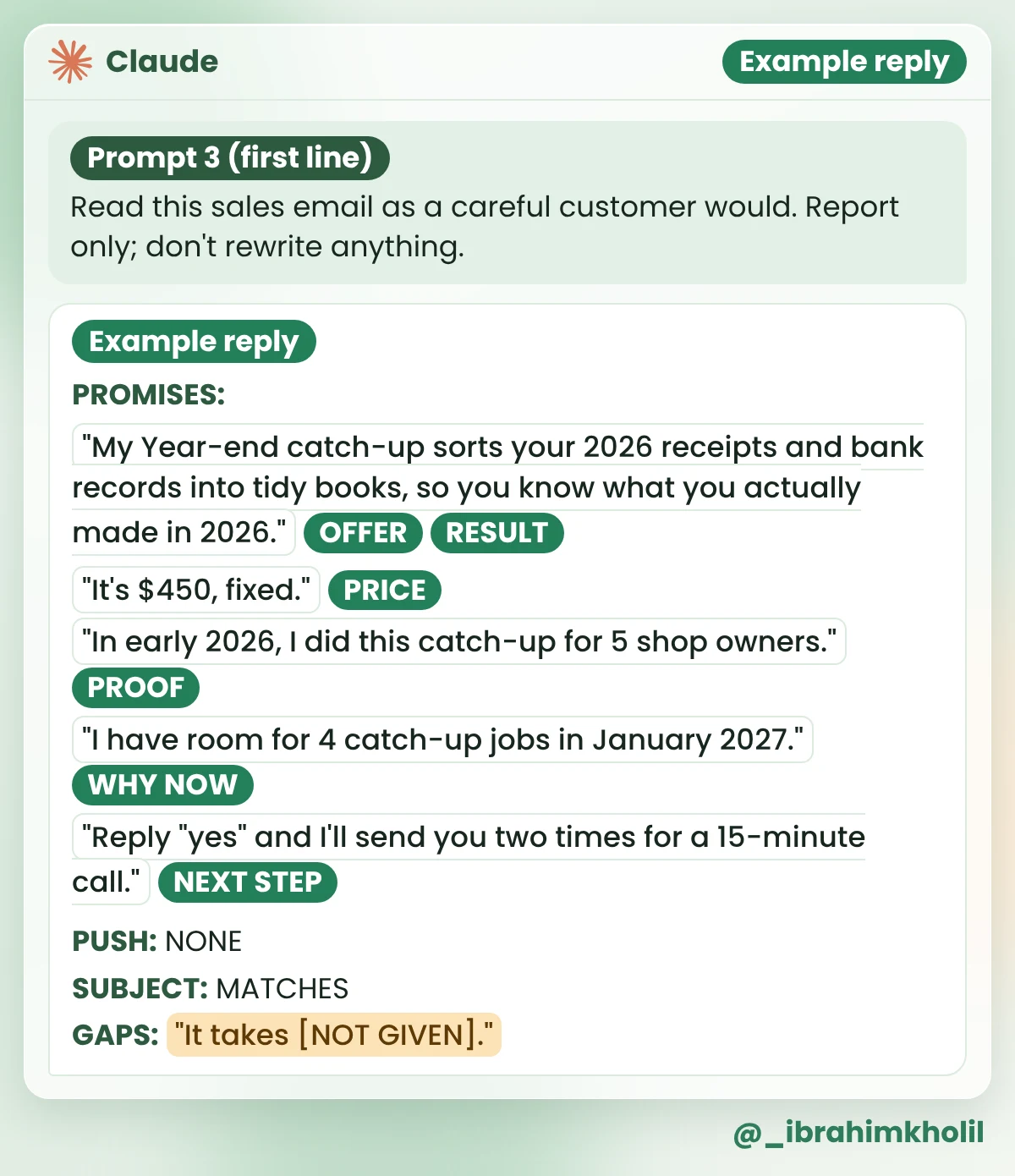
Marta’s fix (Example): the only finding is the gap. She decides a catch-up takes 10 working days from when she has a client’s records. She writes that on her card’s TAKES line first, then changes the sentence in her “Sales email” note to: “It takes 10 working days from when I have your records.”
The same email sent to five people can still read like it was written for each of them. All it takes is one true first line: the job you did together, or the question they asked you. That line is the difference between a note from someone they know and a mailing.
You write a short note about each person, without names. The prompt turns each note into one sentence and adds nothing that isn’t in the note.
Copy this prompt (Prompt 4, personal line):
I'm sending the same sales email to a few people who know me. Write one opening sentence for each person, from my note about them.

MY NOTES (no names):
1. [WHAT YOU DID FOR THEM OR TALKED ABOUT, WHEN, AND ANYTHING THEY SAID]
2. [SAME FOR THE NEXT PERSON]
3. [SAME FOR THE NEXT PERSON]
4. [SAME FOR THE NEXT PERSON]
5. [SAME FOR THE NEXT PERSON]

Rules:
- Use only what that person's note says. Add no praise, feelings or new details.
- One sentence each, under 25 words, numbered like my notes.
- If a note gives you nothing personal to say, write [NOTE TOO THIN] for that number.
On your screen: one numbered sentence per note, or [NOTE TOO THIN] where a note had nothing personal in it.
Marta’s notes and the reply (Example):
| # | Her note (Example) | Claude’s line (Example reply) |
|---|---|---|
| 1 | I did her shop’s books in March 2026. She said next time she’d like to start before the rush. | When we finished your shop’s books in March 2026, you said you’d like to start before the rush next time. |
| 2 | He asked about my prices in October and didn’t book. | You asked me about my prices back in October. |
| 3 | On my email list since the summer. | [NOTE TOO THIN] |
| 4 | I set up her bookkeeping spreadsheet in May 2026. She said it saved her Sunday evenings. | When I set up your bookkeeping spreadsheet in May 2026, you said it saved your Sunday evenings. |
| 5 | Met him at a local business meetup in September 2026. He said his books were a year behind. | When we met at the local business meetup in September 2026, you said your books were a year behind. |
Line 2 leaves out “didn’t book”, and that’s the right call: reminding someone they said no can read like a dig. For number 3, Marta deletes [PERSONAL LINE], so that email opens with the problem line.
To me, spam is mostly about who gets the email and how. Five separate emails to people who know you, each with a true first line and an easy way out, is a very different thing from one blast to a list you bought.
Emailing strangers is a different job with its own rules, and this post doesn’t cover it. Here, you send from your own inbox, one person at a time, or through an email tool if they’re on your subscriber list.
Marta’s first email (Example): it goes to the shop owner from note 1, whom we’ll call Bea (also made up). The image shows the top of the email just before she clicks Send.
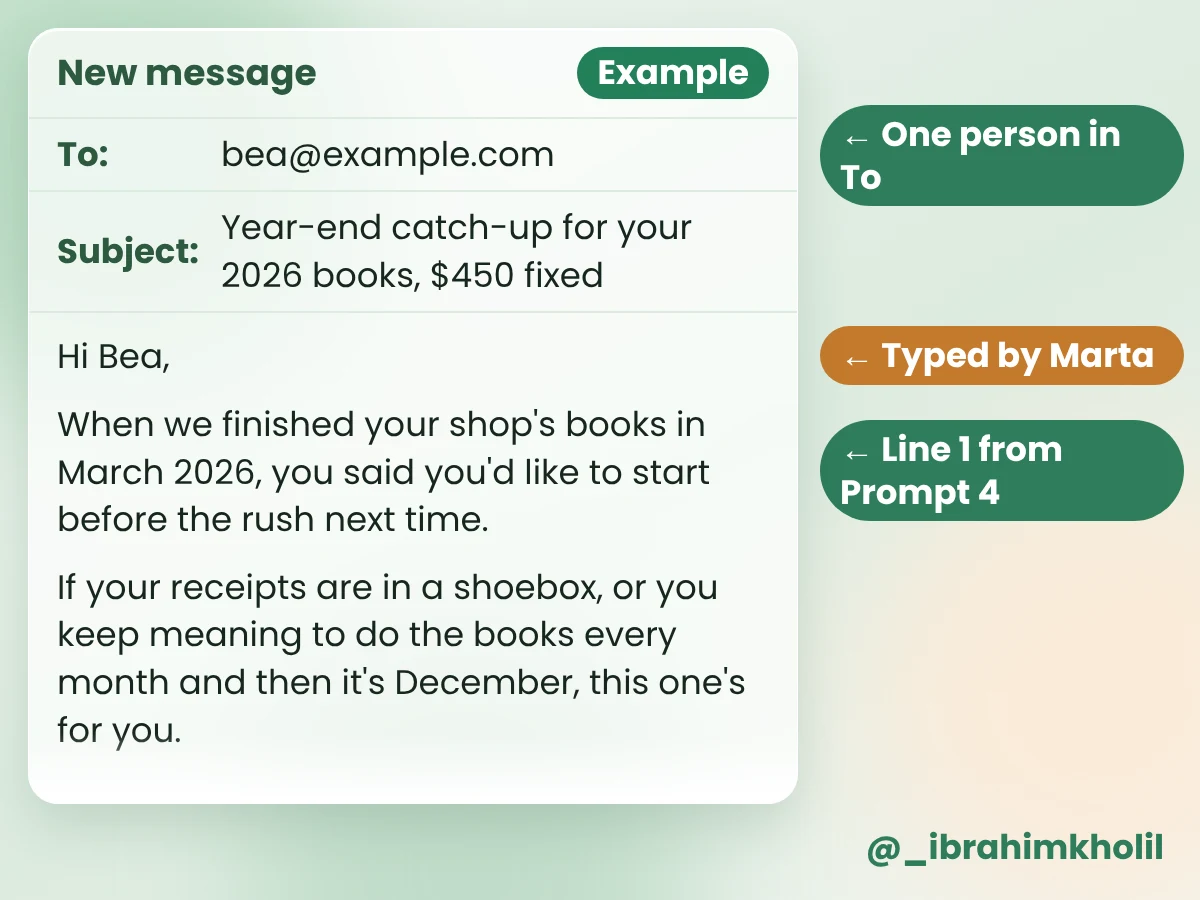
If you’re sending to your subscriber list instead, use your email tool, not your inbox. Skip Prompt 4 and delete the [PERSONAL LINE] line. Before you send, open the preview and look for an unsubscribe link and your postal address at the bottom; if either is missing, search the tool’s help for “footer”. My free AI newsletter generator post compares free email tools and walks through the paste and the test email.
Watch out: US email rules for sales emails (general info, not legal advice)
A sales email is written to sell, and the FTC’s CAN-SPAM compliance guide for business covers commercial email in the US, so it’s the page to know. I could only read the guide’s summary in search results, not the page itself. In that summary, the guide says the law has no exception for business-to-business email, and its points include:
The steps here were written with these points in mind: you send from your own account, the SUBJECT check tests the subject line, the email names the offer and its price, every email ends with your postal address, and the card’s LAST LINE plus the “no offers” mark in your Send list handle opting out. That’s my reading of the summary, not a legal ruling, and following the points in one-to-one emails too is my suggestion. Rules differ by country, so check the linked page and your own country’s rules for current details. This is general information, not legal advice.
A reply is the good part, and it’s also where a rushed answer can promise something you never offered. People ask about the price, the scope or something a little outside your offer.
This prompt answers each question from your card and your email only. Anything the card doesn’t cover comes back as [NOT GIVEN], so the decision stays with you.
Copy this prompt (Prompt 5, reply):
Someone replied to my sales email. Draft my answer.

MY OFFER CARD:
[PASTE YOUR "OFFER CARD" NOTE]

MY EMAIL:
[PASTE YOUR "SALES EMAIL" NOTE]

THEIR REPLY (name and private details removed):
[PASTE THEIR REPLY]

Rules:
- Answer each question they ask, in the order they ask it, using only my card and my email.
- Where my card has no answer, write [NOT GIVEN]. Don't guess.
- End with my NEXT STEP, then my SIGN-OFF.
- Under 80 words. No greeting; I add it.
On your screen: one short answer per question, in their order, then your next step and your name.
Bea’s reply (Example): “Sounds good! Is the $450 for the whole year? And could you do my books every month after that?”
Yes, the $450 is fixed and covers your 2026 receipts and bank records.

Monthly books: [NOT GIVEN].

Reply "yes" and I'll send you two times for a 15-minute call.

Marta
Marta’s edit (Example): she does offer monthly books, so she replaces the whole “Monthly books” line with “Yes, I do monthly books too, and we can agree on a price on the call.” Then she adds a new line to her card: “ALSO: monthly books, price agreed on a call.”
No reply after a few days is normal too. Guides on follow-ups, mostly from email software companies, suggest waiting 2 to 3 days before a first nudge, and my AI follow up email generator post has a prompt for exactly that moment. If someone says yes on the call, my AI proposal generator post turns the call into a written proposal.
What no prompt can promise
The five prompts here, run in a free Claude, ChatGPT or Gemini account, work as one. If you’d rather try a website built for sales emails, check its plans on its own page. Prompt 3 doesn’t care who wrote the draft: paste any draft with your Offer card, and it lists every claim your card can’t back.
My suggestion is under 120 words. That fits the problem, the offer, the price and one ask, and it reads on a phone without much scrolling. Anyone who wants more detail can reply and ask.
The FTC’s CAN-SPAM guide, as its summary reads in search results, asks commercial email to offer a clear way to opt out and says business-to-business email has no exception. I’d add the card’s LAST LINE to every sales email and keep to it. Rules differ by country, and this is general information, not legal advice.
You don’t need to. The prompts work from your notes without names, and you type each name yourself in your email app. Leave out email addresses, phone numbers and figures from their accounts too.
Send a short follow-up after a few days. Guides from email software companies suggest 2 to 3 days before the first nudge and stopping after about 3 or 4 tries in total. My AI follow up email generator post has a prompt for that nudge.
An AI sales email generator writes well when it can only use true facts. Your Offer card holds those facts, the check holds the email to them, and a personal first line makes each email read like it’s from you, because it is.
The parts only you can do are the card, the five names and the last read before Send.
Start with the list. Write down five people who would recognize your name in their inbox, find three old client messages, and fill in your card. The first email can go out today.

12+ years in digital marketing. I test every workflow on real work before I share it, free tools first.
More about me →Steps, a copy-paste prompt and the limits I found. Free, nothing to buy.
Get the Free Starter Kit →