Physical Address
304 North Cardinal St.
Dorchester Center, MA 02124
Physical Address
304 North Cardinal St.
Dorchester Center, MA 02124

Turn nine of your own answers into a one-page lean business plan with free Claude or ChatGPT, then check that every number on it came from you.
Executive summary. Market analysis. Financial projections. Most business plan templates open with headings like these, and for a one-person service business, most of them stay empty. Hand that empty template to an AI business plan generator and it fills every heading anyway, market size and sales forecast included, with numbers you never gave it.
Those numbers look like research, and that’s the trouble. You can’t tell which lines came from you and which the AI made up, so you can’t explain the plan to anyone, including yourself. A freelancer or a new service business doesn’t need a thick document first. It needs one honest answer: does this idea pay?
The U.S. Small Business Administration’s guide, as it reads in search results, describes a shorter format for exactly that: the lean plan, typically one page. You write your own answers to nine plain questions, a free AI chat turns them into the page, and a second prompt traces every number on it back to an answer you gave.
You’ll end with a one-page plan in Google Docs that you can explain line by line, plus a PDF copy. The same SBA guide says a lean plan can take as little as an hour, and I’d hold this one to the same hour as my own estimate. The chat’s share of it is a few minutes; your answers and sums fill the rest.
Quick answer
Ready before Step 1
On this page
The SBA’s guide to writing a business plan, as it reads in search results, sorts most plans into two kinds: traditional and lean. The table puts them side by side. Open the guide itself for its full wording, since I could only read it through search results.
| Traditional plan | Lean plan | |
|---|---|---|
| Length | Long, many sections | Typically one page |
| What’s in it | Executive summary, company description, market analysis, organization and management, service or product line, marketing and sales, funding request, financial projections | A small set of key parts, such as your value proposition, customer segments and cost structure |
| Who it suits | Detail-minded owners; lenders and investors commonly ask for it | Owners who want to start quickly, run a fairly simple business or plan to change the plan often |
| Time | Longer | Can take as little as an hour |
Three of those words need plain meanings. Value proposition means why a customer would pick you. Customer segments means who you sell to. Cost structure means what you pay to keep the business running.
For a one-person service business, the lean plan is the honest place to start. SBA articles also say you don’t have to follow a fixed outline and can use the sections that fit your business. The nine questions below are my own version of the lean parts, shaped by the SBA’s examples and a community college’s free lean-plan template. Change one if your business needs it.
An AI chat could write the whole page from a one-line ask, but it would fill the gaps with guesses. The University of Edinburgh’s page on AI accuracy, as it reads in search results, says generative AI regularly makes up references that look real and calls human checking the core of getting things right. Shopify’s guide to AI hallucinations, meaning made-up answers that sound sure of themselves, says they can be reduced but not removed. So in the steps below, the facts stay with you and the AI only gets the writing.
Meet Rosa (made up for this post)
Rosa isn’t a real person, and every answer and number in her plan is invented to show the method (Example). She wants to start a dog-walking business in her own neighborhood, alone and without a loan. She writes her answers the way most of us write notes: short and a bit messy.
Your answers come first because they hold the only facts the plan is allowed to use. Write the way you’d explain your business to a friend over coffee. The AI tidies the wording later.
PLAN ANSWERS
A1. What I sell:
A2. Who it's for:
A3. Their problem:
A4. Other choices they have:
A5. How they'll find me:
How to answer each line (my suggestions):
| Line | Rosa’s answer (Example) |
|---|---|
| A1. What I sell | 30-min dog walks, weekdays, my neighborhood |
| A2. Who it’s for | dog owners within 15 min walk of my place. most people on my street work in offices all day |
| A3. Their problem | dog home alone 9 to 6, needs a midday walk |
| A4. Other choices they have | friend/neighbor, doggy daycare, walkers on apps. their prices: [FIND OUT] |
| A5. How they’ll find me | flyers at my vet + pet shop, post in neighborhood group, word of mouth |
Check before Step 2: five lines in your “Plan answers” note, each one answered or marked [FIND OUT].
This is the part an AI business plan generator should never invent. Your price, your costs and the amount you want to keep decide whether the business works, and only you know them.
One word first. Break-even is the point where the money coming in covers your costs. Below it, you’re paying to work.
A6. Price:
A7. Monthly costs:
A8. The numbers:
A9. Next 90 days:
Keep the working in the note, not just the answers. The Number check in Step 4 shows each sum again, so you can redo it. A test number is not the same as a guess from the AI: you chose it, it carries its label into the plan, and you swap it once you know more.
Rosa’s four money lines are in the image: her price, four monthly costs and both sums (Example).
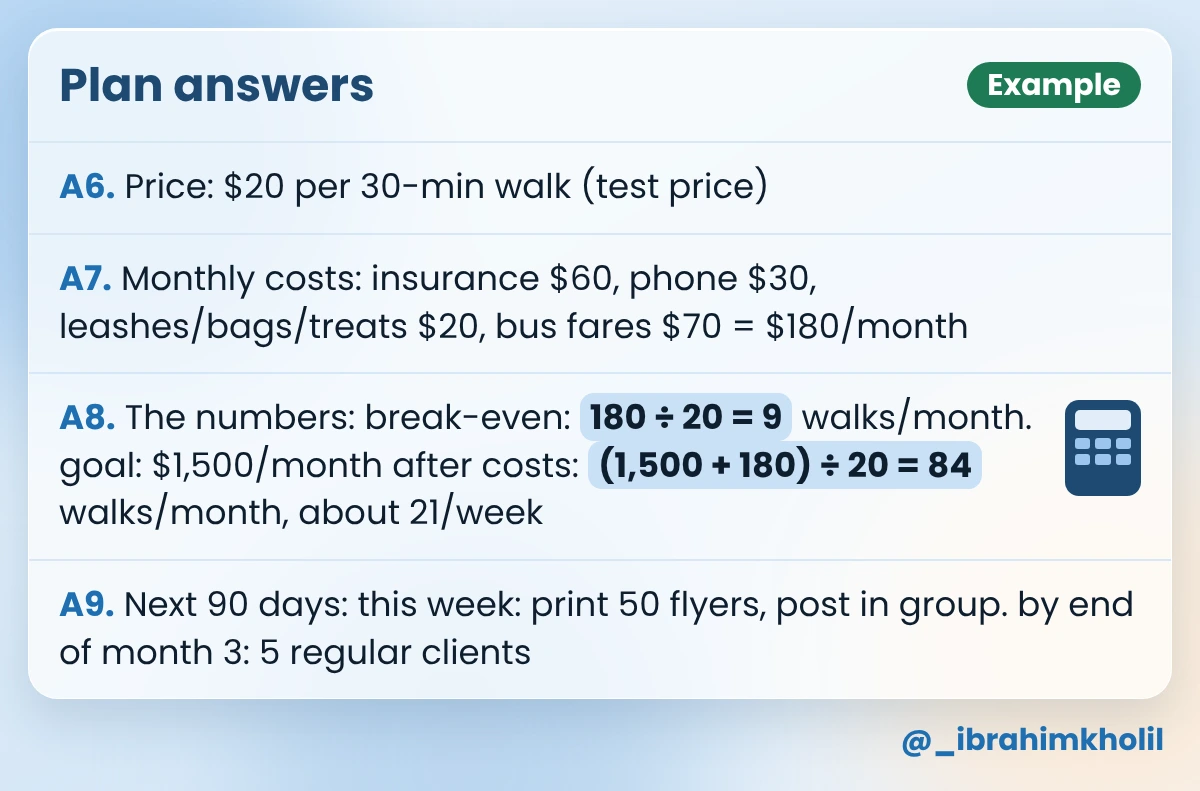
Her price is a test price, because her A4 still says [FIND OUT]. She tried $15 first: ($1,500 + $180) ÷ $15 = 112 walks a month, about 28 a week, more than 5 every weekday. That’s more than she can walk. At $20 the same sum gives 84 walks a month, about 21 a week, roughly 4 a weekday, which fits her days. So $20 went into her note as the test price.
The other number is just as useful: nine walks a month pay her costs. Anything above that is hers to keep.
Check before Step 3: nine lines in “Plan answers”, with every sum written out.
Here a chat assistant does the job of a generator app: it turns your notes into a clear page with headings. The prompt fences it in. It may use your answers and nothing else, and wherever an answer says [FIND OUT], the plan says [FIND OUT] too.
Copy this prompt (Plan prompt):
Write a one-page lean business plan from my answers below.

Rules:
- Use only my answers. Don't add market sizes, statistics, growth rates, competitor names, prices or forecasts I didn't give.
- Where an answer says [FIND OUT] or is empty, write [FIND OUT] in that spot.
- Keep my numbers exactly as I wrote them, with any label like (test price), and keep the working for every sum.
- Plain words, short sentences, no hype. Under 350 words.

Use these 8 headings, in this order:
1. What I sell
2. Who it's for and their problem
3. Other choices they have
4. How customers will find me
5. Price
6. Monthly costs
7. The numbers
8. Next 90 days

MY ANSWERS:
[PASTE YOUR "PLAN ANSWERS" NOTE]
Short version (for a quick first try; the full prompt above gives you the fixed headings):
Turn my answers into a one-page lean business plan. Use only my answers, add no numbers or market facts, and write [FIND OUT] where something is missing.

MY ANSWERS:
[PASTE YOUR "PLAN ANSWERS" NOTE]
The 350-word limit is my suggestion. It usually keeps the plan to about one page in Google Docs at normal text size.
Rosa’s run (Example): she pastes her nine lines under MY ANSWERS and sends it to Claude.
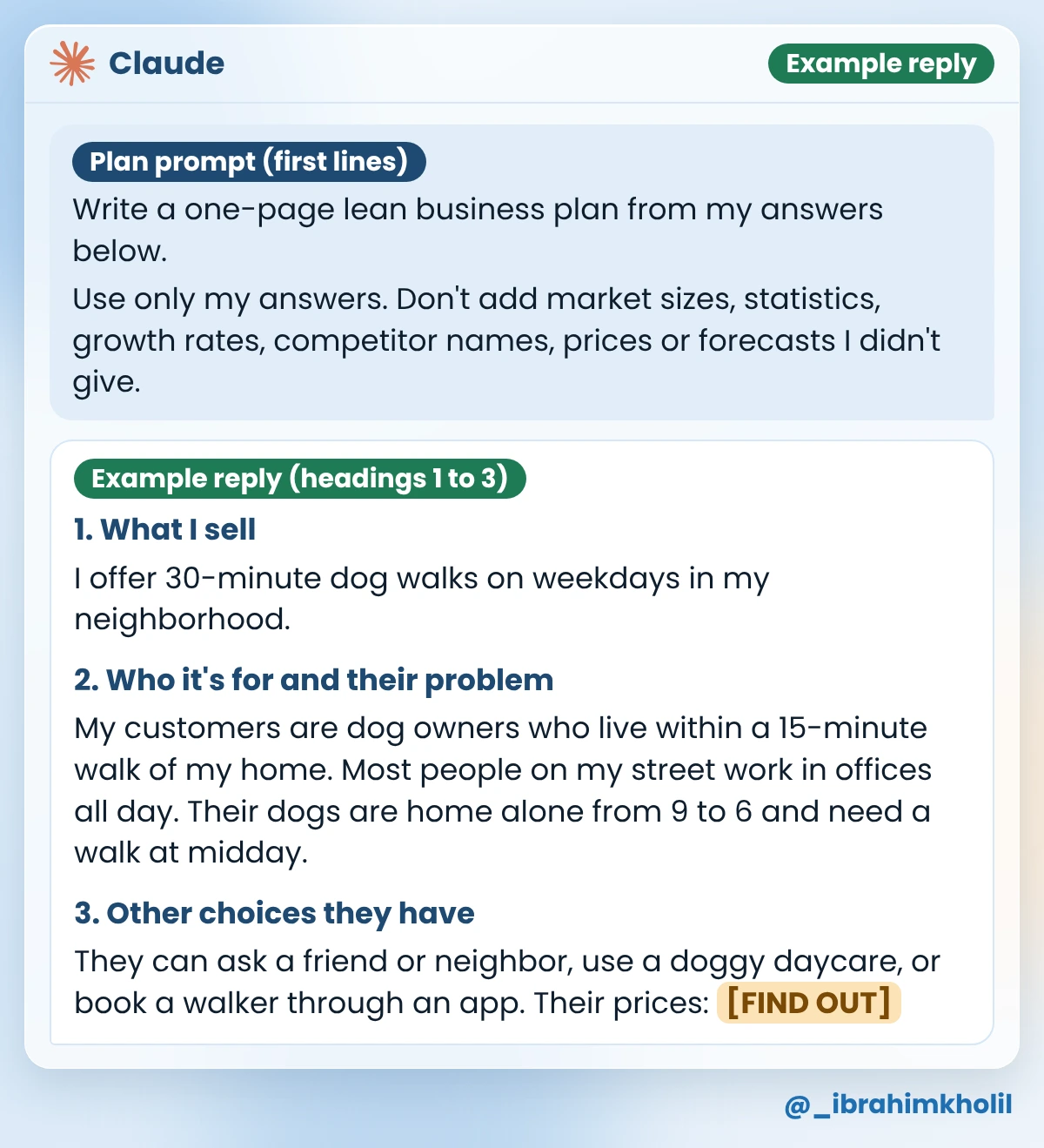
What you should see: eight headings in the prompt’s order, your numbers unchanged, and [FIND OUT] wherever your note had it. The image shows headings 1 to 3 of Rosa’s reply. Here are headings 4 to 8:
4. How customers will find me
Flyers at my vet and the pet shop, a post in my neighborhood group, and word of mouth.
5. Price
$20 per 30-minute walk (test price).
6. Monthly costs
Insurance $60, phone $30, leashes, bags and treats $20, bus fares $70. Total: $180 a month.
7. The numbers
Break-even: $180 ÷ $20 = 9 walks a month.
Goal: $1,500 a month after costs. ($1,500 + $180) ÷ $20 = 84 walks a month, about 21 a week.
8. Next 90 days
This week: print 50 flyers and post in my neighborhood group.
By the end of month 3: 5 regular clients.
Put heading 2 in the image next to her A2 and A3 notes: the same facts, now in full sentences. That’s the whole job the AI does here, and it’s the slow, fiddly part when you do it by hand.
A plan is only as believable as its least believable number. One figure nobody can explain, like a market size from nowhere, makes a reader doubt every other line. That reader could be a partner, a family member who lends you money, or you in three months.
The Number check works like a receipt for your plan. It lists every number and every “most people” claim, names the answer each one came from, and writes out each sum so you can redo it.
Copy this prompt (Number check):
Check this business plan against my answers. Don't rewrite the plan.

MY ANSWERS:
[PASTE YOUR "PLAN ANSWERS" NOTE]

THE PLAN:
[PASTE THE PLAN]

Make a table with 3 columns: Line | Source | Note.
1. Add a row for every line in the plan that has a number, a price, a date, or a claim like "most", "many", "growing", a percentage or a market size.
2. Source: the answer it comes from, like A6. If none of my answers says it, write NOWHERE.
3. Note: write PROOF? if the line has "most", "many", "growing", a percentage or a market size and my answers give no source for it. Write SUM if the line has a calculation, and show the working. Otherwise leave it empty.
After the table, list every [FIND OUT] still in the plan.
What you should see: a table with one row per number or claim, then a list of open [FIND OUT] gaps. Example reply for Rosa’s plan:
| Line | Source | Note |
|---|---|---|
| I offer 30-minute dog walks on weekdays in my neighborhood. | A1 | |
| My customers are dog owners who live within a 15-minute walk of my home. | A2 | |
| Most people on my street work in offices all day. | A2 | PROOF? |
| Their dogs are home alone from 9 to 6 and need a walk at midday. | A3 | |
| $20 per 30-minute walk (test price). | A6 | |
| Insurance $60, phone $30, leashes, bags and treats $20, bus fares $70. Total: $180 a month. | A7 | SUM: 60 + 30 + 20 + 70 = 180 |
| Break-even: $180 ÷ $20 = 9 walks a month. | A8 | SUM: 180 ÷ 20 = 9 |
| Goal: $1,500 a month after costs. ($1,500 + $180) ÷ $20 = 84 walks a month, about 21 a week. | A8 | SUM: 1,500 + 180 = 1,680; 1,680 ÷ 20 = 84; 84 ÷ 4 weeks = 21 |
| This week: print 50 flyers and post in my neighborhood group. | A9 | |
| By the end of month 3: 5 regular clients. | A9 |
Under the table, the same reply lists the open gap (Example): [FIND OUT] still in the plan: heading 3, “Their prices: [FIND OUT]”.
No row says NOWHERE, so every number in this plan came from Rosa. If one of yours does, that’s the first line to deal with.
Rosa’s fixes (Example): her three sums match her calculator. She can’t back up “most people on my street”, so she swaps it for something she has seen herself and can name. Nobody has told her what other walkers charge yet, so the [FIND OUT] stays, and she adds a task under Next 90 days to ask. Both edits come from her, not a chat, so she doesn’t run the check again. The image shows the two changes in her document; the table shows the same two changes in her note.
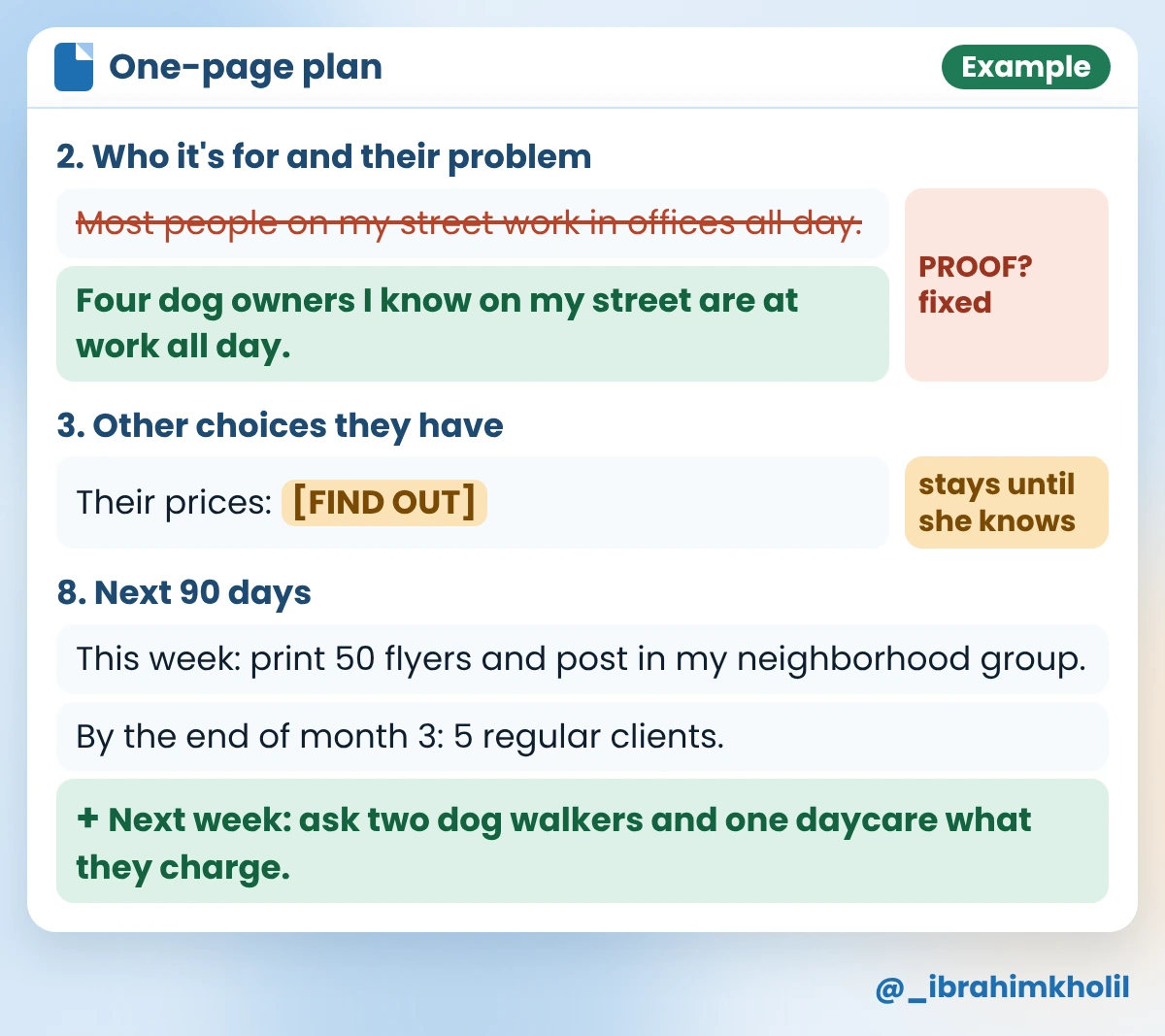
| Line | Rosa’s “Plan answers” note after Step 4 (Example) |
|---|---|
| A2. Who it’s for | dog owners within 15 min walk of my place. 4 dog owners I know on my street are at work all day |
| A9. Next 90 days | this week: print 50 flyers, post in group. next week: ask 2 dog walkers + 1 daycare what they charge. by end of month 3: 5 regular clients |
The plan already sits in your “One-page plan” document. This last step turns it into a page you’ll actually open again, with a PDF copy you can keep or send.
What you should see: one page with your business name and date at the top, the eight headings below it, and a PDF file in your downloads (on a phone, wherever you chose to save it).
What this page is not
Once the plan says who you’re for and how they’ll find you, the next job is winning those customers. When your first client asks for a quote, my steps for an AI proposal generator reuse the price and plan you just wrote. For the day-to-day work, see these AI tools for freelancers. Still choosing an assistant? My picks of the best AI for entrepreneurs sort them by job.
Claude and ChatGPT both offer free plans with usage limits, and with the Plan prompt either one works as a generator for a one-page plan. Limits change, so check claude.com/pricing and chatgpt.com for what’s included today. Paid generator apps exist too; this post doesn’t review them, so check each app’s own page.
It can write the words, and so can Claude. What it can’t know is your price, your costs or your customers. Give it those first, tell it to add nothing, and then trace every number back to your answers, as in Step 4.
Not this one, and no AI tool can promise that. This is a lean one-page plan for you. The SBA’s guide says lenders and investors commonly ask for the longer traditional plan, so ask your lender what they need first.
Your nine answers and the two sums take the longest; the prompt and the check take a few minutes each. Together I’d expect an hour for a first version, as my own estimate. That fits the SBA guide’s view, as it reads in search results, that a lean plan can take as little as an hour.
Only if you have a source you can link to. Don’t let AI supply one: the Number check marks it NOWHERE, or PROOF? if it came from you without a source. For a local service business, what you’ve seen yourself, like who asked and what others charge, is easier to check.
Yes. Paste the plan into Google Docs, then use File, Download, PDF Document on a computer, or Share & export, then Save as, in the phone app.
Paste only what the plan needs. Leave out your full name, address, phone number, bank or tax numbers and real customers’ names, and write “my neighborhood” instead of an address. If you’re unsure, read the chat’s privacy settings before you paste.
The useful part of a business plan was never the writing. It’s the moment Rosa sees that 9 walks cover her costs and 84 reach her goal, and can say where each number came from. An AI business plan generator can do the writing for free. The answers and the sums have to be yours.
If you do one thing today, open your notes app and answer A6 to A8: your price (a test price is fine), your costs and the two sums. Those three lines tell you more about your idea than any template.
For more copy-ready workflows like this one, get my free AI Workflow Starter Kit.

12+ years in digital marketing. I test every workflow on real work before I share it, free tools first.
More about me →Steps, a copy-paste prompt and the limits I found. Free, nothing to buy.
Get the Free Starter Kit →