Physical Address
304 North Cardinal St.
Dorchester Center, MA 02124
Physical Address
304 North Cardinal St.
Dorchester Center, MA 02124

Five generative engine optimization best practices for one existing post: about 35 minutes of moves plus writing time, each tagged Google says or common advice, not proven.
A long list of generative engine optimization best practices is a lot like a packing list written for someone else’s trip. Everything on it is useful to somebody. For a small blog with one free evening, most of it is the wrong luggage.
The bigger problem is that these lists rarely say where each tip comes from. A few come from Google’s own documentation. Many are guesses that travel from one marketing blog to the next. When you can’t tell them apart, doing everything feels like the safe choice, and the evening goes into llms.txt files and schema plugins instead of your posts.
So this checklist keeps five practices and gives each one a tag. “Google says” means Google’s own guide points that way. “Common advice, not proven” means many SEO writers recommend it, but I found no official source showing it gets you cited in AI answers. All five run on one post that Google already shows to people.
The first 14 minutes find the post and rewrite its opening. The next 16 build an FAQ from real searches and add what only you know. The last 5 show what an AI tool answers when someone asks your post’s question. Those minutes are my estimates for a first run; writing your FAQ answers and looking up sources come on top.
In short
Open these first
| Open | Used in |
|---|---|
| Search Console, Google’s free report on your site | Practices 1 and 3. No account: Practice 1 has a route without it. |
| Your blog’s post editor, on a laptop or desktop | Practices 2, 3 and 4 |
| Claude or ChatGPT (free plans exist; the makers’ sites list what’s included) | Practice 3 |
| An AI tool that searches the web, such as Perplexity | Practice 5 |
| A blank note | Every practice adds a line to it |
On this page
Generative engine optimization (GEO) means making your content easy for AI tools that write answers, like Google’s AI Overviews or ChatGPT, to find and use. Google’s own guide frames it, for its AI features in Search, as still SEO.
That guide is “Optimizing your website for generative AI features on Google Search”, published on Google Search Central in May 2026. As it reads in search results, it asks for two things. Pages must be crawlable and indexed to be eligible, and content should be valuable, unique and non-commodity, focused on what users want. Google edits these pages, so check the live page for the current wording.
Search Engine Journal’s coverage adds what Google says you can skip for its AI features: an llms.txt file, splitting posts into “chunks”, rewriting posts specially for AI, and special schema (code that labels page content for search engines).
Here are the five practices, each with its tag:
Each one is a single change with free tools, and in my estimate none of the moves takes more than 10 minutes. That’s what makes them simple. The card below adds up the minutes and says when each one is done.
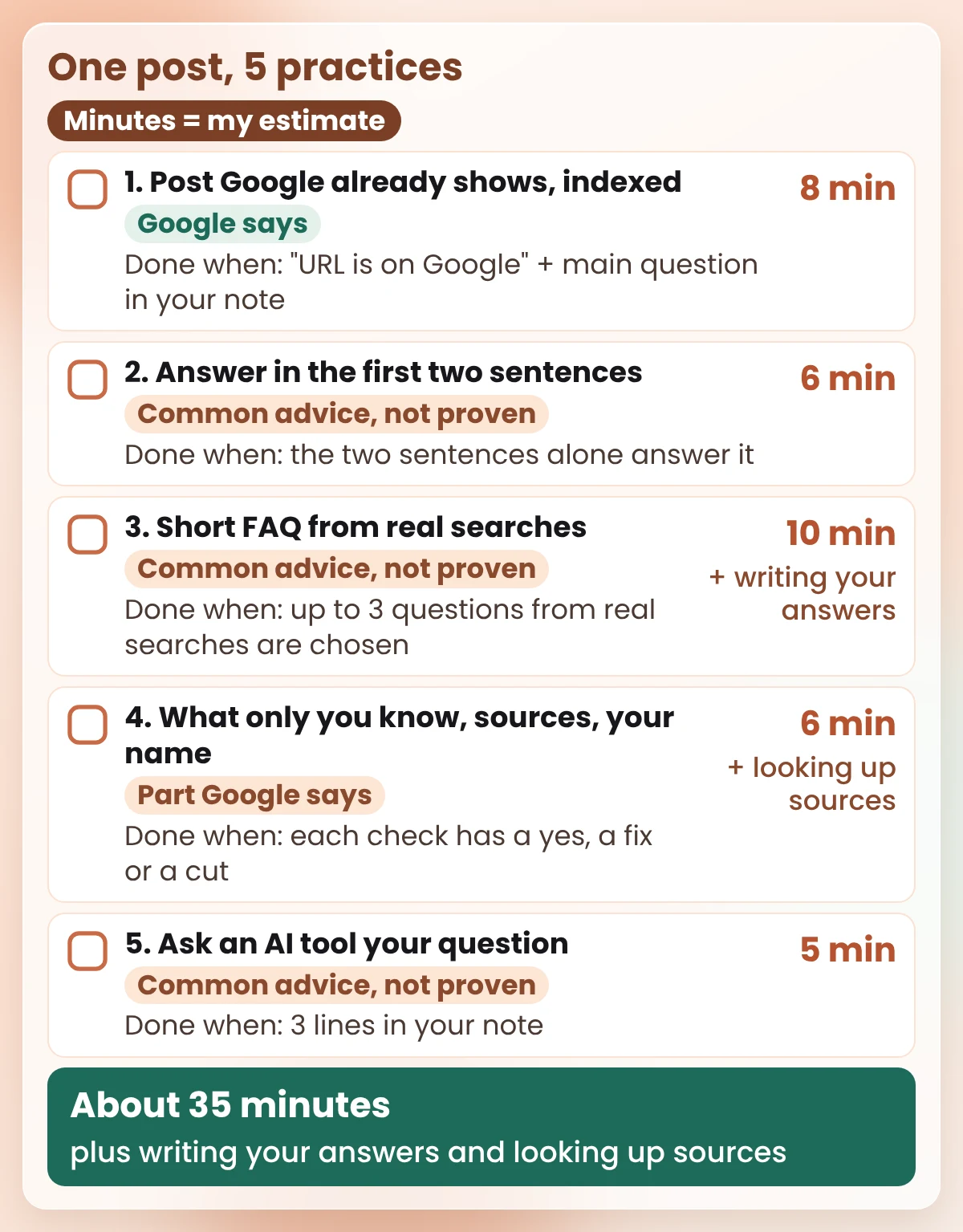
For the wider picture, including robots.txt and AI search bots, see my post on how to optimize content for AI search. For tools that track AI answers month by month, see generative engine optimization tools. This post stays on one job: one post, five practices, today.
Following along: Elif’s dropped-stitch post
Elif is made up for this post. She writes a small knitting blog, and every search, number and line of her post shown here is invented to show the steps (Example).
Tag: Google says. Google’s guide says a page must be crawlable and indexed to be eligible for its AI features. So the first move is a post Google already has and already shows.
Your blog probably has a few posts like that already. A post that shows up for a “how” or “what” search is a good start, because an AI answer tries to answer exactly that kind of question. That pick rule is my suggestion, not something Google publishes.
how and apply it.GEO check: and the post’s name. Second line: Main question: and that search, word for word. Every later practice adds a line to this note.Button names come from general knowledge of Search Console and may look a little different on your screen. If “how” shows nothing, try what, why or can instead.
What you should see: a short list of pages with their impressions. Elif’s list after the “how” filter (Example):
| Page | Impressions, last 3 months |
|---|---|
| /fix-dropped-stitch/ | 1,240 |
| /cast-on-for-beginners/ | 860 |
| /block-a-sweater/ | 310 |
Elif clicked /fix-dropped-stitch/. Its top search was “how to fix a dropped stitch”, so her note now reads Main question: how to fix a dropped stitch. The inspect bar said “URL is on Google”.
If the inspect bar says the URL isn’t on Google, read the reason it shows. A “noindex” setting is a common cause; the plugin-by-plugin fix is in Way 1 of my AI search post. Pick another post for today while you sort it out.
No Search Console yet? The setup steps are in my post on generative engine optimization tools, and it can take a while before data shows. Meanwhile, use this route:
GEO check: and the post’s name. Second line: Main question: and the title’s question, in the words a reader would type.site: followed by the post’s address with no space, for example site:yourblog.com/fix-dropped-stitch/. If the post shows up, Google has it. If nothing shows, treat it as not indexed for now: read Way 1 of my AI search post and pick another post for today.Searches:. Practice 3 uses them.Then carry on with Practice 2.
If you already ran the Fix finder from my post on AI SEO tools, use the post it picked, and take its top search as your main question.
Now you have a post and the exact words people use to find it. The next practice makes sure the post answers those words right away.
Tag: common advice, not proven. Search Engine Journal’s coverage of Google’s guide lists rewriting posts specially for AI among the things Google says aren’t needed. So treat this as a writing habit, not a lever for AI answers.
The cost of a slow opening shows on a phone. The first screen holds two or three sentences under the title. If none of them is the answer, the reader has to scroll on trust.
You’re done when someone who reads only those two sentences could do the thing, or knows the answer.
Elif’s opening, before and after (Example):
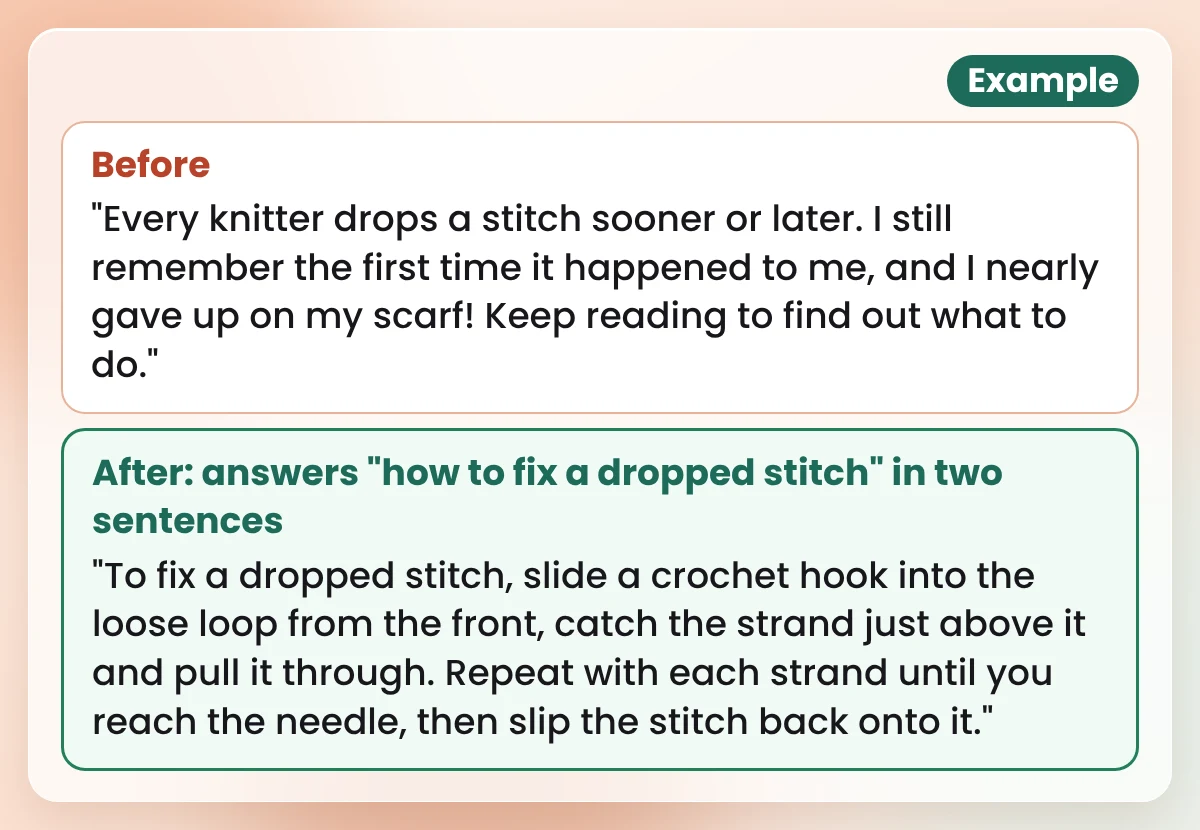
Her first sentence names the tool and the first move. Her second gives the remaining moves, up to the stitch back on the needle. The purl side, a condition some readers need, went into her FAQ in the next practice.
Tag: common advice, not proven. No official source I found says an FAQ raises your chances in AI answers, and coverage of Google’s guide says special schema isn’t needed for its AI features.
The value is in where the questions come from. Most FAQs are guesses. Search Console shows the searches that already bring your post up, so each question you add is one somebody really asked. A chat assistant is useful here for one small job: turning a messy list of searches into clean questions.
Searches:. Typing them by hand is fine. On the no-Search-Console route, your Searches line from Practice 1 is already there; skip this and sub-step 1.Copy this prompt (Search to question):
Below are searches that show my blog post in Google.
Turn them into the questions people really want answered.

MY POST'S MAIN QUESTION: [YOUR MAIN QUESTION]

SEARCHES:
[PASTE THE SEARCHES FROM YOUR GEO CHECK NOTE]

Rules:
- Use only these searches. Don't add questions of your own.
- A search may be a phrase, not a question. Turn each one into the question behind it.
- Join searches that ask the same thing into one question.
- Leave out the main question. My opening already answers it.
- Don't answer the questions.
- Reply as a numbered list: the question, then (searches: how many of mine it covers).
- Last line: "Left out (same as your main question):" and those searches.
Elif’s searches (Example): how to fix a dropped stitch, how to pick up a dropped stitch in knitting, dropped stitch several rows down, fix dropped stitch purl side, what does a dropped stitch look like, how to pick up dropped stitch without crochet hook.
What you should see: a short numbered list and a “Left out” line, with every search you pasted in one or the other. Elif’s reply (Example):
1. How do I fix a dropped stitch several rows down? (searches: 1)
2. How do I fix a dropped stitch on the purl side? (searches: 1)
3. What does a dropped stitch look like? (searches: 1)
4. How do I pick up a dropped stitch without a crochet hook? (searches: 1)
Left out (same as your main question): how to fix a dropped stitch, how to pick up a dropped stitch in knitting
Elif’s FAQ (Example): she answered questions 1 to 3. She has never picked up a stitch without a hook, so she skipped question 4 instead of guessing.
| Question | Elif’s answer (Example) |
|---|---|
| How do I fix a dropped stitch several rows down? | The same way. The hook climbs one strand per row, so go slowly and count the strands as you go. |
| How do I fix a dropped stitch on the purl side? | Turn your work so the knit side faces you, then fix it the same way. |
| What does a dropped stitch look like? | A loose loop sitting below your needle, with a ladder of loose strands above it. |
Tag: part Google says, part common advice. Google’s guide asks for valuable, unique, non-commodity content. Non-commodity basically means it isn’t the same thing every other page on the topic says. That part is Google’s. Source links and a visible name and date are common advice, not proven to change AI answers.
A dropped-stitch fix is on plenty of pages. What isn’t on them is the small thing you do that they don’t mention. One line like that is the cheapest way to make a post less generic, and it’s the part of this practice that comes from Google’s guide.
What you should see: each check with a yes, a fix or a cut. Elif’s three checks (Example):
| Check | Before | After (Example) |
|---|---|---|
| Only-you line | None | “I clip a locking stitch marker onto the loose loop first, so it can’t slip down while I find my hook.” |
| Untested facts | “Acrylic yarn is the hardest to fix.” | Cut. She has no source and never tested it. |
| Name and date | Date shown, no name | “Written by Elif, who runs a beginners’ knitting circle.” Date updated, because the post changed. |
The post is now done. The last practice doesn’t change it. It tells you where it stands.
Tag: common advice, not proven. Asking an AI tool changes nothing on your post. It’s a check on the answer itself: does it cite you, and does it agree with the opening you just wrote?
If you want a list of subtopics your post is missing, that’s a different job, and the Gap check in my post on AI SEO tools does it. This check stays smaller: the citation, the match, and one note on how the cited pages present the answer, such as photos, a video or a table.
Main question: in your note, paste them as your message and send.Cited: yes or no, counting only links that opened. Matches my opening: yes or no. Cited pages have: one way they show the answer that your post doesn’t.Copy this (follow-up line, only if no links show):
Which web pages did you use for this answer? List the links.What you might see: a list of links, which you then open as in sub-step 4. Or a reply like this one, from a chat with web search off (Example):
I answered from my general knowledge and didn't search the web for this reply, so I don't have specific pages to list.If you get a reply like that, or links that don’t open, turn web search on (or switch to Perplexity) and ask your main question again in a new chat. A chat that didn’t search can still write links that look real, so never count those.
What you should see in a tool that searched: a short answer with a few links under it. Elif’s test (Example):
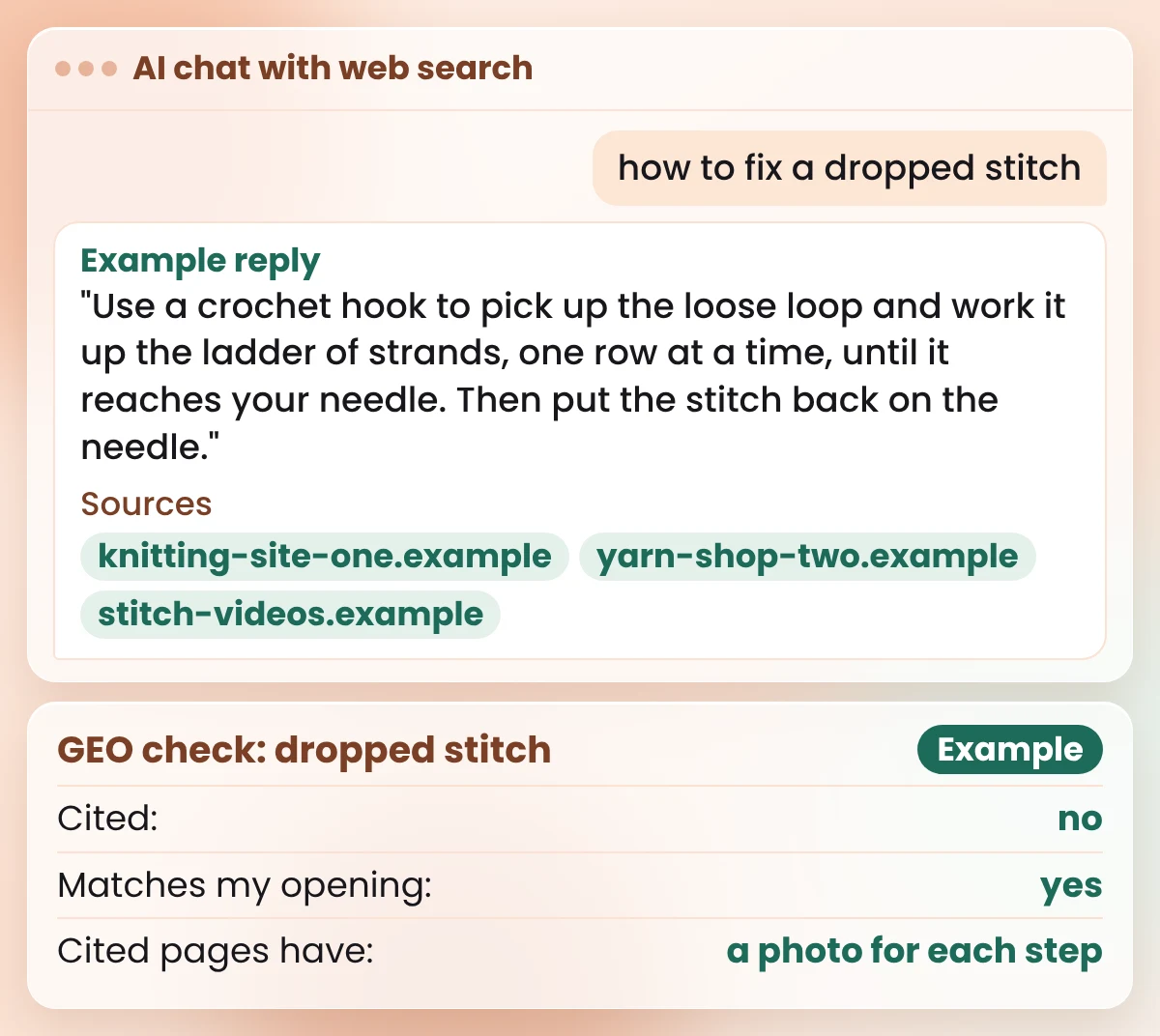
In her test, all three links opened (Example). None was her site, so she wasn’t cited. The answer matched her new opening, and the cited pages show a photo for each step. Taking those photos is her next job, and it’s outside today’s checklist.
Ask once today, in one tool. Answers can differ from one ask to the next, so asking ten times tells you little. Put a reminder in your calendar to ask again in a month (my suggestion). To follow more questions over time, the free monthly check in my post on generative engine optimization tools is built for it.
Before you expect citations
Start with one post Google already shows, and make sure it’s indexed. Then answer its question in the first two sentences, add a short FAQ from real searches and one line only you could write. My post on how to optimize content for AI search covers the site-wide checks, such as robots.txt.
No. Google’s May 2026 guide frames optimizing for its AI features as still SEO. The same basics apply: a page Google can crawl and index, and content that is useful and not the same as everyone else’s.
Nobody can promise it. What you control is that your post is indexed, answers its question clearly and adds something other pages don’t. Then ask the AI tool your question now and then, and note what the cited pages have that yours doesn’t.
Not for this checklist. Everything here uses Search Console, your blog editor and a free chat assistant. Paid trackers only make sense once you check many questions every month; my post on generative engine optimization tools compares them.
It’s the work of making your content easy for AI answer tools to find and use. For Google’s own AI features, Google treats it as normal SEO.
Most generative engine optimization best practices sound equally urgent. Once you tag each one, the list gets short: make sure Google has the post, answer the question at the top, use real searches, add what only you know and look at the answer yourself.
Your next step is small. Open Search Console, filter your searches by “how”, and write your first GEO check note for the post at the top of the list.
My free AI Workflow Starter Kit has more copy-ready workflows like the ones in this post.

12+ years in digital marketing. I test every workflow on real work before I share it, free tools first.
More about me →Steps, a copy-paste prompt and the limits I found. Free, nothing to buy.
Get the Free Starter Kit →