Physical Address
304 North Cardinal St.
Dorchester Center, MA 02124
Physical Address
304 North Cardinal St.
Dorchester Center, MA 02124

Use a free AI headline generator the safe way: one prompt gives 10 title options from your post's facts, a check keeps only true promises, then fit it for Google.
“The Ultimate Guide to Repotting Houseplants.” Click a title like that and you expect everything: soil, pots, roots, pests, and what to do when it all goes wrong. If the post turns out to be six short steps, the title promised more than the post gives, and the reader notices in the first scroll. Any free AI headline generator will happily write that kind of title for you.
That gap is the thing to watch. Big promises are quick to write and easy to click. They cost you the reader the moment the post doesn’t match.
Use Claude or ChatGPT as the generator, and give it a five-line note about what your post really delivers. Ways 1 to 3 take one finished post to a title that’s true, fits in 60 characters and is ready for Google. By my estimate that’s about 20 minutes. Ways 4 and 5 reuse the same work for your meta description, a social post and the titles of older posts.
The short version
Have these ready
On this page
A headline generator does one job well: it writes many options fast. Some are websites built only for that. Any AI chat can do the same job with a prompt, and that’s the version used here.
What no generator does for you is the judging. It can’t tell if your post covers what a title promises, and AI chats can miscount the characters in a title. Those two checks stay with you, and Ways 2 and 3 make them quick.
The tool that makes the judging easy is a short note called “Title facts”. It holds five lines, and every prompt below reads from it.
TITLE FACTS
Keyword:
Who it's for:
What the post gives:
Number:
Not in the post:| Line | How to fill it |
|---|---|
| Keyword | The phrase you want the post found for. If you haven’t picked one, write the words you’d type into Google to find this post. |
| Who it’s for | One kind of reader, in plain words. |
| What the post gives | Read your headings, then write what the reader can do or have after reading. One line. |
| Number | A count your post really has: steps, tools, examples. Use the one in your headings. If there’s no count, write NONE. |
| Not in the post | What a reader might expect but won’t find. Think of what an “ultimate guide” on your topic would cover that yours doesn’t. If nothing comes to mind, write NONE. |
“Not in the post” is the line that keeps your title honest. It tells the AI which promises to leave out, and it gives the check in Way 2 something to test against.
Kofi’s post, start to finish (Example)
Kofi and his houseplant blog are invented for this post. He has just finished a post on repotting and needs a title, so each way below shows his version, labelled Example. Here’s his Title facts note:
| Line | Kofi’s facts (Example) |
|---|---|
| Keyword | repot a houseplant |
| Who it’s for | People with their first few houseplants |
| What the post gives | 6 steps from choosing the new pot to the first watering, plus a list of what to buy before you start |
| Number | 6 |
| Not in the post | Saving a sick or dying plant; how long repotting takes |
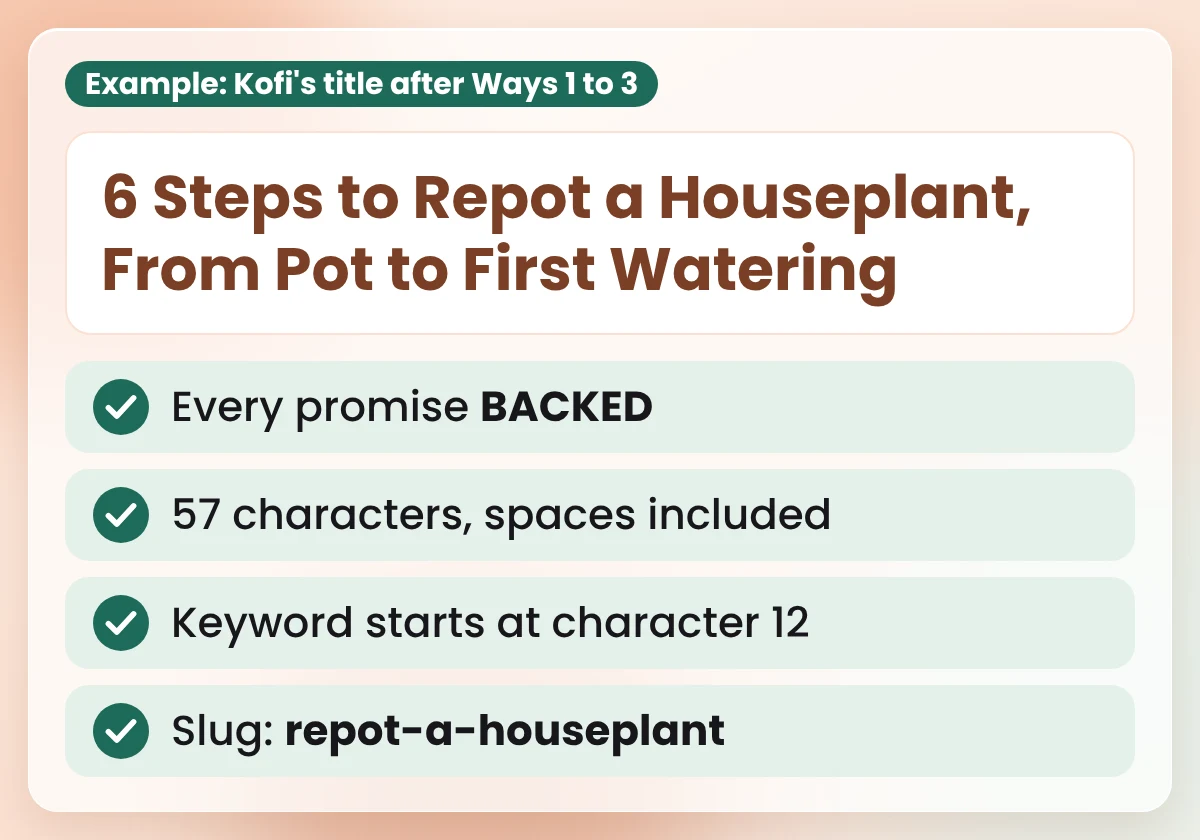
The image shows Kofi’s title after Ways 1 to 3. Each way below adds one part of the route.
One title on its own is hard to judge. Ten side by side make it easy to see which ones say the most about your post. The prompt below asks for ten in different styles and fences in the promises with your Title facts.
Steps for your post
Act as my headline generator. Write 10 title options for my blog post. Use only the title facts below.

[PASTE YOUR "TITLE FACTS" NOTE]

Rules:
1. Put the keyword in every title, word for word.
2. If Number isn't NONE, start at least 5 titles with that number. Never use any other number.
3. Promise only what "What the post gives" says, and nothing listed under "Not in the post".
4. No "ultimate", "secret", "guaranteed" or "best ever".
5. Keep each title to about 60 characters or fewer.
6. Mix styles: number first, how to, a question, and one that names the reader.
7. Give a numbered list of titles only, with no notes.
Rule 5 says “about” on purpose. The AI’s own count can be off, so Way 3 counts for real.
The reply Kofi got (Example):
Five of the ten start with 6, the only number in his facts. None mentions sick plants or a time. Kofi’s 3 for Way 2: number 1, number 10, and “The Ultimate Guide to Repotting Houseplants Like a Pro”, which he had saved earlier from a headline generator website where he typed only “repotting”.
Keep from this way: a saved “Title facts” note and 3 titles to check.
Every word in a title is a small promise. “6 steps” promises a count. “For beginners” promises a level. “Easy” promises a feeling, and that one is the hardest to keep, because it depends on the reader.
The Promise check pulls those words out one by one and holds each against your Title facts. It doesn’t write new titles. It only sorts, so you decide with the evidence in front of you.
Steps for your post
Check these titles against my title facts. Don't write new titles.

[PASTE YOUR "TITLE FACTS" NOTE]

Titles to check:
[PASTE UP TO 3 TITLES, ONE PER LINE]

For each title, list every promise in it: each number, each result, each word about the reader, and each word that describes the post (like easy, quick, complete). Mark each one:
BACKED = a line in my title facts says it.
YOUR CALL = a describing word my facts can't prove or disprove.
CUT = my facts don't say it, or "Not in the post" lists it.
Then give each title one verdict: KEEP (all BACKED), KEEP IF I AGREE (has a YOUR CALL), or DROP (has a CUT).
The check Kofi got (Example):
| Title | Promises and marks | Verdict |
|---|---|---|
| 6 Steps to Repot a Houseplant, From Pot to First Watering | “6 steps”: BACKED (Number) “repot a houseplant”: BACKED (Keyword) “from pot to first watering”: BACKED (What the post gives) | KEEP |
| 6 Easy Steps to Repot a Houseplant for Beginners | “6 steps”: BACKED (Number) “easy”: YOUR CALL (your facts don’t say how hard the steps are) “repot a houseplant”: BACKED (Keyword) “for beginners”: BACKED (Who it’s for) | KEEP IF I AGREE |
| The Ultimate Guide to Repotting Houseplants Like a Pro | “ultimate guide”: CUT (your facts list 6 steps and a buying list, not everything about repotting) “repotting houseplants”: BACKED (close to Keyword) “like a pro”: CUT (your facts say the post is for people with their first few houseplants) | DROP |
Kofi’s call (Example): the saved title is out. For “easy”, he looked through his post for a line about how hard the steps are and found none, so the word goes: “6 Steps to Repot a Houseplant for Beginners”. Of the two titles left, number 1 tells a stranger more, from choosing the pot to the first watering, so he picks it.
One run per shortlist is enough, because the check only sorts words and the decisions are yours. If you add a word to the title later, hold just that word against your Title facts yourself.
Keep from this way: one title with no CUT words, and no YOUR CALL word your post can’t show.
A true title can still trip at the last step. Google can cut a long title short in search results, so the end of it never shows. I aim to keep titles on this blog to 60 characters or fewer, spaces included. That’s my rule of thumb, not a limit Google publishes.
Two more habits help. The keyword sits near the start, so a searcher sees it first. And the post’s address, the slug, is short: only the keyword.
Steps for your post
Kofi’s fit (Example): he liked “for beginners” from the other title, so he added “(Beginners)” to the end of his pick. “Beginners” matches his Who it’s for line, so the word was fine. The length wasn’t: 69 characters.
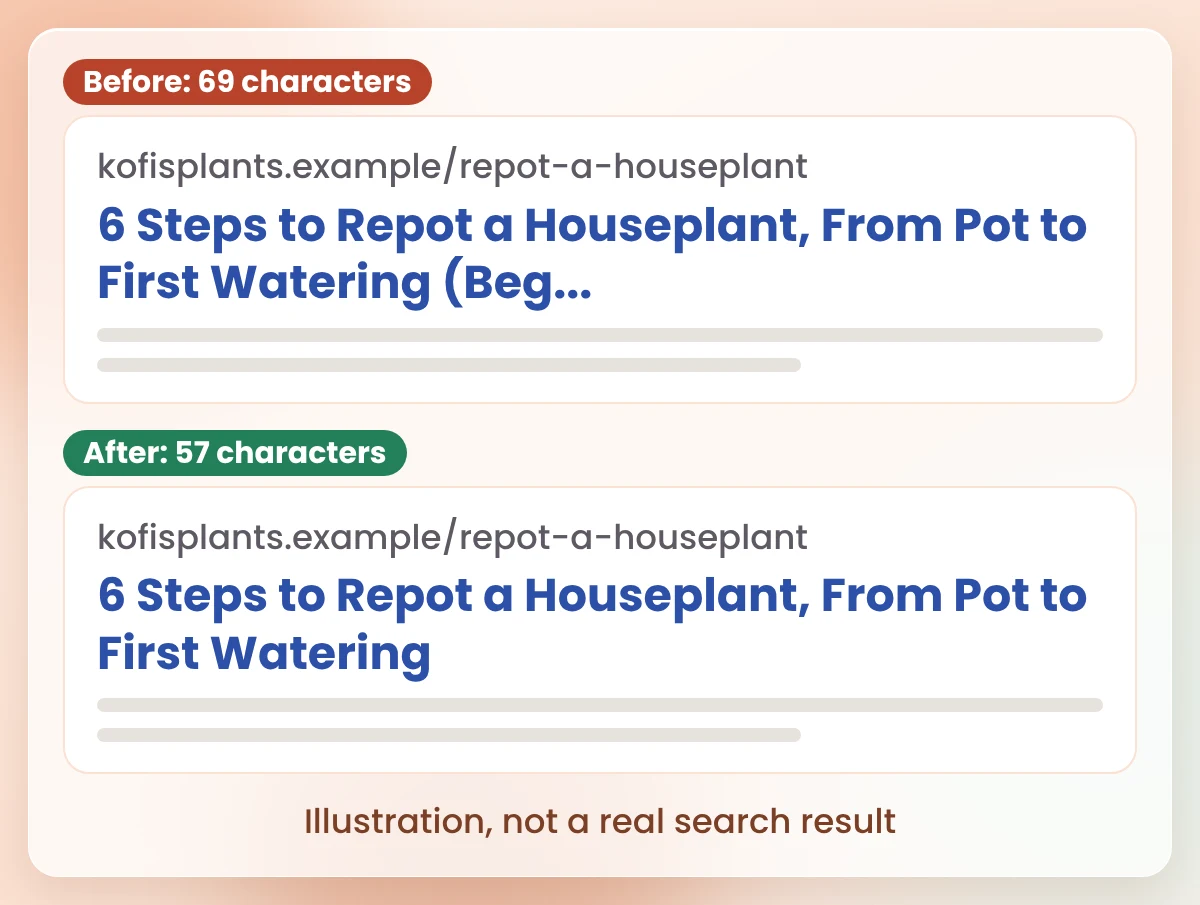
He took “(Beginners)” off again. “6 Steps to Repot a Houseplant, From Pot to First Watering” is 57 characters, the keyword starts at character 12, and the slug is repot-a-houseplant.
Keep from this way: a title of 60 characters or fewer, pasted into WordPress, with a keyword-only slug.
Once the title is set, two more short lines are waiting: the meta description, which Google may show under your title in results, and the line you write above the link when you share the post. Both make promises too, so they come from the same Title facts.
Steps for your post
Using only my title facts, write two things for my blog post.

Final title: [PASTE YOUR FINAL TITLE]
[PASTE YOUR "TITLE FACTS" NOTE]

1. A meta description for Google: one or two plain sentences, 140 to 160 characters, with the keyword in it.
2. One line to post above the link on social media: under 20 words, no hashtags, not the title word for word.
Don't promise anything my title facts don't say.
The reply Kofi got (Example):
| Part | Kofi’s reply (Example) |
|---|---|
| Meta description | New to houseplants? Learn how to repot a houseplant in 6 steps, from choosing the new pot to the first watering, plus a list of what to buy before you start. |
| Social line | Repotting your first houseplant? Here are the 6 steps, plus what to buy before you start. |
Held against his note, both lines carry the reader, the 6 steps, the pot-to-watering route and the buying list, and nothing the note doesn’t hold. Kofi’s counter showed 157 characters for the meta description, inside the range, so he pasted it as it is.
Most blogs have a few early posts with titles like “My Tips” or “Some Thoughts”. The post may be useful, but the title doesn’t say what’s inside. The same prompts can fix that in about 15 minutes per post, by my estimate.
The one thing to leave alone is the URL. Other pages, old social posts and search results point to the old address. A new slug can break those links unless you set up a redirect, which is a bigger job. My suggestion: change the title, keep the slug.
Steps for an old post
Kofi’s old post (Example): an early post called “My Watering Tips” at /watering-tips/. His new Title facts note:
| Line | Kofi’s facts for the old post (Example) |
|---|---|
| Keyword | how often to water houseplants |
| Who it’s for | People with their first few houseplants |
| What the post gives | A finger test for dry soil, and a weekly watering check for 5 common houseplants |
| Number | 5 |
| Not in the post | Watering apps; self-watering pots |
From the Headline prompt’s ten options, he kept “How Often to Water Houseplants: A Check for 5 Common Plants”. The Promise check marked “5 common plants”, “a check” and the keyword BACKED, so the verdict was KEEP. It’s 59 characters, with the keyword right at the start.
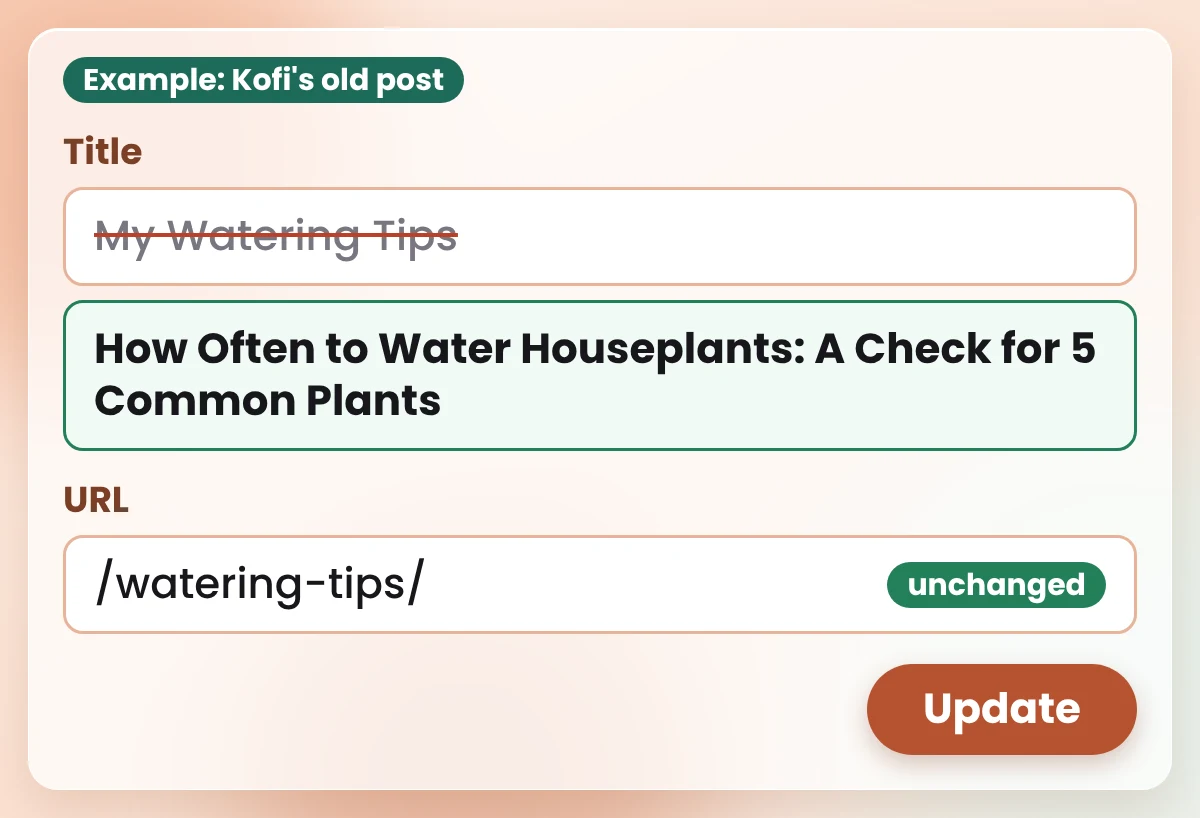
The slug doesn’t contain the new keyword, and that’s fine. A matching slug is a small extra, and on a live post it isn’t worth broken links.
Limits worth knowing
Before and after the title
The title is the last step of writing a post. Before it, my AI keyword research tools post helps you choose the keyword, the AI blog outline generator steps help you plan the headings, and these shortcuts to write blog posts faster cover the draft. For older posts that need more than a new title, see how to update old blog posts with AI.
Yes. The Headline prompt here runs in Claude or ChatGPT, and both let you start with a free account; usage limits change, so check each site for what’s included today. Headline generator websites exist too; check their own pages for limits, and run their titles through the Promise check.
Google can cut long titles short in search results, so I aim to keep mine to 60 characters or fewer, spaces included. That’s my rule of thumb, not a limit Google sets. Count with a counter, not an AI chat.
Only when your post really has that count. A number up front tells the reader what they get before they click, which is why I start most titles on this blog with one. A number your post doesn’t have is a promise you can’t keep.
AI chats don’t read text one letter at a time, so their counts can be off. Ask for “about 60 characters” in the prompt, then count the winner with Google Docs’ Word count or your SEO plugin.
For a post that’s already live, my suggestion is no. Links from other pages, social posts and search results point to the old address, and a new one can break them unless you add a redirect. Change the title and keep the slug, as in Way 5.
A free AI headline generator gives you options in seconds. The five lines of Title facts decide which options you’re allowed to use, and the counter decides which ones fit. Between them, the title that goes live is short, findable and true to every word of the post.
Pick the post you plan to publish next and fill in its Title facts note today. It takes a few minutes, and it’s the input for every other way here.
More copy-ready prompts for your blog are in my free AI Workflow Starter Kit.

12+ years in digital marketing. I test every workflow on real work before I share it, free tools first.
More about me →Steps, a copy-paste prompt and the limits I found. Free, nothing to buy.
Get the Free Starter Kit →