Physical Address
304 North Cardinal St.
Dorchester Center, MA 02124
Physical Address
304 North Cardinal St.
Dorchester Center, MA 02124
Four free prompts for polite follow-up emails: a recap after a call, a nudge after a quote, a last friendly note after silence, and a check that flags pushy or made-up lines before you send.
Monday, a good call. Wednesday, the quote goes out. The next Monday, nothing has come back, and the follow-up you meant to send is still a blank email. Ask an AI follow up email generator for “a polite follow-up” with nothing else to go on, and you may get the same “just checking in” in longer words.
The writing isn’t the hard part. Choosing what to say is: too short feels rude, too long feels needy, and anything that hints at “why haven’t you answered?” feels worse. So the email waits, and a client who was keen on the call hears nothing from you either.
Each prompt below starts with a few short lines you fill in: what happened, the one thing you want the client to do, and the lines the AI must never write. There’s one for after a call, one for after a quote and one for when a client has gone quiet, plus a check that reads each draft for pushy or made-up lines before your client does.
Give the setup about 15 minutes, by my estimate. After that, each follow-up is a few lines of facts, one paste and one read, roughly five minutes. By the end of this post, you can have a polite nudge ready for whichever client you’re waiting on right now.
In short
| When | What the email does |
|---|---|
| After a call | Thanks them, recaps what you agreed, asks for one next step |
| After a quote | Offers to send the quote again, asks one easy question |
| After silence | Says it’s your last note for now, asks a yes-or-no question |
| Every time | The Pushy check reads it before the client does |
All four prompts run in a free AI chat. You add the client’s name yourself, in your email app.
What you need
On this page
Guides on follow-up emails, mostly written by email and business software companies, agree on the basics. A good follow-up tells the client what happened, asks for one clear thing and makes replying easy. The card below sums up what goes in and what stays out.
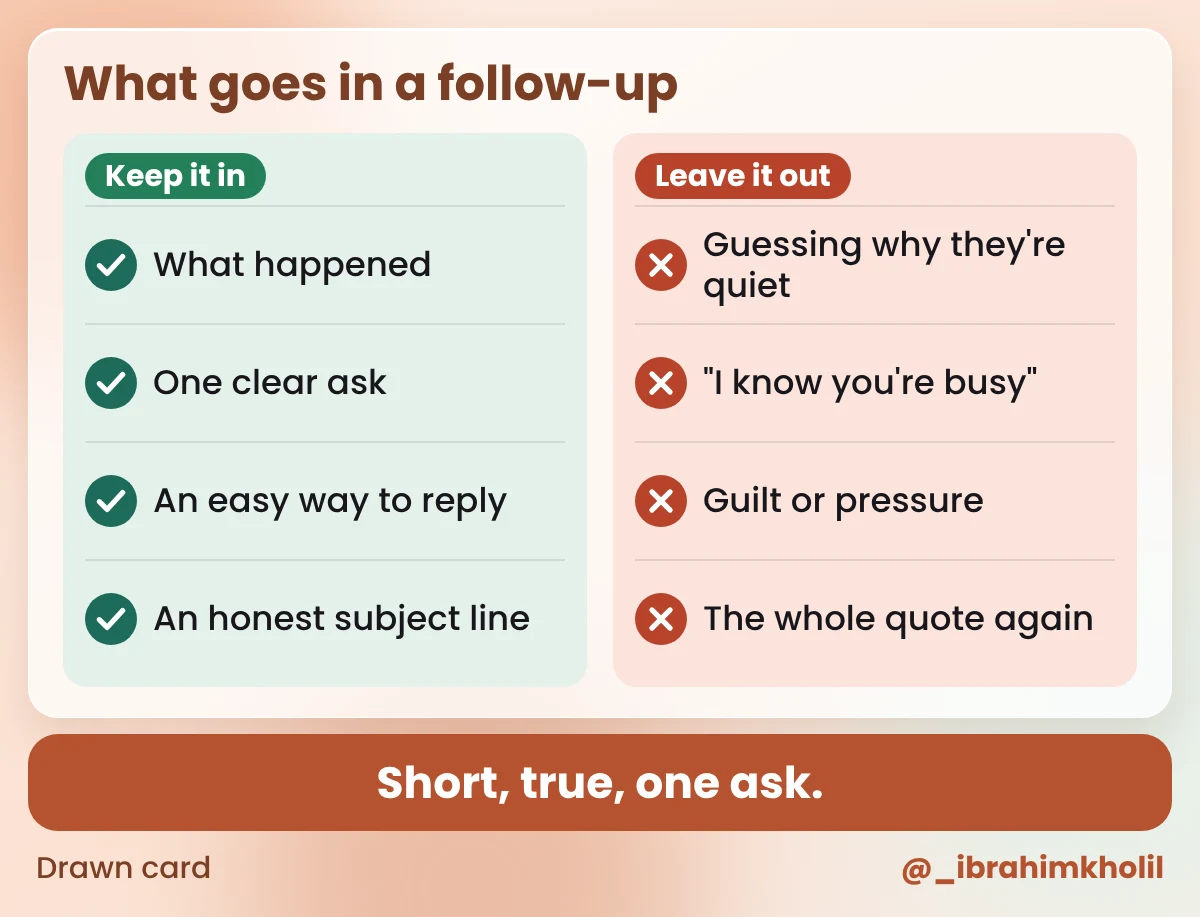
The left side gives the client something to answer. The right side is where follow-ups start to feel pushy. A guess about why someone is quiet can read like a dig, even when you mean it kindly.
Some guides also argue that one question gets answered more easily than three. That’s their advice, not a measured result, but it’s easy to follow. Asked with no rules, an AI chat tends to fall back on polite filler. So each prompt below carries its own rules, and the fourth prompt checks that the AI kept them.
Whose emails these are
All the emails here belong to Nadia, a freelance web designer invented for this post. She’s chasing one client, the owner of a family plant nursery who wants a new website. The client stays unnamed, the same way you’ll leave your client’s name out of the chat. Every day, detail and reply is made up (Example).
You’ll use these prompts again and again, so keep them where you can find them in seconds. One note holds all four. Each time you need one, you copy it out and fill in the copy, so the saved version stays clean for the next client.
Set it up once
You’re set when: the “Follow-up prompts” note exists and you can open it on your phone. It fills up as you read on.
A call feels finished when you hang up, but the client only remembers part of it. A short recap puts the decisions in writing and ends on the one thing that moves the job forward. Most guides suggest sending it within a day or two; sooner is easier, because you still remember the details.
Prompt 1: after a call
Write a short follow-up email to a client after a call. Use only the facts below. Don't add dates, prices, promises or details I didn't give you.

THE CALL: [WHEN IT WAS AND WHAT IT WAS ABOUT]
WHAT WE AGREED: [EACH DECISION ON ITS OWN LINE]
WHO DOES WHAT: [EACH TASK AND WHO DOES IT]
ONE NEXT STEP: [ONE ACTION FOR THE CLIENT, AND A DAY IF THERE IS ONE]
MY FIRST NAME: [YOUR FIRST NAME]

Rules:
- A subject line that names the call.
- Start with "Hi [FIRST NAME]," and leave [FIRST NAME] exactly like that.
- One line of thanks, then a short recap of what we agreed and who does what.
- End with the one next step as a question. Ask for nothing else.
- Under 120 words. Plain, friendly English.
- Sign with my first name.
The 120-word limit is my suggestion, so the email reads in one glance on a phone.
Nadia’s filled-in lines (Example):
| Line | Nadia’s facts (Example) |
|---|---|
| THE CALL | Monday video call about a new website for their plant nursery |
| WHAT WE AGREED | A 5-page website: Home, Plants, Workshops, About and Contact. The online shop isn’t part of this job. |
| WHO DOES WHAT | I send the quote by Wednesday. The client picks 10 photos of the nursery. |
| ONE NEXT STEP | Reply to this email with the 10 photos by Friday |
| MY FIRST NAME | Nadia |
The reply Nadia got (Example):
Subject: Follow-up to our Monday call
Hi [FIRST NAME],
Thanks for the video call on Monday about your plant nursery’s new website. Here’s what we agreed:
– A 5-page website: Home, Plants, Workshops, About and Contact.
– The online shop isn’t part of this job.
– I’ll send you the quote by Wednesday.
– You’ll pick 10 photos of the nursery.
Could you reply to this email with the 10 photos by Friday?
Nadia
Every line traces back to one of her five lines, and the only question is the next step.
Send it as a new email:
A quote with no answer isn’t always a no. Guides on following up on quotes point out that emails get buried, and that offering to send the quote again is a low-pressure way back in. Most of them suggest a first nudge about 2 to 3 working days after the quote went out.
Nadia sent her quote on Wednesday, in an email with the subject “Quote for your new website”. Counting 3 working days (Thursday, Friday, Monday) puts her nudge on the next Monday.
Prompt 2: after a quote
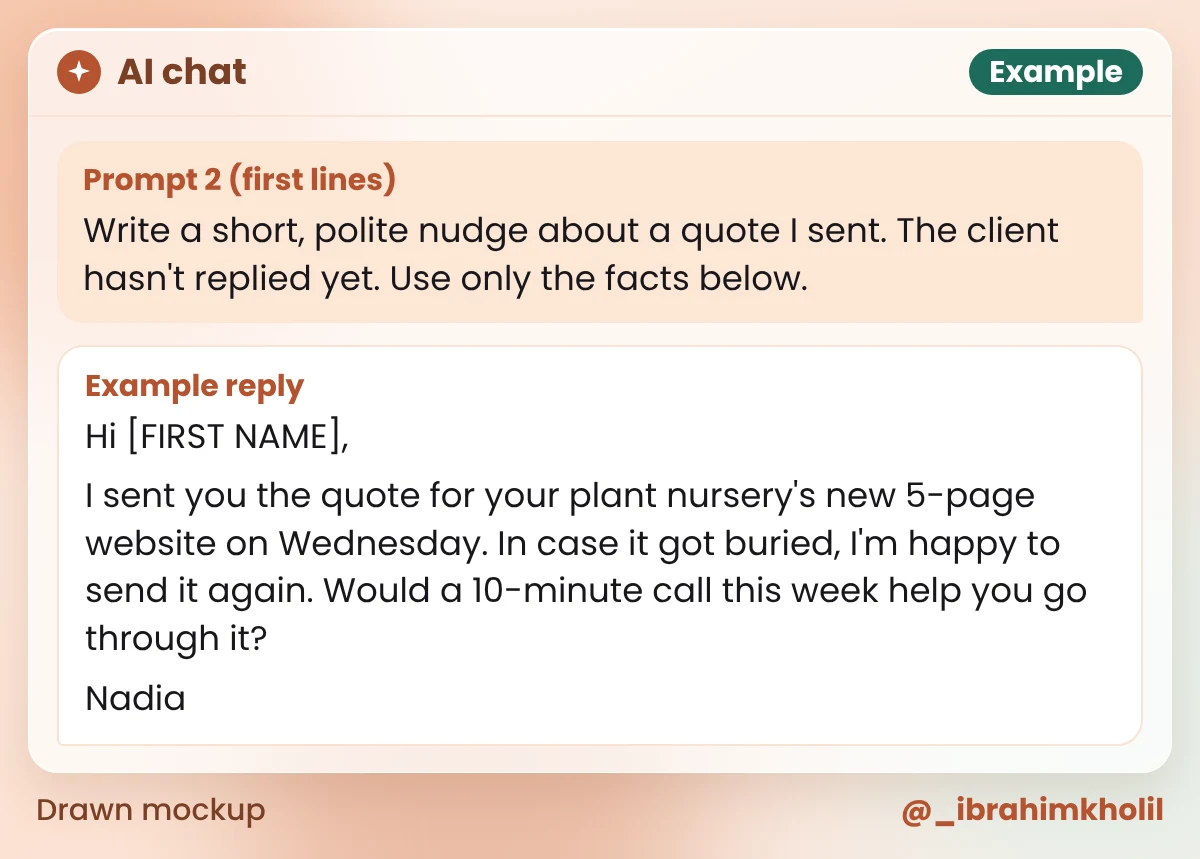
Write a short, polite nudge about a quote I sent. The client hasn't replied yet. Use only the facts below.

WHAT I QUOTED FOR: [THE JOB, IN A FEW WORDS]
SENT ON: [THE DAY YOU SENT IT]
ONE EASY QUESTION: [ONE QUESTION THEY CAN ANSWER IN A LINE]
MY FIRST NAME: [YOUR FIRST NAME]

Rules:
- Start with "Hi [FIRST NAME]," and leave [FIRST NAME] exactly like that.
- Don't repeat the price or the whole quote. Offer to send it again in case it got buried.
- Don't guess why they haven't replied. No "I know you're busy", no guilt, no pressure.
- Ask only the one question above.
- 3 to 5 sentences. No subject line: I'll send it as a reply in the same email thread.
- Sign with my first name.
Nadia’s filled-in lines (Example):
| Line | Nadia’s facts (Example) |
|---|---|
| WHAT I QUOTED FOR | A new 5-page website for their plant nursery |
| SENT ON | Wednesday |
| ONE EASY QUESTION | Would a 10-minute call this week help you go through it? |
| MY FIRST NAME | Nadia |
Her reply is in the drawn chat below: three sentences, no price, and no reason made up for the silence.
Send it as a reply in the same thread:
Replying in the same thread is my suggestion, because the client sees the quote without searching. If you’d rather start a new email, give it a subject that names the quote.
Sometimes the nudge gets no answer either. Guides differ on the exact gaps, but most suggest letting them grow and stopping after about 3 or 4 tries in total. Several suggest ending with a short note that leaves the door open, instead of just fading out.
Nadia’s quote email and her Monday nudge both went unanswered. Her quote has a real end date, the end of the month, so that’s her reason to write. She sends her third and last message about it on the Monday a week after the nudge, which in her example month falls two days before the quote runs out. If you have no real date, the prompt writes the email without one instead of inventing a deadline.
Prompt 3: after silence
Write a last, friendly follow-up to a client who hasn't answered my last emails. Use only the facts below.

WHAT IT'S ABOUT: [THE JOB OR QUESTION, IN A FEW WORDS]
A REAL REASON TO REPLY NOW: [A TRUE DATE OR CHANGE, OR NONE]
YES-OR-NO QUESTION: [ONE QUESTION THEY CAN ANSWER WITH YES OR NO]
MY FIRST NAME: [YOUR FIRST NAME]

Rules:
- Start with "Hi [FIRST NAME]," and leave [FIRST NAME] exactly like that.
- Say this is my last email about it for now, and that the door stays open.
- If the reason is NONE, don't make one up. No fake deadlines.
- Don't guess why they've been quiet. No guilt, no pressure.
- End with my yes-or-no question.
- 3 to 4 sentences. No subject line: I'll reply in the same thread.
- Sign with my first name.
Nadia’s filled-in lines (Example):
| Line | Nadia’s facts (Example) |
|---|---|
| WHAT IT’S ABOUT | The quote for their plant nursery’s new 5-page website |
| A REAL REASON TO REPLY NOW | My quote is valid until the end of this month |
| YES-OR-NO QUESTION | Would you like me to send the quote again before it runs out? |
| MY FIRST NAME | Nadia |
The draft that came back (Example):
Hi [FIRST NAME],
I’m sure things have been busy at the nursery this month. My quote for your plant nursery’s new 5-page website is valid until the end of the month. This is my last email about it for now, and the door stays open whenever you’re ready. Would you like me to send the quote again before it runs out?
Nadia
Nadia never mentioned how busy the client was. That opening sentence came from the AI, although Prompt 3 says not to guess why they’ve been quiet. Friendly guesses like this are the hardest lines to spot in your own draft, and they’re what Prompt 4 looks for.
Send it as a reply in the same thread, after the Pushy check in the next section:
Pushy lines rarely look pushy to the person sending them. “I’m sure things have been busy” sounds kind. To a client who wasn’t busy, it can sound like a hint that they’ve been rude.
The Pushy check is a fresh chat with four fixed questions. It looks for made-up facts, extra asks and pressure, and it doesn’t rewrite anything, so every change stays yours. Run it on every draft, from all three prompts.
Prompt 4: the Pushy check
Check this follow-up email before I send it. Don't rewrite it.

WHAT I GAVE THE AI:
[PASTE THE FILLED-IN PROMPT]

THE DRAFT:
[PASTE THE DRAFT]

Answer these 4 questions with YES, NO or N/A:
1. Is every fact in the draft (a day, a date, an amount, a detail of the job, a promise) in what I gave the AI?
2. Does it ask the client for exactly one thing?
3. Is it free of guesses about why they haven't replied, guilt and pressure?
4. If there's a subject line, does it match what the email is about? (N/A if there's none.)
For every NO, quote the line and ask me one question about it.
What the check said about Nadia’s draft (Example):
| Question | Answer | Line and question |
|---|---|---|
| 1. Every fact in what I gave the AI? | YES | |
| 2. Exactly one ask? | YES | |
| 3. No guesses, guilt or pressure? | NO | “I’m sure things have been busy at the nursery this month.” Did the client tell you they’ve been busy? If not, this line guesses why they’ve been quiet. |
| 4. Subject line matches? | N/A | No subject line. |
Nadia’s change (Example): she doesn’t know why the client went quiet, so the sentence had to go. The email now opens with her end date. That was her only edit, and it changed a single line, so step 4’s limit stops her at one run. Here it is in her email app, as a reply in the quote thread:
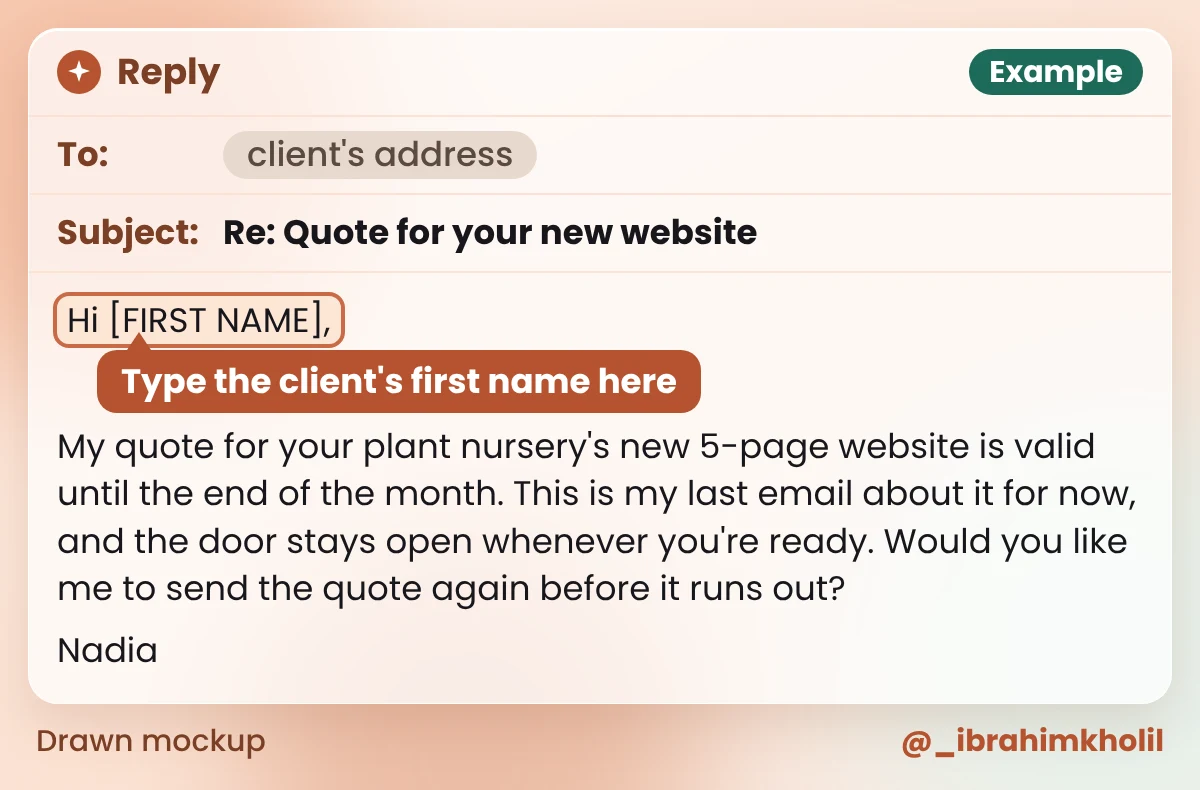
The only thing left is the name. She swaps [FIRST NAME] for the client’s first name and clicks Send.
The gaps below come from guides by email and business software companies. They don’t agree on exact numbers, so treat them as rules of thumb, not research.
| Moment | What most guides suggest |
|---|---|
| After a call | Within a day or two; one guide says up to 3 working days |
| After a quote | A first nudge 2 to 3 working days later, the next about a week after that, and a last note a day or two before the quote runs out |
| After no reply to a normal email | A first nudge after 2 to 3 days, then longer gaps |
| When to stop | After about 3 or 4 tries in total; keep your notes and leave the door open |
Nadia’s plan, worked out (Example):
| Day | Why that day | |
|---|---|---|
| Recap (Prompt 1) | Monday | The same day as the call |
| Quote | Wednesday | The day her recap promised |
| Nudge (Prompt 2) | The next Monday | 3 working days after the quote: Thursday, Friday, Monday |
| Last note (Prompt 3) | The Monday after that | About a week after the nudge, and two days before her quote runs out at the end of the month |
That’s 3 emails about the quote with no answer, inside the “about 3 or 4 tries” most guides suggest. After the last note, she stops and keeps her notes in case the client comes back.
Put the next nudge in your calendar: right after you send a quote, open your phone’s calendar, add an event on the day the first nudge is due and call it “Nudge: [job]”. When the reminder pops up, Prompt 2 is waiting in your note.
In the US, the CAN-SPAM Act sets rules for commercial email, such as marketing emails. The FTC’s CAN-SPAM compliance guide for business, as it reads in search results, lists requirements such as honest sender details, a subject line that doesn’t mislead, a postal address and a clear way to opt out.
I couldn’t confirm whether a one-to-one follow-up to a client who asked you for a quote counts as commercial, so I won’t claim either way. If you send marketing-style emails to many people, follow those rules. The prompts here already keep subject lines honest, and question 4 of the Pushy check tests it. Rules differ by country, so check the linked page and your own country’s rules for current details. This isn’t legal advice.
Easy to miss
Where this fits
A follow-up sits in the middle of a longer chain. Before it, my steps for an AI proposal generator help you write the quote it follows up on, and my post on how to use AI for lead generation without spam covers finding the client in the first place. After the job, an AI review response generator helps you answer the review they leave.
Most guides suggest a day or two after a call, and about 2 to 3 working days after a quote or an unanswered email. These are rules of thumb from email and business software companies, not research, so pick a gap you’d be comfortable with if you were the client.
Most guides suggest stopping after about 3 or 4 tries in total. Make the last one a short note that says it’s your last for now and leaves the door open, like Nadia’s (Example).
Keep it short, don’t repeat the whole quote, and offer to send it again in case it got buried. Ask one easy question, and don’t guess why they haven’t replied. Prompt 2 builds those rules in, and the Pushy check tests for them.
Yes, as long as you read it and send it yourself. The client will hold you to every date and promise in it, so check it against your facts first. The Pushy check does a first pass, and your own read does the last one.
The four prompts here cost nothing and run in any AI chat. Claude and ChatGPT both have free plans with usage limits that change, so check each site for what’s included today. Separate generator websites exist too; check their own pages for their limits.
You don’t need to. The prompts write “Hi [FIRST NAME],” and you type the name in your email app. Leave out email addresses, phone numbers and street addresses too, and follow any agreement you have with the client about their information.
A follow-up works when it reminds the client what happened, asks one thing and makes it easy to say yes. Fill in a few lines, paste one prompt, and an AI follow up email generator drafts that in seconds. Your own read before Send is still the step no prompt replaces.
Open your Sent folder and find the oldest email that never got an answer. Fill in the prompt that fits it, run the check, and send it today.
For more copy-ready prompts for client work, grab my free AI Workflow Starter Kit.

12+ years in digital marketing. I test every workflow on real work before I share it, free tools first.
More about me →Steps, a copy-paste prompt and the limits I found. Free, nothing to buy.
Get the Free Starter Kit →