Physical Address
304 North Cardinal St.
Dorchester Center, MA 02124
Physical Address
304 North Cardinal St.
Dorchester Center, MA 02124
Published a typo again? Here are 7 AI proofreading tools compared in plain words, a free proofreading prompt for ChatGPT or Claude, and a short pre-publish checklist.
You hit Publish, open the post on your phone, and there it is: a typo in the second line. Sometimes a reader points it out in the comments before you even see it. If you’ve ever searched for AI proofreading tools right after a moment like that, this post is for you.
The strange part is that you read that draft several times. That’s exactly why the mistake survived. After a few reads, your brain sees what you meant to write, not what is on the screen. And when you look for help, every tool list names different apps, and almost none of them tells you which mistakes the tools still miss.
The answer isn’t one perfect app. It’s a simple order: you check the facts, one free tool catches the grammar, and you read the post aloud once at the end.
In this post, I’ll compare 7 AI proofreading tools in plain words, give you a free copy-ready prompt for ChatGPT or Claude, and walk through a worked example: a messy paragraph and its fixed version. You can run the whole routine on your next post today. For a 1,000-word post, plan on about 15 minutes (my rough estimate, not a measured number).
In short
What you need
On this page
“I ran my post through a checker and still published a mistake.”
That happens because a checker only sees words, not your world. AI proofreading means software that reads your text and flags spelling, grammar and punctuation mistakes, and sometimes unclear sentences. It is like a spell check that also understands whole sentences.
Tools are good at
You still check
A correct sentence can still be wrong. “The tool costs $10 a month” has perfect grammar, and no checker knows if the price is true. You stay the final reader.
Most people paste the post into a tool first and stop there. The order matters more than the tool. If you fix grammar first and facts later, you end up checking the same sentences twice. I call this the Facts, Fixes, Ears routine:
Pass 1 has to be you. Pass 2 is where the tools below come in.
There are too many tools, and every list ranks them differently. So here they are by the job each one does best. Plans and limits change often. Each tool’s own page shows its current plans; check there before you sign up.
| Tool | Best for | Watch out |
|---|---|---|
| Grammarly | Fixing mistakes while you type, in many apps | It also suggests rewrites. Accept fixes, not style changes. |
| LanguageTool | Grammar and spelling checks, including other languages | Long posts: check one section at a time. |
| Quillbot Grammar Checker | A quick paste-and-check in the browser | It also offers wording changes. Skip them if you want fixes only. |
| ProWritingAid | Writers who want deeper style reports | Check its plans first. Paste one section at a time. |
| Hemingway Editor | Making hard sentences easier to read | It is a readability tool. Use a grammar checker too. |
| Google Docs | A free check if you already draft in Docs | A basic check. It can miss mistakes. |
| ChatGPT or Claude (with the prompt below) | A free check that also flags facts to verify | It can change your meaning or invent “mistakes”. Use the rules in the prompt. |
How to pick one today: write in Google Docs? Use its built-in check. Write in WordPress or many apps? Try Grammarly or LanguageTool. Don’t want a new app? Use ChatGPT or Claude with the prompt below.
Grammarly underlines spelling, grammar and punctuation mistakes as you write. Install it in your browser, then open your post in WordPress or Google Docs. Click each underlined word and choose a suggestion. If a suggestion rewrites a whole sentence, read it twice before you accept it.
LanguageTool checks grammar, spelling and style. Go to the site, paste one section of your post into the text box, and click each highlighted mistake to see the fix. It’s a good pick if you also write in a language other than English.
Quillbot’s Grammar Checker works in the browser. Open the page, paste your text and look at the underlined words. It also suggests smoother wording. For proofreading, take the corrections and leave your own sentences alone.
ProWritingAid checks grammar and spelling and also gives reports on things like repeated words and sentence length. Create an account, paste one section of your post into the editor, and fix the underlined mistakes first. Look at the reports later, when you edit.
Hemingway Editor colors sentences that are hard to read, plus adverbs and passive voice. Paste your text on the site and shorten the sentences it marks. It helps phone readers a lot. It is a readability helper first, so run a grammar check as well.
If you write in Google Docs, you already have a free checker. Click the Spelling and grammar check button in the toolbar at the top left (or go to Tools → Spelling and grammar → Spelling and grammar check). A box opens at the top right. Take each suggestion or click Ignore to skip it. Google explains it in its Docs help page.
A chat assistant is not a proofreading app. Ask it to “check my post”, and it often rewrites the whole thing. But with clear rules, it gives you a list of mistakes and a list of facts to check. That’s the prompt in the next section.
You don’t want another subscription for one check a week. Fair enough. This prompt turns a free chat assistant into a proofreader that lists mistakes, flags facts and leaves your voice alone.
Go to chatgpt.com or claude.ai and sign in. Click New chat, so old messages don’t mix into the check.
Copy the prompt, replace the last line with your post (or one section of it), and press Enter.
You are my proofreader, not my editor.
Check the text below for spelling, grammar and punctuation mistakes only.
Rules:
- Don't rewrite my sentences or change my tone.
- List each mistake in a table with 3 columns: Original, Fix, Why (one short reason).
- Mark any fact, number, date, name or claim you can't confirm with FACT CHECK. Don't correct facts yourself.
- Mark any sentence that is hard to understand with UNCLEAR, but don't rewrite it.
- If a part has no mistakes, say so. Don't invent problems.
- At the end, give me the full text with only the mistakes fixed.

My text:
[paste your post or one section here]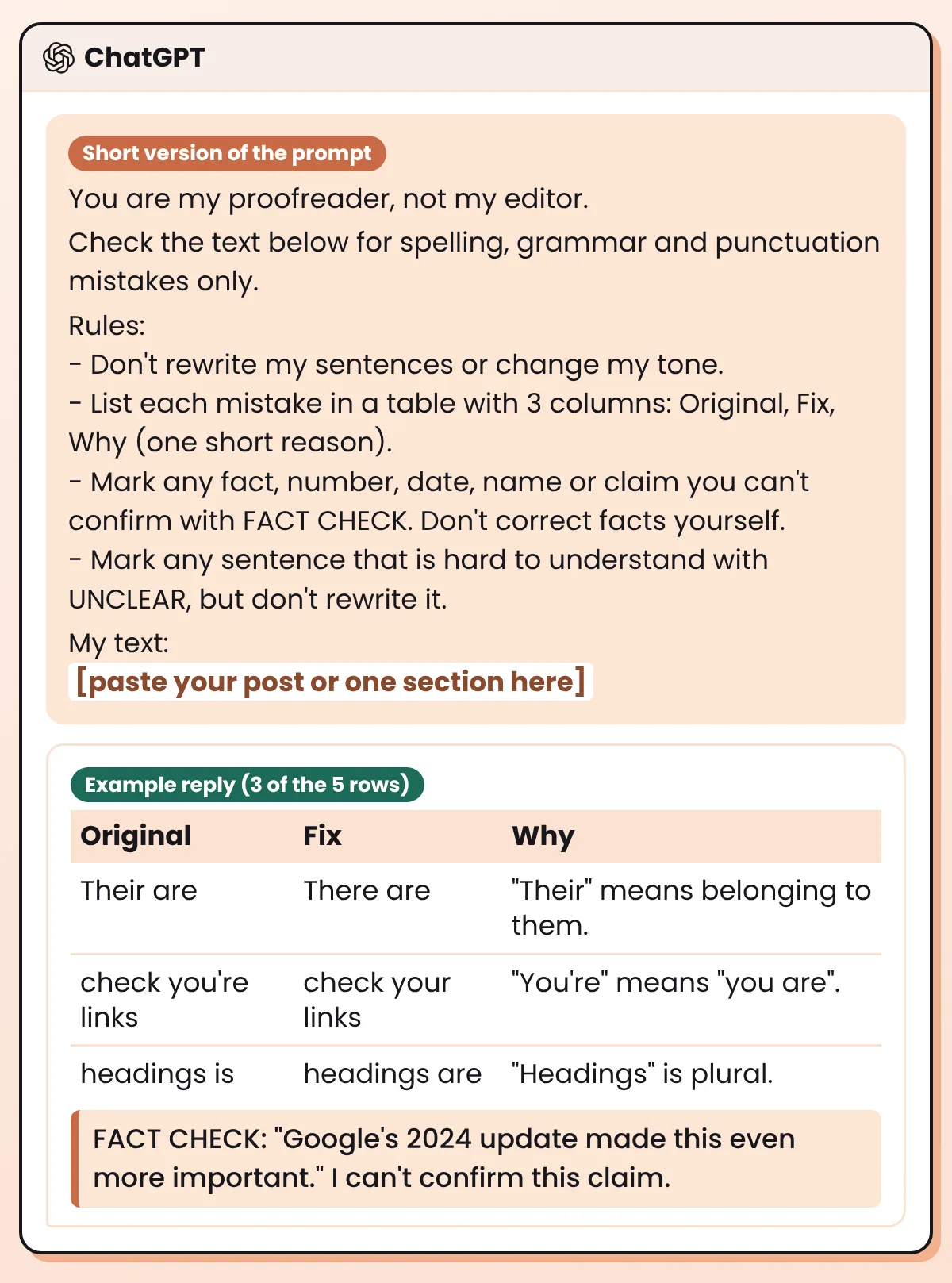
You should see a table of mistakes, a few FACT CHECK lines and the corrected text. Read each fix before you copy anything back. For every FACT CHECK line, open your source. If you can’t find one, cut the sentence.
Here is a short example paragraph I wrote with mistakes on purpose, so you can see what the prompt returns. The image shows it before and after; the table under it is the reply.
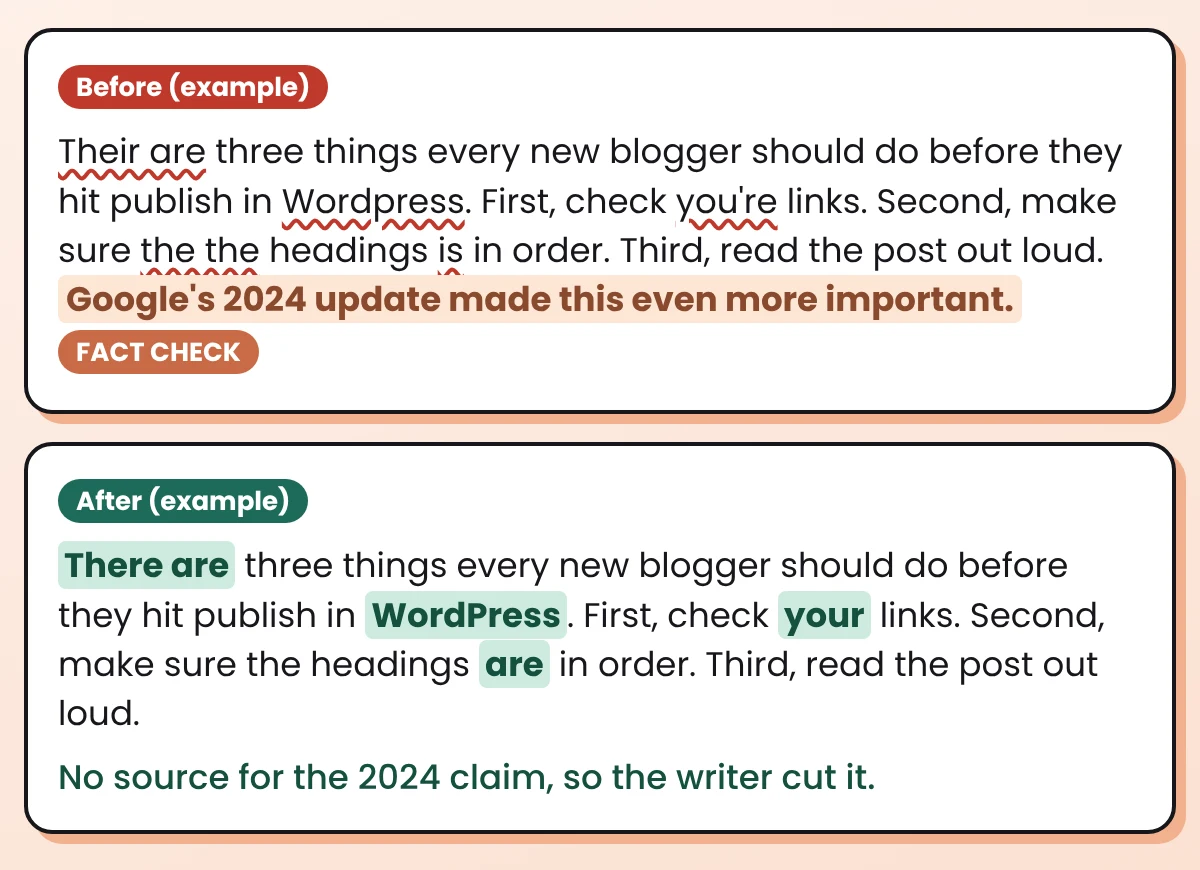
| Original | Fix | Why |
|---|---|---|
| Their are | There are | “Their” means belonging to them. |
| WordPress | WordPress | The brand name has a capital P. |
| check you’re links | check your links | “You’re” means “you are”. |
| the the headings | the headings | The word “the” is repeated. |
| headings is | headings are | “Headings” is plural. |
Notice the last sentence is gone in the After version. The AI didn’t delete it. It only flagged it. The writer had no source for that “2024 update”, so the writer cut it. That human step is the part no tool does for you.
“I can’t see my own mistakes.”
Nobody can, right after writing. Your memory of the draft fills in the gaps. These small tricks make the text look new again, so you catch what the tool missed:
You ask a tool to “improve” your post, and it comes back smooth, polished and not like you at all. Proofreading fixes mistakes. Editing changes the writing. Mix them up, and your voice is the first thing to go.
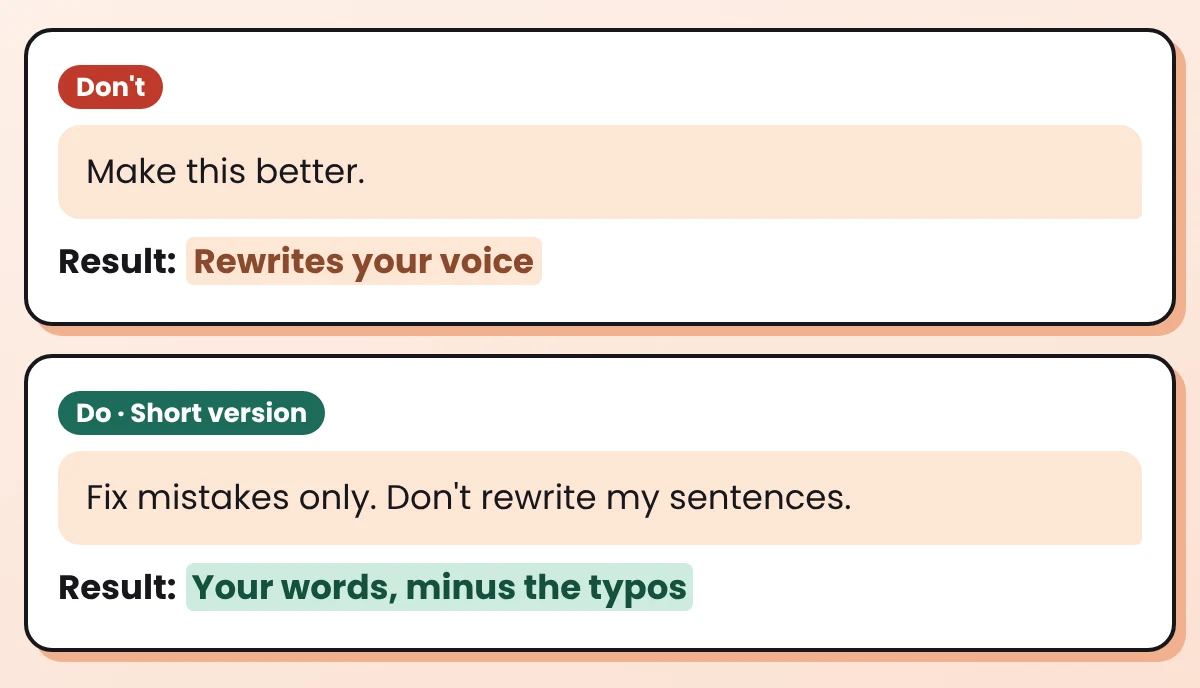
If your draft started with AI and feels flat, that’s an editing job, not a proofreading one. My guide on how to edit AI content so it sounds human covers that part. Do it first, then proofread last.
Watch out
Clean grammar is not the only thing readers notice. A broken link or a missing image description is a mistake too. Run this list after the 3 passes:
Before you click Publish
Updating an older post instead? The same checks apply. See how to update old blog posts with AI.
Your first proofreading run
Want help with the writing before the proofreading? Start with how to write a blog post with AI that still sounds like you, or pick tools from the free AI tool stack for bloggers.
It depends on where you write. If you want fixes while you type, try Grammarly or LanguageTool. If you draft in Google Docs, start with its built-in check. If you don’t want another app, use ChatGPT or Claude with the proofreading prompt in this post.
Yes. Google Docs has a free built-in check, and a free ChatGPT or Claude account with a clear prompt also works. For the other tools, each tool’s own page shows its current plans; check there before you sign up.
AI proofreading is software that reads your text and flags spelling, grammar and punctuation mistakes, and sometimes unclear sentences. It doesn’t check whether your facts are true.
Take a break first, then check facts, then run one tool, then read the text out loud. Reading on a different screen or listening to a read-aloud voice helps you see the words fresh.
Yes. Several tools in this post work as a browser extension, and some also have desktop or phone apps. Check each tool’s site to see which devices it supports.
It can flag most spelling and grammar mistakes in a full post. It can’t confirm your facts, names or meaning, so you still check those and read the post aloud once before you publish.
A typo won’t ruin your blog. But a few small mistakes in a row make readers trust the rest a little less.
So keep it simple. Check the facts yourself. Let one of these AI proofreading tools, or the free prompt, catch the grammar. Then read it aloud once. That’s the whole routine, and you can run it on your next post today.
Want more copy-ready AI workflows like this one? Grab my free AI Workflow Starter Kit. And for more guides, browse the blog.

12+ years in digital marketing. I test every workflow on real work before I share it, free tools first.
More about me →Steps, a copy-paste prompt and the limits I found. Free, nothing to buy.
Get the Free Starter Kit →