Physical Address
304 North Cardinal St.
Dorchester Center, MA 02124
Physical Address
304 North Cardinal St.
Dorchester Center, MA 02124
An honest Hostinger review for WordPress bloggers: what you get, how setup works, the renewal-price catch, who should skip it, and a simple way to test it yourself in the first 30 days.
You want a blog online this week, but every hosting site tells you something different. One list calls a host “the best,” the next list ranks it fifth, and almost none of them tell you what you will pay when the first year ends. If you searched for a Hostinger review, you are probably trying to avoid a costly mistake.
Here is where I stand. This website runs on Hostinger: WordPress, domain and DNS all sit in one panel. So this is a review from someone who uses it for a real blog. It is also a review with limits, and I will point them out as we go.
One more thing before you start. Hosting prices, plan names and deals change often, and I don’t want to print numbers that will be wrong by next month. So instead of a price list, you will get the questions to ask, where to find the current answers, and a simple 30-day test you can run on your own site.
In short
Disclosure: some links in this post may be affiliate links. If you buy through one, I may earn a commission at no extra cost to you. It does not change what I write. Every limit I know of is in this post.
On this page
Web hosting is the computer that keeps your website online. When someone types your address, that computer sends them your pages. A cheap host and an expensive host can both do that. The difference shows up in setup, support, speed under load, and what you pay in year two.
Hostinger is a good fit if you
Look elsewhere if you
Hostinger sells several kinds of hosting: shared hosting, cloud hosting, WordPress hosting and VPS. For a new blog, you are almost always looking at the shared or WordPress plans, so that is what I focus on here.
The part I use every week is its own control panel, called hPanel. It is where you install WordPress, manage your domain and DNS, and open your site’s settings. If you have ever been lost in an older hosting control panel full of tiny icons, hPanel feels simpler. That simplicity is the main reason I would point a beginner here.
The features below are what I compare on any host. Plans differ, so check the plan page for each one before you buy.
| Thing to check | Why it matters | Where to confirm it |
|---|---|---|
| Renewal price | Year two can cost more than year one | The plan’s pricing page and checkout summary |
| Free domain | Some plans include one for the first term; renewal is usually at the normal price | The plan’s feature list |
| Backups | How often they run, and whether you can restore them yourself | The plan comparison table |
| Staging site | Lets you test changes before they reach your live blog | The plan comparison table |
| Server location | A server closer to your readers is usually faster | Checkout or hPanel |
| Support hours | Matters most at 11pm when the site is down | The support page |
You can go from “no site” to “WordPress login screen” in one sitting. Here is the order I would follow on a new account.
I’m not giving you a “set up in X minutes” figure. It depends on whether your domain is already registered, how fast DNS updates, and how much you customise. If a review gives you a precise number without saying how it was measured, treat it with caution.
This is the part most hosting reviews skip, and it is the part that costs you money. Many hosts, not only Hostinger, show a low price for a long first term. When that term ends, the plan renews at a different, usually higher, price.
That is not a trick, and it is not unusual. But it means the headline price is not what you will keep paying. Here is a simple way to compare plans without being fooled.
Deals, including seasonal sales, change quickly. Check the live price on the official site on the day you buy, and write down the renewal price when you do.
Here is my own result. I ran this site’s home page through Google PageSpeed Insights in November 2026 (one run, desktop view). It scored 98 for Performance: First Contentful Paint 0.5 s, Largest Contentful Paint 0.8 s, Total Blocking Time 0 ms and Cumulative Layout Shift 0.017. Best Practices and SEO both scored 100, and Accessibility scored 90. Read that with care. It is one test of one lightweight page, and your theme, plugins, images and server location matter as much as the host. It shows that a site on Hostinger can be fast, not that yours will be.
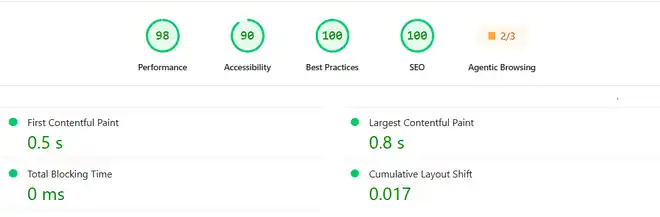
So run the same kind of test on your own site in the first month. It takes a few minutes per check and gives you your own numbers.
| When | What to do | What to write down |
|---|---|---|
| Day 1 | Run your home page through Google PageSpeed Insights on mobile | The score and the load-time notes |
| Day 1 | Add a free uptime monitor for your home page | The date the monitor started |
| Week 1 | Find the backup option in hPanel and run a restore on a test copy if the plan allows it | Whether you could restore it yourself |
| Week 2 | Ask support one real question through live chat | How long the reply took and whether it solved the problem |
| Day 30 | Run PageSpeed Insights again, with the same page and settings | Any change since day 1, and any downtime the monitor reported |
Do this inside the refund window (see the next section). If the numbers disappoint you, you can leave without paying for a full term.
Hostinger offers live chat support, which is the channel most beginners use. Check the support page for current hours and channels, because they can change.
Hosting plans from Hostinger have normally come with a money-back guarantee for new purchases. The rules, including the length of the window and what is refundable, such as domains, can differ by product. Read the refund policy on the official site before you pay, and note the last day you can cancel. That date is the real deadline for your 30-day test.
| Pros | Cons |
|---|---|
| hPanel is simple, with WordPress, domain and DNS in one place | The headline price is a first-term price. Renewal costs more. |
| Low entry cost makes it easy to start a first blog | It is not a hands-off managed service. You still handle updates and plugin choices. |
| Live chat support for everyday questions | Features such as backups and staging differ by plan, so the cheapest plan may not have them |
| Fast on my own site: a 98 Performance score in PageSpeed Insights (see the test section) | A large or very busy site may need a higher plan or a different type of hosting |
You will see Bluehost, SiteGround and Cloudways in most comparisons. Rather than ranking them in one line, here are the questions that decide it for a blogger:
I will cover those hosts in their own reviews. For the tools I use on this site, including hosting, see my recommended tools page.
Still setting up the rest of your blog? The free AI tool stack for bloggers shows what to add once the site is live, and how to write a blog post with AI that sounds like you covers the first post.
Yes, for a new blog or small business site. You can install WordPress from hPanel and manage your domain and DNS in the same dashboard. This website runs on it. A very large or busy site may need a bigger plan.
Its control panel is simpler than many older ones, which helps if this is your first site. You still handle your own WordPress updates, plugins and content, so it is not a “do everything for me” service.
Usually not. The first term is often discounted, and renewal is at a different price. Check both on the checkout page before you pay, and write the renewal price down.
Hosting plans have normally included one for new purchases. The length and the exclusions can change, so read the refund policy on the official site and note the last day to cancel.
Test your own site. Run Google PageSpeed Insights on day 1 and day 30, add a free uptime monitor, and compare. Your theme, plugins and images affect speed as much as the host does.
Skip it if you want a fully managed service where someone else handles every technical task, if you expect heavy traffic from day one, or if you need a specific server setup. Also skip any host if you are not willing to check the renewal price.
For a first WordPress blog, Hostinger is easy to start with, and I use it for this site. It is not magic. The first price is not the lasting price, your own theme and plugins decide most of your speed, and you still look after your own site.
So choose a plan for the traffic you really have, write down the renewal price, and run the 30-day test inside the refund window. If the numbers look good, stay. If not, leave and try another host.
Want copy-ready AI workflows for your new blog? Grab my free AI Workflow Starter Kit, or browse the blog.

12+ years in digital marketing. I test every workflow on real work before I share it, free tools first.
More about me →Steps, a copy-paste prompt and the limits I found. Free, nothing to buy.
Get the Free Starter Kit →